

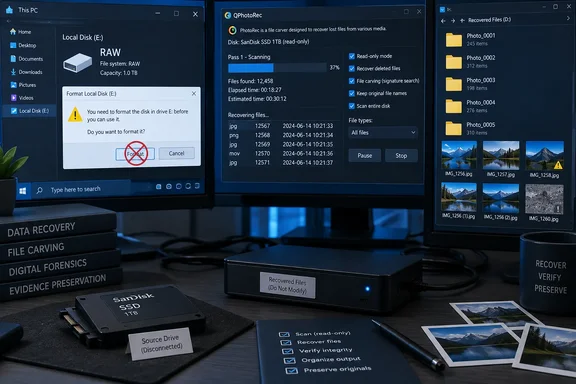
The recovery reportedly took about 90 minutes using QPhotoRec, PhotoRec’s graphical interface. That timing and file count remain single-source observations, not an independently reproduced performance result. However, CGSecurity’s documentation for PhotoRec supports the underlying mechanism: the free, open-source utility searches file data without depending on a working directory structure.
For someone staring at Windows’ “You need to format the disk before you use it” prompt, that distinction changes the immediate decision. Making the disk usable again and saving its existing contents are different tasks. Accepting a format prompt is not the prerequisite for the recovery described here.
Windows’ RAW label described an access failure, not an empty SSD
In MakeUseOf’s account, the affected device appeared as PhysicalDrive0 — 512 GB / 476 GiB (RO) — SanDisk SD8TN8U512G1001. Windows could detect the storage, but Disk Management showed the volume as RAW rather than its expected NTFS filesystem. The owner could no longer browse the family photographs stored there.
“Empty” captures how that experience felt, but it overstates what Windows established. The reported observations were an unreadable volume, missing access to the folders, and a format prompt. None of those observations was a sector-by-sector finding that the SSD contained no data. PhotoRec’s subsequent recovery of recognizable photographs demonstrated that some image content remained readable in this particular case.
A filesystem provides the information needed to turn stored data into named files and folders. PhotoRec’s documentation describes file content as occupying blocks, called clusters in Windows terminology, with filesystem information helping locate and interpret those blocks. Losing access to that structure can therefore prevent normal browsing without necessarily destroying every block that once belonged to a photograph.
There is also no established cause for the RAW state in this account. The report does not identify a Windows update, a particular Windows version, or a confirmed defect in the SanDisk model. Readers should treat it as one recovery from an inaccessible volume, not an advisory that this SSD or a Windows release is broadly affected.
The important boundary comes before any scan. CGSecurity warns against writing to the filesystem that held the lost data because new writes can overwrite recoverable content. The owner followed that principle by stopping writes and selecting another drive for recovered files. Do not format a drive to prepare it for PhotoRec recovery when the objective is to retrieve its existing contents.
That warning also explains why a successful recovery should not be described as repairing Windows’ view of the original disk. QPhotoRec produced a separate collection of recovered files. The account does not establish that it restored the original NTFS volume, returned the folder hierarchy, or made the SSD suitable for continued use.
PhotoRec finds file signatures where NTFS folders are unavailable
PhotoRec uses a technique called file carving: it looks for recognizable patterns in stored data and attempts to extract files from them. CGSecurity explicitly documents this as the reason PhotoRec can recover content from a corrupted filesystem. Rather than asking the filesystem where a named photograph lives, it searches for patterns associated with supported formats, including JPEG.
This approach has a useful but costly independence from the original directory tree. PhotoRec does not need to know that an image once occupied a particular family-album folder. It can recognize image data without that path, but it generally cannot return the original path or filename either. A recovered picture may open correctly while carrying a generated name such as f123456789.jpg.
CGSecurity’s explanation goes beyond simply searching for an extension. When filesystem information is usable, PhotoRec can obtain the block size from it. When that information is unavailable, the program can examine early file discoveries to estimate the block size, then check blocks against its signature database. Recognizing a file’s beginning is the starting point for recovery, rather than proof that every required piece is present.
PhotoRec needs both a recognizable beginning and enough surviving content
The program’s handling of file boundaries depends on the format. Some headers describe the original file size, allowing PhotoRec to limit the recovered output accordingly. For other formats, the appearance of another recognized header helps tell the program where to stop collecting data for the current file.
This is why a matching signature alone does not establish a successful recovery. CGSecurity says PhotoRec checks consistency where possible, and its default validation rejects invalid files. If an extracted file is smaller than the size specified by its header, it may be discarded. Recognizable remnants can exist without forming a usable photograph.
Fragmentation makes that problem harder. When a file’s pieces are separated rather than stored together, finding its first part does not automatically identify the remaining pieces. PhotoRec documents recovery passes that can recover some fragmented files, but it does not promise to reconstruct every fragmented image. The distinction matters when a scan produces something that looks like a JPEG file yet fails to open fully.
The same mechanism explains an easily missed configuration trade-off. Restricting recovery to photographs can make the output more relevant, as it did in the reported attempt. However, CGSecurity warns that disabling too many file formats can produce oversized results for formats whose end is inferred from the next recognized header. Fewer selected formats do not automatically mean cleaner recovery.
QPhotoRec and TestDisk have different jobs
QPhotoRec provides a graphical interface for file carving. The PhotoRec interface documented in CGSecurity’s step-by-step instructions uses text menus, while the distribution also includes TestDisk, a separate utility with partition-recovery and filesystem-repair capabilities.
Those names are easy to blur together during a stressful recovery. Their distinction is operationally important: the successful operation described by MakeUseOf was QPhotoRec extracting files into another destination. It was not a demonstrated repair of an NTFS boot sector, a rebuilt partition table, or recovery of the original directory tree.
CGSecurity’s step-by-step guidance suggests trying TestDisk first for certain lost-partition and deleted-file cases, partly because it can preserve original filenames in supported situations. That recommendation does not establish which repair operation would have been appropriate for this particular SSD. Without a diagnosis of its filesystem damage, there is no evidence-backed reason to prescribe a partition or filesystem write as part of reproducing the PhotoRec result.
The 104,754-file count overstated the usable photo collection
MakeUseOf reports that recovery output accumulated in directories running from recup_dir.1 through recup_dir.210. Among the results were full-size family photographs, embedded thumbnails, duplicates, older images, incomplete fragments, and unusable files. The recognizable photograph that gave the owner confidence was a meaningful success; the headline-sized total was a much broader measure.
That distinction rules out treating the result as a recovery percentage. The account supplies neither the original number of photographs nor a final count of unique, intact originals. It also does not quantify how many important pictures remained missing. What it establishes is that useful photographs survived and could be extracted—not that the original collection was completely restored.
CGSecurity’s documented naming scheme helps interpret the output:
| Output pattern | Documented meaning | What it does not establish |
|---|---|---|
recup_dir.1, recup_dir.2, and later directories | Numbered folders used to hold recovered output. | These are not the original album folders. |
A filename beginning with f | A normally recovered file under PhotoRec’s naming convention. | The prefix alone does not prove that an image is unique or visually complete. |
A filename beginning with t, such as t1234567.jpg | A JPEG thumbnail found inside a picture. | A thumbnail does not establish that the full-resolution original was recovered. |
A filename beginning with b | A broken file or fragment retained when the relevant option is enabled. | Retaining a fragment does not repair it. |
The numbered folders are a packaging scheme, not a recovered organization scheme. CGSecurity documents creating a new directory after each 500 files, excluding embedded thumbnails and report.xml from that count. Consequently, directory totals, file totals, and original-photo totals need not line up in a simple way.
PhotoRec’s timestamps are useful clues, not a restored chronology
The owner sorted recovered material by size and date, then inspected previews. Size helped separate many small thumbnails from larger photographs. That is a useful first pass, but it cannot certify image quality: CGSecurity’s own warning about oversized recovered files shows why a large file is not necessarily a complete original.
Dates need similar care. PhotoRec can reuse time information embedded in supported files, including camera JPEGs. When that information is unavailable, creation and modification times can instead reflect the recovery operation. Even embedded dates can be inaccurate because of the original device’s clock or missing or incorrect timezone information.
For a family collection, those dates can still make manual review more manageable. They should be treated as leads to an event or period, then checked against the image and any surviving metadata. A plausible date does not establish that the file came from the expected folder, and a recovery-day timestamp does not establish when the photograph was taken.
The reported experience also sets a realistic expectation for labor. The scan took roughly an hour and a half, but organizing and checking its results took substantially longer. Generated filenames move work from the recovery program to the person who knows what the pictures mean. The useful endpoint is a checked collection of wanted photographs, rather than a high number on the scan screen.
A PhotoRec recovery starts with preserving the source
The documented procedure supports a cautious recovery workflow, but it should not be mistaken for a universal remedy for every RAW disk. It assumes that the storage remains readable enough for PhotoRec to examine it. It also assumes that any necessary access prerequisites can be met and that another destination is available.
CGSecurity lists Windows 10 and Windows 11 among PhotoRec’s supported operating systems, alongside older Windows releases. That is a statement about the utility’s platform support, not evidence that the reported failure was specific to either version. The recovery account does not establish the exact Windows or QPhotoRec version used.
The following sequence separates the owner’s reported choices from the more detailed controls documented for PhotoRec’s text interface. QPhotoRec users should not expect identical menu names or keyboard navigation. The common decisions are the source, file families, filesystem category, search scope, and destination.
Keep recovery output away from the damaged filesystem
- Stop saving data to the affected volume. CGSecurity’s warning applies to any new files, not only recovered output. Do not use the unreadable source as the place to extract the recovery utility or store its results.
- Arrange a separate destination for the recovered files. The owner used another drive, which keeps the output away from the damaged filesystem. Check that the selected destination is genuinely elsewhere before starting the scan.
- Consider the destination’s file-size limit. CGSecurity warns against FAT32 when recovered files may exceed 4 GB, because FAT32 cannot hold an individual file beyond that limit. This becomes particularly relevant if recovery expands beyond still photographs to large video or other files.
- Establish whether encryption is involved. CGSecurity states that a BitLocker-protected filesystem must first be unlocked for recovery. PhotoRec’s ability to work around damaged filesystem structures does not eliminate that prerequisite.
- Keep the intended source clearly identified. The reported
PhysicalDrive0identifier belonged to that owner’s setup; it is not an instruction to select disk zero on another PC. Use the device information in the recovery interface to select the storage that actually held the lost files.
The source-versus-destination distinction deserves checking before a long operation begins. PhotoRec documents read-only access to the device being recovered, but that does not make a mistakenly chosen output location harmless. Its warning against saving recovered files onto the source filesystem remains explicit.
The amount of destination space needed cannot be inferred from the 104,754-file count. Thumbnails, full-resolution images, fragments, and oversized outputs have very different storage requirements. The report does not give the total size of its recovered collection, so it supplies no reliable free-space target for another recovery.
Select the damaged volume and the appropriate search scope
For readers choosing the documented text-interface workflow, CGSecurity’s instructions establish the following sequence:
- Extract the PhotoRec distribution, including its subdirectories, away from the affected filesystem. On Windows, launch
photorec_win.exewith administrator rights so it can access the physical device. - Select the disk containing the lost files from the list of available media, then proceed to its partition selection. Confirm the disk identity rather than copying an identifier from someone else’s recovery.
- Select the relevant partition. The
File Optcontrol changes the file types PhotoRec attempts to recover;Optionscontains additional recovery settings. - Choose the appropriate filesystem category when prompted. CGSecurity says to choose
Otherunless the source uses ext2, ext3, or ext4. An ordinary NTFS source therefore belongs underOther; the menu is not asking whether Windows currently labels the volume RAW. - For filesystem corruption, select a search of the whole partition. CGSecurity distinguishes this from searching unallocated space only, an option intended to recover deleted files on supported filesystems.
- Select and confirm the output directory on the separate destination, then begin recovery. In the text interface, moving upward through
..allows Windows users to reach the drive list and choose a different destination drive.
The whole-partition choice is especially important here. A volume that became unreadable is not necessarily a case of files being deliberately deleted and their space marked available. Searching only unallocated space answers a narrower recovery question than searching a corrupted partition for surviving content.
The published recovery identifies the physical SSD but does not establish every partition or scan-scope selection made in QPhotoRec. Accordingly, the steps above are CGSecurity’s documented approach to corrupted filesystems, not a claim to reconstruct every click in the owner’s session.
Limit recovery formats with the boundary-detection trade-off in mind
The owner selected image formats, a reasonable way to focus attention on a missing photo collection. PhotoRec’s documentation identifies JPEG support and a TIFF family that includes several camera formats. The format-family detail matters: restricting a scan to JPEG alone would not express a goal of recovering every supported kind of camera image.
Selecting formats is also different from selecting albums. PhotoRec is searching recognized content, so it can return older images and material the user did not intend to keep. The reported recovery did exactly that. Restricting output to photographs reduces some unrelated material, but it does not restore the distinction between current albums, obsolete images, and embedded previews.
The developer’s warning about disabling too many formats should temper aggressive filtering. For formats without a reliable size in their header, another recognized file header can help end the current extraction. If that recognition is disabled, PhotoRec may keep appending data and create an oversized result.
The practical choice is therefore to select the image families actually needed while recognizing that the owner’s filter was a preference, not a proven optimum. The account contains no controlled comparison showing that an image-only scan was faster, recovered more originals, or produced fewer malformed results than a broader configuration.
Judge the scan by usable files, then check the collection
PhotoRec updates its recovered-file count during the scan and writes results into numbered directories as it works. CGSecurity says those files can be accessed before recovery finishes. This explains how the owner could recognize an early photograph while the larger scan continued.
Before opening recovered material, CGSecurity recommends scanning it for malware. Recovery can bring back an infected document or executable alongside wanted data, particularly when the selected format set is broad. There is no need to disable antivirus protection as part of the procedure described here.
After that check, sort results by extension, size, and date to make review manageable. Use the documented filename prefixes to identify embedded thumbnails and deliberately retained broken files. Inspect wanted images and their surviving metadata rather than treating the scan counter as a completeness report.
When the scan finishes, PhotoRec displays a summary. Its documentation also says that an interrupted recovery can offer to resume when the program restarts. These are useful operational features, but neither a completed pass nor a resumable session certifies that all original content has been found.
SSD TRIM and fragmentation limit what PhotoRec can retrieve
The SSD in MakeUseOf’s account still exposed enough image data for useful recovery. That observation is narrower than a general claim about SSD undelete success. The owner reported a volume that had become RAW, rather than a controlled test in which a known set of photos was deleted and then recovered under documented conditions.
The report notes that TRIM can make deleted or discarded SSD data much harder or impossible to recover. It does not establish whether TRIM affected particular missing images in this case. Nor does it provide the diagnostic evidence needed to determine why each incomplete file failed. Those limits should remain attached to any explanation of the result.
Fragmentation is a supported limitation of PhotoRec’s mechanism, but it is not a proven diagnosis for every failed photograph in this recovery. The owner attributed much of the incomplete output to fragmentation. CGSecurity confirms that fragmented recovery is imperfect, while also documenting validation rules that can reject incomplete content. Neither source supplies a file-by-file accounting of the losses.
PhotoRec offers additional JPEG recovery options, with costs
CGSecurity documents a bruteforce option that attempts to recover more fragmented JPEGs after the normal scan. The developer describes this as very CPU-intensive. It is an additional attempt at reconstruction, not a guarantee that an important photograph will become complete.
The text interface also offers Keep corrupted files, which retains invalid files or fragments in the hope that other tools may salvage something from them. That setting changes what remains in the output. A larger retained collection can contain more damaged material without containing more usable photographs.
These controls were not demonstrated improvements in MakeUseOf’s recovery. The owner used QPhotoRec and explicitly did not establish whether a different configuration in PhotoRec’s text interface would have produced better results. Readers should therefore distinguish documented capabilities from results actually observed on the SanDisk SSD.
Some other documented options address specific situations rather than serving as general recovery enhancements. For example, Low memory is intended for cases where memory pressure causes recovery to crash, and CGSecurity says not to use it unless necessary. Expert block-size controls likewise require understanding the source layout; they are not a routine next step merely because a first pass returns fewer pictures than hoped.
A recovered thumbnail cannot replace missing original data
An embedded thumbnail can be emotionally valuable when it is the only remaining view of a photograph. Technically, however, its presence does not establish that the full-size image can be reconstructed. PhotoRec’s t prefix helps make that distinction visible instead of letting a recognizable preview masquerade as an intact camera original.
The same boundary applies to file carving more generally. PhotoRec can find and assemble content that remains readable within its capabilities. It cannot recreate original file data that has been overwritten or is no longer available from the storage. The source account’s successful images and disappointing fragments can coexist without either invalidating the other.
CGSecurity also documents reading raw disk images and EnCase E01 images. That establishes an alternative input for recovery, but it does not provide a diagnosis or a complete imaging procedure for a failing physical device. The published account offers no basis for improvising a universal repair or repeated-scan regimen when hardware readability itself is in doubt.
Choose PhotoRec for surviving content, and budget for the sorting
If Windows presents a previously populated volume as RAW, preserve it before choosing a recovery method. PhotoRec is a documented option when the priority is extracting supported file content and losing original names and folders is acceptable. The MakeUseOf result provides an example of that trade-off working, with substantial cleanup still required.
For a collection whose organization matters as much as its individual files, that cost is significant. PhotoRec’s independence from directory metadata is what enables the recovery, and the missing organization is a direct consequence of that independence. CGSecurity’s separate guidance on TestDisk shows that other recovery approaches can sometimes retain filenames, but this case does not establish which alternative would have succeeded.
A ninety-minute scan should not become a planning estimate for another device. The report documents one SSD, one chosen set of formats, and one observed run. More importantly, its owner spent longer determining what was useful than waiting for the initial output.
The concrete takeaways are these:
- Do not treat a RAW label or a format prompt as proof that the storage contains no recoverable data.
- Stop writing to the affected filesystem, decline formatting as a recovery preparation step, and save recovered output to another drive.
- Meet access prerequisites, including unlocking BitLocker-protected storage where applicable, before expecting file carving to work.
- For a corrupted filesystem, use the documented whole-partition search rather than assuming a deleted-files-only scan covers the same content.
- Treat file counts, generated names, sizes, and timestamps as sorting aids; verify wanted photographs and distinguish thumbnails from originals.
- Expect PhotoRec to return content without the original folder hierarchy, and allow time for malware checks, inspection, and organization.
The useful outcome on the SanDisk SSD was the return of recognizable family photographs from storage Windows could no longer browse. PhotoRec’s documentation explains how that can happen without promising that every RAW volume will yield the same result. For the next person facing that format prompt, preserving the source and recovering elsewhere keeps the immediate objective clear: retrieve surviving content first, then judge what has actually been saved.
References
- Windows said my drive was empty, but a free recovery tool found 104,000 photos inside it MakeUseOf · 2026-09-21T20:00:14+00:00
- 11. Recovering deleted files using PhotoRec — testdisk 7.2 documentation cgsecurity.org
- Digital Picture and File Recovery cgsecurity.org