

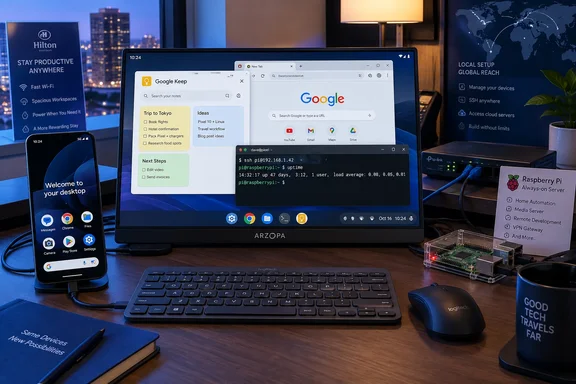
The important change is newer than the headline suggests. Google made connected-display desktop windowing generally available with Android 16 QPR3 on March 3, 2026. On supported Pixels, connecting an external display starts a separate desktop session with a taskbar, resizable app windows, keyboard and mouse support, and a phone that remains usable independently. That makes the author’s Pixel 10 workflow plausible: Google Keep and Notion can sit side by side for writing, while the Linux Terminal handles command-line work.
For Windows users and admins, the practical appeal is straightforward. A Pixel 10 docked at a hotel desk can be a compact SSH endpoint for Windows Server, a Windows workstation running OpenSSH Server, a Linux VM, or a home lab—without carrying a separate Raspberry Pi, mini PC, charger, storage card, and keyboard. It is a portable console, with the phone’s cellular connection and Android app library as useful extras.
The limitation is equally clear: the Pixel is the client in that arrangement. The workstation, server, NAS, or cloud VM remains the durable machine doing the work.
Pixel desktop mode is real, but support does not start with Pixel 6
Google’s Android documentation confirms the desktop-style connected-display experience: supported devices can open a dedicated desktop session on an external monitor rather than merely mirror the phone screen. The session includes window management and a taskbar, and apps can run in freely resizable or maximized windows. Google’s developer announcement specifically named the Pixel 8, Pixel 9, and Pixel 10 series as supported Pixel phones when the feature became generally available in March.
That conflicts with How-To Geek’s broader suggestion that any Pixel 6 or later can deliver this setup. A Pixel 6 may still receive Android updates, and it can run many Android productivity apps, but Google’s March connected-display announcement did not list the Pixel 6 or Pixel 7 families among the supported phones for the external-monitor desktop experience. A reader with an older Pixel should not buy a USB-C dock on the assumption that the Pixel 10 result will transfer unchanged.
The distinction matters because “desktop mode” can mean two very different things. Screen mirroring places the phone interface on a larger panel. Connected-display desktop windowing starts a separate monitor session intended for keyboard-and-mouse work, with independently managed windows and desktop controls. The latter is what makes the phone a credible short-session PC replacement.
Google also warns that availability varies by device. The company’s support guidance does not promise that every Android phone—or every Pixel receiving the same Android release—will expose the same connected-display behavior. Hardware video output support, device-specific software enablement, and the Android build all remain part of the equation.
For the author’s Pixel 10, that compatibility caveat is largely academic. For readers trying to recreate the setup with a Pixel 6, 6 Pro, 6a, Pixel 7, or Pixel 7a, it is the first thing to verify.
The Linux Terminal is a virtual machine, not a repackaged Android shell
The strongest part of the setup is Android’s experimental Linux Terminal. Google describes it as a Linux environment running inside a virtual machine through Android’s Virtualization Framework, rather than the lightweight application sandbox used by terminal apps such as Termux. The terminal downloads its Linux image on first launch and presents a Debian environment where users can update packages, install command-line utilities, use SSH, and run text-mode tools.
That architecture explains why this can feel closer to using a Raspberry Pi than prior phone-terminal experiments. A real Debian userspace means familiar package management, standard shell tools, SSH clients, and the ability to build a portable toolkit with the same commands used on a Linux PC. For someone who has reduced their Pi to LibreOffice, Chromium, GIMP, notes, and remote administration, moving the terminal and the writing tools onto a phone is no longer an absurd compromise.
Google’s original Android 15 documentation, however, listed the Linux development environment for select Virtualization Framework-enabled phones beginning with the Pixel 7 and 7a, then Pixel 8 and Pixel 9 models. It did not list the Pixel 6 series. That is a second place where the article’s “Pixel 6 or higher” wording is too broad.
The experimental label should be taken seriously. Android’s own source documentation describes the Terminal app’s display mode as a way to run graphical Linux applications, but that does not mean the experience matches a conventional Linux desktop. How-To Geek reports lag, incomplete mouse-wheel behavior, and limits on moving some graphical-app windows. Those are not minor polish defects if the plan is to run GIMP, LibreOffice, or an IDE for hours at a time.
There is still useful progress here. Android 17’s Terminal documentation includes a Display control for graphical apps and a mouse-passthrough option, evidence that the feature is being actively developed. But Google has not presented the Terminal as a finished desktop-Linux product, nor has it published a broad compatibility promise for desktop application workloads.
The right workload is therefore the one the author eventually favors: SSH, command-line utilities, text interfaces, small scripts, package testing, and occasional graphical work. Treat GUI Linux software as an experimental convenience rather than the reason to retire a laptop.
A Pixel can replace the Pi workstation role, not the Pi infrastructure role
The submitted account is most persuasive because the Raspberry Pi had already stopped being the author’s home server. Nextcloud, Pi-hole, Immich, Jellyfin, Docker containers, and local AI experimentation had been moved to a more powerful workstation after the Pi could no longer keep up. The Pi was subsequently used as a lean personal computer for writing and browsing.
Once that happened, the Raspberry Pi’s defining advantage—being an always-on, inexpensive, separately managed Linux computer—was no longer central to the author’s workflow. The Pixel 10 replaces a monitor-attached terminal workstation that happens to be a Pi; it does not replace the homelab that was moved elsewhere.
That is a meaningful difference for IT use. A Raspberry Pi can sit on Ethernet, boot after a power event, mount persistent storage, expose USB devices, and be left in a rack or cupboard without taking a person’s primary phone offline. It can be imperfect hardware for heavy containers, but its operational model is still that of a small server.
A personal phone has an opposing operational model. Android prioritizes battery life, thermals, security, calls, messages, and foreground-user experience. The Linux VM exists under Android’s control. As How-To Geek notes, Android can reclaim resources, an overnight update can reboot the handset, and the user may need to reopen the Terminal environment and restore workloads. That makes the phone unsuitable as the sole host for DNS filtering, file sync, media services, home automation, or any service expected to remain reachable.
Docker is the point where the distinction becomes operationally dangerous. A container can run inside the Linux VM, but the fact that it starts does not establish a reliable service platform. There is no value in moving Pi-hole, Nextcloud, or a monitoring agent to a device that leaves the building every day, may enter battery-saving states, and may reboot on a vendor update.
For administrators, it is safer to use the Pixel as the management plane: SSH to the host that runs the containers, check logs, restart a failed service, edit a configuration file, or use a browser-based console. Keep persistent services on hardware designed to remain powered, connected, and recoverable.
The Windows use case is remote administration, not local replacement
The Pixel setup has an especially clear place in Windows-heavy environments. A Windows admin who already uses SSH to manage Hyper-V hosts, Windows Server systems, WSL instances, Azure VMs, network devices, or Linux containers does not need a full Linux workstation simply to reach a shell. With a dock and monitor available, the phone can provide a more workable interface than a small touchscreen without requiring a separate travel computer for basic maintenance.
It can also be useful for documenting work. Android apps provide access to Microsoft 365, Outlook, Teams, OneDrive, password managers, note-taking tools, VPN clients, browser consoles, and remote-desktop software. The Debian VM then fills in the Unix command-line gap. That combination is more flexible than a stock Raspberry Pi desktop for lightweight mobility, particularly when the user already lives in Android’s app stack.
There are security tradeoffs. A handset used as an administration endpoint should have a strong screen lock, current security updates, encrypted device storage, a controlled SSH key strategy, and a clear plan for lost-device revocation. SSH private keys stored on a daily-use phone are more exposed to theft and coercive access scenarios than keys kept on a dedicated admin device. Hardware-backed key protection and a separate low-privilege administrative account are sensible safeguards.
The external-display setup also depends on more gear than the “phone as PC” framing suggests: a monitor or television, a compatible USB-C display adapter or dock, power delivery, and keyboard and pointer input. It is compact, but it is not self-contained. The improvement over a Raspberry Pi is that the compute device is already in a pocket, not that the full desk has disappeared.
The Pixel 10 result is therefore a useful proof of a narrow, increasingly practical idea. Google’s March 2026 desktop-windowing release makes newer Pixels capable of serving as real portable workstations for Android apps and Linux terminal tasks. But the successful replacement is a Raspberry Pi used as a lightweight seat at the network—not a Raspberry Pi used as dependable infrastructure.
References
- My Google Pixel replaced my Raspberry Pi (it’s now my portable Linux PC) How-To Geek · 2026-09-18T13:00:14+00:00