

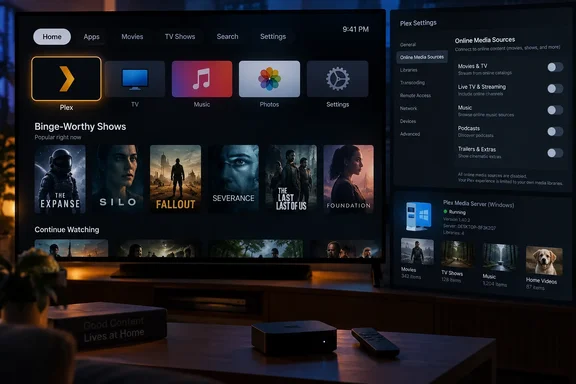
The report originated in the Plex Forums on September 17, where an Apple TV owner using only a self-hosted Plex Media Server documented the problem after installing version 2026.18.0. Neowin subsequently highlighted the report, but the important confirmation came from Plex employee Houwert the following day: the account’s media-source opt-outs were “not properly passed along to the topshelf,” and a fix has been submitted for next week’s build.
For WindowsForum readers running Plex Media Server on a Windows PC, this is a client-side regression rather than a server failure. Restarting the server, rescanning libraries, changing remote-access settings, or rebuilding metadata will not remove the unwanted recommendations. The account preference is being lost somewhere between Plex’s cloud configuration and the Apple TV app’s presentation layer.
The problem is in tvOS Top Shelf, not a media-library setting
The phrase “Apple TV home screen” needs a little precision. Apple calls the content panel shown when a docked app is selected Top Shelf. It is part of the tvOS interface, outside Plex’s ordinary in-app library views, and apps can populate it with dynamic recommendations, previews, and direct links into content.
That distinction explains why the affected user’s normal troubleshooting produced no result. Force-quitting Plex, signing out and back in, and deleting and reinstalling the Apple TV app all leave the account-level media-source choices intact — but they cannot fix an app build that is incorrectly receiving, or applying, those choices when it generates Top Shelf content.
Plex’s employee response also narrows the failure considerably. The company did not say that Movies & Shows, Discover, or Live TV were re-enabled for the account. It said the opt-outs were not passed along to Top Shelf. In practical terms, the privacy and content configuration appears to remain stored correctly, while the Apple TV extension that supplies home-screen artwork and recommendations behaves as if those settings do not exist.
Apple’s developer documentation describes Top Shelf as an app-provided area designed to highlight featured or recommended material and send viewers directly into an app. Apple also cautions developers against filling it with advertising. Plex’s “Binge-Worthy Shows” shelf is not a conventional banner ad, but it is promotional discovery content from Plex’s own streaming catalogue — precisely the type of material a self-hosted-library user may have deliberately disabled.
Disabled cloud sources are supposed to mean disabled
The affected Plex account had disabled Live TV, Movies & Shows, Discover, “More Ways to Watch” search results, and availability information from other streaming services. Those controls exist because Plex now combines a traditional personal-media server with its own free, ad-supported streaming service and broader content-discovery features.
For many Plex users, that combination is useful. For others — especially households that use a Windows PC, NAS, or home server solely to organize their own films, television, music, and home videos — it is unwanted clutter. In a managed household setup, the distinction can be more important than aesthetics: the purpose of separately selected libraries and account restrictions is to determine what viewers can encounter.
Plex’s own support community has previously treated the ability to remove on-demand recommendation shelves as an expected configuration outcome. A 2025 forum discussion about managed users found that Plex’s online sources could be hidden by correctly disabling the applicable sources for those accounts. The 2026.18.0 regression is therefore not a case of a newly imposed product policy or an undocumented setting buried elsewhere in the app. Plex has acknowledged that the configured opt-out should have been honored.
The problem is also narrower than the more provocative reading of the bug might suggest. There is no evidence in the current report that Plex has turned cloud services back on for affected accounts, inserted cloud titles into local libraries, changed watch-history data, or modified a Windows Plex Media Server installation. The visible failure is that Top Shelf receives content that the account configuration says should be excluded.
Still, the distinction offers little comfort to people who use the Apple TV interface as their household’s main Plex entry point. Top Shelf is among the first things seen after waking an Apple TV or highlighting the Plex app. A recommendation surface that ignores account choices can undermine the carefully curated experience that self-hosted media users built Plex for in the first place.
Do not waste time rebuilding a Windows Plex server
The immediate workaround is mostly to wait for Plex’s promised client update. Houwert said on September 18 that the fix had been submitted and was expected in “next week’s build,” which points to a build during the week beginning September 21, 2026. Plex did not provide a version number, a precise App Store release date, or confirmation that the correction will be distributed immediately to every Apple TV user.
That lack of a build number matters. Plex releases can be staged, and a submitted fix is not identical to an App Store update available to all users. Until Plex publishes release notes or affected users confirm that a newer tvOS build restores the preference, version 2026.18.0 should be regarded as affected when the unwanted shelf appears.
Users who encounter it should keep their cloud-source settings disabled rather than toggling them on and off in an effort to force a refresh. Re-enabling those services may change what Plex presents elsewhere without curing the Top Shelf defect. The stronger diagnostic is simple: verify that the online media sources remain disabled in the Plex account, confirm the Apple TV client version, and then check whether the “Binge-Worthy Shows” material disappears after Plex issues its next build.
There is also no reason to downgrade or alter the Plex Media Server on a Windows machine based on this report. The server’s library database, transcoding configuration, storage paths, and remote-access rules are unrelated to the acknowledged fault. Administrators who maintain a Windows Plex server for several Apple TV clients can treat this as an interface issue on each updated tvOS endpoint, not a server-wide content leak.
A small defect with a clear product-boundary consequence
Plex’s quick acknowledgment is the encouraging part of this incident. The company has identified a specific mechanism — account opt-outs not reaching the Top Shelf component — and says a correction has already been submitted. That is considerably more useful than asking customers to reset devices or question whether they configured their accounts incorrectly.
But it also shows why opt-out controls need to be tested wherever content appears, not merely inside an app’s main menus. A preference that works in Plex’s standard interface but fails on an operating system’s home-screen extension is still a broken preference from the user’s perspective.
For now, Apple TV owners on Plex 2026.18.0 who see “Binge-Worthy Shows” despite disabled online sources are looking at a confirmed tvOS client bug. The practical consequence is limited to unwanted Plex streaming recommendations on the Apple TV home-screen surface — and the only meaningful fix is the next Plex build, not another round of server maintenance.
References
- Plex bug forces cloud content onto Apple TV home screen Neowin · 2026-09-18T11:48:01+00:00