

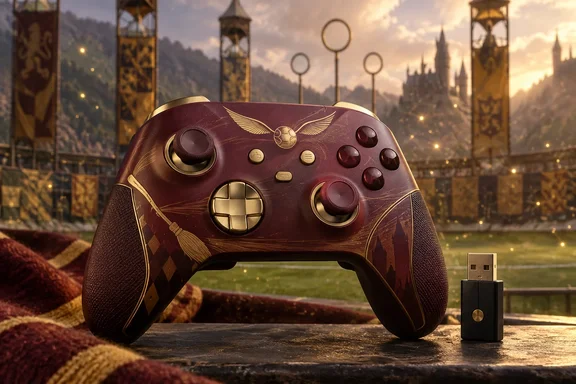
Two things matter for readers. Which parts of the review are one person's opinion, and which are manufacturer specifications? And does the "works everywhere" pitch hold up once you read the connection details?
What the reviewer says
Houston's verdict is that the design is the main draw. He says PowerA built something inspired by Quidditch rather than slapping a movie logo on a pad. In his words it is collector-worthy, a piece of Wizarding World memorabilia that could sit next to books and wands. That is an aesthetic judgment, and it is his.
His practical impressions are largely positive:
- Sticks and triggers: He welcomes the Hall Effect parts and calls the control precise and responsive. He has had stick drift often in the past.
- Flexibility: He likes that it moves between consoles, PCs, phones and handhelds.
- Customization: He expects competitive players to appreciate the trigger locks and four rear buttons.
- Comfort: He calls it light, with textured grips and a shape that suits long sessions. He also mentions generous battery life and "slick" rumble.
- Price: He says it is "not exactly cheap" at about $100, but good for fans.
His one real complaint is the rear buttons. He had moments of accidental presses and wished for a simple lockout to disable them temporarily. The piece reports no controlled testing, no measured battery runtime and no comparison with rival controllers. His comfort, accuracy and value conclusions therefore remain his own impressions.
What PowerA says the hardware does
The rest of this section is manufacturer specification, not independent testing.
- Licensing and platforms: It is officially licensed for Xbox Series X|S and also works with Xbox One and Windows 10/11. PowerA also names Android, cloud gaming and compatible PC handhelds.
- Three connection modes: A mode switch selects 2.4 GHz Xbox wireless through a USB adapter, Bluetooth, or wired USB-C. PowerA says Xbox and PC users should use the adapter or the USB-C cable. Android users pair over Bluetooth to a compatible device.
- Hall Effect modules: PowerA says contact-free magnetic sensors in the thumbsticks give smoother control and longer life. Its FAQ says they "help reduce" stick drift. That is weaker than a promise that drift cannot happen.
- Trigger locks: Two positions give a shorter pull for shooters or a longer pull for racing.
- Rear buttons: Four mappable Advanced Gaming Buttons can be programmed mid-game without going into system settings. The listing mentions no lockout feature, which fits Houston's wish.
- Polling rate: 1000 Hz is advertised for wired PC mode only.
- Battery and cable: The battery is an 800 mAh lithium-polymer cell. PowerA claims up to 30 hours per charge, with a caveat that results vary. The cable is 10 ft (3 m).
- Extras: Dual rumble motors, impulse triggers (compatibility varies by title), a 3.5 mm headset jack and anti-friction thumbstick rings.
- Size and weight: 6.14 × 4.21 × 2.56 inches and 0.708 lb (0.321 kg).
Fine print for Xbox and PC owners
Bluetooth is not the Xbox route. PowerA's FAQ says users need the included adapter to connect to Xbox devices. If you buy this expecting to pair it with a console over Bluetooth, you will be disappointed.
The 30-hour figure is an estimate. PowerA's support FAQ for the Advantage Wireless line gives more conservative numbers. It lists 16+ hours when playing with audio and 25+ hours without audio. That page covers the general Advantage Wireless family and also links this SKU's manual. I have not confirmed that the figures apply to this exact model. Treat the 30 hours as a best case. PowerA's estimated charging time is 3 hours. You can play while charging with the supplied USB-C cable.
Companion app. PowerA points users to its Gamer HQ app for Xbox Series X|S or PC, and warns that its separate PC HQ app is not compatible with Xbox Series X|S controllers. PowerA's FAQ says the app can adjust triggers, rumble, dead zones and audio. The sources do not say which settings are available on each platform or connection mode, so check the manual before relying on a specific one.
Profiles and pairing. PowerA's support page says the PRO/MAP button on the back cycles through three locally saved profiles. This could help with the rear-button complaint. Switching to a profile with no rear mappings might work as a manual stand-in for a lockout. PowerA does not describe it that way, and I have not tested it. For Bluetooth pairing, PowerA says to hold the SYNC button on the bottom for 3 seconds until the LED flashes rapidly. For the 2.4 GHz adapter, hold SYNC on the top of the controller for 3 seconds, then hold SYNC on the adapter.
Is it worth $100?
You are paying for the Quidditch finish on top of a feature set PowerA also sells in other designs. The cheap-looking part of the equation is that you get Hall Effect sensing, rear buttons, a wireless dongle and a 10-foot cable in the box. The caveats are:
- Hall Effect sensors reduce one common cause of drift. The sources do not show that this model is immune, or that it lasts longer in real use.
- One reviewer's accidental rear-button presses are not proof of a general defect. They are still worth noting if you plan to alternate between competitive and casual play.
- No independent battery, latency or durability testing turned up in the sources I reviewed.
- Prices change, and the $99.99 figure comes from PowerA's own listings.
Bottom line
For Xbox and Windows 11 players who also like Harry Potter, the review makes a credible case that this is a capable, good-looking controller. Skeptics should note that the evidence is one sample-based impressions piece plus manufacturer specs. If rear buttons tend to get in your way, check the profile options before buying. Also remember that console wireless play needs the dongle, and that the 1000 Hz polling claim applies only to wired PC use.
References
- This Harry Potter Quidditch Controller Brings Wizarding World Style to Xbox - COGconnected COGconnected · 2026-10-04T20:22:17+00:00
- PowerA Advantage Wireless Controller for Xbox Series X|S | XBOX Series X|S Wireless Controllers | PowerA powera.com