

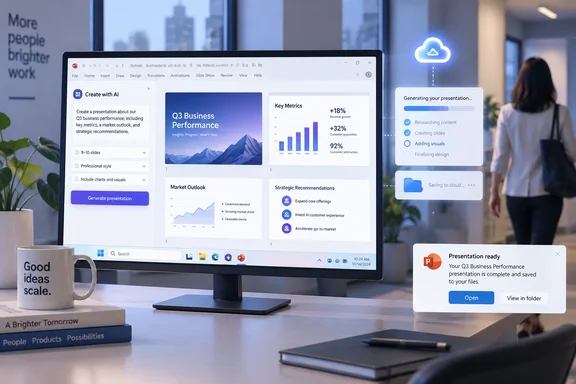
The practical benefit is straightforward: PowerPoint’s newer agent-driven creation workflow can involve multi-step drafting, content generation, clarification prompts, and edits that are poorly suited to a “wait at the screen until it finishes” interaction. A completion signal turns that workflow into something closer to a background job. For a user creating a deck from a substantial prompt, the notification could reduce the temptation to leave PowerPoint open in the foreground simply to see whether Copilot has reached the next decision point.
Microsoft’s own documentation describes Agent Mode in PowerPoint as an in-app content-creation experience that can create and edit presentation content in place. Its broader PowerPoint Agent documentation also describes creating files from Copilot and saving them to OneDrive, while Microsoft’s PowerPoint support material says Copilot can conduct multi-step tasks and directly generate or modify deck content. The new roadmap item addresses a gap created by that shift: agent work may outlast the user’s attention span, but until now PowerPoint has not publicly promised a way to alert users after they leave the active session.
An October target, not an available feature
Roadmap ID 570437 lists General Availability in October 2026 for PowerPoint Desktop in Microsoft’s worldwide standard multi-tenant cloud. That designation means the stated target is broad commercial availability rather than an Insider-only or preview-ring release.
It does not mean the capability has shipped. “In development” is Microsoft’s planning status, and the company can alter feature scope or timing before rollout. There is no corresponding release note, support article, Message Center post, Microsoft 365 Apps version number, or PowerPoint build requirement published alongside the roadmap card. Admins should therefore treat October as a deployment-planning window, not a date to promise to users.
The entry also specifies Windows desktop, rather than PowerPoint for the web or PowerPoint for Mac. That platform limitation is meaningful because Microsoft presents Copilot capabilities across multiple PowerPoint clients, yet feature parity has repeatedly arrived on different schedules. Organizations with mixed Windows and Mac fleets should not assume that an alert generated from PowerPoint Agent activity will have an equivalent experience outside the Windows desktop app.
“Go offline” does not mean the agent works without connectivity
Microsoft’s description says users can leave PowerPoint, switch devices, go offline, or end their workday while remaining confident they will be notified when the work completes or requires attention. The language promises a more durable notification experience, but it leaves an important operational detail unstated: being offline cannot mean a Windows client receives an alert at the moment it is disconnected.
PowerPoint Copilot itself requires an internet connection, according to Microsoft’s PowerPoint Copilot FAQ. The reasonable reading is that a task already submitted may continue in Microsoft’s cloud-backed service and that a notification could be retained until the user reconnects, returns to a supported client, or otherwise regains access. Microsoft has not confirmed that mechanism. It has not said whether notification delivery will occur through Windows toast notifications, the Microsoft 365 Copilot app, email, Teams, or a PowerPoint activity feed.
That distinction matters for users handling time-sensitive decks. A notification system can solve the problem of having to remain in the PowerPoint window. It cannot guarantee immediate delivery to a laptop in airplane mode, a device without notifications enabled, or a user who has signed out. Until Microsoft documents the delivery channel and persistence behavior, teams should not design a presentation-review process around the assumption that an unattended agent task will reliably escalate to every device.
The feature is about task state, not autonomous presentation publishing
The roadmap wording says PowerPoint Agent will notify users when work is “complete” or “requires attention.” That is a useful but narrow promise. It does not say that the agent will automatically send a completed deck to colleagues, apply final approval, publish it to SharePoint, or make decisions after a user departs.
In practice, the “requires attention” portion may be more valuable than the finished signal. PowerPoint Agent workflows can need clarification about audience, style, content scope, source material, or requested changes. If the agent pauses on one of those decisions and the user has moved to another task, the value of the task falls quickly unless there is a reliable way to bring that person back. A notification could make longer prompts more workable by separating the initial request from the next required human decision.
Microsoft’s existing PowerPoint guidance continues to emphasize review of generated content before sharing. That safeguard remains necessary after asynchronous notifications arrive. A “complete” status should be read as the end of the agent’s current run, not an endorsement of factual accuracy, slide quality, branding compliance, or whether source material was interpreted correctly.
Licensing and management details are still absent
Microsoft’s support documentation says the Word, Excel, and PowerPoint Agents are available to Microsoft 365 users with a Microsoft 365 Copilot license. The roadmap entry for asynchronous PowerPoint Agent notifications does not identify a different entitlement, so there is no public basis to assume this will extend the agent to unlicensed PowerPoint users.
The omission creates several practical questions for Microsoft 365 administrators:
- Microsoft has not said whether asynchronous notifications require a particular Microsoft 365 Apps update channel or minimum PowerPoint build.
- Microsoft has not said whether tenant admins will have a policy to disable alerts, restrict notification delivery, or control the feature separately from PowerPoint Copilot and Agent Mode.
- Microsoft has not said what happens when a user begins a task on one Windows PC and opens the related deck on another device before the job ends.
- Microsoft has not said whether notification content will reveal file names, prompt text, or presentation details on a lock screen, an issue that can matter on managed or shared devices.
Those are not trivial implementation details. Windows notifications can expose useful context at a glance, but organizations using sensitivity labels, shared meeting-room PCs, virtual desktops, or strict endpoint-notification policies will need to know precisely what is surfaced and where. Microsoft says its Copilot services respect enterprise access policies and sensitivity labels, but that does not answer how much metadata an eventual PowerPoint completion alert will display.
What Windows users should do before rollout
There is no immediate configuration action because the capability has not shipped and Microsoft has not published deployment instructions. The sensible preparation is to identify where PowerPoint Agent is already enabled, which users hold Microsoft 365 Copilot licenses, and whether Windows notifications are allowed on the devices where those users create presentations.
Teams that use PowerPoint Agent for substantive deck creation should also establish a basic habit now: submit the task, save the presentation in its intended OneDrive or SharePoint location, and review the generated file before distributing it. Notifications may make it easier to step away during the run, but they do not replace file-location discipline or human approval.
Microsoft’s October 2026 target will be worth watching for one reason beyond convenience: it will show whether PowerPoint Agent can become a dependable background workflow on Windows rather than an AI feature that demands an open window and continuous supervision. Until Microsoft publishes the supported notification paths, affected builds, and administrative controls, the roadmap promises the outcome—an alert when work finishes—but not the operational details IT teams need to rely on it.
References
- PowerPoint: Async Notifications for PowerPoint Agent (Windows Desktop) Microsoft 365 Roadmap · 2026-09-15T23:00:36.9110325Z