

What the pull request says
The GitHub pull request is titled Settings: Composition "Power on" intro for the OOBE Welcome page, and its number is 50873. It was opened by Laute and was still a request to merge into main when the search result was captured. I couldn't confirm whether it has been merged, or which PowerToys release would carry it. Treat the screen as work in progress, not a shipped feature.
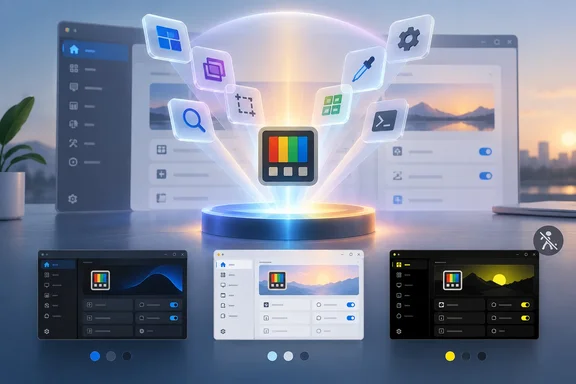
The description says the change replaces the static hero image on the "Welcome to PowerToys" page with an interactive Windows Composition scene. The scene is built from the module icons in doc/images/icons.
The commit message sketches the intro sequence:
- The logo springs out of the depth with a flash of the brand colors.
- A dome of light rises behind it like a sunrise.
- 35 tool icons erupt out of the logo in 3D and land in glass tiles that fan out in a V-shaped lattice.
- The title, description, actions and diagnostics card rise in.
You may see it more than once
Windows Central laments that most people will see the animation only on first install. The pull request is more nuanced. The playback rules say the full intro plays on the first Welcome visit per OOBE window, and later visits get a short settle of about 450ms. So the full show is tied to the first visit in each OOBE window. That isn't necessarily the same as once per install. The pull request doesn't say how often that window opens.
PowerToys already has a first-run flag. The public source code stores an oobe_settings.json-style state, with an openedAtFirstLaunch field, in the PowerToys local app data folder. Separately, the developer guide says the OOBE window opens before the Settings application for new users and after updates. That would suggest users might see it after upgrades as well. Whether the new scene shows up in those cases isn't something I could verify.
Accessibility and themes
This is the part most readers will care about. The pull request says that when Windows Animation effects are off, the final state is shown instantly, with no idle motion, tilt or magnification. The scene has Dark, Light and High contrast palettes and crossfades when the theme changes. That is a sensible approach for a flashy onboarding page. People who disable animations in Windows won't have to sit through the spectacle.
Why Composition matters
Microsoft's Learn documentation describes the Visual layer as a high performance, retained-mode API for graphics, effects, and animations. It relies on graphics hardware acceleration so content renders smoothly, independent of the app's UI thread. Windows Central describes Composition as sitting below WinUI. That is a fair simplification. Microsoft's docs say WinUI and Windows App SDK apps already use the Visual layer through their UI framework, and you can also use it directly for custom rendering, effects and animations.
Three caveats apply:
- The 60 FPS figure is a target the platform supports, not a benchmark of this screen on your hardware. Microsoft's documentation describes the layer's design. It does not measure PowerToys.
- Composition can't draw everything. Microsoft notes that external content such as
WebView2,MediaPlayerElementandSwapChainPanelsits outside the compositor. You can't layer compositor effects behind or over those elements the way you can with native visuals. - The animation doesn't change how PowerToys utilities run. It affects the Welcome page in Settings.
Part of a wider pattern
This isn't the first time Composition has appeared in PowerToys. The PowerToys 0.101 release notes, written by Laute, describe Mouse Highlighter getting composition-powered ripple effects. They add that ripple rendering and animation now run separately from the low-level mouse hook, which keeps clicks responsive. The same notes say the release continues the WinUI 3 modernization.
The practical lesson is that Composition is useful for things beyond decoration. In Mouse Highlighter it helps keep input responsive. In the Welcome page it carries a showpiece animation.
Analysis
The Windows Central piece is an enthusiast's take. Its argument that Microsoft's other apps could benefit from the same polish is opinion. No Microsoft roadmap or commitment backs it. It is also fair to ask whether a 35-icon 3D intro is the best use of engineering time. Setup screens are rarely the weak point of a utility suite, and the code and test burden grows with every effect.
On the other hand, PowerToys is a public, open-source WinUI 3 app, so the pull request doubles as a worked example. Developers can read how a team handles palettes, theme crossfades and reduced-motion behavior. The reduced-motion handling is the detail I'd copy first.
What to watch
- Whether pull request 50873 merges, and in which PowerToys release.
- Whether the full intro replays after updates, or only on a fresh install or a new OOBE window.
- How the scene behaves on older or lower-end GPUs, since no performance data has been published.
For now, this is a cosmetic change to PowerToys onboarding. You don't need to do anything. If it ships, the animation is easy to skip by turning off Windows animation effects.
Update: PowerToys Welcome animation revised with a “Warp” sequence (October 7, 2026)
PowerToys’ proposed Welcome screen now has a different opening sequence from the “Power on” version described above. Neowin’s October 7 report highlights the revised “Warp” design, and Microsoft’s updated GitHub pull request confirms that the same proposal, number 50873, now uses a hyperspace-style entrance. It remains open, so this is a revision to the proposed feature—not confirmation that it has shipped.
Instead of icons erupting from the logo, 35 tool tiles fly toward the viewer through a star field, trailing colored light. The logo then drops into place, followed by a flash and a shockwave that makes the tiles bounce. The sequence reaches its gently floating idle state at roughly 2.1 seconds.
The updated description also clarifies the page’s practical interactions: hovering displays a utility’s localized name, clicking a tile opens that utility’s onboarding page, and clicking the PowerToys logo replays the intro. The standard navigation pane provides the same destinations for assistive-technology users.
One testing caveat remains: although the proposal includes a high-contrast palette that hides the stars and streaks, the developer’s validation notes say that palette has not yet been verified.
References
- Microsoft revamping a PowerToys design to improve first impressions - Neowin Neowin · 2026-10-07T05:10:01+00:00
- I'm way too impressed by this new PowerToys animation - Windows Central Windows Central · 2026-10-06T17:14:43+00:00
- new-powertoy.md github.com