

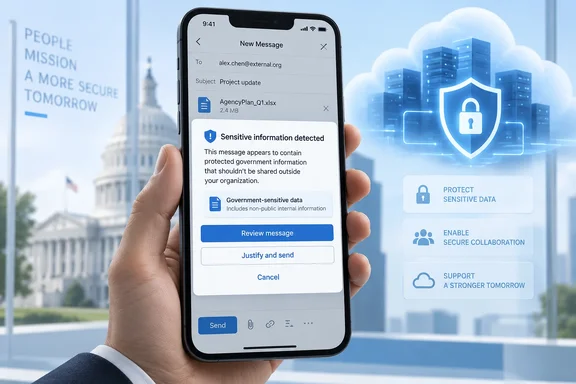
The entry lists the release phase as General Availability with a GA date of January 2026. It describes the feature as real-time alerts on mobile that help users avoid accidentally sharing sensitive information. The record's metadata carries a September 30, 2026 timestamp, so the "Launched" label is recent paperwork for a January ship date.
A launched feature is not the same as a working one, though. The tips are hidden by default, licensing still applies, and some mobile features are newer than this roadmap item.
What the feature actually does
Data loss prevention (DLP) policy tips are in-app warnings. They appear when a message matches the conditions of a Microsoft Purview DLP policy, so the user sees the problem before the message is sent, not in an incident report afterward.
Microsoft's Learn documentation says Outlook for Android, iOS, and macOS now supports data loss prevention (DLP) policy tips with commonly used predicates and exceptions, advanced classifiers, and override capabilities.
The same reference lists these classification types as supported:
- Custom sensitive information types (SITs): All custom SITs are supported.
- Exact data match (EDM) SITs: All EDM SITs are supported.
- Sensitivity labels: All sensitivity labels are supported.
- Retention labels: All retention labels are supported.
- Trainable classifiers: All trainable classifiers are supported.
- Email actions: All actions and information types for email communications are supported.
Read "all" carefully. It covers those named categories for email. It does not mean every DLP condition in every Purview workload now works on a phone. For built-in SITs and the detailed condition and action lists, Microsoft points to separate reference pages.
The oversharing dialog
On Outlook for Android and iOS, Microsoft documents an "oversharing dialog." When it's turned on in a DLP rule, users who share labeled or sensitive email get popups for warning, override or block actions. Microsoft says it requires "the necessary licenses and configuration."
There are two versions:
- Default dialog: reuses the policy tip text (default or custom) and, when an override is allowed, shows a fixed set of justification options that you can't edit.
- Customized dialog: lets admins set the title, body, justification options and dynamic variables such as
%%MatchedRecipientsList%%.
What the user sees depends on how you configured the rule. A policy tip is not an automatic block.
Section summary: Outlook Mobile can show Purview policy tips and warning, override or block dialogs for email. What each user sees depends on your DLP rules.
The catch: it's off by default
This is the setting most likely to cause confusion. Microsoft's reference says Policy Tip UI is turned off by default in Outlook for Android, iOS, and macOS to allow for administrators to test and perform user training prior to deployment.
The switch is not in the Purview portal. It's in the Microsoft 365 Apps admin center.
How to turn it on
- Sign in to the Microsoft 365 admin center.
- Expand "All Admin Centers" to find the "Microsoft 365 app" admin center.
- Go to Customization, then Policy Management.
- Create or edit a policy and set Enable Purview Data Loss Prevention (DLP) policy tips in Outlook to Enabled. (default) Disabled policy tips aren't shown Enabled policy tips are shown.
- Scope it to a pilot group first. Microsoft notes you can target policies to individuals or groups, so you can test and deploy policy tip UI as needed through your organization.
- Test with your pilot users, train them, then widen the scope.
This setting only controls whether the client shows the tips. Your DLP policies still have to exist in Purview, include Exchange email in scope, and have policy tip notifications configured.
Conflicting guidance to be aware of
Older reporting contradicts the current documentation. A 2025 summary of a commercial-cloud message center post on M365 Admin (HandsOnTek) said tips and enforcement would arrive in mid-August 2025 and that the feature is on by default and requires no admin action to enable. The same summary said no additional licensing is needed beyond what is already in place for Microsoft Purview DLP.
The current Learn page, last updated April 16, 2026, says the tip UI is disabled by default. For government tenants planning a rollout now, treat the current documentation as the authority, and confirm in your own tenant what users actually see.
Troubleshooting: "I see the block, but no justification prompt"
The most common complaint on Microsoft Q&A has been around for a while. In a 2025 thread, an admin reported that in the mobile apps the override option is not available and messages containing sensitive data are blocked without prompting the user to provide a justification.
In a June 2026 thread, another admin reported that users on current Outlook for Android weren't getting the business justification prompt, even though the forwarding restriction appeared. The Microsoft moderator's first suggestion was the admin-center switch: verify whether the "Enable Purview Data Loss Prevention (DLP) policy tips in Outlook" setting has been enabled through the Microsoft 365 Apps Admin Center. Microsoft documentation indicates that Policy Tips on Outlook Mobile are disabled by default and must be enabled before users can experience the full DLP policy tip functionality.
That moderator added that if the setting is on and the problem continues on Outlook for Android 5.2604.1, it may indicate a limitation in the current mobile implementation.
If you're seeing this, a reasonable checklist:
- Confirm the Apps admin center policy is enabled and scoped to the affected user's group.
- Confirm the DLP rule allows override and requires a business justification.
- Update Outlook Mobile on the device. Feature parity has arrived in stages.
- Check whether the rule is enforcing even without the dialog. In the June thread, the visible restriction confirmed that policy evaluation was working and only the prompt was missing.
- Tell users about current limits while you're still checking whether everything works in your tenant.
Section summary: If enforcement works but the tip or prompt doesn't appear, check the disabled-by-default client switch first. Client version is the next suspect.
Scope boundaries
- Mobile, not macOS, for this roadmap item. The Learn page covers Android, iOS and macOS, but item 491017 is titled for Outlook Mobile. Treat Mac support as a separate documented capability.
- Outlook only. Microsoft's cross-app support matrix states that DLP policy tips aren't supported in mobile apps for Office (Word, Excel and PowerPoint mobile). This launch doesn't change that.
- Licensing isn't named. The mobile reference has a licensing heading, and the oversharing dialog requires "necessary licenses," but the page doesn't name a SKU. Check your Purview entitlements before promising anything.
- Wait-to-Send. The April Learn page says Outlook for Android and iOS doesn't yet support DLP Wait-to-Send, which is controlled centrally through Exchange Online mailbox settings. Microsoft has since announced support. HandsOnTek's message center summary says Outlook for iOS and Android will support Microsoft Purview DLP wait-on-send policies, allowing organizations to require and configure a wait time for DLP evaluation before sending emails, with rollout starting and completing in late September 2026. That's a separate change, and the summary doesn't say when government clouds get it, so don't assume GCC timing.
What's coming next for mobile DLP
Microsoft is also extending DLP on Outlook Mobile to calendar events. HandsOnTek reports that organizations will be able to detect and help prevent the sharing of sensitive information in meeting subjects, descriptions, and invite content through policy tips, user remediation, and policy enforcement. The rollout is listed as worldwide in late September 2026. Like Wait-to-Send, it's a separate item from 491017, and cloud-specific timing isn't stated.
Analysis: why this matters for regulated tenants
Phones have been a weak spot in many DLP programs. People type quick replies, forward from the airport, and pick the wrong "Alex" from autocomplete. Blocking without explanation frustrates users. Policy tips explain the block at the moment it happens, which can also make users less likely to dodge the policy or flood the help desk.
For GCC, GCC High and DoD tenants, which often handle controlled unclassified information (CUI) and export-controlled data, a mobile client that warns users instead of quietly blocking or allowing their mail matters.
There are tradeoffs. Override options only help if you actually review the justifications users give. A tip shown on every email trains people to ignore it. Staged deployment helps on both fronts: pilot with a team that sends sensitive mail regularly, adjust the rules, then expand.
Bottom line: Item 491017 is now listed as Launched for government clouds. Nothing changes on users' phones until an admin enables the policy tip setting in the Microsoft 365 Apps admin center and scopes it to them.
References
- Microsoft Purview Compliance Portal: DLP Policy Tip Support in Outlook Mobile Microsoft 365 Roadmap · 2026-09-30T23:31:03.389585Z
- Data loss prevention policy tip reference for Outlook for Android, iOS, and macOS learn.microsoft.com
- Data Loss Prevention policy tips reference | Microsoft Learn learn.microsoft.com