

Microsoft’s September roadmap entry, ID 569477, describes “default protection controls” for classification failures and lists general availability for September 2026 across GCC, GCC High, and DoD. But Microsoft Learn documentation and an earlier Microsoft 365 Message Center notice show that the underlying Exchange Online capability had already entered public preview in July and was scheduled for worldwide general availability in August under a different roadmap ID, 561916. The distinction matters for regulated tenants: the September record appears to track availability in Microsoft’s government clouds, rather than a wholly new DLP feature.
The practical change is not a new content classifier. It is a way to treat failure to classify as a condition that DLP policy can evaluate. Instead of treating every unscanned or partly scanned attachment alike, administrators can distinguish a timeout from throttling or another scan error and decide whether to audit, notify, block, or otherwise handle the email under their existing policy design.
What Purview now detects when an attachment cannot be classified
Exchange Online DLP already had conditions for attachments that could not be scanned and attachments whose scans did not complete. Historically, those conditions covered text-extraction problems: unsupported formats, inaccessible files, password-protected files, documents too large to fully extract, and similar cases.
With classification-failure detection enabled, those same conditions expand. “Any email attachment’s content could not be scanned,” represented in Security & Compliance PowerShell as DocumentIsUnsupported, can also match a complete classification failure. “Any email attachment’s content didn’t complete scanning,” represented as ProcessingLimitExceeded, can match a partial classification failure — the case where at least one classifier finished but another did not.
Microsoft’s documentation draws an important boundary between the two. A full failure means the classification service could not complete the document scan because of a timeout, throttling, or another error. A partial failure means some checks succeeded while one or more sensitive information types, exact data match classifiers, or trainable classifiers failed.
That gives compliance teams a more truthful signal than a generic “scan failed” result. A password-protected attachment is a policy and workflow problem; a service timeout or throttling event is potentially an availability or capacity problem. Treating both identically can either create blind spots or impose overly broad restrictions on ordinary mail.
The new condition is granular, but it cannot stand alone
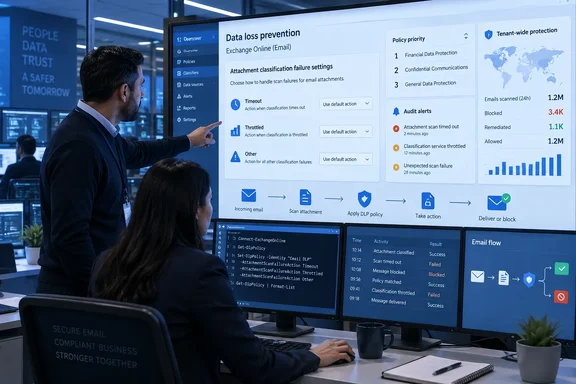
Microsoft has added the DocumentScanFailures condition, which targets three classification-failure categories: Timeout, Throttled, and Other. It must be combined with either the “could not be scanned” or “didn’t complete scanning” condition using an AND relationship. It cannot be used on its own.
That limitation prevents a policy from firing merely because a category exists abstractly; the rule must also establish whether the attachment failed completely or only partly. It is a reasonable safeguard, but it means administrators cannot simply add one broad “block all classification failures” rule and assume they have modeled the failure state correctly.
Microsoft’s own example favors an audit-first approach:
- A rule can audit a full scan timeout when an attachment could not be scanned and
DocumentScanFailuresis set to Timeout. - A separate rule can audit partial scans affected by throttling when scanning did not complete and the failure type is Throttled.
- A third rule can audit other full scan errors before an organization decides whether a stricter action is warranted.
For most tenants, that is the safer rollout sequence. A timeout means Purview did not establish that protected content is absent; it does not establish that protected content is present, either. Immediate blocking may be appropriate for a narrow set of high-risk outbound mail flows, but using it as the default response across all Exchange DLP rules could turn intermittent service-side failures into a mail-delivery incident.
Existing DLP rules can change behavior after opt-in
The most consequential part of this release is easy to miss: organizations with existing Exchange DLP rules that use the older scan conditions may see more rule matches without editing those rules. Microsoft explicitly warns that enabling classification-failure detection can increase DLP matches because the conditions begin recognizing timeout, throttling, and other classification failures in addition to the text-extraction cases they already covered.
This is why the feature is tenant-level opt-in rather than an automatic expansion of policy semantics. The opt-in setting changes how existing conditions are evaluated across Exchange Online. It is not merely a new checkbox available to a single policy author.
The setting is available in the Microsoft Purview portal under Settings > Data loss prevention > Scan failure settings for Exchange. Microsoft also documents the PowerShell configuration:
Connect-IPPSSession
$json = '{"Classification":{"State":1}}'
Set-PolicyConfig -DlpErrorHandlingConfig $json
Microsoft says administrators should allow up to one hour for the setting to synchronize before validating the policy behavior. Setting the value back to 0 disables the expanded classification-failure detection, providing a rollback path if alert volume or enforcement results prove disruptive.
The tenant-wide nature of the switch makes change control important. Before enabling it, administrators should identify every Exchange rule using DocumentIsUnsupported or ProcessingLimitExceeded, then document the enforcement action attached to each rule. A rule that only logs an event may simply produce more telemetry. A rule that blocks external delivery, shows Outlook policy tips, or triggers incident workflows may create a much more visible effect.
Rule order decides whether Purview sees the failure
Microsoft’s implementation has a second constraint that could easily produce misleading results during testing: scan-failure rules only detect failures from classifiers that DLP has already evaluated. If a rule that tests for a timeout or throttling condition is placed ahead of the content-detection rule whose classifier fails, the failure does not get detected.
Microsoft recommends placing content rules first and scan-failure rules after them. In its example, sensitive information type, account-number, and exact-data-match rules occupy higher priority positions, followed by rules for full scan timeouts, partial throttling, and other errors.
This ordering requirement makes sense mechanically, but it changes the normal “catch-all first” instinct that some administrators use when designing restrictive mail policies. A scan-failure rule is dependent on preceding evaluation; it cannot observe a classifier that never ran.
It also means DLP policy review should focus on priority as well as conditions. A tenant could enable the feature, create a well-formed DocumentScanFailures rule, and still conclude there are no failures simply because the relevant detection rule sits below the failure rule. That would be a configuration mistake, not evidence that Purview classification is completing reliably.
Exchange Online only — and government-cloud timing remains the open detail
This capability applies to Exchange Online only. It does not extend the equivalent failure detection to SharePoint, OneDrive, Teams, or Endpoint DLP policies. Administrators should not read the “default protection” wording as a tenant-wide Purview control; mail attachments are the workload in scope.
Microsoft’s general DLP policy reference confirms that Exchange is a data-in-motion location, while SharePoint and OneDrive have different data-at-rest and data-in-use models. Those workloads still have their own scan-related conditions and limitations, but the September roadmap item does not announce comparable granular classification-failure handling for them.
There is also a documentation inconsistency worth preserving in deployment notes. The submitted Roadmap ID 569477 says the feature is in development with September 2026 general availability for GCC, GCC High, and DoD. Microsoft’s earlier Message Center communication tied the same functional description to Roadmap ID 561916, saying public preview would complete in late July and worldwide general availability would occur in late August. Microsoft Learn’s configuration article, last updated July 17, already documents the portal toggle, PowerShell setting, conditions, and rule-order requirement.
The reasonable reading is that the feature itself reached commercial availability first, while the September roadmap record tracks the government-cloud release. Microsoft has not, in the material available here, explained why the same capability appears under two roadmap IDs or whether every documented control is already enabled in every sovereign environment. GCC, GCC High, and DoD administrators should therefore verify the Scan failure settings for Exchange control in their own Purview tenant rather than relying on the global rollout timetable.
For Exchange DLP owners, the immediate task is straightforward: enable the setting in a controlled window, put existing scan-related rules under review, keep new classification-failure rules in audit mode initially, and monitor Activity Explorer and DLP alerts for timeout and throttling patterns. The feature closes a real visibility gap, but it also changes what existing policies consider a match — and that is the part most likely to surprise a production mail environment.