

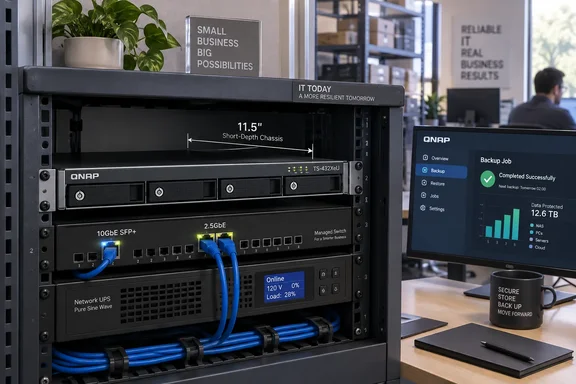
QNAP’s TS-432XeU puts four drive bays into a shallow 1U chassis
The TS-432XeU is a network-attached storage appliance: a dedicated system that makes its storage and applications accessible over a network. QNAP positions this model for small offices, factories, surveillance rooms, and AV environments, with backup, file sharing, and lightweight container applications among its intended jobs. The concrete change is a new hardware option combining four internal drive bays with 10GbE and dual 2.5GbE networking in a short-depth rackmount enclosure.
Inside is an AnnapurnaLabs Alpine AL324 64-bit ARM processor with four cores running at up to 1.7GHz. The standard configuration has 4GB of non-ECC memory, expandable to 16GB, and four SATA drive bays. QNAP’s hardware specification explicitly lists compatibility with 3.5-inch SATA hard drives and 2.5-inch SATA SSDs.
For an administrator, the physical dimensions deserve more attention than the “12-inch” marketing description. QNAP’s announcement describes the chassis as 292.1mm, or 12 inches, deep. Those figures are not exact equivalents: 292.1mm is 11.5 inches, which matches the depth in QNAP’s U.S. hardware specification. That specification also excludes the mounting ears and protruding part of the power supply from its dimensions.
The practical consequence is straightforward: assess cabinet fit using the detailed dimensions and the required installation clearance, not the rounded product description. QNAP lists two optional rail kits with different mounting requirements. The RAIL-S02 supports rack-post depths of 8–13 inches, while the RAIL-B02 is described as designed for a 25-inch mounting depth, with additional installation considerations for 18-inch racks. A shallow chassis and an appropriate mounting arrangement are separate purchasing decisions.
QNAP also lists an operating temperature range of 0–40°C and three 40mm fans. Those are more useful planning boundaries than the broad suggestion that the NAS suits factory floors or vehicle installations. The proposed location still needs to meet the appliance’s stated operating conditions.
The TS-432XeU’s 10GbE results depend on an SSD-backed test
Networking is the clearest attraction. The TS-432XeU includes one 10GbE SFP+ interface and two 2.5GbE RJ45 interfaces; QNAP’s hardware specification says the latter also support 1GbE and 100MbE connections. This offers distinct connection choices, but the 10GbE interface is specifically SFP+, not a third RJ45 socket. A procurement plan needs to account for that interface difference.
QNAP publishes performance measurements that give the port speeds some useful context. Its laboratory tested sequential SMB transfers using 1MB operations and reported the following results. SMB, or Server Message Block, is the file-sharing protocol relevant to conventional Windows network shares.
| QNAP test connection | Sequential read | Sequential write |
|---|---|---|
| One 10GbE connection | 1,181MB/s | 859MB/s |
| Two 2.5GbE connections | 590MB/s | 591MB/s |
These are QNAP laboratory measurements, not WindowsForum tests. The NAS ran QTS 5.2.7 with four Samsung 850 PRO 512GB SATA SSDs configured in RAID 5. Its Windows Server 2019 client used an AMD EPYC 7232P processor, 64GB of RAM, and a QNAP QXG-10G2SF-CX4 network adapter. QNAP states that results vary by environment.
The test configuration changes how the figures should be read. It demonstrates the appliance’s sequential transfer capability with four SSDs and a specified server client. It gives a prospective buyer no measured result for a hard-drive configuration, a small-file workload, or simultaneous backup and application activity. An office planning to populate the NAS with capacity-oriented hard drives should therefore treat the published numbers as an SSD-backed reference, not its expected backup rate.
The read/write difference is also useful. On the 10GbE connection, QNAP’s read result is substantially higher than its write result; on the dual-2.5GbE configuration, the results are almost equal. A backup target primarily receiving data and a file server primarily supplying large files need different parts of that table. Buying against the highest number alone would miss that distinction.
QNAP’s software specification lists QTS 5.2.9, while the performance measurements identify QTS 5.2.7. Keep that version difference attached to the results: the published benchmark describes a particular configuration, rather than a measurement of every shipping software combination.
SMB Multichannel gives Windows users a second networking option
The pair of 2.5GbE ports is more than an alternative to the SFP+ interface. QNAP advertises support for both SMB Multichannel and port trunking, explaining that the former can increase bandwidth between the NAS and a single connected device, while the latter supports aggregate access by multiple users. Its product description frames aggregation around ports operating at the same speed.
That makes dual 2.5GbE worth evaluating for a Windows file-sharing deployment, especially when a single client needs more bandwidth than one connection provides. It does not make the appliance’s three network interfaces a universally available 15Gbps connection. The published dual-2.5GbE test is the relevant evidence for that connection choice; the separate 10GbE test describes another.
The distinction also prevents a configuration mistake at the planning stage. An administrator choosing SMB Multichannel is evaluating a file-sharing path between client and NAS. An administrator choosing port trunking is evaluating how multiple network connections serve the wider deployment. QNAP describes the two options separately, so a design should specify which behavior is required instead of treating the names as interchangeable.
Beyond throughput, QNAP’s software specification lists Microsoft networking through CIFS/SMB and Windows access control lists, or ACLs, which govern file and folder permissions. It lists Windows 10 and Windows 11 among supported clients, and Windows Server versions through Windows Server 2025. These features make the appliance relevant to a Windows office without requiring an incidental Microsoft connection.
The useful decision is therefore about the whole file-service path: the intended clients, their permissions, the chosen network interfaces, and the workload. The announcement and product page establish support and a benchmark baseline, but do not provide a complete deployment procedure for a particular Windows network.
USB expansion adds capacity choices, not measured performance
The TS-432XeU has four USB 3.2 Gen 1 ports, each specified at 5Gbps. QNAP identifies external backup, importing data from removable storage, and attaching compatible expansion hardware as their intended uses. Its product page specifically describes a four-bay TR-004U expansion unit, while the launch announcement also names the larger, 12-bay TL-R1200C-RP.
These options give a four-bay appliance a path to additional storage, but capacity expansion and transfer performance remain separate questions. QNAP’s published SMB benchmark uses the four internal SATA SSDs. It supplies no equivalent result for either named external enclosure, so those internal-array figures should not be carried over to an expanded system.
External backup and capacity expansion also represent different purchasing goals. QNAP explicitly offers both uses for USB connectivity. A buyer seeking additional working storage should identify the supported enclosure and its intended operating mode; a buyer seeking a separate backup destination should specify that requirement rather than assuming that adding more bays satisfies it.
The software offering extends beyond basic shares. QNAP lists scheduled snapshots, file synchronization, and Container Station for Docker applications on the product page. Its specification also lists Hybrid Backup Sync capabilities including NAS-to-NAS backup, cloud backup, and external-drive backup. Those are concrete workflow options, although they do not establish how many such jobs the standard 4GB configuration can comfortably run at once.
Memory planning is particularly relevant if the appliance will host applications alongside file services. QNAP’s hardware specification lists one DDR4 SODIMM slot and a maximum configuration of one 16GB module, so reaching that maximum means replacing the supplied module. The launch announcement says ECC is supported, but also identifies the installed 4GB memory as non-ECC. Buyers requiring error-correcting memory should obtain confirmation of the supported configuration rather than treating the standard unit as ECC-equipped.
What this means for a TS-432XeU deployment
Shortlist the TS-432XeU when shallow rack installation and local network storage are the primary requirements. Before choosing drives or expansion hardware, establish whether the job is chiefly receiving backups, serving large files, or supporting several concurrent applications; QNAP’s evidence is most useful when mapped to one of those specific workloads.
- Measure the usable cabinet space against the 11.5-inch chassis depth, allowing for the excluded protrusions and the mounting requirements of the selected rail kit.
- Choose the network path explicitly: one 10GbE SFP+ connection, dual 2.5GbE for a supported multichannel design, or a multi-user trunking configuration.
- Use QNAP’s 1,181MB/s read and 859MB/s write results only as references for its documented four-SSD RAID 5 test, not as forecasts for a hard-drive array.
- Budget memory around the single-slot design, and confirm the supported module if 16GB capacity or ECC capability is a requirement.
- Specify whether USB-connected storage will provide additional capacity, an external backup destination, or data import, and obtain a quote covering that complete configuration.
There is also a useful boundary around application ambitions. QNAP advertises Docker support and describes lightweight containers, development sandboxes, and microservices as uses. That supports considering a small additional service on the appliance; it supplies no sizing result for a particular application stack. Keep a proposed container workload separate from the measured file-transfer claims.
QNAP’s cost argument still needs a complete system quote
QNAP presents the TS-432XeU as a cost-conscious business NAS and attributes lower long-term storage costs to its combination of connectivity, expansion, and compact installation. The hardware supports a credible space-efficiency argument. The financial argument remains dependent on a price and the buyer’s required configuration: neither the announcement nor the inspected product material supplies enough pricing information for a total-cost comparison.
A meaningful quote should cover the intended drives, network connection equipment, mounting hardware, any memory replacement, and external storage if required. These are not reasons to reject the appliance; they are the items that turn a promising chassis into a deployable system. QNAP lists a three-year standard warranty and offers an optional extension to five years, adding another explicit choice to that comparison.
For a small Windows-focused office or branch installation, the TS-432XeU offers a concrete combination worth evaluating: four internal bays, fast networking, and a genuinely shallow rackmount chassis. The next purchasing step is a configuration-specific quote matched to cabinet fit and workload—not an assumption that the headline 10GbE speed, expansion options, and cost claims describe the same finished deployment.