

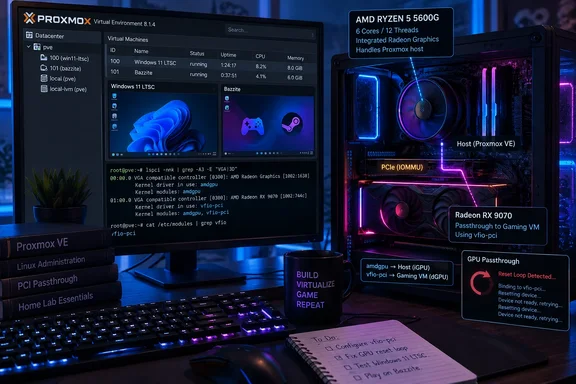
Proxmox VE on a Ryzen 5 5600G and RX 9070 gaming desktop
The hardware is a standard consumer build. According to MakeUseOf's first-person account, it's an AM4 system with a Ryzen 5 5600G, 32GB of memory, a non-XT Radeon RX 9070, and a micro-ATX motherboard with two M.2 slots, all in a micro-ATX case. It's a gaming PC with RGB lighting, not a server. The writer admits it isn't the most power-efficient way to run a homelab.
The install was simple. The writer booted the Proxmox installer from a Ventoy USB stick and put the hypervisor on a spare 120GB SATA SSD, keeping both M.2 slots free for VM disks and game libraries. Proxmox itself takes up very little space, so putting it on a small, cheap drive leaves the fast NVMe storage for the workloads that benefit from it.
Firmware changes were minimal. The writer enabled SVM, AMD's CPU virtualization extension, and IOMMU, which lets the platform isolate a PCIe device and assign it to a guest. CPU undervolting was mentioned as an optional power-saving tweak. Proxmox's own documentation notes that firmware vendors label these options differently: AMD-V is sometimes shown as IOMMU, for example. It also says IOMMU must be enabled in both the firmware and the kernel before passthrough works.
That's the whole configuration story up to the point where the GPU is involved. Proxmox ran without problems. Nearly all of the difficulty came from getting the Radeon card to move cleanly between the host and a guest.
The 5600G's integrated graphics give the host a display without a second GPU
GPU passthrough means assigning a whole physical graphics card to a virtual machine. The guest gets the card, loads its own driver, and drives a monitor directly, and the host can no longer use that card. The host still needs something to display on, or has to run headless.
The usual answer is a second graphics card for the host. In this build a micro-ATX board and case left no room for one, so the writer used the Radeon graphics built into the Ryzen 5 5600G. The iGPU runs the Proxmox host console, and the RX 9070 is "borrowed" from the host and handed to a VM when it's needed.
This is the most transferable detail in the build. Anyone planning something similar on AM4 or AM5 should check whether their CPU has integrated graphics before buying a second GPU. Many AM4 Ryzen chips have none, and the 5600G is one of the G-series APUs that does. Single-GPU passthrough is possible, but giving the host its own display device takes a whole class of problems out of the setup.
Assigning the card to one guest also means the card can't be shared. MakeUseOf points out that splitting a GPU into several smaller virtual GPUs requires a very specific series of cards. Proxmox's documentation covers that approach separately: its vGPU guide deals with specific NVIDIA data-center and workstation cards running NVIDIA's licensed vGPU software. For a consumer RX 9070, it's whole-card passthrough to one VM at a time.
The RX 9070 reset bug is the real cost of AMD GPU passthrough
The first passthrough seemed to work. The RX 9070 appeared in the guest, then dropped off the PCIe bus. MakeUseOf describes the card ending up in a "limbo" state where it was bound to no driver and couldn't be used, and the only fix was a full power reset of the machine.
This is a known problem. Radeon cards often fail to reset properly when a VM releases them, so the next time a guest or the host driver tries to initialize the card, it fails. The writer says the usual community fix, the vendor-reset kernel module, is mostly aimed at RDNA 2 cards and doesn't cover the RDNA 4-based RX 9070.
Proxmox forum users describe the same problem on the same card generation. One user who moved from an NVIDIA card to an AMD RX 9070 encountered the notorious reset bug for the first time. Another, posting about the RX 9070 XT three weeks ago, called it a very old and still preset in 9000 radeon gpu series issue. A third user, describing a working 9070 XT passthrough, reported that even the AMD 90xx-Series has the well known reset-bug which you have to deal with.
The error messages in those threads also match. One Windows 11 passthrough attempt with an RX 9070 XT on a B550 board logged a failed PCI reset followed by kvm: vfio: Unable to power on device, stuck in D3, meaning the card was stuck in a low-power state. None of the reports treat this as a problem with Proxmox itself. A Proxmox forum participant summed it up bluntly: PCI(e) passthrough is always tricky and trial and error and cannot be guaranteed unfortunately.
Hook scripts keep the RX 9070 usable between VM sessions, mostly
What fixed it was a Proxmox hook script: a shell script attached to a VM that Proxmox runs at defined points in the VM's lifecycle, such as before it starts and after it stops. MakeUseOf's writer got there with help from Claude and the Proxmox forums. The script binds and unbinds the RX 9070 between the host's amdgpu driver and the vfio-pci driver used for passthrough, so the card is handed back in a known state after each session. The writer calls it a hard requirement and reports no further problems once it was in place. The exact script wasn't published.
Community scripts follow the same pattern. One Proxmox forum user running an RX 9070 described a version that, before the VM starts, checks whether the GPU is still bound to vfio-pci. If it is, the script unbinds it and rebinds it to amdgpu, then continues as normal: unbinding from amdgpu, resizing a BAR memory region, and giving the card to vfio-pci for the guest. After the VM stops, the script reverses the process. An earlier forum report on the 9070 XT reached a similar conclusion: the reliable fix was to unbind the gpu from vfio-pci and bind it to amd after the VM (with GPU passed-through) stopped.
There's an important caveat about how the VM gets shut down. MakeUseOf says its script runs whenever the VM shuts down cleanly. The forum user found that if shutting down a guest from within the VM itself, the "post-stop" phase in the script doesn't trigger and so the GPU remains bound to vfio-pci. That's why their version checks and repairs the card's state before each start. Another RX 9070 XT owner said reliable handoff back to the host only worked if the script ran in the pre-stop phase and they were NOT using shutdown or restart procedures from within Windows VM itself.
The results also aren't consistent from system to system. One user reported that the reset bug is still happening intermittently even with a hook script, and asked whether the fixed delays in the post-stop step should be replaced with a loop that checks the card's state. Another reply in the same thread suggested some guests also need a reset mechanism inside the guest OS. In practice, the hook script turns a reboot after every session into something that usually works if you follow a set routine. It doesn't guarantee a clean reset.
Windows 11 LTSC and Bazzite share one RX 9070, one at a time
With the card behaving, the writer built two VMs in the Proxmox web interface. One ran Windows 11 LTSC and the other ran Bazzite, a gaming-focused Linux distribution chosen for a more SteamOS-like experience. Each VM got 8 of the host's 12 logical CPUs and 16GB of RAM. The OS disks were kept small, 50GB for Bazzite and 120GB for Windows, and one NVMe drive was passed through as a shared game library. The GPU and the hook script had to be added to each VM by hand.
This isn't unusual. In a separate thread, another user reported being able to see/use the card in vm-guests like Bazzite (Linux) and Windows 11 with an RX 9070 XT. That user needed a ROM file for the card under Windows and a newer Proxmox kernel. Those are details that apply to their setup, not requirements MakeUseOf reported.
On performance, the writer says they couldn't tell the difference between native and VM gaming. That's a subjective impression, not a benchmark, and no frame rates were published. The writer also points out that the 5600G only supports PCIe 3.0 while the RX 9070 is a PCIe 5.0 card, so some performance should be lost, and calls it an acceptable trade-off given the CPU. Whatever the bus costs, it's hard to separate from the fact that a six-core APU is already limiting the card.
The build can't run both gaming VMs at the same time, and not only because the GPU can't be split. Two 16GB guests would use all 32GB of RAM with nothing left for Proxmox or the containers running alongside. What the build does is run a headless Proxmox host with services in the background and start a gaming VM when needed. The writer says that works well enough to keep using. Their upgrade plan is a Ryzen 9 5950X for 16 cores and 32 threads, plus a move to a full-size ATX board, probably X570, with room for a second GPU.
What this means for you
The decision comes down to whether you'll tolerate some ongoing care and feeding of the GPU. If you already run a homelab and your gaming PC sits idle most of the day, this build shows that a mid-range AM4 system can host containers and a gaming VM on the same hardware. If you want a gaming PC that just works, dual-booting or a separate box is still simpler. That's especially true on RDNA 4 Radeon cards, where community fixes are still being revised.
- Before buying anything, check that your CPU has integrated graphics or that your board has room for a second GPU, because a separate host display device is what made this build simple.
- Enable SVM (AMD-V) and IOMMU in firmware, expecting different labels depending on the board vendor, and make sure IOMMU is also enabled in the Proxmox kernel.
- If you pass through an RX 9070 or 9070 XT, plan on a hook script that moves the card between
amdgpuandvfio-pci, and don't expect vendor-reset to cover RDNA 4. - Shut the guest down from Proxmox rather than from inside Windows until you've confirmed your script handles guest-initiated shutdowns, because forum users report the post-stop phase can be skipped.
- Treat "no noticeable difference from native" as one writer's impression on a PCIe 3.0 platform, and measure your own games before committing.
- Budget RAM for the host as well as the guest, since 32GB covers one 16GB gaming VM plus background services, not two gaming VMs.
The build shows that gaming hardware and a hypervisor can live on the same PC. The iGPU handles the host, one Radeon card goes to whichever VM is running, and nobody reports serious performance problems. What still needs work is the Radeon reset behavior. Until AMD or the kernel fixes it for RDNA 4, anyone passing through a 9070-series card is relying on community hook scripts, so a reliable handoff between host and guest still takes some trial and error.
References
- I turned my gaming PC into a Proxmox server and found a whole new use for its power - MakeUseOf MakeUseOf · 2026-09-22T20:00:15+00:00
- (SOLVED) - AMD GPU passthrough & reset hookscript that works through guest shutdowns | Proxmox Support Forum forum.proxmox.com