

What scripts can read—and write
ITOOSOFT identifies three new functions:
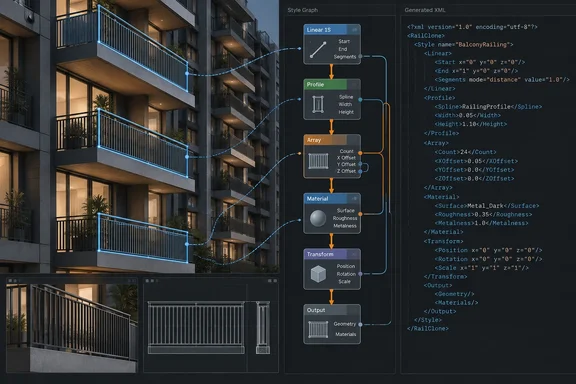
railclone.getXMLStylereturns the current style as XML.railclone.setXMLStyle <xml>assigns a style from XML, returningOkon success or an error on failure.railclone.getXMLOutputreturns generated-item information, including source segments, transformation matrices, bounding boxes and tags.
That separates two useful jobs. A pipeline script could inspect or transfer a style graph without an artist rebuilding its nodes by hand. Another could inspect what a graph generated without first converting the result into ordinary scene objects. These are possibilities enabled by the interface, not claims that every studio workflow will work automatically.
There is an important boundary: XML output is not a general-purpose geometry export. ITOOSOFT’s requirements documentation still points to RailClone Tools for converting RailClone objects into standard 3ds Max instances, including when a renderer does not support RailClone directly.
The AI angle needs an asterisk
ITOOSOFT suggests that an external large language model might inspect or modify a graph’s XML and hand it back to RailClone. That is an experiment a developer could build around the new functions—not a built-in AI modeller, cloud workflow or prompt interface announced in 7.3.5.
The sensible production distinction is between reading a style and writing one back. For any automated edit, keep a known-good copy, test the returned XML on a duplicate object, check whether setXMLStyle reports success, and inspect the resulting style and render before replacing an approved asset. An Ok response establishes that an assignment succeeded; it does not establish that the result matches an art director’s intent. That last safeguard is pipeline advice, not a validation feature ITOOSOFT claims to have added.
Smaller fixes with visible results
The release also tackles several problems artists can check in existing scenes:
- RC Slice: Gizmos are colour-coded and remain visible while the modifier is edited, rather than requiring the relevant sub-object mode. Labels have been clarified.
- Evenly distribution: Divide by Sections has been refined for configurations that still produced uneven spacing. Unlike division across an entire spline, this mode accounts for geometry at the start, end and corners of an array.
- 3D offsets: Simple Y Offset now applies to the Offset operator in 3D mode. It can avoid the usual attempt to repair overlapping offsets on shapes such as roads or stairs that double back.
- Graph editing and corners: Hidden Link wires can no longer be selected while invisible. Compose output with an even number of input segments now centres correctly at a Generator corner, removing the former Null-segment workaround.
- Animation: Changes to animated spline banking now update correctly in both the viewport and final render.
ITOOSOFT’s official release notes add a practical fix not highlighted in that list: exporting a portable .rail file from a scene whose units are not centimetres no longer has the reported scaling issue. They also record fixes for a rare .pmat loading exception and distorted non-rectangular Style Library thumbnails. Studios exchanging portable assets should test the unit-sensitive export as well as their newly scriptable graphs.
Check the Windows and 3ds Max boundary
ITOOSOFT officially supports RailClone with 3ds Max 2023–2027 on 64-bit Windows 10 or Windows 11. Its installer contains builds for earlier Max releases, but the company says it cannot test those under Autodesk’s licensing policy and therefore does not officially support them. Renderer feature support also varies: being able to render a RailClone object is not a guarantee that every instancing or material feature behaves identically.
RailClone 7.3.5 is available to users with an active Maintenance Plan through User Panel → My Products. RailClone Lite is free and permitted for commercial projects, though feature-limited. ITOOSOFT lists Pro at €250 before VAT as a perpetual licence with one year of extendable maintenance; an expired plan does not stop the licensed version working, but newer releases require renewed maintenance.
The headline, then, is access rather than automation by magic. RailClone has opened its graph to scripts; the useful work now lies in building careful tools around it—and checking the scene after those tools have had their say.
References
- RailClone Opens Its Graphs to MaxScript - Digital Production Digital Production · 2026-09-28T05:00:00+00:00
- RailClone 7.3.5: Exposing RailClone Graphs to Scripts and LLMs itoosoft.com
- Requirements | Reference & Documentation docs.itoosoft.com