

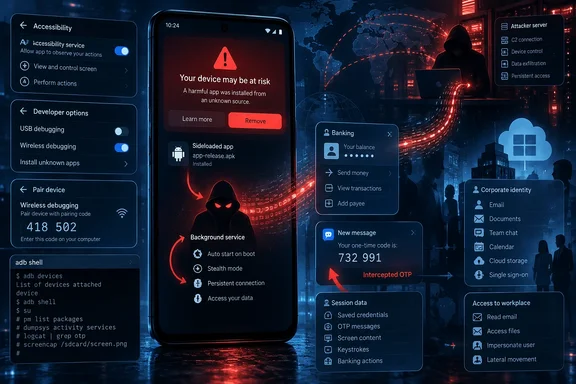
Zimperium zLabs published the technical analysis on September 16, and BleepingComputer independently reported the findings on September 17. The headline-grabbing AI component is real in the researchers’ samples, but it is not the most urgent operational issue. RatHat’s lasting consequence is the combination of Accessibility-driven user-interface control, local ADB pairing, an out-of-app persistence component, and a reverse tunnel that can leave an attacker with interactive access beyond the ordinary Android app sandbox.
For Windows users and IT teams, the immediate concern is not Windows malware. It is the unmanaged Android handset that receives corporate email, MFA codes, VPN approvals, browser sessions, and password-manager notifications. A compromised personal phone can become the weak link in an otherwise well-administered Microsoft 365 or Entra ID environment.
The AI feature automates interface changes, not initial compromise
According to Zimperium, RatHat serializes the active Android Accessibility tree into XML and sends it to an unnamed widely used generative AI assistant. The responses are used to identify interface elements, retrieve their displayed text, and return navigation actions such as scrolling. The researchers found Chinese-language prompts and assess that the operators appear to be based in China; that is a threat-researcher attribution, not evidence of Chinese government involvement.
The important distinction is that the model is described as a navigation aid. It helps the malware adapt when Android settings menus, dialog layouts, localized text, or OEM skins do not precisely match a fixed script. Rather than hard-coding every tap location for every device, the operator can ask the service to find a particular control in the live interface and translate the answer into synthetic taps or swipes.
That makes the automation more portable, but the attack still needs a victim to cross the hard security boundary first. Zimperium says RatHat is delivered through SMS phishing, malicious advertisements, deceptive download sites, and third-party forums that persuade targets to sideload an APK. The app then lures the user into enabling Accessibility access. Android documents Accessibility services as tools intended to help people with disabilities use applications and receive interface events; malware operators value the same ability to observe and manipulate screens.
The public reporting does not identify the AI assistant, disclose whether the service was accessed with attacker-controlled credentials, or show the scale of the campaign. Zimperium’s report names the behavior and its sample analysis, but it does not publish victim counts, targeted countries, or a public indicator-of-compromise list that administrators could directly feed into endpoint tools. Those omissions mean defenders should treat RatHat as a documented capability set, not as proof of a broad global outbreak.
Wireless Debugging is the route out of the app sandbox
RatHat’s most consequential step is its use of Android’s legitimate Wireless Debugging feature. Google’s Android developer documentation says wireless ADB is supported on Android 11 and later, requires Developer Options, and ordinarily pairs a device with a development workstation using a pairing code. RatHat reportedly uses Accessibility automation to enable the relevant settings, read the temporary pairing code and port from the screen, and pair with the device’s own local ADB daemon without an external PC.
That local pairing changes the threat model. The malware does not become root, and the Android shell identity is not equivalent to unrestricted device ownership. But it escapes the narrower operating limits imposed on a conventional Android application and obtains command execution in an ADB shell context. In RatHat’s case, Zimperium says that access is used to stage liblocal-service.so, a Go-based component masquerading as a shared library and placed in /data/local/tmp.
The agent can issue shell commands, exempt the malware from Doze battery restrictions, push it into an active app-standby bucket, and manage permissions and persistence. Zimperium also says strings in the agent indicate the capacity to disable or uninstall other packages. That capability deserves more attention than the AI branding: an infection that can keep itself awake, remove defensive software, and re-grant its own access is materially harder to contain than a banking overlay app that dies when its package is uninstalled.
RatHat is not the first Android threat observed using this path. BleepingComputer recently reported that ToxicPanda used Accessibility abuse to enable Wireless Debugging, capture pairing information, and gain local ADB shell access. The repeated appearance of the technique shows why Android’s developer controls need to be treated as high-value settings on both personal and enterprise devices. They are useful for legitimate development, but a malicious app that can drive the settings UI can turn an on-device security decision into a scripted privilege step.
Two external components complicate removal
Zimperium describes RatHat as three cooperating pieces: the user-facing Android app, the liblocal-service.so Go agent, and libmedia_codec.so, a second disguised component that functions as an FRP reverse-proxy client. The reverse proxy establishes an outbound tunnel to attacker infrastructure, exposing local device services to the operator without requiring the operator to make an inbound connection to the victim’s network.
This design matters because the package the victim sees on the launcher is no longer the entire infection. The local agent is intended to run separately from the original app lifecycle. If the app is stopped or removed, the agent can check for it and reinstall it; while the app remains active, the app can in turn redeploy the agent if it disappears. Zimperium also reports an anti-uninstall tactic in which RatHat intercepts the removal confirmation path, cancels it, and shows a fake Google Play-styled failure overlay.
Deleting a suspicious app is therefore not a reliable clean bill of health once the malware has reached the ADB-pairing and agent-installation stage. Users who only see an unfamiliar sideloaded app and have not granted Accessibility access or enabled Developer Options may be dealing with a less entrenched problem. Users who granted those permissions and then saw unexplained Developer Options or Wireless Debugging activity should assume the device needs a more thorough response.
The malware’s collection capabilities raise the stakes. Zimperium says RatHat can target banking, cryptocurrency, WeChat, and Alipay applications with HTML overlays; intercept SMS and notification content including one-time passcodes; log text-change events; read browser address bars; capture lock-screen credentials; and collect raw touch coordinates through the shell-level agent. A stolen banking password is damaging. A stolen password plus real-time OTP interception and an attacker-controlled interface is an account-takeover chain.
The detection problem is behavioral, not a single filename
RatHat uses deliberate anti-analysis measures, including ZIP container tricks, an Android manifest enlarged to roughly 61 MB with undocumented chunks, malformed DEX pseudo-instructions, string encryption, and debugger, root, emulator, Xposed, and Frida checks. These features can frustrate unpackers and automated sandbox pipelines, but they should not drive the entire response strategy.
The better detection opportunity is the sequence of actions that must occur for the threat to succeed. An app installed from outside Google Play that quickly seeks Accessibility access, opens Developer Options, enables Wireless Debugging, reads pairing UI, creates local ADB activity, and establishes an unusual persistent outbound tunnel is far more suspicious in combination than any of those events alone.
For organizations managing Android through enterprise mobility management, this is a policy and telemetry problem. Security teams should review whether personally owned devices are allowed to receive Microsoft Authenticator approvals, access Outlook and Teams data, or hold browser sessions without baseline checks for sideloading, Developer Options, Accessibility services, and device integrity. Conditional Access can reduce what an unmanaged or noncompliant handset can reach, but it cannot retroactively protect OTPs, session notifications, or credentials already displayed on a compromised screen.
Google says Play Protect checks applications from outside Google Play, may warn about or block potentially harmful apps, and periodically scans devices. It should remain enabled, including the option to improve harmful-app detection for unknown apps. But Play Protect is a preventive and detection layer, not proof that a phone with shell-level persistence has been restored to a trusted state.
What affected users and administrators should do now
A phone suspected of a RatHat-style infection should be removed from sensitive accounts before attempting ordinary app cleanup. Revoke active sessions for email, banking, cryptocurrency, and identity-provider accounts from a known-good device; change passwords where credentials may have been entered on the phone; and review payment, recovery-email, and authenticator changes. If the handset was used for work, notify the organization’s security or help-desk team so it can revoke mobile access tokens and investigate anomalous sign-ins.
On the device, review installed apps, enabled Accessibility services, Device Admin apps, Developer Options, and Wireless Debugging pairings. Android’s developer documentation says existing ADB pairings can be removed through the Wireless Debugging screen, including a control to revoke debugging authorizations. Those steps are useful for scoping exposure, but they should not substitute for a supported full reset and clean re-enrollment when shell-level persistence is credible.
For enterprise administrators, the practical takeaway is narrow: alerting on malware names alone will miss the broader pattern. Watch for unauthorized sideloading, suspicious Accessibility activation, Developer Options changes, local ADB behavior, and security-tool removal attempts. RatHat’s AI navigation may make one stage less brittle, but its ability to translate a socially engineered Accessibility grant into persistent on-device control is what makes this malware worth treating as a serious mobile identity risk.
References
- New RatHat Android malware uses AI to automate device control BleepingComputer · 2026-09-17T17:50:26-04:00