

Razer Soma Chroma's "wireless" RGB runs on a power bank you buy yourself
Razer announced the chair on June 25, 2026. It called the Soma Chroma a chair that features reactive Razer Chroma™ RGB lighting integrated with more than 300 games, a built-in ergonomic lumbar arch, and dual-mode wireless connectivity. The dual-mode wireless covers the connection to your computer or phone. Power is a separate job. Razer's own FAQ says the chair can be powered by a power bank (not included) via its USB Type C connection, or from a wall outlet using a power adapter (not included) and a USB Type C extension cable (sold separately).
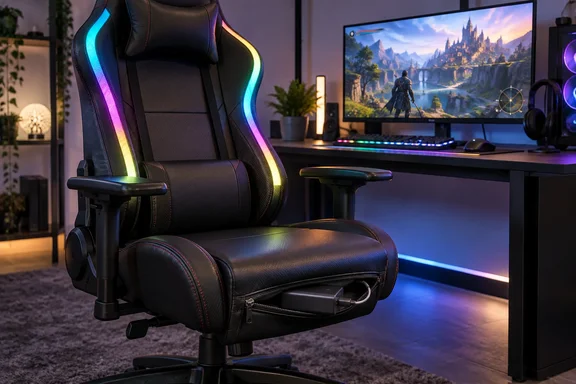
The hardware makes this more awkward than the spec sheet suggests. According to Gizmodo, the chair features a single, 4-inch-long USB-C cable dangling behind the chair like a rogue tail. Game Rant's reviewer also found that cable extremely short, so it's virtually impossible to plug it in without some sort of extension cord, or a power bank tucked into the zipper of the chair itself. The cable is built into the chair, which brings its own problem: Game Rant warned that if the included USB-C breaks, the replacement process will be much more of a headache than a simple cable swap.
Razer clearly expects most buyers to use a power bank. Gizmodo reports that Razer told me in a briefing that it expects players to grab a separate power bank and plug that in to supply the juice necessary to power the RGB lights. Tom's Hardware found a zippered pouch at the back of the seat base, which runs the full width. It's large enough to accommodate a portable power bank, so you don't have to be tethered to a long extension cord to power the RGB lights.
The wall-power option works, but it brings back the cable the wireless design was meant to remove. Tom's Hardware said running an extension to the PC is a nightmare for ergonomics, and Gizmodo warned that dangling a cable so close to your rolling wheels is a recipe for accidental shutdown or, worse, damaged cords. Not every reviewer minded. G Style Magazine noted that if your desk allows for clean cable management, running a longer USB-C cable effectively creates a permanent setup that requires very little maintenance.
Power bank capacity decides whether the Soma Chroma stays lit
The biggest practical unknown is which power bank to buy. Razer's product page points readers to its tech specs for detailed power requirements. According to Windows News, Razer specifies a power bank with at least 20,000 mAh capacity and 20W USB-C Power Delivery 2.0 output for portable use. No other outlet in our research repeated that exact figure, so check it against Razer's current spec listing before you buy.
Gizmodo's testing supports a larger battery. Its reviewer wrote that the RGB strips built into the Soma Chroma don't draw too much power, but I still had multiple issues getting the chair to run consistently with a 10,000mAH power bank. Instead, I opted for a massive 25,000mAH brick from UGreen, which seemed to help it run in a stable fashion. That is one reviewer's experience, not a standardized runtime test. Still, it fits the reported 20,000 mAh recommendation. A small phone power bank you already own may be marginal, and a bank that can't supply the needed output could explain unstable behavior like Gizmodo's.
No reviewer we found published a measured hours-per-charge figure. Buyers relying on a power bank should expect to recharge it on a schedule, though nobody has established what that schedule looks like.
How Synapse and the HyperSpeed dongle drive the Soma Chroma lighting
The data side is simpler. Razer says the chair connects wirelessly to your PC via the included USB Type A HyperSpeed Wireless dongle and is fully compatible with Synapse. A built-in control panel lets you cycle through effects, tweak brightness, and switch seamlessly between your PC (2.4 GHz) and mobile (Bluetooth) connections at the touch of a button.
Synapse is optional for basic use. Razer says the lighting can be controlled directly via the builtin control panel with limited functionality, even without Synapse. Synapse is required to unlock the full experience — including syncing with other Chroma RGB-enabled gear. On a Windows gaming PC, that means installing Razer's software if you want the chair to react to games or match your keyboard and mouse. If you just want a static glow, the chair works without it.
Inside Synapse, Razer promises that you can set the mood in Razer Synapse with 16.8 million colors and 10 lighting presets. The game-reactive effects depend on the game supporting Chroma. Razer's list of 300+ titles includes games such as Battlefield 6 and Borderlands 4, and the company describes the integration as covering 300+ Chroma RGB integrated PC games. That means PC titles only, not every game.
Brightness has its own control. Razer recommends darker rooms with glossy or reflective monitors often pair well with lower brightness, while brighter rooms with matte screens work well with higher brightness. As a starting point for most setups, we recommend 60%. The chair has 10 brightness levels on the panel. Windows Central's Daniel Rubino, who liked the chair overall, found the panel layout awkward in use: you cannot actually see or easily reach these buttons blindly while sitting down. You have to get up out of the chair to make physical adjustments, making Razer Synapse the vastly superior option for mid-game tweaks.
Reviewers split on whether Soma Chroma RGB earns its $499.99
Reviewers mostly agree the software integration works. They disagree on whether it's worth the money. Tom's Hardware concluded that the Soma Chroma is a great-looking chair with excellent RGB integration, but the $200 premium over the Iskur V2 X is debatable. MMORPG.com reached almost the same verdict, finding that the reactive lighting works as promised. But the $200 premium over the Iskur V2 X is hard to justify when you're getting fewer ergonomic adjustments and no included power solution.
TechRadar was the harshest, and its complaint was about where the LEDs sit. Its reviewer, Zak Storey, described two diffused strips that run alongside the upper part of the backrest that are forward-facing only, and you can't really see it when you're sat down. He said he ran the lighting for a day and then promptly unhooked the USB cable Razer graciously provided me with and never touched it again. TechRadar also pointed out a design clash: a glossy green Razer logo in the backrest limits which RGB colors look good next to it.
TechRadar and MMORPG.com both identified the same group of buyers who benefit most. TechRadar's buy-it-if section names streamers as the one audience that actually sees the Chroma, you know, work. MMORPG.com said that for a solo player, the positioning limits how much you actually notice. Windows Central was the most enthusiastic, calling it a wireless RGB gaming chair powered by a simple USB‑C power bank, keeping your setup clean while adding reactive lighting to your entire battlestation.
Taken together, the reviews suggest the lighting mostly shows up for people looking at you: a webcam, a stream audience, or someone else in the room. From the seat you'll mostly see its glow on the surroundings, and the reviewers disagree on how much that's worth.
The chair underneath the Soma Chroma LEDs
If you ignore the lighting, reviewers liked the seat. TechRadar called it perhaps one of the most comfortable chairs its reviewer had used, and Windows Central found the comfort the real surprise. Dual‑density foam, an ergonomic lumbar arch, and a reinforced frame make it feel like a genuine upgrade, not just an RGB stunt.
The trade-offs are adjustability and upkeep. Tom's Hardware listed the lack of 3D armrests and lumbar adjustments as a drawback. G Style Magazine missed the Iskur V2's adjustable lumbar system. Tom's Hardware and TechRadar both flagged the airflow channels in the seat base, which Tom's Hardware expected to quickly fill with dirt, dust, and food crumbs. TechRadar also reported that no headrest cushion comes in the box. Razer sells one separately.
Razer's published sizing covers users 160 to 200 cm (5'3" to 6'6") tall, with a weight limit of ≤150 kg (331 lbs). Purchase terms include a 3-year limited warranty, backed by a dedicated team of chair support experts. Upgrade to a 5-year limited warranty for free by joining our Extended Warranty Program, exclusive for Razer.com. RazerStore purchases also get 14 days of risk-free returns. That return window is useful if you're unsure whether you'll actually use the lighting.
What this means for you before buying a Soma Chroma
Decide how you'll power the chair before you order it. The rest of the purchase follows from that choice. A power bank in the seat pouch keeps the chair free to roll and swivel, but reviewers had trouble with small banks. An extension cable to a wall adapter or your PC saves recharging, but you'll be running a cable past the casters. If you don't care much about the lighting, you can skip both. Several reviewers treated the chair as a comfortable seat with optional LEDs.
- Budget beyond the $499.99 sticker price. Razer includes no power bank, wall adapter or USB-C extension cable, and the built-in USB-C lead is only a few inches long.
- Choose a high-capacity USB-C PD power bank. One outlet reports Razer recommends at least 20,000 mAh with 20W PD 2.0 output, and Gizmodo had unstable operation on a 10,000 mAh bank.
- Install Razer Synapse on your Windows PC if you want game-reactive effects or sync with other Chroma devices. The chair's own control panel only handles basic effects, brightness and PC/Bluetooth switching.
- Check that the games you play are among Razer's 300+ Chroma-integrated PC titles before paying for reactive lighting.
- Keep in mind that the forward-facing strips behind your head mostly benefit a camera or onlookers. Streamers get the most from them.
- If you're still unsure, buy through RazerStore. You get the 14-day return window and the free upgrade to a five-year warranty.
Razer has put Chroma in a chair by moving the power problem onto the buyer. The software integration works as advertised, and the seat itself earns good marks. Before the lights turn on, though, you need to buy a power source and decide where it goes. Until Razer ships a built-in battery or at least bundles an extension cable, count that accessory as part of the chair's real cost.
References
- Razer Chroma Soma lighting PC Gamer · 2026-09-23T16:26:29+00:00
- Best Chroma RGB Immersive Gaming Chair💺 | Razer United States razer.com
- Razer Soma Chroma Chair Review: An Awkward Beginning to 'Immersive' Furniture gizmodo.com