

PCMag’s September 19 review found the SP-2240N delivered clean output, avoided jams in its testing, and exceeded Ricoh’s rated speed over USB, reaching 45.8 ppm simplex and 91.5 images per minute duplex. Digital Camera World independently describes the same product as a compact, standalone business scanner built around wired Ethernet and USB-C rather than Wi‑Fi or Bluetooth. Ricoh launched the SP-2240N alongside the slower SP-2230N on June 16, 2026.
For a Windows shop with a reception desk, records room, accounting department, or small mailroom, that combination solves a specific operational problem: scanned paperwork can enter a controlled network location without leaving an always-on Windows workstation logged in beside the scanner. But prospective buyers should read the current support record more carefully than the review’s platform summary suggests, particularly if their fleet includes Arm-based Windows PCs or Macs.
DirectScan changes the deployment model
A conventional USB document scanner is usually a peripheral first and a network resource second. Connect it to one computer, install the driver, share the device, then keep that computer available whenever another employee needs it. That creates a dependency on a workstation, its power state, its user session, its driver health, and its connection to the network.
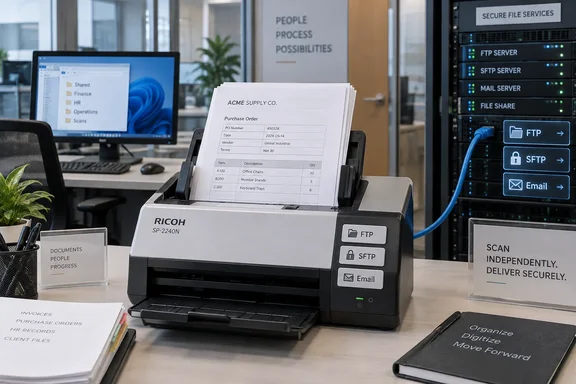
The SP-2240N can still operate that way. It has USB-C connectivity, TWAIN, TWAIN x64, ISIS, WIA, and SANE driver options, plus Ricoh’s PaperStream software suite for Windows workflows. But its Ethernet port enables a more useful mode for shared offices: a staff member can load a stack, press one of three configured Send buttons, and deliver the output without launching a scan application or being tethered to a PC.
Ricoh says the scanner can send directly to network folders, FTP or SFTP servers, and email addresses. That makes the device best understood as a small, fixed-function network appliance rather than merely an endpoint attached to a computer. The scanner does not offer Wi‑Fi, and that limitation will rule it out for mobile or cable-light offices. In a site that already requires wired endpoints for reliability, segmentation, or policy reasons, however, Ethernet is the feature that makes the product distinct.
There is a trade-off that Ricoh’s marketing cannot remove: the three Send buttons have no display beside them. An office can configure separate destinations for invoices, client intake, and archives, but users must remember which button maps to which destination. A printed label is a practical necessity, especially on a shared device. That is a modest inconvenience when destinations are stable; it becomes an administrative weakness when teams change folders, mailboxes, or workflows frequently.
The ARM Windows restriction in the review is already outdated
PCMag’s review states that the SP Series installer does not work on Arm-based Windows 10 or Windows 11 PCs. Ricoh’s own support record contradicts that for Windows 11.
On June 30, 2026, PFU — the Ricoh group company behind the scanner line — announced Arm-based Windows 11 support for the SP-2240N. The support is limited: Ricoh lists the 32-bit PaperStream IP TWAIN driver and PaperStream Capture as compatible, rather than declaring the entire SP Series software bundle Arm-ready. Its current compatibility table also lists supported versions of PaperStream ClickScan, PaperStream Capture, and the Network Setup Tool for Windows 11, Windows 10, and Windows 11 LTSC 2024.
That distinction has consequences for organizations standardizing on Snapdragon-powered Copilot+ PCs. An SP-2240N can no longer be dismissed outright for a Windows 11 Arm deployment, but IT should not assume every bundled utility, line-of-business capture application, or 64-bit driver path is equally supported. Verify the exact capture workflow using the 32-bit TWAIN driver before buying a fleet of scanners for Arm devices.
The simplest way to avoid that compatibility question is also one of the scanner’s chief advantages: use DirectScan for recurring document-routing jobs. When a scan goes from the scanner directly to a file share or SFTP server, the workstation architecture becomes irrelevant to the basic capture process. Windows endpoints then consume the completed files from the destination rather than controlling the scanner.
Windows Server support is broader than the review’s setup implies
Ricoh lists support for Windows Server 2016, Windows Server 2019, Windows Server 2022, and Windows Server 2025. That matters for offices that run PaperStream Capture on a managed server, use a scan station built on Windows Server, or want centralized scanner administration through PaperStream Central Admin.
The SP-2240N’s software bundle is unusually broad for a sub-$400 desktop scanner. PaperStream ClickScan covers quick desktop capture, while PaperStream Capture is designed for profile-based and batch workflows. The included drivers give Windows administrators a better chance of integrating the unit with an existing document-management, accounting, records, or case-management system than they would get from a scanner locked to a consumer-oriented companion app.
PCMag’s review also found that the scanner supports output to PDF, JPEG, TIFF, BMP, Word, Excel, and PowerPoint through its software. Those Office-format options should be treated as convenience exports, not as a substitute for a document workflow with retention and access controls. For a business record, the sensible baseline remains a PDF or TIFF stored in the designated repository, with OCR and metadata handled according to the organization’s established process.
Ricoh rates the hardware for 6,000 pages per day and gives it an 80-sheet automatic document feeder. The rating places it above a casual desktop device, although it is still a workgroup scanner rather than a departmental production unit. At the stated capacity, a team would need to load 75 full ADF batches in a day to reach the rated maximum volume. The real constraint for most offices will be sorting, preparation, exception handling, and filing — not raw feed speed.
Network scanning needs a destination-owner, not just a cable
DirectScan reduces the number of PCs involved, but it does not eliminate administration. Someone must own the network folders, FTP/SFTP service, or SMTP configuration behind the three front-panel buttons. That owner needs a documented process for credential changes, mailbox changes, storage quotas, and staff moves.
Before deploying the SP-2240N, administrators should decide whether the scanner’s output will go to a restricted drop folder, an SFTP landing zone, or a monitored mailbox. A broad shared drive that every employee can modify is easy to configure and difficult to audit. A dedicated drop location with controlled access and an automated filing process produces a cleaner chain from paper intake to records storage.
Email scanning deserves particular caution. Ricoh supports SMTP-based delivery, but email is often the wrong transport for documents containing invoices, personnel forms, health information, or customer identifiers. Even when the SMTP path is properly authenticated, mailboxes introduce attachment-size limits, retention ambiguity, and wider opportunities for accidental forwarding. A protected network share or SFTP destination is usually the better default for sensitive document intake.
The lack of a touchscreen is also relevant here. The SP-2240N is designed for repeatable, preapproved routes, not ad hoc selection from a directory of destinations. That is a feature when the goal is to make the correct action easy for front-line staff. It is a limitation for departments that expect users to choose a different case folder, client matter, or project destination on every scan.
Mac support requires verification before purchase
The cross-platform picture is less straightforward than the Windows one. Digital Camera World and PCMag both describe USB-based macOS and Linux use, while Ricoh’s broader multi-OS materials list the SP-2240N among models supported through macOS ICA and Linux SANE drivers.
Yet Ricoh’s current SP-2230N/SP-2240N compatibility FAQ marks the SP-2240N as unavailable for the listed macOS releases and specifies that LAN connections are not supported for macOS or Linux. It does list the device as supported under Ubuntu 26.04 LTS through its Linux driver, again with USB-only connectivity.
The reliable conclusion is narrower than the product’s broad “multi-OS” positioning: Windows is the supported platform to prioritize for a networked SP-2240N deployment. A Mac or Linux office should obtain written confirmation for its exact operating-system version and connection method before treating this scanner as an approved standard. Do not buy it on the assumption that USB support automatically means Ethernet-based network scanning from those clients.
For wired Windows environments, though, the SP-2240N fills a gap that Wi‑Fi-first desktop scanners leave open. Its standout capability is not exceptional scan speed or an unusually large feeder; it is the ability to turn three routine paper workflows into controlled, repeatable, PC-independent network jobs.
References
- Ricoh SP-2240N Review: This Scanner's Tops for Ethernet-Only Offices PCMag UK · 2026-09-19T12:00:00+00:00