

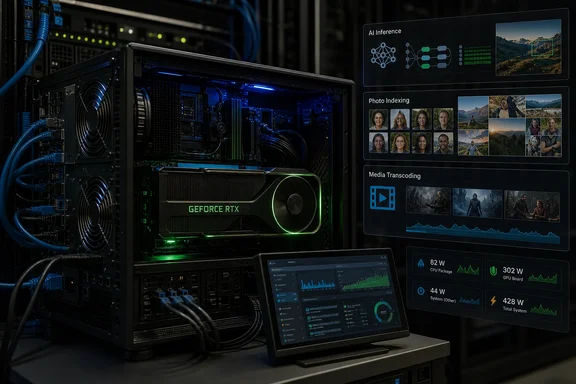
For a home lab already running services that can call CUDA or NVIDIA’s video engines, a decommissioned gaming card can shift expensive work off an aging CPU. NVIDIA’s own Linux documentation confirms that headless systems can repeatedly initialize and deinitialize a GPU when no client holds it open, and its persistence daemon exists specifically to avoid that startup cost. Jellyfin and Immich separately document supported GPU paths for transcoding and machine-learning tasks.
The overlooked part is operational: an old GPU is only a win when it replaces a real bottleneck often enough to justify its electricity use, heat, PCIe slot, cabling, and maintenance. A GTX 1080 Ti or RTX 3080 sitting at idle around the clock can be a poor trade for a server that transcodes only once a month. The same card can be an excellent fit for a household with several remote streams, a large photo library awaiting face recognition, or a locally hosted model that is used every day.
The RTX 3080 Still Has the Right Hardware for Several Server Jobs
XDA Developers is right to separate gaming performance from server suitability. Gaming workloads lean heavily on rasterization, shader throughput, frame pacing, display support, and modern rendering features. A home server’s GPU workloads are often much more specialized.
Jellyfin, for example, can use NVIDIA’s fixed-function NVDEC decoder and NVENC encoder through its FFmpeg stack. Those engines are physically separate from the CUDA cores that mattered so much in games. NVIDIA documents NVENC as a dedicated hardware encoder, capable of operating alongside CUDA work rather than consuming the same execution resources.
That makes an older card useful for real-time transcoding even if it no longer delivers satisfying frame rates in current PC games. It also explains why comparing a card’s old gaming review scores with a modern CPU can lead to the wrong buying decision. The relevant question is whether the card supports the codecs and bit depths present in the media library and needed by client devices.
For a GeForce GTX 1080 Ti or RTX 3080, H.264 and HEVC acceleration remain valuable for many libraries. But age does show up in codec support. An older GPU will not acquire AV1 decode or encode capability through a driver update; that is hardware-bound. Before assigning a discarded card to Jellyfin, check NVIDIA’s current encode/decode support matrix against the actual media formats in the library. A card that handles the household’s H.264 and HEVC files may be sufficient. A server expected to efficiently transcode AV1 for multiple users needs a more recent architecture.
Jellyfin’s documentation also makes a point worth emphasizing for headless deployments: NVENC does not require a monitor connected to the GPU. That removes one of the most persistent misconceptions carried over from desktop gaming builds.
Local LLMs Turn VRAM Into the First Constraint
The XDA report’s strongest point is that local language-model inference has different priorities from gaming, but its VRAM advice needs a sharper boundary. Memory bandwidth influences token generation speed, while VRAM capacity determines whether a model, its runtime buffers, and its active context can reside on the GPU in the first place.
The RTX 3080’s 10GB of VRAM gives it respectable bandwidth for its era, but 10GB is also an increasingly tight ceiling for a shared home server. A quantized model with roughly seven to eight billion parameters can often be a practical fit, depending on the inference engine, quantization format, configured context, and concurrency. Larger models may load only by moving part of the workload to system memory, which can sharply reduce responsiveness.
The complication is the KV cache, the memory used to retain the current conversation or prompt context. It grows with context length and can also grow with parallel requests. Ollama’s documentation explicitly ties default context behavior to available VRAM and notes that concurrent model loads must fit within GPU memory. In other words, “the model file is smaller than 10GB” is not a reliable capacity test.
This is where an old GPU can disappoint after appearing to work in a quick test. A 14B-class model may respond to a short prompt acceptably, then slow down or spill work to system RAM when the context grows. A server that also keeps Immich’s machine-learning service and Jellyfin available may face memory contention even when each service works individually.
A better planning rule is to reserve the card for one latency-sensitive AI workload at a time. Keep context limits modest, avoid assuming that model-parameter counts map directly to VRAM needs, and measure actual memory usage with the chosen runtime. If a household only needs semantic search, document summaries, light coding assistance, or a private chatbot, a smaller model that stays entirely in VRAM is usually more useful than a larger one that runs partly on the GPU and partly on the CPU.
Immich Is a Better Match for Intermittent GPU Work
Immich is a particularly sensible destination for a spare card because its GPU-accelerated tasks do not require a permanent interactive workload. Its documentation supports CUDA for NVIDIA hardware, ROCm for supported AMD hardware, and OpenVINO for Intel GPUs. Smart Search and facial recognition can run on the accelerator, reducing CPU load during library ingestion and later uploads.
That makes photo management a more forgiving use case than serving a local LLM. The GPU can process a backlog of photos and videos, then remain mostly quiet until new media arrives. There is no expectation that every service request produce a response in a fraction of a second.
But the software setup is more specific than simply installing a driver. Immich’s GPU acceleration is configured through its machine-learning container deployment, and its documentation marks the feature experimental. NVIDIA users need a supported official driver, the CUDA-capable Immich image, and—in Linux container deployments—the NVIDIA Container Toolkit. AMD users need to verify that their exact GPU is supported by ROCm rather than assuming every Radeon card can use that backend.
This is one area where repurposed hardware earns its keep without requiring a 300W gaming-card mindset. Face detection, embeddings, and semantic indexing can be scheduled around other demands. A server owner can let Immich process a large initial library overnight, then reserve daytime GPU capacity for media streams or local AI.
Headless Linux Needs Persistence and Power Limits
The setup changes once a desktop GPU becomes server equipment. NVIDIA’s driver-persistence documentation describes the headless behavior directly: after the final client disconnects, the GPU is generally deinitialized unless persistence is enabled. The next CUDA application must then bring it back up, and GPU settings whose lifetime ends with initialization can reset.
For server use, enabling nvidia-persistenced is more than cosmetic. It keeps the driver attached to the device in the absence of a display server, avoiding repeated initialization delays for sporadic jobs. NVIDIA designed the daemon for exactly this kind of compute-only environment.
Power control is the other basic adjustment. XDA Developers recommends lowering the card’s power limit using nvidia-smi, and that is a reasonable default for an around-the-clock machine. A home server usually benefits more from predictable thermals and lower power draw than from extracting the final few percent of throughput. The setting is generally volatile, however, so it needs to be applied through a boot-time service or equivalent configuration if it is meant to survive restarts.
Do not treat a lower limit as free efficiency. Test the actual workloads after applying it. Video transcodes may be largely unaffected because NVENC is fixed-function hardware, while CUDA-based AI inference can lose noticeable generation speed at aggressive limits. The correct setting is workload-specific: enough headroom for the job, no more.
Proxmox Containers and Virtual Machines Are Different Choices
The most consequential correction to the XDA configuration advice is conceptual. Sharing a GPU across Proxmox LXC containers and passing a GPU through to a virtual machine are fundamentally different arrangements.
With LXC, containers share the host kernel. The host retains the NVIDIA driver, and selected device nodes can be exposed to multiple containers. That can allow a single card to serve separate Jellyfin, Immich, and Ollama deployments, but it does not provide hard performance isolation. One memory-hungry LLM can still starve another service of VRAM or compute time.
Full PCI passthrough gives a VM exclusive control of the card through IOMMU and VFIO. That is appropriate when a guest OS needs ownership of the physical device, but the host and other containers cannot use that GPU at the same time. Proxmox’s NVIDIA vGPU documentation covers a third option—partitioning supported hardware across virtual machines—but that requires compatible enterprise-oriented components and licensing. It should not be confused with ordinary consumer GeForce passthrough.
For most home servers, shared LXC access is the practical route when the goal is running several Linux services on one host. It also demands care: the host and containers must have compatible NVIDIA user-space components, device permissions must be correct, and updates can break a previously working stack. The GPU should be validated in each service after any driver, Proxmox kernel, or container-image update.
A retired gaming GPU has a productive second life in a home server when its owner assigns it work that matches its fixed-function media engines, available VRAM, and supported software stack. The card does not become server hardware by losing its display cable; it becomes useful when the host is configured to keep it ready, prevent it from wasting power, and avoid asking 10GB of VRAM to serve every workload at once.
References
- Old GPUs work perfectly in headless home servers once you stop treating them like gaming cards XDA · 2026-09-14T16:00:18+00:00