

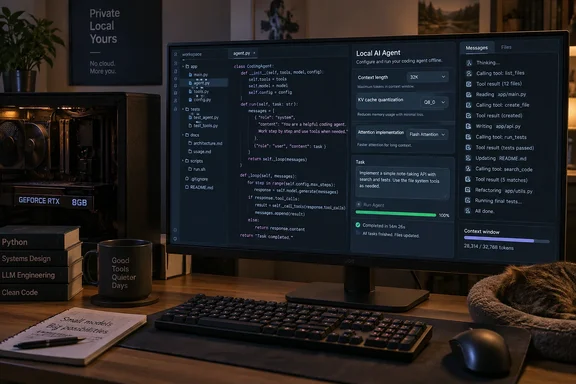
The headline says the setup "handles what Claude Code does." That's the headline's claim, not a proven one. What Jonker actually shows is one local agent stack finishing one multi-step file-editing job after tuning, and doing it more slowly than Claude. That's still useful, as long as you read it for what it is.
Why agents burn context so much faster than chat
The context window is how much tokenized text a model can hold at once. It counts the model's own replies as well as your prompts. A short chat barely touches it. Jonker notes that a GPU with less than 8GB can run a Gemma 4 model smoothly for quick questions and notes.
Agents are a different workload. Every request carries the agent's instructions and a description of every tool it can call, and each file it reads gets added on top. So usage grows with every step. Ollama explains the same pattern in its own writing on agent workloads: every tool call is a new request, and every request resends the whole transcript: system prompt, tool definitions, and every file read so far. Over one task, the model can end up reprocessing the same context dozens of times.
Jonker ran into this in Eigent, an open-source, model-agnostic multi-agent app that can connect to local LLMs. Eigent split each job into subtasks, and on default settings every one of them came back with "Context size has been exceeded." Jonker says that still happens today if the defaults are left in place.
Section summary: Agents resend instructions, tool definitions and file contents with every step. A context size that's fine for chat runs out fast.
The default context sizes are small
Part of the problem is how little context local runners give you by default. Jonker puts LM Studio's standard presets at roughly 2K to 4K tokens, and llama.cpp at about 4K. llama.cpp once cut off a small coder model mid-conversation for Jonker. Treat those numbers as a snapshot: defaults change between versions, models and modes.
Ollama's rule is written down in its docs. It defaults to the following context lengths based on VRAM: < 24 GiB VRAM: 4k context - 24-48 GiB VRAM: 32k context - >= 48 GiB VRAM: 256k context. The same page says tasks such as web search, agents, and coding tools should be set to at least 64000 tokens.
So why ship such low defaults? Context memory is reserved in VRAM, and a huge window would crash most consumer GPUs when the model loads. Ollama's docs say the same: Setting a larger context length will increase the amount of memory required to run a model. Ensure you have enough VRAM available to increase the context length. On Jonker's 8GB card, the Qwen 3.5 9B file at Q4_K_M quantization already uses more than 5GB before any context is added.
Section summary: Most GPUs with less than 24GB of VRAM get about a 4K context by default, far below what agent frameworks need. The low default protects VRAM; it isn't a bug.
The settings that made the difference
Jonker's main point is that fixing this means managing VRAM, not just raising the context slider. Here's how the fix breaks down.
1. Choose a model and quantization that fit your GPU
A quantized model stores its weights at lower precision to shrink the file. Jonker estimates Qwen 3.5 9B at about 18GB at full precision and about 5GB at Q4_K_M. Higher quants such as Q8_0 are closer to lossless but take about twice the memory, and every gigabyte the weights use is a gigabyte the context can't. On 8GB, Jonker calls 4-bit the sensible choice.
Tool calling matters as much as size. Jonker recommends the Qwen, Llama and GLM model families for agent work.
2. Raise the context length, then reload the model
The context length is set when the model loads. Changing it means ejecting the model and loading it again.
LM Studio's developer documentation shows these as load-time options. Its model-load API has a context_length parameter, a flash_attention flag that it says can lower memory use and speed up generation, and an offload_kv_cache_to_gpu option that controls whether the cache lives in GPU memory or system RAM. The Flash Attention and cache-offload options apply only to models loaded through LM Studio's llama.cpp-based engine.
If you use Ollama instead, you can change the value there too. Change the slider in the Ollama app under settings to your desired context length. For a server install, the server can be overridden with OLLAMA_CONTEXT_LENGTH. Then confirm the change took effect: Check ollama ps after loading a model because it shows the context actually allocated to that running model. The value that matters is the one the server accepted, not only the environment variable that was set. One catch: If a model's Modelfile already has PARAMETER num_ctx baked in, it overrides the environment variable for that model.
3. Quantize the KV cache
The KV cache holds the model's working memory for the current context, and it grows with context length. Jonker quantizes it separately in LM Studio, which requires Flash Attention to be turned on, and sets both the K and V caches to Q8_0. Jonker calls that the milder option. Going down to 4-bit can cost some precision, and Jonker's version of LM Studio labels the feature experimental, so Jonker hasn't pushed it further.
How much memory the cache needs depends heavily on the model. One agent-configuration guide warns that KV cache memory, which scales with context length, layer count and attention geometry, so any table of megabytes would mislead you. At 32K and above the cache can outweigh the model weights. Its advice is to measure on your own machine instead of trusting published figures.
4. Turn off Thinking
Reasoning tokens use up the same context budget. Jonker expected the small Qwen 3.5 models to ship with reasoning off, but the logs still showed reasoning tokens on some requests. Jonker hasn't found out whether Eigent or LM Studio was turning it on. Either way, the advice is to keep it off.
5. Balance context against GPU offload and leave headroom
Last, adjust context length and GPU offload until the model fits. Jonker leaves about 1.5GB free between the estimated model load and the card's actual memory, and still manages a 32K context. LM Studio's memory estimate helps here. If the Total figure goes above the GPU figure, the extra is spilling into system RAM and things may slow down.
Section summary: Pick a model that fits, set context at load time and confirm it applied, use Q8_0 for the KV cache, turn off Thinking, and keep some VRAM free.
Before and after
Eigent's model setup only asks for things like an API key, endpoint and model name. It has no settings for context length, KV cache or GPU offload. All of that has to be configured in the runner that serves the model.
On default settings, Jonker's first Eigent task with Qwen 3.5 9B ran for almost 30 minutes and then gave up. After tuning:
- Eigent registered seven agents and read a pricing-card webpage Jonker had designed.
- It edited the file directly, then wrote a
CHANGES.mdwith one line per fix. - Another run stopped partway through to ask whether Jonker wanted the fixes applied.
- In one run, its agents read the file, ran commands, made edits and then wrote a second file.
- One agent completed all six of its steps without a context error, in about 14 minutes.
| Run | Settings | Result |
|---|---|---|
| First attempt | Defaults | Ran ~30 minutes, then failed |
| Tuned | Up to 32K context, Q8_0 K/V cache, Flash Attention, ~1.5GB headroom | Six-step agent finished in ~14 minutes |
These are Jonker's own runs and timings, not controlled benchmarks. The exact software versions and how repeatable the results are aren't documented.
What this does and doesn't show
The practical lesson holds up: on consumer GPUs, default settings will stop agent workflows before they get going. Still, some caveats:
- 32K is a compromise. Ollama recommends at least 64K for coding tools. A 32K window on 8GB is making the best of limited hardware, not matching a high-memory setup.
- A bigger window doesn't guarantee a fit. A long task, large files or verbose tool output can still overflow 32K.
- Speed. Fourteen minutes for a single pricing-card cleanup is fine as a background job. It isn't an interactive coding partner.
- Quality wasn't measured. No one compared coding accuracy, tool reliability or success rates against Claude Code. The 9B model finished the job; whether it did the job well enough for your codebase is something to test yourself.
The privacy benefit is real, and for small, repetitive jobs such as tidying a folder, applying a batch of edits or writing a change log, a tuned local agent on an 8GB card now seems workable.
Bottom line: If your local agent keeps saying "Context size has been exceeded," the default settings are the likely cause, not the model. Change the load-time settings in your runner (LM Studio, Ollama or llama.cpp), confirm the new context value actually applied, and test the exact multi-step workflow you plan to rely on before trusting it with real work.
References
- I stopped my local LLM agent from running out of context, and now it handles what Claude Code does XDA · 2026-09-27T10:00:16+00:00
- Ollama Context Length Exceeded: Fix num_ctx & Modelfile Errors (2026) | Markaicode markaicode.com
- ollama/docs/context-length.mdx at main · ollama/ollama github.com