

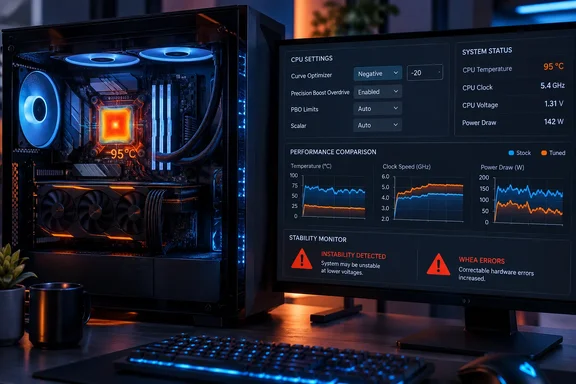
The practical takeaway for Ryzen 7000 owners is still useful: if your processor is spending sustained all-core workloads at AMD’s 95°C thermal target, Curve Optimizer is a better first tuning control than simply raising PBO power limits. It reduces the voltage the boost algorithm requests at particular frequency points, potentially leaving room for the processor to boost higher within the same thermal envelope. But the usable number is specific to each chip, and copying an all-core “negative 15” setting can produce silent calculation errors or intermittent crashes long after a short benchmark appears stable.
Ryzen 5 7600X at 95°C Is Operating as Designed
AMD lists 95°C as the maximum operating temperature for the Ryzen 5 7600X, and its Zen 4 desktop processors were designed to pursue performance aggressively until they encounter a power, current, voltage, or temperature limit. Seeing a 7600X settle near 95°C in Cinebench or another heavy all-core task therefore does not, on its own, establish a cooling failure or abnormal thermal throttling.
That distinction is important for anyone tempted to remount a cooler after seeing a 90°C-plus reading. A poor cooler installation can certainly cause excessive temperature, but a correctly installed premium air cooler or liquid cooler may still allow a stock 7600X to reach its temperature ceiling during a sustained rendering load. AMD’s own product page identifies the 7600X as a 105W-class processor, recommends a premium air cooler, and explicitly supports Precision Boost Overdrive and Curve Optimizer voltage offsets.
XDA’s test setup illustrates the point. Its 7600X reportedly averaged 122.7W package power and 94.7°C during two stock Cinebench 2026 multithreaded runs, while reported clocks averaged about 5.04GHz. The processor was evidently temperature-limited before it consistently reached the power ceiling cited in the article. In that situation, unlocking additional PBO power headroom alone is unlikely to deliver much: the CPU has nowhere thermally useful to spend it.
Calling that condition “throttled” is technically understandable but misleading in the way many PC users use the term. It is more accurately the normal behavior of AMD’s Precision Boost 2 algorithm reaching a programmed limit, not an emergency fallback caused by a fault. The relevant question is whether a user can make the chip do more work per watt without destabilizing it.
Curve Optimizer Changes the Boost Algorithm’s Voltage Budget
AMD describes Curve Optimizer as a way to shift the processor’s voltage/frequency curve. A negative value requests lower voltage at a given point on that curve; a positive value requests more. Unlike a fixed all-core multiplier and voltage overclock, Curve Optimizer leaves the processor’s normal boost logic in control of clocks, current management, and temperature response.
That makes it particularly useful for a thermally constrained Ryzen processor. Lower requested voltage generally cuts CPU power consumption because dynamic power rises sharply with voltage. If a workload has already pushed the package to its thermal boundary, the firmware may convert some of those savings into higher sustained clocks instead of a dramatically lower temperature. The temperature can remain near 95°C while throughput improves because the chip is using the available heat budget more efficiently.
AMD’s Ryzen Master documentation supports this basic mechanism: negative Curve Optimizer values shift the voltage/frequency curve toward lower voltages, and larger offsets apply a larger shift. AMD also makes clear that PBO operates beyond default infrastructure limits and can permit higher sustained frequencies when board, power, and thermal conditions allow.
The key word is can. The setting is not a universal undervolt profile and it is not a cure for every performance problem. A 7600X limited by memory configuration, background applications, insufficient cooling, motherboard firmware behavior, or a restrictive Eco Mode profile will not necessarily produce the same result. Even two processors carrying the same Ryzen 5 7600X label can tolerate very different negative offsets.
XDA’s Numbers Show an Efficiency Gain, With One Testing Gap
According to XDA Developers, enabling PBO and applying a negative 15 all-core Curve Optimizer offset increased its 7600X’s average Cinebench multithreaded score from 3,223 to 3,390, a gain of roughly 5.2%. Reported average package power fell from 122.7W to about 118.3W, average Tdie temperature dropped from 94.7°C to roughly 93°C, and average clocks rose by about 150MHz.
Its single-core figures point toward the other possible outcome. XDA reported a score increase of roughly 3.2%, while package power fell by more than 8W and temperature dropped from about 75°C to the mid-to-high 60s Celsius. Since the single-core test retained thermal headroom at stock, the efficiency savings appeared more visibly as lower temperature and power draw, alongside a higher reported peak clock.
Those are plausible results, and they fit how Curve Optimizer is intended to work. But the article’s before-and-after comparison uses “stock” for one side and “PBO + Curve Optimizer” for the other. It does not provide a separate PBO-only result. Consequently, the available data cannot distinguish the contribution from PBO, the negative Curve Optimizer setting, and any interaction between the two.
That is not a minor methodological quibble. PBO can alter power, current, and boost limits; Curve Optimizer can alter the voltage required to pursue those limits. A proper three-step comparison would include stock settings, PBO alone, and PBO with Curve Optimizer while holding BIOS version, cooling, ambient temperature, memory profile, Windows power plan, and background workload constant. Without that middle result, XDA has shown that its combined tuning profile beat stock, not that Curve Optimizer alone delivered the full 5.2% increase.
The article also does not publish the motherboard model, BIOS/AGESA version, cooler, case airflow, room temperature, memory speed, or stability-test results. Those omissions limit how broadly its numbers can be applied. They do not negate the result, but they prevent readers from treating the result as a ready-made performance expectation.
A Negative 15 Offset Is a Starting Point, Not a Safe Default
AMD’s Ryzen Master guide warns that more aggressive Curve Optimizer values can cause system restarts and stability problems. That warning deserves more attention than it usually gets in “free performance” guides, because an unstable negative curve often does not fail immediately in Cinebench.
A processor can finish a 10-minute render test, boot Windows normally, and play games without complaint while still failing in lightly threaded bursts, idle transitions, browser workloads, compiling code, decompression, or sleep and wake cycles. The worst outcome is not always a blue screen. A too-negative curve can cause corrected hardware errors, application crashes, corrupted calculations, or Windows Event Viewer entries from the Windows Hardware Error Architecture, commonly called WHEA.
For a Ryzen 7000 desktop, a cautious approach is more valuable than chasing another 25MHz on a benchmark chart:
- Start with a small all-core negative setting, such as negative 5, rather than importing a negative 15 or negative 30 profile from another system.
- Test one change at a time, including a PBO-only baseline if PBO is part of the intended configuration.
- Check Windows Event Viewer for WHEA-Logger warnings after both load testing and several days of ordinary use.
- Reduce the offset or move to per-core tuning if one core produces errors while the rest appear stable.
- Save the known-good BIOS profile before changing PBO, Curve Optimizer, EXPO, or memory timing settings.
Per-core tuning takes longer but can produce a more defensible configuration. Modern Ryzen processors do not have six identical cores in the practical overclocking sense; one core may tolerate a deeper negative offset while another becomes unstable much earlier. An all-core negative 15 profile is therefore a convenience setting, not evidence that every core is equally efficient.
PBO Carries a Warranty and Support Trade-Off
Ryzen owners should also separate “supported in firmware” from “covered at stock terms.” AMD’s current Ryzen Master documentation says PBO enables operation beyond factory specifications and warns that overclocking-related damage is not covered by AMD’s warranty; it also notes that system-builder or retailer warranty terms may be affected. Curve Optimizer is presented alongside PBO as a tuning capability, but it is still a user-directed change to processor operating behavior.
For a self-built desktop, that may be an acceptable trade. For a work machine, a system under a managed support contract, or a PC already exhibiting instability, the sensible first move is to update the motherboard BIOS, chipset driver, and cooling configuration before experimenting with voltage curves.
The useful conclusion from XDA’s 7600X test is narrower and stronger than its headline: a thermally limited Ryzen 7000 CPU may gain performance through a carefully validated negative Curve Optimizer setting, even when adding PBO power by itself would not help much. The setting can improve efficiency, but it cannot turn one chip’s stable offset into another chip’s guaranteed configuration.
References
- Your CPU has been thermally throttled since day one, and one BIOS setting fixes it XDA · 2026-09-18T16:00:17+00:00