

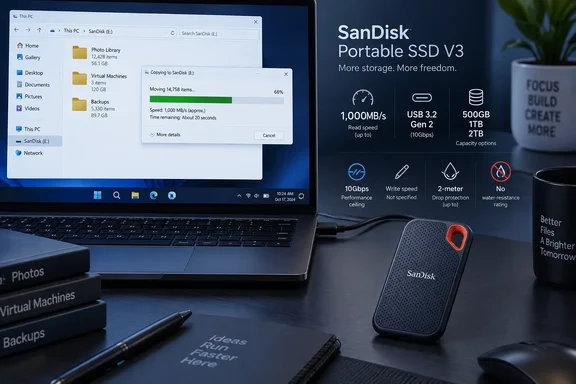
Club386 first reported the retail launch after Sandisk introduced the family in February 2026. Sandisk’s own product listing confirms the three capacities, USB-C connection, USB 3.2 Gen 2 interface, up-to-1,000MB/s sequential-read claim, two-meter drop protection, and a three-year limited warranty. The company also confirms Windows 10 and later support.
The practical news is availability rather than a technical breakthrough. A 10Gbps USB SSD capable of roughly 1GB/s reads can make a meaningful difference when moving large photo libraries, virtual-machine images, game installers, or Windows File History archives. It is also fast enough that many current laptops will hit the drive’s rated ceiling—provided their USB-C port actually supports 10Gbps data transfer.
The 1,000MB/s rating is a USB 10Gbps ceiling
Sandisk specifies USB 3.2 Gen 2, the 10Gbps flavor of USB. After protocol overhead, a real-world ceiling around 1,000MB/s is what buyers should expect from a well-performing drive on that connection. In other words, the V3’s read figure is plausible, but it should not be mistaken for the sort of multi-gigabyte-per-second performance possible with USB4, Thunderbolt, or faster 20Gbps USB connections.
That distinction matters on Windows PCs because a USB-C connector tells a buyer almost nothing by itself. A USB-C port may carry only USB 2.0 data, 5Gbps USB, 10Gbps USB, or substantially faster USB4 and Thunderbolt modes. Plugging the V3 into an older 5Gbps port will limit it below its advertised peak; connecting it through a low-cost hub, front-panel cable, or monitor port can introduce another bottleneck.
Sandisk has disclosed a read maximum but no corresponding sequential-write rating. The company’s footnote says write performance is lower, and that actual results vary with host hardware, capacity, usage conditions, and other factors. That is ordinary wording for a consumer portable SSD, but it leaves an operational gap: readers cannot estimate how quickly a 100GB folder, a disk-image backup, or a video project will land on the drive from the specification sheet alone.
For occasional transfers, that omission may not matter. For a PC used to ingest camera footage, copy daily backups, or run portable virtual machines, sustained write performance matters at least as much as peak read throughput. Buyers should wait for independent sustained-write testing before treating the V3 as a dependable work-drive for large, repeated writes.
Windows compatibility is broad, but the iOS claim needs correction
Sandisk lists the Portable SSD (V3) as compatible with Windows 10 and later, macOS 13 and later, Android 13 and later, and iPadOS 15 and later. Club386’s report says “iOS 15,” but Sandisk’s official product page names iPadOS—not iPhone iOS—as the supported Apple mobile platform.
That difference is more than labeling. iPads with a suitable USB-C port can work naturally with external storage for file transfer and supported creative workflows. iPhones require their own hardware and power considerations, and support varies by model, connector, file format, and application. Windows users sharing a drive with an iPad should therefore treat iPadOS support as the stated compatibility target, rather than assume the SSD is a universal iPhone accessory.
On Windows, the drive should appear in File Explorer like a normal removable disk once it is connected. The useful setup question is file system format. ExFAT is normally the pragmatic choice when the same SSD needs to move files among Windows PCs, Macs, and compatible mobile devices. NTFS remains better suited to Windows-only workloads that need its permissions, journaling behavior, or support for files larger than 4GB without cross-platform tradeoffs.
Users should also remember that “compatible with Windows 10” does not guarantee peak performance on every Windows 10 system. The drive can work on a slower USB port while operating far below 1,000MB/s. Check the PC maker’s documentation, Device Manager, or the markings beside the port to establish whether the connection supports USB 3.2 Gen 2 10Gbps.
Drop protection is not ruggedization
Sandisk says the V3 can withstand drops of up to two meters, based on its internal testing. Its light 33.2g body and 45 x 85 x 10mm dimensions make it easy to keep in a bag or pocket, and solid-state storage eliminates the spinning platters and moving heads that make portable hard drives especially vulnerable to a knock while operating.
But the V3 is not positioned as Sandisk’s fully rugged range. The published product information highlights drop protection, yet does not advertise an IP rating for dust or water ingress. Buyers who need to use a drive outdoors, on job sites, or around camera gear should not read “two-meter drop protection” as a claim of water resistance.
Sandisk’s Extreme Portable SSD line illustrates the difference. Those products carry more explicit ruggedness language, including IP-rated dust and water resistance on certain models, whereas the V3 is a pocketable everyday SSD. The V3 may be a sensible option for a student’s laptop bag or a commuter’s work files; it is not the product to choose solely because a device will face rain, sand, or repeated field use.
The three-year limited warranty is also worth reading as a hardware warranty, not a backup plan. No portable SSD, drop-rated or otherwise, should be the only copy of important data. A drive can be lost, corrupted, accidentally reformatted, or damaged along with the laptop it was intended to back up.
Capacity pricing favors the larger drives, but the product needs a purpose
Club386 lists U.S. prices of $99.99 for 500GB, $159.99 for 1TB, and $299.99 for 2TB. On those figures, the 2TB model has the lowest cost per terabyte, while the 500GB version is the most expensive capacity on a per-terabyte basis. Sandisk’s official U.S. retail presence has been uneven in search results, however: its official eBay storefront showed the 500GB SDSSDE31 listing at $99.99, while Sandisk’s regional product pages confirm all three capacities and model numbers.
The positioning is awkward for users who shop only by benchmark numbers. Sandisk already sells faster external SSDs, and its announced premium portable range reaches far beyond the V3’s 1,000MB/s read rating. Yet a faster drive only produces a meaningful benefit when the PC’s port, cable, and workflow can use it. A Windows laptop limited to 10Gbps USB will see little point in paying for a 20Gbps or USB4-class SSD merely for File Explorer transfers.
The more useful comparison is against a portable hard drive or an older 5Gbps USB SSD. For ordinary document archives, offline OneDrive copies, family photos, and recovery-media storage, the V3’s compact shape and solid-state durability may matter more than chasing higher benchmark figures. For video editors, developers who keep large local repositories, or administrators moving disk images among modern USB4 machines, the unspecified write speed and 10Gbps ceiling are stronger reasons to consider a better-documented, faster alternative.
Treat it as portable secondary storage, not the backup strategy
The Sandisk Portable SSD (V3) gives Windows users a compact 10Gbps USB-C option with capacities reaching 2TB and a clearly stated drop claim. Its official specifications support the basics, but they do not establish sustained write performance, water resistance, or a universal iPhone workflow.
For a Windows laptop with a verified 10Gbps USB-C port, it should be well suited to quick access to large files and an additional backup destination. The purchase decision should come down to capacity, port speed, and whether a second copy exists elsewhere—not the 1,000MB/s number alone.
References
- Sandisk just released a compact, drop-resistant portable SSD, offering up to 2TB of fast storage Club386 · 2026-09-18T11:00:11+00:00