

This is a workflow and cost argument, not a news event. It is still useful to Windows users who pay for Microsoft 365, so here is what holds up, what needs qualifying, and what to try.
The case: Word is a finishing tool
Preece's complaint is that Word opens onto a page, margins and a style gallery. All of those assume you already know what the document will be. That suits a contract, a cover letter or a report. She says it suits a commissioned feature much less.
Her usual starting point is a pile of links, a transcript, a half-read spec sheet, two competing openings and a middle section that probably belongs elsewhere. Word offers one long scroll with a navigation pane beside it. She says that becomes a chore at around 1,500 words.
Her example is a 3,000-word feature written in Word because the client wanted a .docx. After several rounds of restructuring she had many saved versions with poor names, and she couldn't tell which one held the paragraph she wanted back. She concedes this may say more about her habits than about Word.
Word's save behavior has changed
Preece also objects to Word's newer defaults. The details support her, with some qualifications.
- Microsoft's Insider post says that when you create a new document in Word on Windows, AutoSave is already on. The document is named with a date instead of the traditional DocumentN name.
- The change began with Word for Windows version 2509, build 19221.20000 and later, according to 365techies.
- 4sysops reports that organizations can control this through Group Policy and Microsoft Intune.
- Users can turn it off in File > Options > Save by clearing "Create new files in the cloud automatically."
- Office Watch notes the change does not apply to Office 2024 or Office 2021.
This is a default that can be changed, not a mandatory cloud-only policy. Preece is right that a writer who wants a blank page to stay on their own machine has to opt out. Microsoft says the point is to reduce lost work and make collaboration easier. Both views are reasonable, and which one applies depends on how you work.
How Scrivener works
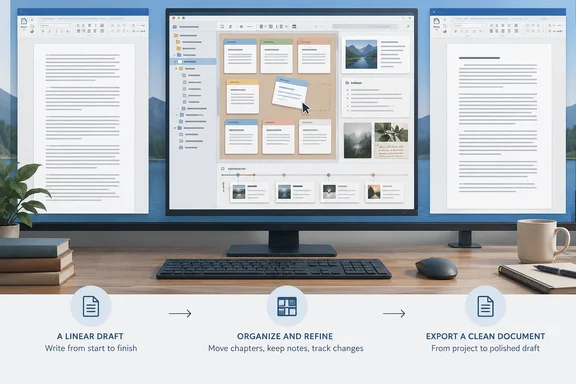
Literature & Latte describes Scrivener as a tool for long projects. You write in sections of any size and in any order, and you restructure later. Its overview says turning Chapter Four into Chapter One is a matter of drag and drop (the quote is from the vendor's own text, so treat it as marketing language). The main parts are:
- Binder. Each section is its own small document that you can drag above or below the others. Reordering takes seconds instead of a cut, scroll and paste.
- Research folder. You can import Word and OpenOffice files, plain text, images, PDFs, media and web pages. Preece likes having a source on one side of a split screen and your own writing on the other, which cuts down on alt-tabbing. The vendor notes that an imported web page is saved as a snapshot rather than staying live. It also notes that Windows users may see a message when a particular page can't be displayed.
- Snapshots. You take a snapshot of a section before rewriting it, and the earlier text stays attached to that section. Literature & Latte says you can compare it with the current text. This is a different job from backups. Snapshots track earlier text inside a project, and backups protect the project data.
- Compile. Compile assembles the pieces into a conventional document. The vendor lists export to Microsoft Word, RTF, PDF, plain text and ebook formats. The exported layout can differ from what you see while writing, so check the file before you send it to a client.
The money comparison
Scrivener's own figures, from the Literature & Latte store and FAQ:
- Desktop licenses are $59.99 each for macOS and for Windows. Each license covers one platform only.
- The iPhone and iPad app is sold separately at $23.99. Its sync features need a Dropbox account.
- Windows requires 64-bit Windows 10 or later and a display of at least 1024×768.
- The trial is the full app and lasts 30 days of use, not 30 calendar days. Using it every other day stretches it to 60 days.
- Refunds are available within 30 days of purchase.
- Minor updates are free. If Scrivener 3 is the version you buy, all 3.x updates are covered, and a future version 4 would be a paid upgrade.
- The license is a "household" license, so you can install it on machines you own and use as the primary user. Family members in the same home can also install it.
Preece puts the three-platform total at around $120. By my arithmetic from the vendor's research-time pricing, $59.99 plus $23.99 plus the $37.95 cross-grade comes to about $121.93 before tax. That is not one license for every device.
Microsoft 365 Personal is $99.99 a year or $9.99 a month. Her line that the money buys "access and nothing more" is too strong. The subscription also includes desktop apps, 1 TB of OneDrive storage and ongoing feature updates. Scrivener is one dedicated writing app, so the two prices are not like for like. For a writer who only needs a drafting tool, though, $59.99 once is less than one year of the subscription.
What happens when a subscription lapses
Preece's point about expiry is accurate. Microsoft Support says
Here is what Microsoft Support actually says.
To be precise, Microsoft's expiry page says the apps stay installed and
I need to correct the previous two paragraphs; they contained malformed attributions. The supported facts are these:
- After expiry, the desktop apps remain installed and you can still open existing documents. You can usually print them.
- The apps go into Reduced Functionality Mode, so you can't create new documents, edit existing ones or save changes until the subscription is renewed.
- Your files remain intact, and Microsoft says the free Office on the web versions of Word, Excel and PowerPoint are available with a Microsoft account.
- OneDrive storage drops to the free 5 GB. Going over that limit blocks uploads and can affect sync.
Preece also says the apps revert to reduced functionality if you don't connect at least once every 31 days. I could not confirm that exact interval. Microsoft's guidance says apps should connect to the internet at least once a month, so I would treat "monthly" as the safer wording.
A perpetual Office option still exists. Office Home 2024 is a one-time purchase for one PC or Mac, but Microsoft's listing says it is for non-commercial use. That rules it out for a freelancer writing professionally. Office Home & Business 2024 is listed separately.
Where Scrivener gets in the way
Preece is candid about the downsides, and they are worth weighing:
- Learning curve. The first week will feel slower than Word. The binder, inspector and compile pane each have their own logic.
- No real-time co-editing. Literature & Latte's materials describe comments and annotations, but I found nothing showing Word-style live coauthoring. In Preece's workflow, an editor who wants margin comments means exporting to Word and carrying on there.
- Dropbox dependency. The iPhone and iPad version syncs through Dropbox.
- Per-platform licensing. A household split between Mac and PC pays twice unless it buys the bundle.
- Overkill for short documents. If most of what you write is a page long, the extra structure is unlikely to pay off.
Who might switch, and how to test it
Scrivener fits writers whose work is long, research-heavy and still moving: features, scripts, a dissertation, a newsletter series or a book. Preece suggests giving the trial two full weeks, because the friction comes first and the benefit may not show until the second or third project. That is her editorial advice, not a vendor requirement.
A low-risk way to test it:
- Download the Windows trial and pick a real project, not a sample.
- Import your research (PDFs, notes, a Word draft) into the Research folder.
- Split your draft into sections in the Binder and reorder them at least once.
- Take a snapshot before a major rewrite and compare it afterward.
- Compile to .docx using one preset, then open the result in Word and check the formatting before sending it.
Her other suggestions are brief. LibreOffice is a free, Word-shaped word processor, and Obsidian is free for personal use and stores plain Markdown files. I have not compared either with Scrivener's project structure or Word's collaboration features, so treat them as pointers.
Bottom line
Scrivener is not a replacement for Word, and Preece's own workflow shows it. It is a drafting environment that outputs a .docx, and Word stays in the loop for editors, comments and final formatting. The decision depends on the kind of writing you do and what you are willing to pay over several years. If your documents are short and linear, Word is likely enough. If they are long and keep being rearranged, a $59.99 trial is cheap to run.
References
- I found the perfect Microsoft Word replacement, and it isn't Google Docs - Pocket-lint Pocket-lint · 2026-10-03T10:00:15+00:00
- Disable OneDrive as the default save option in Microsoft Word with Group Policy 4sysops.com
- Stop Word Saving Everything to OneDrive — the 5-Minute Fix 365techies.co.uk