

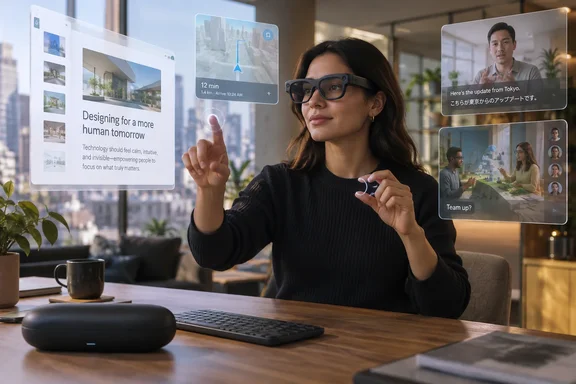
Engadget’s Karissa Bell reported responsive index-finger pointing and pinch-to-select controls, along with a usable display and AR windows that can follow the wearer as they move. Tom’s Guide and T3 independently described low-latency gesture input and smooth performance during limited demo sessions. Those accounts back Snap’s central claim that Specs are fully self-contained; they do not, however, establish all-day comfort, reliable outdoor visibility, or the long-term battery behavior buyers will encounter outside a supervised demonstration.
The distinction is important for PC users: Specs are positioned as a personal spatial display and input device, not as lightweight glasses that merely relay phone notifications. Snap says pre-orders opened in June with a $200 refundable deposit, and shipments in the United States, United Kingdom and France remain scheduled for fall 2026. As of September 17, Snap has still not publicly given customers a specific shipment date.
The computer is in the frame
Specs uses two Snapdragon processors: Snap says one handles continuous computer-vision work, including hand tracking, while the other runs its AR applications, called Lenses. That split is the hardware choice that separates the product from tethered display glasses, which typically lean on a phone, laptop or external battery module to do the heavy lifting.
The glasses have a 51-degree field of view, a proprietary liquid-crystal-on-silicon display system, electrochromic lenses that can darken, and two frame sizes weighing 132 grams and 136 grams. The weight is far higher than ordinary glasses and remains a practical obstacle to constant wear. But it is also well below the weight and facial coverage of conventional mixed-reality headsets.
Snap advertises up to four hours of mixed use and up to 20 hours with the supplied charging case. Four hours is respectable for a self-contained AR device, but it frames Specs as hardware for sessions—working at a desk, using directions, playing a shared game, or watching a show in transit—rather than prescription eyewear someone forgets they are wearing from morning until night. T3 reached the same conclusion after its demo, describing Specs as something better suited to intentional tasks than grocery-store errands.
That makes Snap’s product category clearer. Specs compete more directly with a portable monitor plus a headset than with camera-first smart glasses. The company is asking buyers to accept conspicuous 132- to 136-gram frames in exchange for a binocular, spatial interface that works away from a PC or phone.
Hand tracking is good—until the cameras lose the hands
Bell’s Engadget hands-on provides a useful caveat missing from Snap’s marketing. The interface relies on two cameras observing the wearer’s hands. In her trial, hair falling in front of a camera made the cursor jump erratically; moving the hair out of the way fixed the behavior. That is a minor failure in a controlled setting, but it identifies the dependency: this is camera-based input, not magic.
In normal use, the controls sound deliberately conventional. Point with an index finger to position the cursor, pinch thumb and index finger to select, then open a palm to expose shortcuts and menus. T3 similarly found palm menus and pinch gestures easy to use, while Tom’s Guide called the interaction responsive. The system does not require a controller, ring, mouse or touchpad, and that is a genuine advantage when the device is being used while standing or moving.
Yet a gesture-only workflow has unavoidable limits. Pinching and pointing are appropriate for selecting an app, moving a window, accepting directions or taking a quick action. They are much less persuasive for long-form text entry, spreadsheets, code editing, remote administration consoles and anything that demands accurate repeated input. Bell found the built-in AR keyboard suitable for only a few words, but reported that Google Docs in the glasses’ browser felt natural when paired with a Bluetooth keyboard.
That is the practical setup Windows and enterprise users should take from the demonstrations. Specs may make a credible large private screen for browser-based work, remote dashboards and documents, but it does not eliminate the keyboard. A compact Bluetooth keyboard—and likely a conventional pointing device for detailed work—will remain part of the kit.
Anchored windows make the field of view usable
Snap’s most consequential software improvement is anchoring: the ability for a virtual window to persist and move appropriately in the wearer’s view as they physically move through a space. Bell says older Spectacles could leave content behind in an inconvenient part of the scene, requiring the wearer to look around for it. In the new Snap OS experience, a window can follow the wearer instead.
This is an unglamorous feature compared with live translation or social AR games, but it is the foundation for doing anything useful in a limited field of view. A floating browser, whiteboard or video screen only behaves like a workspace if its placement is predictable. Snap’s 51-degree field of view is substantially more workable than narrow heads-up displays, but it still does not encompass a desktop monitor’s entire visual area at a glance.
Both Engadget and T3 encountered that limitation. Bell said content could be cut off at times, requiring window resizing or repositioning; T3’s reviewer occasionally had to move their head to see the whole virtual view. That does not invalidate the design. It means Snap’s claim that the field of view can equal a 24-inch desktop display should be read as a virtual-size comparison, not as proof that it replaces a 24-inch monitor’s effortless overview.
For productivity, virtual screen size is only half the equation. A monitor lets users scan peripheral windows, source material and alerts with fast eye movement. On Specs, the workspace has to be composed around a much smaller viewing cone. The device could be strong for a primary document, a video call, a focused web task or a remote session. It is less clearly suited to the wide, information-dense multi-window layouts common in IT operations and development work.
Utility apps are stronger evidence than spectacle demos
The September demonstrations point toward a more useful initial software library than Snap’s earlier Spectacles efforts. Bell tried a Mapbox-powered walking navigation tool and a translation experience that projected English captions for Italian speech. She also saw the beginnings of measuring and whiteboard applications, while Snap has promoted spatial instruction, entertainment and collaborative Lenses.
The most convincing demo reported by Engadget may be the least flashy: opening Google Docs in a browser window, pairing a Bluetooth keyboard and typing. It establishes that Specs can serve as a general-purpose display surface instead of depending solely on bespoke AR apps. That matters because a new hardware platform cannot wait for every productivity company to publish a native client.
Still, browser compatibility is not the same thing as a desktop operating environment. Neither Snap nor the hands-on reports establish support for Windows virtual desktops, Remote Desktop, Microsoft 365 native applications, endpoint management, identity integration, corporate device controls, or a secure enterprise deployment model. Those omissions should keep IT departments from treating Specs as a workplace endpoint today.
Snap did announce developer-facing work around Lens Studio, including a Native Development Kit and tools intended to assist developers in creating and migrating Lenses. The company says hundreds of Lenses are already available. That gives Specs a head start in spatial application content, but the apps shown so far are mostly focused on individual utility, media and shared experiences—not the Windows management and business software stack.
Travel mode and shared AR show where glasses beat headsets
The form factor has its strongest case in uses where a headset feels socially or physically excessive. Engadget tested a shared dominoes game with another person wearing Specs and found the setup more natural than bulky VR hardware for playing across a table. Snap’s collaboration model turns the room into a common play area while leaving both participants able to see one another.
Travel mode makes a related argument for media. When enabled, it is designed to stabilize a streaming window against the movement of a vehicle rather than tie the display solely to the wearer’s head movement. Bell’s parking-lot test was brief, so it cannot settle whether the feature reduces motion discomfort on a flight, train or longer car journey. But the use case is sound: a virtual screen is more useful in motion if it behaves like an object in the passenger’s environment.
These are scenarios in which Specs can be better understood as an alternative to putting a headset on, rather than an attempt to replace a phone. The glasses preserve awareness of the room and make shared physical presence part of the experience. Whether consumers will accept the price and appearance for that trade-off remains the commercial question.
The unresolved test is public use, not another controlled demo
Snap has now shown that the core stack works: on-board processing, camera-based hand tracking, visible AR content, spatial window placement and keyboard-assisted browser productivity. The independent hands-ons from Engadget, Tom’s Guide and T3 are consistent on that point. The product is farther along than the developer-focused Spectacles generations that made compelling AR demonstrations without making a credible consumer computer.
But the reports also describe pre-release experiences in Snap-controlled settings. The actual test begins when purchasers use the glasses for hours under sunlight, inconsistent Wi-Fi or cellular coverage, crowded spaces, varied prescriptions, changing temperatures and applications that were not selected by Snap’s demo team.
At $2,195, Specs does not need to win over people looking for ordinary smart glasses. It needs to prove that a portable, private spatial screen with natural hand input is worth more than carrying a laptop, a tablet or a lighter pair of display glasses. Its scheduled fall 2026 delivery window is now the deadline for that proof.