

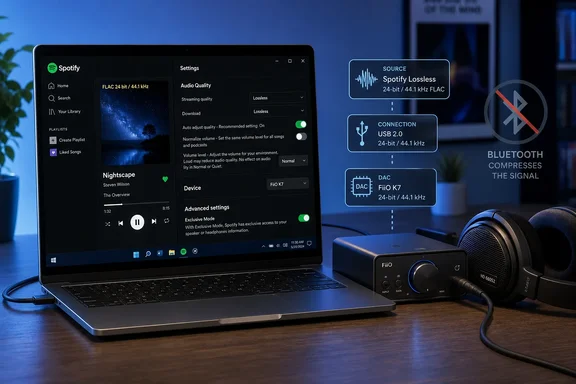
Engadget’s guide correctly identifies Bluetooth as the common weak link, but Spotify’s own documentation adds an important Windows-specific option: Exclusive Mode. On a compatible Windows desktop setup, it lets the Spotify app take direct control of an audio device, avoiding Windows system sounds and much of the shared audio processing that can otherwise alter playback. The feature is useful for a wired USB DAC, audio interface, or headphone amplifier; it is not a magic upgrade for Bluetooth headphones.
Spotify introduced Lossless for Premium subscribers in 2025 after years of promising a HiFi tier. Its support documentation now lists Lossless as available in the mobile and desktop applications, with support beginning at desktop app version 1.2.67 and mobile version 9.0.58. The service’s ceiling is 24-bit/44.1 kHz FLAC—higher bit depth than CD audio, which is 16-bit/44.1 kHz, but not the 96 kHz or 192 kHz sampling rates marketed by some competing high-resolution services.
For most WindowsForum readers, the practical conclusion is simple: enable Lossless only where the device and connection make it meaningful. A PC connected by USB to a competent DAC and wired headphones is a good candidate. A laptop streaming to ordinary Bluetooth earbuds is not.
Enable Lossless in the Windows desktop app
Spotify’s web player is excluded from the useful part of this discussion. Spotify says web playback is capped at AAC—128 kbps for Free accounts and 256 kbps for Premium—without a quality selector. To access Lossless, install and use the Spotify desktop application.
In the Windows app, open the account menu, select Settings, and find the Audio Quality or Media Quality controls. Set streaming quality and download quality to Lossless where appropriate. Spotify’s documentation says the option applies to Premium accounts and supports music streaming and offline downloads; it does not apply to podcasts, audiobooks, music videos, preview clips, or Canvas clips.
Do not assume the setting alone confirms every track is arriving in lossless form. Spotify notes that source recording quality, content availability, the selected output device, and network stability all affect what can actually be played. A lossless transport cannot restore detail that was never present in the supplied master.
Spotify recommends a steady 1.5 Mbps to 2 Mbps connection for lossless playback. That is modest for a fixed broadband connection, but it is still a reason to separate Wi-Fi and cellular settings on a phone, and to think twice before downloading a large library again at the highest available quality.
Use Windows Exclusive Mode with a wired DAC
Spotify’s Windows-only Exclusive Mode is the most consequential detail missing from a generic “use wired headphones” recommendation. When enabled, Spotify takes control of the selected audio device so other applications cannot send sound to it at the same time. Spotify describes the feature as intended for external hardware such as DACs and audio interfaces.
The setting is best suited to this chain:
- A Windows PC runs the Spotify desktop app.
- The PC connects over USB to an external DAC, audio interface, or USB headphone amplifier.
- Wired headphones, powered speakers, or a stereo receiver connect to that device.
Enable Exclusive Mode in Spotify’s Settings when the dedicated device is selected. Then disable Spotify’s volume normalization and ensure its equalizer is off. Spotify specifically recommends both steps for listeners who want the most direct rendition of the stream. Automix may also be disabled because seamless transitions conflict with exclusive playback behavior.
There is a trade-off. Windows notification sounds, browser videos, Teams calls, games, and other software cannot use that same output while Spotify has exclusive control. This is expected behavior, not a driver failure. Users who regularly switch between music and work audio may prefer the normal shared mode, where Windows mixes sources together, even if it is less purist.
Exclusive Mode also does not mean the application is necessarily bit-perfect in every circumstance. Spotify’s documentation says it takes control of audio processing to deliver music as recorded, but the service’s own output is capped at 24-bit/44.1 kHz and the final result still depends on the DAC driver, device capabilities, DSP features, and whether the selected song is available losslessly. The practical value is eliminating avoidable processing—not creating “high-resolution” files beyond Spotify’s source quality.
Bluetooth remains a quality ceiling, even on expensive gear
Spotify’s support pages warn that Bluetooth, Spotify Connect, and AUX connections can affect whether lossless playback is possible. Its Lossless launch announcement is more direct: Bluetooth does not have sufficient bandwidth for Spotify’s lossless stream and the signal must be compressed before transmission.
That means setting Spotify to Lossless while listening through Bluetooth headphones may still have some value if the app is using the best source available before the handset or PC re-encodes it. It does not mean the audio arriving at the headphones remains lossless. The distinction is easy to miss because a Bluetooth product can advertise sophisticated codecs, high bit rates, or “HD audio” while the source and receiver negotiate their own connection mode.
The cautious approach is to treat Bluetooth as a convenience path. It can sound excellent, particularly with well-tuned headphones, but it is the wrong connection to use when the goal is verifying Spotify’s full lossless delivery. Do not spend money on a DAC for a Bluetooth-only listening path and expect that purchase alone to preserve a lossless signal to the headphones.
The same caution applies to USB-C earbuds. Engadget’s assertion that any USB-C earbuds can carry a lossless signal is too broad to use as buying advice. USB-C describes a connector, not a uniform audio implementation. Some headphones include their own DAC, some rely on a phone or PC’s digital-audio behavior, and some low-cost adapters have unclear specifications or poor analog stages. A known-compatible USB DAC or reputable USB audio headset is the safer choice.
Spotify Connect can be better than playing from a phone over Bluetooth
Spotify Connect changes the path of the audio. Instead of a phone receiving music and relaying it to a speaker through Bluetooth, a compatible speaker, streamer, receiver, TV, or console can retrieve the audio itself over the network while the phone acts as a remote control.
Spotify says its compatible Connect devices can stream wirelessly at up to 24-bit/44.1 kHz, but the wording matters: support is device-specific. A product that has Spotify Connect is not automatically a lossless endpoint. Firmware support, the vendor’s implementation, and the device’s current quality setting all determine the result.
Spotify’s support instructions also establish a less obvious requirement: set quality while connected to the target device. Start playback on the Connect device, open the device selector in Spotify, select the active endpoint, and choose Change quality settings. For multi-room hardware, Spotify says Lossless is still rolling out across markets and may not yet be available on every device.
That per-device behavior is where many otherwise capable home setups fall short. Changing the desktop app’s streaming preference does not guarantee that a connected receiver or speaker will play at the same quality. Check the active device settings rather than assuming the phone, PC, television, soundbar, and speaker group all inherited one global choice.
Hardware and room noise decide whether the upgrade is audible
Lossless audio preserves the source data. It does not automatically make weak speakers more detailed, fix a noisy headphone jack, or overcome road noise in a car. Spotify itself acknowledges that technical fidelity does not always translate to a dramatic difference for every listener.
This is why the best use of Spotify Lossless is usually a stationary one: a Windows desktop, wired headphones that resolve subtle detail, a competent DAC or interface, and a quiet environment. Differences are most likely to show up in clean transients, low-level ambience, reverberation tails, and recordings with dense acoustic detail. They are less likely to be obvious on inexpensive earbuds, stock car systems, or speakers competing with an air conditioner, traffic, or office conversation.
Before replacing hardware, compare Lossless with Spotify’s 320 kbps Very High mode using the same track, volume level, and wired output. Louder playback is routinely mistaken for better playback, so keep the level matched and turn off normalization if making a serious comparison. If the difference is not apparent, that does not mean the setting failed; it may mean the listening chain has reached the point where compression artifacts are no longer the limiting factor.
Spotify’s lossless option is a worthwhile Premium feature, especially now that Windows users can pair it with Exclusive Mode and a wired DAC. But the configuration that matters is not a checkbox in the app. It is the route from Spotify’s 24-bit/44.1 kHz stream to the headphones or speakers—and Bluetooth remains the point where that route stops being lossless.
References
- How to get Spotify's best audio quality Engadget · 2026-09-15T23:30:00+00:00