

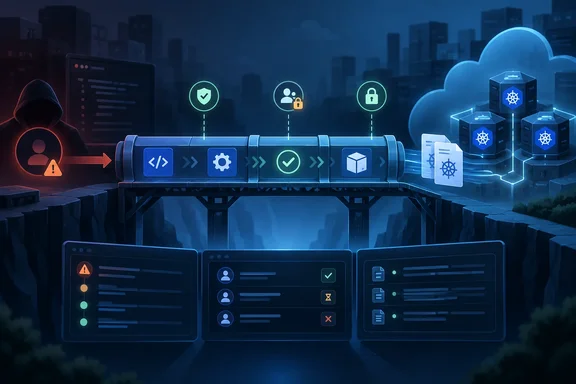
According to Microsoft, the attacker didn't need malware or a software exploit. It used the organization's own identity and cloud services, which is why this one should worry any shop that runs CI/CD next to production.
The attack chain, step by step
Microsoft's Security Blog post lays out a clear progression. Microsoft has not named the victim, and the public write-up includes no timestamps.
- Initial access through SSPR. Storm-3068 got into a user account through the self-service password reset process.
- Taking over the identity. The actor then registered its own authentication methods on the account. That turned a one-time break-in into ongoing access that the attacker controlled.
- Azure DevOps reconnaissance. Using legitimate administrative tools and automated scripts, the actor listed the organization's repositories, projects, pipelines and deployment environments.
- A pipeline built to steal credentials. The actor created a malicious pipeline designed to harvest Kubernetes credentials at scale. It deployed a "kube agent" and ran several jobs to collect kubeconfig files, which hold cluster connection details and authentication information. Because it ran with the compromised account's permissions, Microsoft says the pipeline was authorized to access more than 50 resources and authenticated services.
- Backup routes for remote access. The actor changed pipeline scripts to install the Atera remote management agent and download the Chisel tunneling utility. Microsoft says these were attempts to create other ways in and to expose the Kubernetes API server. Chisel commands were run to open a reverse tunnel to an external IP address.
- Stolen credentials committed to Git. Investigators used Azure DevOps audit logs and Git version history to reconstruct the next stage. The actor added seven stolen kubeconfig files to a repository, which gave it the credentials for the targeted clusters.
The two tools are worth a closer look. From general industry knowledge (not Microsoft's report): Atera is a commercial remote monitoring and management product, and Chisel is an open-source tunneling tool. Both are legitimate software, so allow-lists and signature-based detection tend to let them through. Attackers like them for exactly that reason.
Summary: Microsoft's account shows no zero-days and no custom malware. It shows a password reset, some MFA registrations, and an attacker who knew that Azure DevOps sits where identity, code and cloud operations meet.
Why Azure DevOps is such a good target
Microsoft's main point is that Azure DevOps holds much more than source code. Repositories, pipelines, service connections and deployment settings add up to a roadmap of the wider environment.
Microsoft's own documentation shows how direct those links are. Its Learn guide to canary deployments on Kubernetes has administrators go to Pipelines > Environments, then under Resource, select Kubernetes from the dropdown list. From there they choose an Azure subscription and a specific AKS cluster. That's normal, useful setup. It also means an Azure DevOps project can point straight at production clusters and hold the authority to deploy to them.
So an attacker who can create or edit pipelines doesn't have to break into a cluster. They can have the pipeline fetch the credentials, and the pipeline will run the job without questioning it. It's like breaking into a building by getting hired as the night janitor: nobody checks why you're in the server room.
This framing does have limits. Microsoft's public materials don't say that every remote-access attempt worked, that all 50-plus resources were compromised, or that production data was stolen. What the evidence supports is narrower, and still bad: the compromised account's pipeline permissions allowed credential collection and opened a path toward connected Kubernetes resources.
Summary: A pipeline is automated trust. Anyone who can edit it can borrow its access, and many organizations have given their pipelines broad access.
How DART responded
Microsoft says DART moved quickly to investigate and cut off the attacker's access. It analyzed telemetry across identity systems, development platforms and cloud infrastructure to work out where the attacker had spread beyond the first account. The team briefed the customer daily with prioritized containment and remediation guidance. It also worked with Microsoft Threat Intelligence to place Storm-3068's activity in a broader threat context.
The blog post doesn't list every affected system or the full response sequence. That's normal for a customer case study, but it limits what outside defenders can learn from it. The most useful forensic detail is how the incident was reconstructed: Azure DevOps audit logs combined with Git history. If your organization doesn't collect either of those today, that's worth fixing.
Microsoft's recommended defenses
Microsoft's advice for customers falls into three layers.
Identity
- Watch password reset activity for unusual patterns, such as repeated reset attempts or resets aimed at multiple users.
- Protect privileged accounts by limiting their exposure to SSPR and requiring phishing-resistant MFA.
Source control
- Require approval for code changes and enforce branch protection policies.
- Block direct commits to critical branches so every change goes through review.
Pipelines and cloud
- Limit who can create, modify or run build and deployment pipelines.
- Apply least privilege across identities, development platforms and cloud resources.
That list is sensible but general. The rest of this article turns it into specific Azure DevOps settings.
Practical hardening: turning the advice into settings
The guidance below comes from Microsoft Learn's Azure Pipelines security documentation, which covers Azure DevOps Services, Azure DevOps Server and Azure DevOps Server 2022. These are separate controls. Tightening one doesn't secure the others, and Microsoft doesn't claim any one of them would have stopped this particular intrusion on its own.
1. Find every "Open access" resource
Microsoft's documentation says pipeline permissions on a resource can be set to Open access, which lets every pipeline in the project use it, or restricted to specific pipelines. Only Project Administrators can turn on Open access, and Microsoft's resource-security guidance advises against it.
The resources Microsoft calls "protected" are:
- Repositories
- Environments
- Service connections
- Agent pools
- Secure files
- Secret variables in variable groups
For each one, check which pipelines are authorized. If the answer is "all of them," a newly created malicious pipeline may be authorized too.
2. Put checks in front of sensitive resources
Azure Pipelines lets you require checks before a pipeline stage can use a protected resource:
- Approvals: hold the request until named users or groups approve it.
- Branch control: only authorized branches can use the resource.
- Business hours: deployments can only start within a set time window.
A manual approval on your production Kubernetes environment would force a malicious pipeline to wait for a person to say yes. The documentation says failed checks can suspend or fail the run.
3. Narrow your service connections
Microsoft's pipeline-security overview recommends:
- Scoping Azure Resource Manager service connections to a specific resource group that holds only what the build needs.
- Using workload identity federation, which is OpenID Connect-based and needs no stored secret, in place of service principal secrets wherever possible.
- Adding branch control checks so service connections only run on authorized branches.
- Using project-level build identities rather than collection-level ones, so a pipeline can only reach its own project's resources.
4. Tighten how pipelines get created and run
- Check who has the Create build pipeline permission. Microsoft's documentation confirms it's required to create a new pipeline.
- Think about turning off creation of Classic build and release pipelines. When both are off, Microsoft says no new Classic pipelines, task groups or deployment groups can be created through the UI or the REST API.
- Turn on the settings that limit which variables can be set at queue time, and turn on shell task argument validation.
5. Make sure your audit trail exists before you need it
DART rebuilt this intrusion from audit logs and Git history. Microsoft's auditing event list includes events that apply directly to this attack:
- Security events: creating, modifying and deleting pipelines, and authorizing resources for pipelines.
- Pipelines.ResourceAuthorizedForPipeline: records when a resource is authorized for a pipeline ID.
- Library.ServiceConnectionExecuted: records when a service connection runs.
- Git.RefUpdatePoliciesBypassed: records when branch policies are bypassed.
There are two caveats. Microsoft lists Azure DevOps auditing as in preview, and it's only available for organizations backed by Microsoft Entra ID. Microsoft also notes that token access events aren't currently logged. If your organization isn't connected to Entra, you don't have this audit data. Streaming audit data to your SIEM keeps it available after the portal's default retention runs out.
Summary: Close Open access on resources, put approvals in front of production, scope service connections tightly, and confirm your audit logs are actually collected.
The bigger picture
This case matches a trend defenders have seen for years: attackers log in with valid credentials rather than breaking in. What's different here is where they went next. Most identity-hardening work has centred on email, SharePoint and admin portals. Storm-3068 went for the build system, which often has more standing access to production than any single engineer.
For organizations with Azure DevOps and Kubernetes, the key question is this: if any one developer account were taken over tomorrow, which production credentials could that person's pipelines reach? If nobody on your team can answer quickly, start with that review.
To be fair, Microsoft is a vendor, and Cyberattack Series posts also advertise DART's incident response service. The technical story still stands. Every weakness described here involves standard platform features and misconfigurations, not a flaw in Microsoft's software, and all the recommended fixes are settings available in Azure DevOps today.
Quick checklist for Azure DevOps admins
- [ ] Check SSPR sign-in and reset logs for bursts of resets or resets across many users
- [ ] Remove privileged accounts from SSPR, or require phishing-resistant MFA for them
- [ ] List every protected resource set to Open access
- [ ] Add approval checks to production environments and Kubernetes service connections
- [ ] Move Azure service connections to workload identity federation
- [ ] Reduce who holds Create build pipeline permissions
- [ ] Enforce branch policies and block direct commits to main
- [ ] Confirm Azure DevOps auditing is on (it requires Entra ID) and streaming to your SIEM
- [ ] Search repositories for committed kubeconfig files or other credentials
Microsoft's title says Storm-3068 went "beyond source code." In practice it went through the pipeline, so treat pipeline permissions as a security boundary in their own right.
References
- Beyond source code: A path to the keys to the kingdom - Microsoft Microsoft · 2026-09-29T16:00:00+00:00
- Manage security in Azure Pipelines - Azure Pipelines | Microsoft Learn learn.microsoft.com
- Pipeline resource security - Azure Pipelines | Microsoft Learn learn.microsoft.com