

What Sublime actually launched
Email DLP is an add-on for Sublime Enterprise customers who use Microsoft 365 or Google Workspace. It runs in Sublime-hosted environments and in supported self-hosted ones. Sublime says it deploys through native mail-flow rules, so you don't have to change your MX records. That matters because rerouting MX records tends to make Exchange admins nervous.
The company is pitching it at three ways sensitive data leaves by email:
- Accidents, such as an employee sending a customer spreadsheet to a personal address
- Deliberate exfiltration, such as a departing engineer emailing source code to themselves
- Compromised accounts, where an attacker quietly sends files out from a hijacked mailbox
Sublime has not published pricing, required Microsoft 365 plans, permission scopes or infrastructure requirements for self-hosting. According to its product documentation, onboarding goes through your Sublime account team. There is no self-service switch.
Summary: This is a third-party email DLP add-on for existing Sublime Enterprise customers. It is not a Microsoft feature, and it is not a general-purpose DLP suite.
How it works: rules first, then an AI review
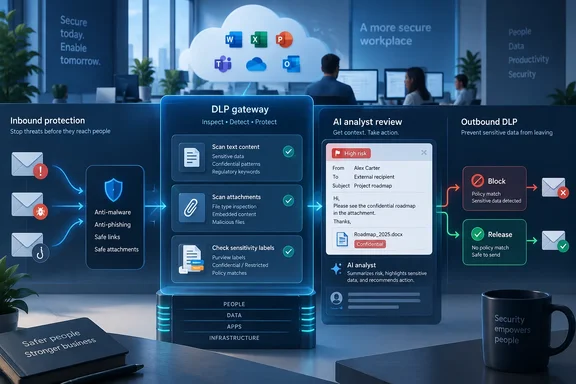
Sublime's documentation describes a four-step pipeline:
- Scan. Each outbound message is analyzed: subject, body and every attachment, including files nested inside archives. OCR pulls text out of images, scans and screenshots.
- Detect. DLP rules check the message for sensitive data and policy violations. Sublime maintains a managed set of detections, and customers can add their own.
- Review. ASA, Sublime's "Autonomous Security Analyst," investigates each rule match and returns a verdict with its reasoning.
- Remediate. Your configured policy decides whether the message is blocked, alerted on or sent.
ASA only looks at messages that a rule has already flagged. It does not review every outbound email. The design treats rules as a broad first filter and uses the AI review to clear false positives before they hold up legitimate mail.
The detection methods Sublime documents include:
- Entity recognition with confidence scores, so look-alike numbers don't trigger blocks
- Natural-language topic classification, such as "Financial Communications" or "Legal and Compliance," which can be combined with other conditions (for example, legal correspondence sent to a personal email domain)
- Deep file inspection that recursively unpacks archives and embedded files
- Custom rules in MQL (Message Query Language), the same language behind Sublime's inbound detection rules, scoped to specific senders, recipients or groups
Out of the box, coverage includes PII, health data, payment card data, credentials and secrets, financial records and intellectual property. Custom rules can target things like project code names, customer lists, contract templates, source code, restricted file types or unapproved recipient domains.
Summary: Detection rules you can read decide what gets flagged. The AI then decides which of those flags really are violations.
The Microsoft Purview connection
For Microsoft shops, Purview support is the most practical part. Sublime's documentation says its DLP rules can read the Purview sensitivity label on a message, so a rule could block mail labeled Confidential that is addressed outside the organization. The documentation also lists "Encrypt with Purview" as a remediation option. Both are listed for Microsoft 365 customers only.
Sublime's public rules repository on GitHub shows how this is being built. One pull request proposes a beta DLP rule that detects outbound emails stamped with a Microsoft Information Protection (MSIP/Purview) sensitivity label. It matches on the msip_labels header and the simpler sensitivity header, filtering for Confidential/Highly Confidential/Restricted/Secret labels, with no recognizer needed — header match only. A second pull request proposes a low-severity feed rule for the same kind of labels. Its author reported 255 message groups on Confidential/Restricted/Secret labels from 5,305 total MSIP-labelled messages in hunt results. Both appeared as open proposals rather than merged rules in the snapshot we saw, so treat them as a look at how the feature is put together, not as a description of what ships.
That header-based approach has a practical consequence. Sublime's label enforcement depends on your Purview labeling being in good shape. If users mislabel mail or don't label it at all, label-based rules have nothing to act on. Sublime uses Purview as its classification source. It does not replace Purview.
Summary: Purview handles classification, and Sublime can act on those labels at the email layer. Messy labeling will still give you messy enforcement.
Isn't Microsoft already doing this?
Partly, yes. Microsoft's own documentation says Purview DLP can use sensitivity labels as conditions for Exchange email messages, SharePoint, OneDrive, Devices. Sensitivity label details also are shown in the DLP rule match audit log for DLP policy matches that contain a sensitivity label as a condition. Microsoft 365 tenants that are already licensed for Purview DLP have a native way to block labeled mail from going outside the organization.
Sublime isn't the only third-party vendor in this space either. Check Point's Harmony Email & Collaboration documentation says Email Security allows administrators to define Data Loss Prevention (DLP) policies using Microsoft Purview Sensitivity Labels. Using Purview labels in a non-Microsoft email DLP layer is not new.
So what is Sublime actually offering? By its own account:
- One console and one detection engine for inbound threats and outbound data loss, which mainly helps teams already using Sublime for inbound protection
- Detection logic you can read and edit, so analysts can see exactly which rule flagged a message
- An AI second look before blocking, aimed at the false positives that keep many DLP programs stuck in monitor mode
CEO and co-founder Josh Kamdjou put the problem this way: every outbound message blocked by mistake affects "a deal, a deadline, or a customer," and that risk is why so many email DLP programs never move past alerting. That is a real problem. Plenty of admins have built a DLP policy, watched the help desk queue fill up, and quietly switched it back to audit mode.
Sublime has not published false-positive rates, detection rates, latency figures, test-set sizes or deployment counts. The customer quotes are testimonials, not independent validation. Anand Prem, a cyber security engineer at Classic Fashion, says his team deployed outbound protection in days with policies tailored to pricing, design and style-code data.
Summary: Microsoft 365 already has native email DLP. Sublime is competing on transparency, AI triage and consolidating tools, and none of those advantages has been measured independently yet.
Blocking, alerts and release requests
Sublime's documentation lists four remediation modes:
| Mode | What it does |
|---|---|
| Block delivery | Holds the message before it reaches the recipient |
| Encrypt with Purview | Encrypts the message using Purview (Microsoft 365) |
| Monitor | Runs detections with no effect on mail flow |
| Alert | Sends matches by email, Slack or webhook, alongside blocking or instead of it |
When a message is blocked, admins can send the sender an email explaining why, with a link to request release. Admins review those requests, approved messages get delivered, and the sender gets a follow-up with the result. Sublime's launch blog says these notifications can be turned off or scoped with exclusions. That matters for insider-threat investigations, where you don't want to warn the person you're investigating.
DLP reporting tracks what was flagged, blocked and released over time. The launch materials also describe audit logs for manual actions and detection changes. Sublime says these help compliance teams support HIPAA, PCI DSS and GDPR requirements. That means supporting evidence for audits, not compliance certification.
Suggested rollout for Microsoft 365 tenants
Sublime's own guidance follows standard DLP practice:
- Work with your Sublime account team to configure mail flow (no MX change required).
- Pilot on a small group of mailboxes in monitor mode.
- Review what the managed detections flag and how ASA rules on each match.
- Turn on blocking and expand coverage, up to your whole tenant.
Before you sign, a few questions for Sublime are worth asking:
- What Microsoft Graph or Exchange permissions does the integration need?
- How do Sublime's mail-flow rules interact with your existing Purview DLP policies and Exchange transport rules? Could two systems end up acting on the same message?
- If you use both, which system decides on Purview encryption?
- How long do messages wait while ASA reviews them?
The bottom line
Sublime Email DLP adds outbound data protection to a platform many organizations already use for inbound phishing defense. It does this without MX changes and with direct use of Microsoft Purview sensitivity labels. The design is sensible: readable rules flag candidates, and AI review clears the noise before anything gets blocked. The weak spots are the usual ones for a launch. "First platform" is a vendor claim, there are no efficacy numbers yet, and Microsoft 365 customers with Purview DLP already have native label-based email controls. For current Sublime Enterprise customers whose DLP has been stuck in monitor mode, a pilot is worth running. Everyone else should set it against what their Microsoft 365 licensing already provides before adding another layer to the mail flow.
References
- Sublime Security Launches Email DLP, Becoming the First Platform to Deliver Agentic Email Security for Both Inbound Threat Detection and Outbound Data Protection - VMblog VMblog · Thu, 01 Oct 2026 18:16:49 GMT
- Add ASR-style Feed Rule for Purview sensitivity labels by Jummyberry · Pull Request #5446 · sublime-security/sublime-rules github.com
- Add beta DLP rule for MSIP sensitivity label outbound detection by Jummyberry · Pull Request #5330 · sublime-security/sublime-rules github.com