

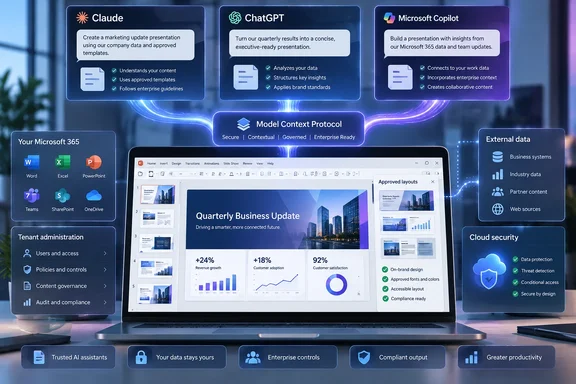
The September 15 announcement, published by Templafy and syndicated through GlobeNewswire, says its connector is now listed in Claude’s Connector Directory, ChatGPT’s Plugin Directory and Microsoft Marketplace. Microsoft’s Marketplace listing confirms that the Templafy app is available in Teams and Microsoft 365 Copilot, while Templafy’s own administrator documentation identifies the actual Copilot surfaces as Microsoft 365 Copilot Chat and Microsoft Copilot Cowork.
For IT administrators, that distinction is important. This is not a blanket capability that automatically appears across every product carrying the Copilot name, nor is it a connector that turns an ordinary chat response into a governed Word, Excel and PowerPoint workflow. The currently documented MCP workflow is centered on generating branded PPTX presentations, with PDF output also supported.
A distribution announcement, not the first appearance of Templafy MCP
Templafy’s release presents the directory listings as a new native connection across the three AI assistants. But the company’s support documentation shows the underlying Templafy MCP Server was already documented on August 19, 2026, nearly a month before the announcement. Its Microsoft 365 app guide was updated on August 25 and already described the same Copilot Chat and Copilot Cowork scenarios.
That does not make the announcement meaningless. Directory placement changes how users find and activate an integration; it can move a tool from an administrator-led deployment or custom-connector setup into an in-product catalog. But organizations evaluating the news should treat September 15 as an availability and discoverability milestone, rather than evidence that Templafy has suddenly created a new cross-model document-generation engine.
The timing also coincides with changes in the AI vendors’ own catalogs. OpenAI says it migrated ChatGPT’s app directory to a Plugin Directory on July 9, 2026. Anthropic describes its Connector Directory as a reviewed catalog for third-party MCP servers. In Microsoft’s case, Marketplace publication provides an installable Microsoft 365 app package rather than proof that the service is built into Microsoft’s own Copilot model or Microsoft Graph.
Templafy remains the external service processing the document-generation task. Microsoft’s Marketplace listing explicitly says the app can send data over the internet, and Microsoft’s Copilot extensibility documentation says MCP requests go to a server hosted outside Microsoft 365.
The handoff is designed for PowerPoint, not general office automation
The company’s press release uses expansive language about producing “fully formatted, editable business document” from approved templates, assets, company content and compliance rules. Its technical documentation is notably narrower: users ask for a deck, select an available presentation theme, refine an outline, and receive a branded PPTX or PDF.
The Microsoft Marketplace entry is equally specific. It says that in Copilot Chat and Copilot Cowork, users can find an appropriate Templafy Document Agent, choose a company-approved theme, provide requirements through a short conversation and generate a branded PowerPoint presentation.
That is a useful capability for firms that spend heavily on sales decks, quarterly business reviews, pitch materials, audit presentations and client briefings. It is also a reason not to assume the connector covers every document workflow merely because Templafy’s marketing uses the broader word document.
Templafy’s own data-flow description explains the mechanics. Administrators configure templates, layouts, required structure, tone-of-voice controls and approved assets. The agent combines those controls with the user’s request and any allowed contextual information, routes the assembled request to a language model, then applies the defined presentation rules before producing the finished PowerPoint file.
The company says it uses OpenAI models hosted on Azure for its managed service and can support customer-hosted OpenAI models; it also says self-hosted models can be connected for knowledge retrieval and text generation. In other words, Claude, ChatGPT or Copilot is the user-facing assistant and starting point, while Templafy is the orchestration and presentation-production layer. Enterprises selecting the integration should evaluate both systems rather than treating the destination AI assistant as the only model or data-processing decision.
Copilot Chat access has fewer Microsoft licensing hurdles than Cowork
Templafy’s Microsoft 365 deployment guide makes a licensing distinction missing from the September 15 release. A user can access the Templafy agent in Microsoft 365 Copilot Chat with an eligible Microsoft 365 subscription and without a separate Microsoft 365 Copilot add-on, according to Templafy. The company says that scenario does not use shared tenant data such as SharePoint or Copilot connectors, so Microsoft’s metered pay-as-you-go billing does not apply.
Microsoft Copilot Cowork is different. Templafy says it requires a Microsoft 365 Copilot license assigned to the user. Both surfaces still require the organization’s Templafy tenant to have the MCP Server module enabled, at least one published Document Agent and at least one configured theme.
That means “available in Microsoft Copilot” should not be read as “free to deploy” or “ready for every Microsoft 365 account.” Templafy has not disclosed public pricing for the MCP Server module or Document Agents in its announcement. The Marketplace listing also requires an active Templafy account on a tenant where the relevant modules are enabled.
The user identity model is another operational constraint. Each employee needs an active Templafy account in the same organization, according to Templafy’s MCP Server documentation. This is not an anonymous connector that a user can install from a catalog and immediately point at a corporate slide library. The organization has to provision the service, publish agents, configure themes and ensure that user access corresponds to the content they are permitted to use.
The governance claim depends on the tenant configuration
Templafy’s pitch is that organizations can allow employees to use Claude, ChatGPT, Copilot, Perplexity or another compatible assistant while preserving the organization’s branding and policy controls at the moment a presentation is generated. That is credible as an architectural goal, but the outcome depends on the configuration work performed before employees begin prompting.
Templafy’s implementation guidance says administrators determine the slide layouts, tone of voice, available knowledge and image library. The agent can only work with the structures and assets it is given. Poorly maintained templates, incomplete brand libraries, weak layout rules or stale company knowledge will produce a governed presentation that may still be outdated, incomplete or unattractive.
There is also an important boundary between brand compliance and factual correctness. Applying an approved master deck, disclaimer and tone-of-voice rule can reduce formatting drift. It does not independently verify whether a model’s claims, numbers, citations or strategic recommendations are accurate. Organizations producing sales, financial, regulated or client-facing materials should retain their existing review process for substance, even if the generated slides pass template checks.
The integration can retrieve contextual knowledge from sources such as SharePoint, OneDrive, external connectors and Glean when those sources are configured for a custom agent, Templafy says. That makes access control and source hygiene more consequential: an AI-generated presentation will be only as current and appropriately scoped as the material made available to the agent.
MCP adds a connector review task for security teams
MCP solves a real interoperability problem, but it also adds another external service and authorization path to the AI stack. Templafy requires outbound HTTPS access to its platform and MCP endpoint. Its documentation notes that Claude reaches remote MCP servers from Anthropic’s cloud infrastructure, so the endpoint must be reachable from the public internet for the Claude connection to work.
OpenAI’s own guidance says that full MCP support, including write or modify actions, is still rolling out in beta for ChatGPT Business, Enterprise and Education plans. It also tells workspace administrators to vet third-party connectors before deployment. Anthropic similarly warns that remote connectors can access or act on connected services under the user’s permissions and recommends reviewing requested OAuth scopes and tool invocations.
Microsoft documents much the same model for its own extensibility framework. Copilot may prompt a user before data is first sent to a plugin, and the plugin then communicates with an MCP server outside Microsoft 365. In Templafy’s case, the creation action itself is the point: prompt content, instructions and selected context are sent to Templafy so it can generate the presentation.
A sensible rollout therefore starts with a limited group, a narrowly scoped Document Agent and a dedicated template set. Administrators should validate which information reaches Templafy, which knowledge sources a custom agent can retrieve, who may use particular agents and themes, and whether existing data-residency, retention and supplier-review policies cover the new path.
Templafy’s connector makes the last mile of AI-assisted PowerPoint creation easier to standardize across Claude, ChatGPT and Microsoft 365 Copilot. The immediate result is not a universal document agent installed inside every AI assistant; it is a catalog-distributed, externally hosted presentation-generation service that still requires Templafy licensing, tenant configuration, user provisioning and security approval before it produces the polished deck promised in the announcement.