

The TENKU Note Pro AI puts Windows 11 Pro and a Core Ultra 5 125U in a 960g convertible
According to TechRadar's launch report, the Note Pro AI uses a Core Ultra 5 125U processor with 12 cores and 14 threads, alongside hardware dedicated to selected AI workloads. The 125U belongs to Intel's first Core Ultra generation, known as Meteor Lake. Notebookcheck's breakdown of its cores says the mid-range "Meteor Lake" chip powering the Note Pro AI sports a 12-core setup consisting of two performance cores, eight efficiency cores, and two more low-power efficiency cores. Intel's product listing gives the chip a maximum turbo of 4.30GHz. Independent spec databases describe it as a processor with a TDP of 15 Watt, aimed mainly at office-class systems.
The rest of the core specification matches across TENKU's launch material, Japan's PC Watch and the Japanese review site Win-tab. The machine has 16GB of LPDDR5 memory and a 512GB SSD. Win-tab identifies the drive as an M.2 2280 PCIe unit. The display is a 10.51-inch IPS touchscreen at 1,920 × 1,280, which gives a 3:2 aspect ratio, and it supports 10-point multitouch. Wireless is Wi-Fi 6 with Bluetooth 5.2, and PC Watch lists a 2-megapixel front camera.
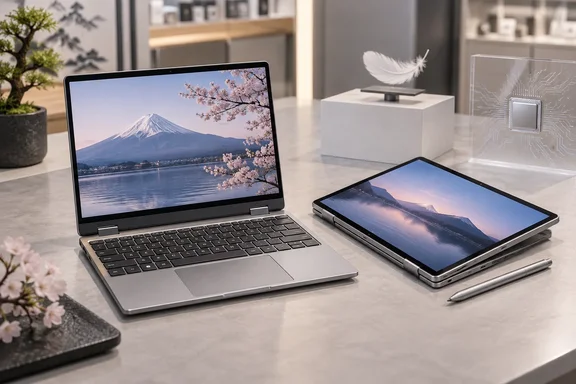
A 360-degree hinge lets the keyboard fold behind the screen, so the device works as a laptop, a tablet or a propped-up presentation screen. TechRadar notes that it supports 10 point touch input and works with active styluses offering 4096 levels of pressure sensitivity, although Technetbook reported that detail and TechRadar's wording is different. Win-tab says the pen uses the Microsoft Pen Protocol (MPP) and is sold separately, so it does not come in the box.
The Note Pro name has been used before. Notebookcheck calls TENKU a specialist in ultra-compact laptops, such as the 10.51-inch Note Pro, and describes the new machine as an updated variant of the laptop powered by an Intel Core Ultra 5 125U CPU. The same report says this laptop can be equipped with up to 16 GB of LPDDR5 RAM, which is only half as much as its predecessor's peak capacity. Buyers who were waiting for a 32GB configuration of the earlier model should note that the new chip comes with a lower memory ceiling. Win-tab also points out that TENKU is best known in Japan as the distributor of GPD and OneXPlayer handheld gaming PCs, and that the Note Pro AI is sold under TENKU's own brand.
The weight has a small inconsistency. TENKU's September 18 press release gave roughly 950g and a minimum thickness of 1.1cm. PC Watch first printed 950g, then corrected it to 960g after hearing from the company. Win-tab and TechRadar also use 960g, and every source gives the dimensions as about 243 × 177.6 × 17.5mm. The corrected 960g figure is the one to plan around.
Meteor Lake's NPU gives the Note Pro AI camera effects, but not Copilot+ status
The "AI" in the name refers to the neural processing unit (NPU) built into the Core Ultra 5 125U. An NPU is a low-power block designed for machine-learning inference. TechRadar writes that the NPU supports functions such as background processing and noise reduction during video calls. TENKU's own material names webcam background blur and noise cancellation in video meetings as the main uses.
That is a modest set of tasks, and the numbers show why. Intel rates the 125U's NPU (branded Intel AI Boost) at up to 11 TOPS (trillions of operations per second, INT8) and quotes 21 TOPS for the whole chip once the CPU and GPU are included. Reports sometimes blur the two figures. Notebookcheck, for example, lists a 21 TOPS NPU among the device's features, which gives the NPU the whole-chip number. Intel's own specification puts the NPU alone at 11 TOPS.
The 11 TOPS figure decides which Windows features the machine can use. Win-tab says plainly that the Note Pro AI has an NPU but does not meet Copilot+ PC requirements. A Core Ultra 5 125U buying guide gives the reason: Microsoft's Copilot+ definition requires an NPU capable of more than 40 TOPS, while the 125U's NPU is rated at 11 TOPS. Windows features limited to Copilot+ PCs are therefore not part of this machine, whatever its name suggests. Intel does list Windows Studio Effects support for the chip, and that covers the camera and microphone processing TENKU advertises.
For developers and power users, the NPU can still run some local inference. The same guide says it can take on camera effects, noise suppression and workloads built on OpenVINO, Windows ML, DirectML and ONNX Runtime tooling, and adds that whether an application actually uses the NPU depends on the application, operating system, driver, model, and software framework. TechRadar makes the same point: the dedicated hardware does not automatically light up every AI feature in Windows.
The 17-hour battery claim collides with a seven-hour video figure
The battery is where the sources disagree most. TechRadar reports that the device packs a 3,800mAh battery that is smaller than many smartphone batteries today, yet TENKU rates it for 17 hours. TENKU's press release says "up to approximately 17 hours" and does not describe how that was measured. PC Watch, reporting on the same launch, gives about seven hours of video playback.
Comparing the capacity to a phone battery is also misleading. Win-tab lists the pack as 3,800mAh at 7.6V. A milliamp-hour rating means little without the voltage, and a two-cell 7.6V laptop pack holds roughly twice the energy of a single-cell phone battery with the same mAh number. Notebookcheck adds to the confusion by listing an 8000 mAh battery. My inference is that this is probably the same capacity restated at a lower nominal voltage, not a different battery. No source explains the difference, so treat 3,800mAh/7.6V from the Japanese listings as the reference figure.
The 17-hour and seven-hour figures could both be accurate under very different conditions, such as an idle or light-use test on one side and continuous video on the other. Without TENKU's test method, the seven-hour video-playback number is the safer planning figure. No independent battery test of the Note Pro AI has been published.
Two USB-C ports and a 17.8mm keyboard define the Note Pro AI's compromises
Fitting a keyboard into a 243mm-wide body means cutting something. Win-tab measures the key pitch (the distance between the centres of neighbouring keys) at 17.8mm. Most notebooks use about 19mm, and some compact models go down to around 18mm. Win-tab's view is that most typists will get used to it, but the punctuation keys on the right-hand side look cramped. Technetbook adds that TENKO included a keyboard with a 17.8mm key pitch alongside a smooth glass touchpad for everyday navigation. Technetbook misspells the company's name in its coverage.
The machine has very few ports: two USB Type-C connectors and a 3.5mm headphone/microphone jack. Win-tab says both USB-C ports support video output and USB Power Delivery, and Notebookcheck describes them as USB-C ports with DisplayPort output and power delivery. The sources disagree on the USB generation. PC Watch lists USB 3.2 Gen 2 Type-C, while TENKU's release says USB 3.1 Type-C. These may be two names for the same 10Gbps standard, but the listings do not confirm it. With only two ports and one needed for charging, a USB-C hub or dock is effectively required for desk use with a monitor, wired Ethernet or USB-A peripherals.
The screen suits the form factor. Win-tab notes that 3:2 is taller than the 16:10 or 16:9 panels on most notebooks, which gives more vertical space for documents and web pages. At 1,920 × 1,280 on 10.51 inches the pixel density is high, so Windows display scaling will probably need to be set well above 100% to keep text readable. That is my inference from the panel specification; no reviewer has reported the default scaling.
Performance expectations should follow the chip's class. Buying guides describe the 125U as better suited to thinner, quieter, more efficiency-oriented systems and a less suitable choice for long CPU renders, professional 3D rendering, sustained large software builds, CPU-heavy simulations, heavy 4K production, or high-end gaming without a discrete graphics card. Notebookcheck, citing aggregated benchmarks, says the 15 W Core Ultra 5 chip should be able to keep up with an AMD Ryzen 5 8540U APU. Those results come from other laptops. How the chip performs in a 17.5mm-thick chassis depends on TENKU's cooling and power limits, and nobody has tested that yet.
Two gaps matter for anyone planning to keep the device for years. The SSD sits in a standard M.2 2280 slot, but no source confirms whether users can reach it or replace it. LPDDR5 memory is normally soldered to the board, so 16GB should be treated as permanent. TENKU's release says its domestic support includes battery replacement and repairs at locations in Japan, but it does not give warranty length or eligibility terms.
Japan-only pricing and a launch discount that ends September 24
The list price is ¥176,800 including tax, which TechRadar converts to about $1,127. For launch week, TechRadar reports a launch promotion that cuts the price by 25% through Highbeam's official online store and physical outlets, bringing the price to ¥132,600 (about $845) until September 24, 2026. Highbeam is TENKU's direct sales channel, with shops in Akihabara and Osaka's Nipponbashi district. Amazon Japan is running a separate 15% discount over the same period. Notebookcheck confirms the laptop is priced at ¥150,280, or roughly $953 there.
TENKU is also offering a download copy of WPS Office 2 Standard Edition to buyers who post a review within a month of purchase on the store or e-commerce site they bought from. WPS Office is not preinstalled. The machine ships with Windows 11 Pro and no bundled office suite.
The device is sold only in Japan. Notebookcheck notes that given that Tenku's products are primarily targeted at the Japanese domestic market, a global launch is unlikely but not impossible. No US or European pricing or distribution has been announced. An imported unit would come with a Japanese keyboard layout, a Japan-focused warranty and repair network, and import costs on top of the yen price. The keyboard layout is my inference from the domestic sales channel; TENKU has not published keyboard layout options.
What this means for you
The buying decision depends on whether you need a real Windows 11 Pro machine in the smallest possible size, and whether you can buy and service it in Japan. For field technicians, frequent travellers and people who take handwritten notes, the combination of full desktop software, an MPP pen, 16GB of RAM and a 960g convertible chassis is uncommon, and Win-tab notes that few competing products exist in this category. Anyone expecting Copilot+ features, a full-size keyboard, several ports or verified all-day battery life should look elsewhere or wait for independent reviews.
- The Note Pro AI runs full Windows 11 Pro on an Intel Core Ultra 5 125U with 16GB LPDDR5 and a 512GB M.2 SSD, so ordinary desktop applications and Pro features such as domain join are available.
- Its NPU is rated at 11 TOPS, below the 40-plus TOPS Microsoft requires for Copilot+ PCs, so expect Studio Effects-style camera and audio processing but not Copilot+ features.
- Plan around the roughly seven-hour video-playback figure PC Watch reported, not TENKU's untested "up to 17 hours" claim.
- Two USB-C ports with video output and Power Delivery are the only data connectors, so budget for a USB-C hub or dock if you will use the machine at a desk.
- The 17.8mm key pitch and the separately sold MPP pen are worth checking in person at Highbeam's Akihabara or Nipponbashi shops before buying, if you can get there.
- The ¥132,600 Highbeam price and the ¥150,280 Amazon Japan price both expire on September 24, 2026, after which the ¥176,800 list price applies.
TENKU has shown that a Meteor Lake Core Ultra chip, 16GB of RAM and a pen-capable 3:2 screen fit into a sub-1kg Windows 11 Pro convertible. The same specifications show that the "AI" label rests on an entry-level NPU and that the battery claim has not been tested. Once shipments start on September 24, hands-on reviews from Japanese outlets should settle the runtime and thermal questions, and those results will show whether this is a practical pocket workstation or a niche device.