

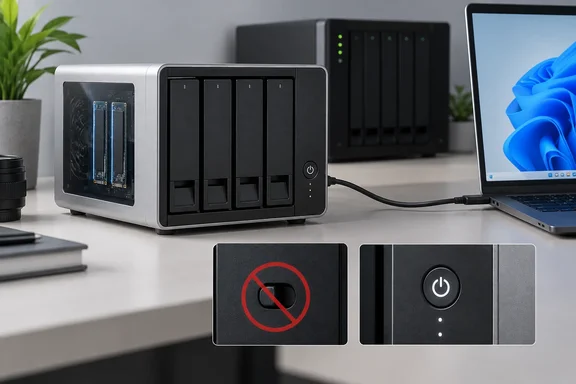
What the D8 Hybrid 2 is (and isn't)
The D8 Hybrid 2 is a direct-attached storage (DAS) box, not a NAS. It combines 4 SATA HDD/SSD bays with 4 M.2 NVMe SSD slots in a single USB 3.2 Gen 2 desktop box. Nothing in it runs its own operating system. It connects over one 10Gbps USB-C link, and the host does the rest.
The main specifications, per Neowin's review and TerraMaster's listing:
| Spec | D8 Hybrid 2 |
|---|---|
| Dimensions / weight | 222 × 179 × 154 mm / 1.9 kg |
| Bays | 4 × 3.5"/2.5" SATA HDD or 2.5" SATA SSD, plus 4 × M.2 2280 NVMe |
| Interface | USB 3.2 Gen 2 Type-C (10Gbps) |
| Max raw capacity | 152TB (4 × 30TB HDD + 4 × 8TB M.2) |
| Onboard RAID | Single disk only |
| Power supply | 90W (up from 72W on the original) |
| Fan / rated noise | One 120mm fan / 21 dB(A) |
| MSRP | $299.99 |
The 152TB figure is raw capacity. Formatting, and any mirroring or parity you set up on the host, will reduce it.
TerraMaster's published power figures are 40.8W with four 22TB Seagate drives reading and writing, and 9.8W with those drives hibernating. Neowin notes these are the same claims TerraMaster made for the first-generation D8 Hybrid.
Summary: On paper, the hardware is nearly identical to the original. The real changes are to the controls and the RAID feature.
The missing RAID switch
This is the headline change. The original D8 Hybrid had a physical mode selector. According to TerraMaster's launch material, it featured a hardware mode switch design, allowing HDD1 and HDD2 to quickly set the RAID mode through a manual switching knob, and it supports four hardware adjustment modes: SINGLE, JBOD, RAID 0, and RAID 1. Even then, RAID was limited to the first two SATA bays. The other two SATA bays and all the NVMe slots always worked as independent disks.
The D8 Hybrid 2 removes the switch entirely. TerraMaster's FAQ says D8 Hybrid 2 is designed with single drive architecture for simpler management, greater stability, and flexible storage expansion.
Neowin's Windows 11 testing showed what that means in practice. There's no automatic RAID mode, so all of the disks display as SINGLE drives in Windows, and the NVMe can only ever be accessed as separate drives, with no way to add them into a striped volume. The reviewer calls the removal disappointing for anyone planning to use the box with Windows.
One detail on TerraMaster's product page needs context. The company says four HDDs configured in RAID achieve up to 980 MB/s. That RAID has to be built by the host system. The enclosure itself can't create it.
Summary: If you counted on the original's hardware RAID for a simple mirror on a Windows PC, the Hybrid 2 no longer offers it.
What did improve
Neowin lists several real hardware improvements:
- Front power button. It used to be on the back.
- Thumbscrews on the M.2 side panel. They replace the regular screws, which the reviewer had asked for in the original review. The screws were easy to remove by hand and big enough to handle comfortably when securing the NVMe drives.
- Power Save / Active switch. This rear switch replaces the RAID selector. TerraMaster calls the feature TPM (TerraMaster Power Management).
- Quieter fan. The reviewer couldn't measure it over roughly 50dB of room noise, but heard only a soft whir, much quieter than the ZimaCube 2 NAS sitting under it.
A word on "tool-less" marketing: TerraMaster's page promises tool-less installation for both HDDs and M.2 SSDs. You still have to remove two thumbscrews and slide off the side panel to reach the M.2 slots. That doesn't need a screwdriver, but it's not quite snap-in.
Windows 11 performance: HDDs fine, NVMe disappointing
Neowin tested with four 4TB WD Red Plus HDDs and two 4TB TEAMGROUP MP44Q NVMe SSDs.
- HDD volume: CrystalDiskMark 9.0.3 showed up to 892 MB/s sequential read and 1,005 MB/s write, which the reviewer thought was good for hard drive storage.
- Backup test, SATA: A TPC Backupper job covering 49.9GB (22,217 files in 1,947 folders) finished in 5 minutes 19 seconds. Restoring it took 2 minutes 44 seconds.
- Backup test, NVMe: The same job on one of the NVMe SSDs took 13 minutes 21 seconds, more than twice as long.
It's odd that an NVMe drive lost to hard drives. The reviewer points out that the NVMe slots share the same 10Gbps link, and guesses the NVMe controller may have changed since the first generation. Those are theories, not confirmed causes. TerraMaster's own figure for a single M.2 SSD is up to 1020MB/s read and 980MB/s write, so the result in Neowin's backup test falls well short of the spec sheet. Treat it as one test setup, not a universal rule.
The reviewer also asks the obvious question: why stay on USB 3.2 Gen 2 instead of moving to USB4? The same criticism came up with the first model. AppleInsider's 2024 review of the original concluded that there's no real way to take good advantage of the high-speed storage slots. Two and a half years on, the bottleneck is still there.
Summary: A single 10Gbps link is plenty for hard drives but held back the NVMe slots in this test.
Using it as NAS expansion
This is where the design makes the most sense. TerraMaster says that on its own NAS systems, the enclosure supports four HDDs and four M.2 SSDs for creating new volumes, while taking full advantage of TerraMaster NAS features, including storage pool configuration, multiple RAID modes, and snapshot functionality. PetaPixel adds that it is also compatible with Windows Server, Proxmox, TrueNAS, Linux, and Unraid environments.
Neowin connected it to a ZimaCube 2 running ZimaOS 1.7.1. The reviewer set up the four HDDs as RAID 5 and the two SSDs as a RAID 1 mirror. Power draw stayed around 38W while the arrays were checked and resynced.
The RAID 5 check took more than seven hours. The reviewer blames the single USB link, which has to handle reads from three drives and writes to a fourth at the same time, plus the overhead of parity calculations. That explanation makes sense, but it's the reviewer's analysis rather than a measured breakdown. Once the arrays were built, transfer speeds basically maxed out the ZimaCube 2's 2.5GbE network connection.
As a practical matter, the first big array build over a single USB link will take a long time. Plan for it overnight rather than squeezing it into a lunch break.
TPC Backupper: the weakest part of the package
TerraMaster recommends its TPC Backupper software, but it isn't in the box. The quick-start card sends you to a download instead. Neowin found that version 7.3.1 is a rebranded copy of AOMEI Backupper Standard. After installation it opens a browser page pushing a paid upgrade, and it's the same version the reviewer downloaded two and a half years earlier.
The bigger problem: the reviewer couldn't set up a backup to a mapped network drive. The software kept rejecting correct credentials, including for a cloud drive already mapped in File Explorer. That's one reviewer's experience, not proof that every NAS destination fails. Still, if you're buying this box for scheduled Windows backups to a NAS, test your backup software before you rely on it. Any third-party tool that handles network destinations reliably will do.
Power Save mode: good on a PC, not so much on a NAS
TerraMaster says Power Save mode puts the enclosure into deep hibernation when the host goes idle or disconnects. Drives, fan and internal circuits shut off, and a small controller waits for a wake signal over USB. The company claims up to a 98% cut in standby power.
Neowin's measurements were less generous:
- On a Windows PC: draw fell to about 4W, an 85.31% reduction. Good, but not 98%.
- On the ZimaCube 2: draw stayed around 27–29W with the front lights on, even after the storage pools had been lost.
The reviewer thinks ZimaOS may be keeping the drives active, and has asked TerraMaster whether its own TOS software handles Power Save differently. For now, count on the power savings only when it's connected to a PC.
Price and who should buy it
MSRP is $299.99, which Neowin calls steep for an enclosure with no drives. When the review was written, TerraMaster had knocked $30 off on its own store, and Amazon US had it cheaper still. Pricing has moved around since launch. NAS Compares reported in July that TerraMaster lists it at $287.99 at the time checked, down from a compare-at price of $359.99. Check current listings before you buy.
Neowin scored it 7 out of 10. Here's how the decision breaks down:
- NAS owners who want mixed HDD and NVMe expansion: A good fit. Your NAS software handles RAID, so the missing switch doesn't matter.
- Windows users who want a hardware mirror without software: The Hybrid 2 can't do it. Neowin suggests the first-generation D8 Hybrid, which TerraMaster no longer sells on its own site but which the review says is still available through TerraMaster's official Amazon storefronts. Remember that its RAID only ever covered bays 1 and 2.
- Anyone buying it mainly for fast NVMe: Adjust expectations. One shared 10Gbps link limits the SSD slots, and the NVMe backup test was slower than the hard drives.
- Anyone relying on the bundled backup software for NAS targets: Test it first, or plan to use something else.
TerraMaster's "hot data on NVMe, cold data on HDDs" pitch still works as a way to keep several SSDs and hard drives in one tidy box on your desk. For Windows users, though, this version gives up capability in exchange for convenience.
Update: PCWorld identifies the D8 Hybrid 2’s USB and SATA controllers (September 28, 2026)
A newly published PCWorld review identifies the controller hardware inside the D8 Hybrid 2 as Realtek’s RTS5432, RTL9210CN, and RTL9201. TerraMaster has not previously made those component details prominent in its consumer-facing specifications.
That does not, by itself, explain the uneven NVMe results reported elsewhere: PCWorld does not provide a matching breakdown of bandwidth allocation, controller roles, or multi-drive performance. But it gives technically minded buyers a clearer starting point for assessing the enclosure’s shared 10Gbps USB architecture.
PCWorld also describes the bundled TPC Backupper—TerraMaster’s AOMEI Backupper-branded package—as capable. That is not necessarily inconsistent with the earlier report of mapped-network-drive credential failures, which concerned a specific setup rather than the software’s general feature set. Windows users planning scheduled backups to a NAS should still validate their own destination and credentials before depending on it.
References
- TerraMaster D8 Hybrid 2 review: one step forward, and two steps back - neowin.net neowin.net · 2026-09-27T18:00:01+00:00
- TerraMaster D8 Hybrid 2 review: DIY storage for SSD speed, HDD capacity PCWorld · 2026-09-28T11:00:00+00:00
- TerraMaster's D8 Hybrid 2 Merges Fast NVMe and High-Capacity HDD Storage | PetaPixel petapixel.com