

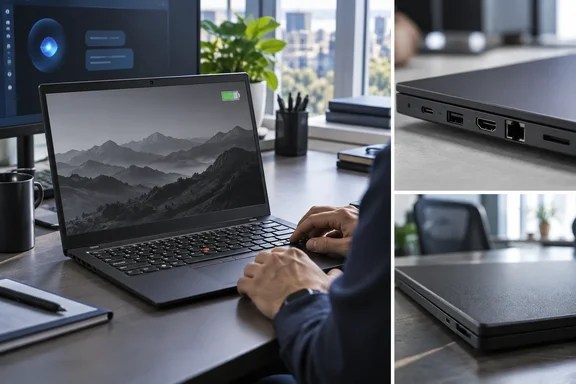
For anyone planning a fleet refresh, the review settles one thing: the badge on the lid doesn't tell you much. The exact configuration does.
What IT Pro tested
IT Pro's reviewer, Stuart Andrews, used a Core Ultra 5 325 model with 16GB of DDR5, a 512GB PCIe 4 SSD, a 57Wh battery and Windows 11 Pro. The review mentions a higher-end Core Ultra 7 356H model but didn't test it.
Lenovo's own spec sheet (PSREF) confirms the chip's layout. The Core Ultra 5 325 has 8 cores (4 P-cores + 4 LP E-cores) and 8 threads, P-core 2.1GHz / LP E-core 1.6GHz base, up to P-core 4.5GHz / LP E-core 3.4GHz, 12MB Intel Smart Cache, Intel Graphics rated up to 40 TOPS, and an NPU rated up to 47 TOPS.
The same PSREF listing shows why buyers should read the processor name closely. The cheaper Core Ultra 5 332 has 6 cores (2 P-core + 4 LP E-core), with its GPU rated at just 18 TOPS. It's still a Core Ultra 5 in an L14 Gen 7, but it has half the performance cores of the chip IT Pro reviewed. If the 325's multi-core scores already look ordinary, the 332's will likely be lower. Treat that as an inference from the specs; nobody has benchmarked it here.
Section summary: IT Pro tested the 8-core Core Ultra 5 325. Other L14 Gen 7 models use different chips, so its results don't carry over automatically.
The benchmarks: "fine" but not a leader
IT Pro's Geekbench 6 results for the Core Ultra 5 325 were 2,562 single-core and 9,417 multi-core. The reviewer called that acceptable for mainstream apps. It was roughly level with the new Dell XPS 14, which uses the same chip, and behind several rivals:
| Benchmark (IT Pro results) | ThinkPad L14 Gen 7 (Core Ultra 5 325) | Lenovo IdeaPad Slim 5x Gen 11 (Snapdragon X2 Plus) | Acer Swift Go 16 AI (Ryzen 7 AI 455) |
|---|---|---|---|
| Cinebench 2024 multi-core | 469 | 649 | 646 |
| Geekbench 6 GPU | 23,021 | 13,300 | 13,669 |
- CPU: In Cinebench multi-core, both rivals beat the ThinkPad by roughly 38%. IT Pro also puts it behind the Acer Swift Spin 14 AI with Snapdragon X2 Elite.
- Graphics: The integrated Intel GPU scores about 70% higher than either rival in Geekbench 6. IT Pro says 3DMark's heavier graphics tests showed the same pattern but didn't publish those scores.
- AI: Results were mixed. In Geekbench AI, the ThinkPad seemed to beat the Swift Spin 14 AI on CPU and NPU compute. In Procyon's AI text- and image-generation tests, it lost by what IT Pro called "some margin." No exact AI scores were published, so don't treat any single AI benchmark as a final ranking.
In daily use, the reviewer says the laptop never felt slow. Windows stayed smooth with a dozen browser tabs and the usual office apps open, and Qira running in the background made no noticeable difference.
In short, the headline's "underperforms" is about how the ThinkPad compares with other machines on charts, not how it feels to use. For spreadsheets, Teams and email, the CPU is enough. For heavy multi-threaded work like code builds or rendering, Snapdragon X2 and Ryzen AI machines at similar prices look stronger.
Section summary: CPU scores trail Arm and AMD rivals, graphics are well ahead of them, AI results are mixed, and everyday use is smooth.
Battery life: where Panther Lake does well
IT Pro says Panther Lake has generally shown real gains in energy efficiency. The L14 Gen 7 lasted 20 hours and 13 minutes in its standard rundown test. That beat both Acer laptops and Microsoft's new Surface Laptop 8, though it fell well short of the Dell XPS 14's 28 hours 13 minutes. In real use with the brightness turned up, it lasted a full workday with enough charge left for most of the next morning.
Lenovo's own figures are more conservative and use a different test. PSREF lists 46.5Wh and 57Wh batteries, both supporting Rapid Charge (charge up to 80% in 1hr) with a 65W AC adapter, and quotes MobileMark 30: up to 17.28 hr for its best-case setup. That setup is WUXGA (non-touch), Intel Core Ultra 5 332, 16GB DDR5-5600, Win 11, 57Wh battery, best power efficiency power mode.
The figures can't be compared directly. The test method, the CPU and the power mode all differ. What they do show is that the 20-hour result comes from the larger battery. If a quote lists the 46.5Wh battery, expect less.
Section summary: Battery life is the review's clearest strength. Check that your configuration has the 57Wh battery.
The display: bright, anti-glare and low on color
IT Pro calls the screen the laptop's main weakness. The tested 14-inch WUXGA (1920×1200) IPS panel is rated at 45% NTSC. In IT Pro's measurements it covered:
- 57% of sRGB
- 39.7% of DCI-P3
- An average Delta E just under 5, which is poor color accuracy
It does get bright, peaking at 432.5 cd/m² against a 400 cd/m² rating. Combined with an effective anti-reflective coating, that makes it easier to use in bright offices than many glossy screens. For email and spreadsheets it's fine. For photo editing, design work or brand-color checks, it isn't suitable.
One caution: IT Pro's spec table lists the panel as a 120Hz touchscreen, and we couldn't confirm that from the evidence available. Check refresh rate and panel type against Lenovo's model-specific PSREF entry before assuming either.
Design and ports: familiar ThinkPad
Physically, the L14 Gen 7 is barely different from the Gen 6. IT Pro reports:
- A 313.7 × 226mm footprint, tapering from 11.32mm to 17.01mm thick
- A weight of 1.36kg
- An aluminium lid over a body of 50–90% post-consumer recycled plastics
- MIL-STD 810H certification
- A TrackPoint, physical touchpad buttons, a separate fingerprint reader and IR-camera Windows Hello face sign-in
- The usual comfortable ThinkPad keyboard, with no numeric pad
The ports cover a typical desk setup without a dongle: two Thunderbolt 4, HDMI, three USB-A, RJ-45 Ethernet and a 3.5mm audio jack. Lenovo's PSREF confirms the networking. Gigabit Ethernet uses the Intel I219-LM on vPro models and the I219-V on non-vPro models, both supporting Wake-on-LAN. Wi-Fi cards include Intel Wi-Fi 7 BE211 (802.11be 2x2) with Bluetooth 5.4, Bluetooth 6.0 hardware ready, and Intel vPro support, or the BE213 variant.
The vPro split matters for administrators. If you rely on Intel AMT for remote management or Wake-on-LAN, make sure the model you order has the vPro Ethernet chip and Wi-Fi card, not just the right CPU.
IT Pro praised the webcam, noting well-exposed video at both 1080p and 1440p. PSREF lists a 5.0MP + IR discrete camera with privacy shutter, fixed focus and temporal noise reduction, alongside an HD 720p option with privacy shutter. An entry-level model with the 720p camera won't match what IT Pro saw, and it may not support Windows Hello face sign-in.
Qira: promising, but check the limits
Lenovo is marketing the L14 Gen 7 on local AI. It's a Copilot+ PC; Lenovo's PSREF definition of that tier requires at least 16GB RAM, 256GB storage, and an NPU that runs 40+ TOPs. It also ships with Lenovo's own assistant, Qira. A floating toolbar offers four modes:
- Chat: a chatbot that can answer questions about documents added to a knowledge base, using local or hybrid processing
- Live: multimodal conversation by text and voice
- Catch Me Up: summaries of your notifications
- Pay Attention: live transcription and translation
Image generation and the knowledge base sit in a separate area called Focus Zone. A settings toggle switches between local and hybrid processing.
The important finding for businesses: in IT Pro's testing, only Chat seemed to work with local processing. Live and Pay Attention didn't offer the same offline option, so those features don't get the privacy benefits you might expect from an NPU-equipped PC. That applies to the software IT Pro tested and could change in later versions. Still, it shows that owning an AI PC doesn't mean every AI feature runs on the device.
On output quality, IT Pro found:
- Chat answers about uploaded documents were useful, but less thorough than Claude, ChatGPT or Gemini
- Generated images looked artificial and included some strange elements
- Meeting transcription and summaries were reasonably accurate, but Qira didn't identify or track individual speakers
Before rolling out Qira, admins should:
- Test the exact Qira version you plan to deploy, one feature at a time
- Record which features send data to the cloud, and check that against your data-handling policy
- Decide on rules for consent before anyone uses meeting transcription
- Have people review transcripts and summaries before they become official records
IT Pro's view is that Qira has potential but isn't something it would bet a business on yet. That seems like a fair place to start.
Should you buy one?
IT Pro's conclusion is reasonable. The L14 Gen 7 doesn't give organizations much reason to switch to ThinkPad, but if you already run ThinkPads, there's little reason to leave. The keyboard, build quality, port selection and Lenovo's security and management features are all still there, and battery life has clearly improved.
The weak points are a low-color display, CPU performance that lags Snapdragon X2 and Ryzen AI rivals, and an AI assistant that isn't ready. For buyers, the practical advice is to check the configuration line by line:
- CPU: the 325 (4 P-cores) or the 332 (2 P-cores)
- Battery: 57Wh or 46.5Wh
- Camera: 5MP + IR or 720p
- vPro: matching networking parts if you need remote management
- Display: the exact panel, especially for anyone doing color-sensitive work
Two laptops sold under the same name can be quite different machines. As usual with the L-series, the details are in the spec sheet.
References
- The AI-enhanced Lenovo ThinkPad L14 Gen 7 underperforms with Intel's latest tech - IT Pro IT Pro · 2026-09-30T07:00:00+00:00
- Product - Lenovo PSREF psref.lenovo.com
- ThinkPad L14 Gen 7 (Intel) psref.lenovo.com