

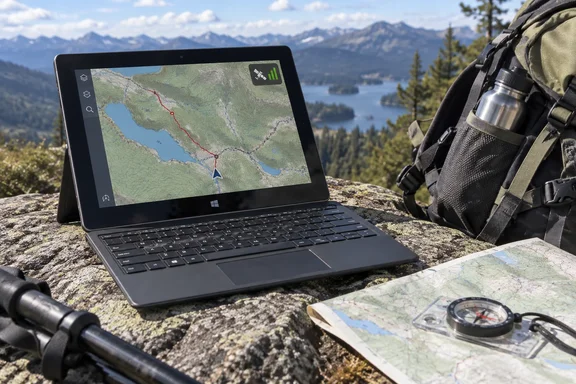
Below is what he did, what it shows, and the caveats that matter in late 2026.
The GPS chip nobody mentioned
The TabPro S launched in 2016 as a 12-inch Windows 10 Pro 2-in-1 with a detachable keyboard. Samsung's short sensor list for it names accelerometer, light and Hall sensors. It doesn't list GNSS. Gibson found the receiver while running Linux on the tablet, during a long fight with its camera and LTE modem drivers. An unfamiliar Broadcom device turned out to be a satellite receiver.
After he reluctantly went back to Windows 10, Samsung's drivers identified it as a Broadcom GNSS 4752 Geolocation Sensor with a matching bus driver. He used this PowerShell query to find it:
Get-PnpDevice | Where-Object { $_.FriendlyName -match 'GNSS|GPS|Location' -or $_.InstanceId -match 'SSE.4752' } | Format-Table Status, Class, FriendlyName -AutoSize
The name-matching part of that filter works on any Windows machine and is a quick way to check for hidden positioning hardware. The SSE.4752 instance-ID match is specific to this device. On other tablets, especially LTE-equipped business models, the GNSS hardware may sit inside the cellular modem or be missing entirely, so a blank result doesn't prove much.
Takeaway: your old Windows tablet might have a GPS receiver that the spec sheet never mentioned. Device Manager or Get-PnpDevice is where to look.
Why the first dot on the map was misleading
Gibson installed Cartograph Maps 4, a cross-platform mapping app from developer Harald Meyer. Its download page lists Windows 10 64-bit and newer. At first the app placed him roughly in the right spot but didn't follow him outdoors. A PowerShell check showed why: Windows reported the location source as IPAddress, with an estimated accuracy of about 300 feet. That position stayed even after he turned off Wi-Fi and cellular.
This matches how the Windows location stack is built. Microsoft's developer documentation for the PositionSource enumeration lists possible sources as cellular network data, satellite data, Wi-Fi network data, and IP address, plus Unknown, Default and Obfuscated values. Microsoft says Default represents the user's manually configured location, and accuracy depends entirely on user input and may not reflect the current physical location.
Microsoft also says IP-based location provides instant acquisition but limited precision, so apps often use it as a fallback or for initial rough positioning. Satellite, by contrast, provides the highest accuracy outdoors but requires a clear sky view. Initial acquisition may take 30+ seconds for a cold start. And importantly, the system selects a single provider based on availability, cost, accuracy, and reliability, and may switch to a different source if conditions change.
So your mapping app can show a confident-looking marker that is really just a guess based on your IP address, while the GPS chip does nothing.
Gibson fixed it in three steps:
- He turned on Cartograph's "Keep GPS always on" setting, a tip he found on Reddit. Cartograph's Sensor Manager documentation says this option keeps GPS on while the app is in the foreground.
- He cleared Windows' location history and rebooted.
- He went outside under open sky with Wi-Fi off.
The second PowerShell check reported Source: Satellite, AccuracyMeters: 6 (about 19.7 feet) and FixAgeSeconds: 1. That was his proof of a fix with no Wi-Fi or SIM. Treat these as one reported result on one device, not a benchmark.
Two practical notes:
- Location history has changed. Microsoft's privacy documentation says Windows removed local storage of location history, and the related settings, in March 2025. If you're signed in with a Microsoft account and Location Services is on, your location may be saved periodically in the cloud instead. You clear that from your Microsoft account's privacy page with "Clear location activity," not from a local Settings button. Depending on how current your build is, the "clear history" step may not look the way you expect.
- Check the app's filters. Cartograph's Sensor Manager also has a minimum-accuracy setting. Readings less accurate than the threshold are ignored. If the marker won't move, check that setting along with the always-on toggle. This is an inference from Cartograph's documentation, not something Gibson reported.
Takeaway: a GPS test only counts once the location source reads Satellite.
Offline topo maps on a 12-inch screen
For the screenshots, Gibson spoofed his location to Chain Lakes near Mount Baker in Washington, and he says so clearly. He downloaded the OpenAndroMaps map for Washington State and applied its Elevate theme in Cartograph.
OpenAndroMaps is an OpenStreetMap-based set of offline vector maps built for outdoor use, with topographic detail such as contour lines, in the Mapsforge format. Cartograph's site says the app is fully compatible with OpenAndroMaps maps and themes. It also supports MBTiles, Garmin IMG maps without DRM, offline hill shading and slope mapping.
The result was trails winding between lakes and ridges, with contour lines showing elevation changes. Gibson found outdoor features easier to read than in Google Maps on PC, and the big screen let him see the whole route and still zoom in on woods, rocks and creeks.
His offline check is worth copying. With the internet off, he reopened Cartograph, panned well away from any area he'd already viewed and zoomed in. The map still rendered, which shows the data was stored on the tablet and not just cached tiles. Do this at home before you trust any offline setup in the backcountry.
Planning the route before you leave
Next came planning. Gibson dragged a public Chain Lakes GPX file from File Explorer into Cartograph. The app asked whether it was a map, style, track, overlay or package. He chose Track, and the route appeared on the offline map.
He then:
- Added bookmark waypoints with the touchscreen, marking photo spots
- Replaced the generic red pins with real photos so each landmark was easy to recognize
- Opened the GPX elevation graph to see where the climbs were and where he'd want a break
Cartograph's feature list covers most of this and more: GPX, KML and Garmin FIT import/export, photo waypoints, a track-drawing tool, and elevation profiles. Gibson says exporting his own GPX files requires the Pro version. He also gives a sensible warning: check self-made GPX files before sharing them. The track points and geotags can reveal where your walk starts and ends, which is often your home or your parked car.
The real walk: 20 minutes and a dog
Screenshots only prove so much. Gibson turned off the location override, disabled Wi-Fi and took the tablet, with his dog, on a real 20-minute walk around his neighborhood.
With "Keep GPS always on" enabled:
- The marker moved with him, and the compass indicator turned the right way when he did.
- He logged waypoints roughly every 300–400 feet but didn't measure precise error. He says the accuracy was adequate.
- At 50% screen brightness, the battery indicator dropped 5 percentage points in 20 minutes.
That battery number is good for a short test, but it's one data point. Microsoft notes that satellite positioning provides the highest accuracy but consumes more power and requires more time for initial positioning. An old battery, cold weather, more brightness and hours of use will all change the picture. Gibson himself would bring a full-featured power bank on an all-day hike.
What he didn't test
- Offline route calculation. Cartograph includes BRouter, an OpenStreetMap-based offline router. Its help page describes the steps: press and hold a map point, choose "Navigate to" or "Navigate from," open the three-dot menu in the bottom toolbar, pick "Routing service," then select "BRouter offline." It also supports no-go areas and custom routing profiles. Gibson says this was out of reach in the free version and he chose not to upgrade, so it's untested here.
- Off-road and marine use. He mentions downloaded terrain maps for off-roading and OpenSeaMap nautical charts, but only tested on foot. Don't treat a repurposed tablet as a certified marine or vehicle navigator.
- Rugged conditions. A slab of glass and magnesium with a keyboard cover is not a waterproof, drop-rated handheld GPS. Carry a backup.
The Windows 10 problem
This is the caveat most coverage will skip. Windows 10 reached end of support on October 14, 2025. Microsoft no longer provides free security updates, software updates or technical support for standard installations. The OS still runs, but Microsoft warns that unpatched PCs face greater malware risk. The consumer Extended Security Updates program can cover eligible Windows 10 devices until October 12, 2027, so check whether you qualify.
A mostly offline, single-purpose navigation device is lower risk than a daily driver used for email and banking. That doesn't make the OS supported again. If you do this, keep the tablet off untrusted networks, install apps only from trusted sources, and don't store anything sensitive on it.
Quick checklist for trying it yourself
- Find the receiver: run the
Get-PnpDevicefilter above, or look under Sensors and similar categories in Device Manager. - Enable location: turn on Location Services and allow your mapping app to use it. Microsoft notes that desktop apps don't get per-app control over precise location.
- Confirm the source: make sure Windows reports Satellite outdoors, not IPAddress or Default.
- Configure Cartograph: turn on "Keep GPS always on" and check the minimum-accuracy filter.
- Download maps and a theme: an OpenAndroMaps region plus Elevate.
- Test offline: turn off networking, pan somewhere you've never viewed, and zoom in.
- Load your route: import the GPX as a Track and add waypoints.
- Test the battery at home first, then pack a power bank.
Bottom line
Gibson doesn't claim to have replaced Google Maps for everything. With a signal, Google still wins on convenience. But for trips beyond cell coverage, a decade-old Windows tablet with a forgotten Broadcom GNSS chip gave him a verified satellite fix, big-screen offline topo maps and proper route planning, all with Wi-Fi off. The main lesson for Windows users is to check that the location source says Satellite before you trust the dot. The main caution is that it's still running Windows 10.
Have an old Windows tablet with an LTE slot? It may have a GPS receiver too.
References
- I turned a 10-year-old tablet into an offline hiking GPS and ditched Google Maps for good - MakeUseOf MakeUseOf · 2026-09-28T11:01:15+00:00
- Cartograph Maps – Offline vector maps cartograph.eu
- Sensor manager – Cartograph Maps cartograph.eu