

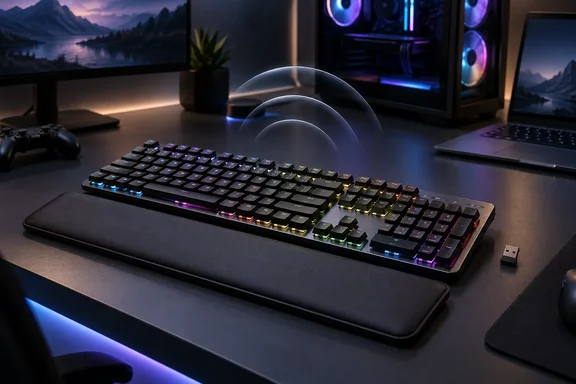
Turtle Beach Vulcan II XP Air: What Wireless Adds to the Vulcan Design
According to Turtle Beach's press release, carried by TechPowerUp, the Vulcan II XP Air is a premium full-size wireless mechanical gaming keyboard built on the award-winning low-profile Vulcan design. Several outlets covered the launch on the same day, including NextGenTech.it, Megamodo and Dekazeta. Their stories mostly repeat the press release, so they confirm that the announcement happened but don't add independent testing. NextGenTech.it does point out that "full-size" here means the keyboard includes the numeric keypad.
The keyboard supports three connection modes. You can use 2.4 GHz wireless, Bluetooth, and wired USB-A connectivity and switch between as many as five devices. Turtle Beach's product specifications show how those five slots are split: one 2.4 GHz connection through a USB-A receiver, three Bluetooth channels and one wired USB-A connection. So "five devices" means five saved connections you can switch between. Turtle Beach does not say you can type on all five at the same time. The company pitches the feature at people who share one desk between a gaming PC, a laptop, a tablet or a phone. The keyboard also has a built-in slot for storing the receiver.
The specifications give a 1,000 Hz polling rate for both the 2.4 GHz and wired modes. No Bluetooth polling rate is listed. That gap matters if you plan to game over Bluetooth, because the published high-performance figure covers only the receiver and the cable. The keyboard comes with a braided, detachable 1.8-meter USB-C-to-USB-A cable. The system requirements call for USB-A 2.0 or later.
The 95-Hour and 2,000-Hour Battery Figures Depend on Two Settings
Turtle Beach says the 6,000 mAh battery delivers up to 95 hours of battery life with RGB lighting and AirTrack enabled, or up to 2,000 hours with both disabled. On the product page, the 95-hour figure is tied to AIMO RGB lighting at 80 percent brightness. These are Turtle Beach's own numbers under stated conditions. No outlet has published an independent battery test yet.
The gap between the two figures shows where the power goes. Lighting and the gesture sensor account for most of it. If you run the keyboard mainly with the lights on, plan around the lower figure, which works out to about two working weeks per charge for a heavy user. The 2,000-hour figure only applies with both features off.
Turtle Beach also describes a presence-detection feature that automatically dims RGB lighting when you step away to help extend battery life without interrupting your workflow or gameplay when you return. That should help in everyday use, since a keyboard left on a desk overnight or over lunch would otherwise keep its lights on. Turtle Beach hasn't published how much runtime this saves, and the product page doesn't give a charging time.
AirTrack Gesture Sensor: A New Feature With Few Details So Far
AirTrack is the one feature the Air has that the wired model lacks. Turtle Beach calls it exclusive AirTrack Gesture Sensor technology, adding intuitive touch-free control for media playback, audio, and compatible commands with a simple hand movement. Italian outlet SHIFTS! Magazine describes it as an infrared sensor that detects hand movement above the keyboard's chassis. Turtle Beach's own product page doesn't name the sensing technology.
The public materials leave out the things a buyer would most want to know: which gestures are recognized, how far away the sensor detects a hand, and what "compatible commands" means in practice. Media playback and audio control are the only functions named. Treat anything beyond those as unconfirmed until Turtle Beach publishes a gesture list or reviewers test it.
Turning AirTrack off is one of the two changes behind the jump from 95 to 2,000 hours, so it isn't a free extra. Buyers who never use media gestures lose little by turning it off. The presence-based dimming is part of the same system, though. Turtle Beach doesn't say whether dimming still works with gestures disabled.
TITAN HS Switches, Hot-Swap Sockets and a 50-vs-100-Million Rating Conflict
Both keyboards use Turtle Beach's TITAN HS mechanical switches. They come lubricated from the factory and sit in hot-swap sockets that accept both 3-pin and 5-pin mechanical switches. You can pull a switch and replace it without soldering, whether it's a worn one or a different type you want to try. The Air comes with a combined keycap and switch puller and three spare TITAN HS switches. Turtle Beach also claims factory pre-lubed TITAN HS switches, refined stabilizers, and integrated sound-dampening foam deliver smoother keystrokes and cleaner acoustics. No outlet has published a sound test or typing impressions yet.
The Air is sold only with Red Linear switches. The spec sheet lists 1.8 mm actuation and 45 g actuation force, which match the wired model's Red Linear specs. The durability figures don't match. Turtle Beach's Air product page rates the Red Linear switches at 100 million tested keystrokes. The wired Vulcan II XP's product page and August press release rate the same-named switches at 50 million, and the September press release uses the 50 million figure too. Turtle Beach hasn't explained whether the Air uses a different version of the switch or whether one page is wrong. If switch lifespan affects your decision, take 50 million as the confirmed figure for the wired model and treat the Air's 100 million as a claim that needs confirming.
The design carries over from the Vulcan line: a brushed aluminum top plate, floating keys, dedicated media controls, a detachable wrist rest covered in vegan leatherette, and height adjustment with flat and raised positions. Without the wrist rest the Air measures 462 × 153 × 32 mm. Turtle Beach hasn't listed its weight. The wired model weighs 801 g without the rest or cable.
Windows Dynamic Lighting, Windows Wheel and Swarm II: Separate Software Requirements
The Windows integration has the most direct effect on PC setups. The Air has a dedicated multi-function media wheel with Windows Wheel support, per-key AIMO RGB lighting, Windows Dynamic Lighting support, and Swarm II software with five onboard profiles. The wheel adjusts volume and mutes when pressed. Turtle Beach says Windows Wheel support allows navigation "in compatible Windows applications," but it doesn't list which apps those are.
The system requirements split into two levels, and buyers should know which one applies to them:
- Turtle Beach's Swarm II desktop software supports Windows 10 and later, and the driver software needs an internet connection.
- Windows Dynamic Lighting support requires Windows 11, where Turtle Beach says you can control the keyboard's lighting directly from Windows and match it to compatible third-party devices without extra software.
- Five profiles can be stored on the keyboard itself, so remaps and macros set up in Swarm II should carry over when you switch to another device. Turtle Beach doesn't say whether those profiles work over Bluetooth on non-Windows devices.
- AIMO lighting sync across other Turtle Beach AIMO peripherals is handled through Swarm II, not through Windows.
For Windows 10 users, this means the lighting and remapping features rely on Swarm II. The option to skip vendor software and let Windows manage the RGB is only available on Windows 11. Since Turtle Beach's software needs an internet connection, anyone setting this up on a locked-down or offline machine should check that requirement before assuming the full feature set will work.
For gaming, Turtle Beach lists full N-key rollover (NKRO) and anti-ghosting, which aim to register every key in a combination, plus ReacTap SOCD. SOCD stands for simultaneous opposing cardinal directions. Turtle Beach describes ReacTap as prioritizing the latest directional input, so if you hold both A and D, the most recent press wins. That makes counter-strafing faster. EASY-SHIFT[+] turns a held key into a modifier for secondary functions, macros and remaps. Game Mode switches on ReacTap and locks the Windows key.
Vulcan II XP vs. Vulcan II XP Air: The $50 Difference
This launch is really a two-model lineup, and the wired Vulcan II XP isn't new this week. Turtle Beach's corporate newsroom dates its reveal to August 26, 2026, the same day pre-orders opened. Megamodo notes that it was already unveiled at Gamescom 2026 and is now available for pre-order alongside its wireless sibling. Both models ship October 25.
| Vulcan II XP Air | Vulcan II XP | |
|---|---|---|
| MSRP | $199.99 / €179.99 / £169.99 | $149.99 / €129.99 / £119.99 |
| Connectivity | 2.4 GHz, Bluetooth (3 channels), wired USB-A | Wired USB-A only |
| Battery | 6,000 mAh, up to 95 h / 2,000 h (Turtle Beach figures) | None |
| AirTrack gestures and presence dimming | Yes | No |
| Switch options | TITAN HS Red Linear | TITAN HS Red Linear or Brown Tactile |
| Stated switch lifecycle | 100 million (Air product page) | 50 million |
| Colors | Not specified in available listings | Black and White |
| Shared features | Hot-swap 3/5-pin, NKRO, ReacTap SOCD, EASY-SHIFT[+], Game Mode, media wheel, AIMO RGB, Windows Dynamic Lighting, Swarm II | Same |
Regional retailers confirm the euro prices. NextGenTech.it reports both keyboards arrive on 25 October 2026, at €179.99 and €129.99 respectively, and Turtle Beach's French store lists the Air for pre-order at €179.99 with an expected ship date of October 25. The US dollar and pound prices for the Air come from Turtle Beach's press release. The French store also offers German, French, US and Swiss layouts for the Air. Turtle Beach hasn't said which layouts will be sold in other regions.
The wired model is the only one with a tactile option. Buyers who prefer the bump of a Brown switch can get it straight from the factory only on the cheaper keyboard. Because the Air has hot-swap sockets, you could fit tactile switches yourself, but you'd have to buy them separately.
What this means for you
If you want one full-size keyboard to switch between a gaming PC and a work laptop or tablet without moving cables, the Air is the model to consider. For a single desktop that already has the cable run, the wired Vulcan II XP gives you the same switches, gaming features and Windows integration for $50 less. Since neither keyboard ships until October 25, pre-ordering the Air now only makes sense if you're willing to buy AirTrack before its gestures, range and supported commands have been documented or tested.
- The Vulcan II XP Air costs $199.99, €179.99 or £169.99, and the wired Vulcan II XP costs $149.99, €129.99 or £119.99. Both ship October 25, 2026.
- The Air's 95-hour battery figure assumes RGB at 80 percent brightness with AirTrack on. The 2,000-hour figure only applies with both turned off.
- Windows Dynamic Lighting control requires Windows 11. Swarm II supports Windows 10 and later and needs an internet connection for the driver software.
- The five-device switching covers one 2.4 GHz receiver, three Bluetooth channels and one wired connection. Turtle Beach publishes a 1,000 Hz polling rate only for 2.4 GHz and wired.
- Brown Tactile switches are available only on the wired model. The Air ships with Red Linear, and its hot-swap sockets accept 3-pin and 5-pin replacements.
- Turtle Beach's pages give conflicting switch lifespans for the Air (100 million) and the wired model (50 million). If durability matters to you, get this confirmed before you buy.
On paper, the Vulcan II XP Air is a sensible expansion of a well-known low-profile design: it adds wireless, a large battery and good Windows 11 lighting support to the wired XP's features. Its standout feature, AirTrack, is also the one Turtle Beach has explained least. Once the Air ships on October 25 and reviewers publish battery tests and hands-on gesture impressions, it should be clear whether AirTrack is worth $50 over the wired model.
References
- (PR) Turtle Beach Unveils the Vulcan II XP Air Gaming Keyboard TechPowerUp · 2026-09-25T13:37:53+00:00