

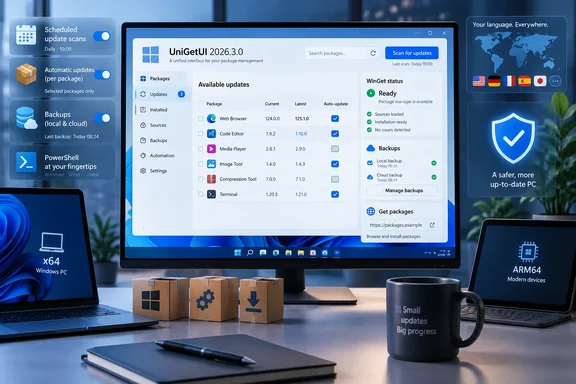
The project’s GitHub release, published September 15, describes 2026.3.0 as a feature release with independent schedules for update scans, automatic installations, local backups, and cloud backups. ComputerBase, which independently reviewed the update on September 16, confirms those scheduling controls and the accompanying WinGet fixes. The practical consequence is straightforward: UniGetUI users can now automate a narrower, more deliberate set of maintenance tasks without opting every discovered application into unattended updates.
This is a useful advance for the tool’s Windows audience, but it should not be mistaken for enterprise patch management. UniGetUI still orchestrates package managers and their upstream repositories; it does not establish a tested deployment ring, approve individual package versions, or provide the policy and audit controls organizations normally require before allowing software updates to install unattended across managed endpoints.
Scheduled maintenance separates checks, installs, and backups
Version 2026.3.0 lets users schedule four actions independently: checking for available updates, installing selected updates automatically, making local backups, and making cloud backups. Each can have its own schedule, retry behavior, and timeout. That separation is more significant than a single “auto-update” switch because it allows a machine to inventory available changes frequently while reserving actual installations for a maintenance window.
A workstation, for example, can check package status daily, back up its UniGetUI package configuration weekly, and install an approved set of updates overnight. The release notes do not spell out every scheduling trigger or whether missed jobs run immediately at the next sign-in, so administrators should validate the behavior on a pilot device before treating it as a replacement for an existing maintenance process.
The companion change is selective automatic updating. Rather than enabling automatic updates for every package UniGetUI recognizes, a user can mark individual packages for automated installation. This gives the feature a usable safety boundary: routinely updated utilities can be automated while browsers, developer toolchains, drivers, business applications, and packages with fragile plug-ins can remain manual.
That is particularly relevant because UniGetUI combines more than WinGet. Windows builds work across WinGet, Scoop, Chocolatey, PowerShell, npm, pip, Cargo, .NET Tool, and other supported sources. A broad “update everything” instruction can involve fundamentally different installation methods, privilege requirements, package metadata quality, and vendor-hosted installers. The new per-package opt-in does not eliminate those risks, but it makes it easier to avoid creating them by default.
WinGet reliability work addresses real blind spots
The strongest Windows-specific changes in 2026.3.0 are not the new scheduler controls. They are fixes for how UniGetUI finds and interprets WinGet packages.
Devolutions says the release corrects package detection, search, and update checks on Windows installations using a non-English display language. It also changes how UniGetUI finds WinGet when the executable is missing from the normal system path: instead of assuming a conventional command-line environment, it attempts to locate Microsoft’s App Installer through Windows. ComputerBase separately highlighted both corrections.
For users whose Windows display language is not English, these were not cosmetic defects. A package front end that cannot reliably search its catalog or recognize installed software can produce an incomplete inventory, and incomplete inventory is the most dangerous kind of automation input: it looks clean while omitting software that still needs attention.
The release also fixes an issue in which the first update scan could under-report available updates. UniGetUI now refreshes its snapshot of the WinGet catalog when the source index changes. That does not guarantee that every package manager will always report a current version accurately—third-party manifests and version conventions remain outside UniGetUI’s control—but it removes a local caching failure that could make a fresh scan misleading.
Another welcome change is that the interface now warns when it cannot reliably verify an installed package version. That sounds minor, but it is the right behavior for a management tool. Silent uncertainty leads users to assume an application is current, or leads an automated rule to act on an unreliable comparison. A visible warning is not a cure for ambiguous package metadata; it is an honest indication that the application does not have enough evidence to claim the installed version with confidence.
The security changes deserve prompt updating, but not panic
UniGetUI 2026.3.0 hardens PowerShell-based package operations by validating package values, rejecting shell metacharacters, and passing arguments as data rather than inserting them into a command. That is a standard but important defense against command injection, where specially crafted input can change the meaning of a shell command and cause unintended code to execute.
The release also tightens settings imports. It rejects unknown or unsafe names and blocks secure-settings paths from escaping their intended directory. In plainer terms, an imported settings file should no longer be able to use unexpected configuration keys or path traversal to write outside the directory UniGetUI expects to protect.
Neither the GitHub release nor ComputerBase identifies a CVE, describes an in-the-wild exploit, assigns severity, or says whether malicious package metadata, a shared configuration file, or another input path could previously trigger the issue. Readers should therefore treat this as a meaningful hardening update rather than evidence of a publicly documented breach.
Still, the security relevance is higher for users who manage packages through PowerShell, import UniGetUI settings between machines, or share configuration backups. Updating is prudent, particularly where the tool runs with elevation. Its new shortcut-removal logic can request elevated rights when required, and any package-management utility that can invoke installers or administrative actions deserves the same care as other software deployment tooling.
Backup retention and portable support change how the tool can be operated
The release adds configurable retention limits for timestamped local backups, automatically deleting the oldest files once the limit is exceeded. That makes recurring backup jobs more practical, especially on systems where UniGetUI’s package lists and customized install settings are part of a repeatable workstation build.
UniGetUI’s backups are useful for reconstructing a software setup, but they are not a full device image and should not be represented as one. A package backup can preserve a list of applications and chosen install parameters; it cannot guarantee that an upstream package remains available, that the same installer behavior persists, or that application data and license state will return with it. The new scheduler makes these backups easier to keep current, while the retention limit reduces the chance that they simply accumulate unnoticed.
The release’s “full portable support” is also most useful when paired with a realistic expectation. A portable copy of UniGetUI can make it easier to carry the management interface between machines or keep it alongside a technician toolkit. It does not make every package manager or every package portable. WinGet still depends on Windows and App Installer integration, while other supported managers may have their own prerequisites, repositories, installation scopes, and environment requirements.
UniGetUI additionally adds a %NAME% placeholder and a per-package subfolder option for custom installation directories. For users maintaining tools outside the default Program Files path—such as developer utilities, portable-adjacent software collections, or test applications—that can produce more predictable, sanitized package paths. It is a configuration convenience, not isolation: software installed into a custom directory can still register services, add file associations, modify PATH, or otherwise affect the system if its installer does so.
Shortcut and installer-host visibility improve oversight
The unified shortcut manager now covers Start menu shortcuts and folders as well as other supported shortcuts. Users can remove, reset, and relocate entries, and UniGetUI can prompt after installation. The official notes also mention command-line support, while ComputerBase reports that command-line shortcut management is planned for a future version; the present release documentation is clearer on the feature destination than on the exact current command-line workflow. Users who need to script shortcut changes should verify the available commands in the version they deploy rather than assume feature parity from the graphical interface.
More immediately useful is the optional Installer host column. It exposes the download domain used for an installer and makes the full installer URL available in a tooltip. For a tool that fronts several package ecosystems, that is a practical transparency feature: the package’s display name is not always enough to tell an operator where an executable will come from.
It should be treated as an inspection aid, not a trust verdict. A familiar domain does not by itself verify a package’s publisher, and an unfamiliar content-delivery domain is not automatically malicious. But making the host visible before installation gives users an opportunity to spot unexpected download paths, compare them with an organization’s allowlists, and investigate a package before it is executed.
The version also improves error reporting for unavailable installers, already-current packages, and WinGet hash mismatches. The latter deserves attention: a hash mismatch means the downloaded installer does not match the package metadata expected by WinGet. The correct response is to stop and investigate, not to bypass verification merely to complete an update.
What to do with 2026.3.0
Existing UniGetUI users should update to 2026.3.0 for the localized-Windows WinGet fixes, the first-scan catalog refresh, and the PowerShell and settings-import hardening. The official release was published September 15 with installer and portable packages for both x64 and ARM64 Windows systems, alongside checksums for verifying downloaded files.
Before enabling scheduled automatic installs, start with a small allowlist of applications that have predictable unattended updates and low business impact. Keep development environments, line-of-business software, packages requiring elevated installation, and anything tied to drivers or integrations on manual approval until their behavior is known. Configure backup retention deliberately, and test restoring a package list on a noncritical machine.
UniGetUI 2026.3.0 makes the application more credible as a maintenance console because it improves the reliability of the information users act on and narrows automation to packages they choose. Its value will come from applying that control selectively—not from treating every package source on a Windows PC as safe to update on a timer.
References
- UniGetUI 2026.3.0 Neowin · 2026-09-16T22:00:02+00:00