

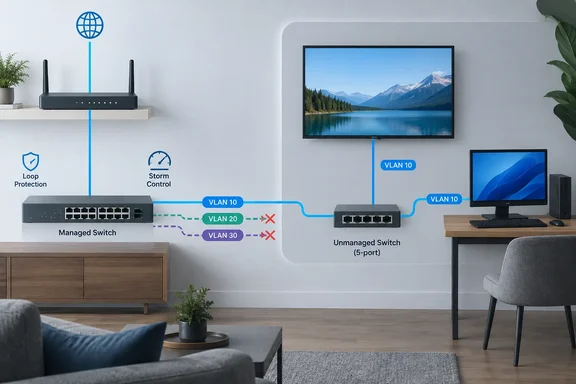
A new piece from XDA Developers argues that this is where the trouble starts. The author, Joe Rice-Jones, says mixing the two kinds of switch broke his network in ways he didn't expect. The practical risk is that a port configured for one endpoint may now serve several devices behind an unmanaged switch. Managed switches can support multiple MAC addresses on a port when configured for them; VLAN and loop protections must also fit the actual topology. Much of the fix is on the managed-switch uplink. Cisco documents configurable port-security MAC limits.
Below is what goes wrong, what the standards and vendor documentation actually support, and where the original account needs a "your mileage may vary" label.
The trunk port problem: tags pass through, but nothing enforces them
Most of the trouble starts when the managed-switch port feeding the unmanaged switch is set up as a trunk that carries tagged traffic for several VLANs.
An unmanaged switch knows nothing about VLANs. To it, an 802.1Q tag is just an unfamiliar EtherType (0x8100 in the Tag Protocol Identifier field, per Cisco's frame-format documentation). So what does it do with the frame?
- Usually, it forwards it. Network engineer Daniel Dib looked at this on his blog and concluded that even for a device that doesn't understand 802.1Q, this is a perfectly valid frame. A switch should not concern itself with the payload of the frame. It should just bridge the frame based on the MAC address table.
- Hands-on tests agree, mostly. Kenneth Finnegan set up a test where two L2 managed switches tagged and untagged Ethernet traffic, then put various unmanaged switches between them on their trunk line, and the VLAN tunnel kept working.
- But not always. An IP Cam Talk forum reply summed it up: if you're lucky an unmanaged switch will just pass the tags. Others might strip them or drop the packets entirely. It really depends on the switch.
XDA's claim that some switches strip or drop tagged frames is plausible and matches community reports. Neither the XDA piece nor the sources above names a specific model that misbehaves, though, so treat pass-through as something that depends on the hardware, not a guarantee.
The four-byte size problem
The second issue is frame size. Cisco's 802.1Q documentation says the tag is 4 bytes, so a tagged Ethernet frame can be as large as 1,522 bytes. The pfSense documentation from Netgate says the same: each VLAN frame has a 4 byte 802.1Q tag added in the header, so the frame size can be up to 1522 bytes, compared with the normal 1518 byte maximum with 1500 MTU Ethernet.
Cisco employee Peter Paluch made the same point on the Cisco Community forums. Frames over 1,518 bytes may be considered as oversized by the unmanaged switch and dropped or corrupted - this has to be experimentally verified, and while most modern unmanaged switches tolerate slightly oversized frames, he wouldn't guarantee it.
XDA describes the classic symptom: pings and DNS lookups work, but file transfers and large web pages stall. Small packets fit and full-size ones don't. That's a good hypothesis to test, not a diagnosis. The same symptom can come from MTU mismatches elsewhere, bad cables or firmware problems.
A Windows-side test (general practice, not taken from XDA): on a Windows PC whose NIC or Hyper-V virtual switch is tagging traffic across the suspect segment, ping -f -l 1472 <target> sends a full 1,500-byte IP packet with "don't fragment" set. If ping -l 64 works and the 1472 version consistently fails, look closely at frame-size handling somewhere in the path.
Section summary: Tagged frames usually get through unmanaged switches, but you can't count on it, and the extra four bytes can cause trouble on some hardware. The only way to know is to test your own switch.
Every VLAN on the trunk ends up in one room
This is the part that surprised the XDA author most, and it's the most important security point. Even when tags pass through cleanly, the unmanaged switch forwards frames by MAC address and ignores VLAN membership. Paluch's forum answer puts it plainly: another device on that switch may therefore get access to the tagged traffic as a result, or inject arbitrary frames to any VLAN including the native VLAN.
The IP Cam Talk thread gives a useful way to think about it: if the switch keeps 802.1Q tags intact, treat the unmanaged switch as if every port is a trunk port without any VLAN restrictions.
What does that mean in practice? A Linux box, a Proxmox host, an access point or a Windows machine running Hyper-V can all be VLAN-aware. Guides on trunking describe the link from a switch to a virtualization host is tagged when the host's vSwitch is configured for trunked VLAN access (VMware "VLAN tagging mode 4095", Hyper-V trunked vNIC, etc.). Any of those devices, plugged into the unmanaged switch, can send traffic into whichever VLANs the trunk carries. Your carefully isolated IoT and camera networks stop at that one cable.
One correction to XDA's wording: an ordinary TV or smart plug doesn't suddenly start using every VLAN just because tagged frames pass its port. Most endpoints ignore frames tagged for VLANs they aren't set up for. The real risk comes from devices that are VLAN-capable, misconfigured or deliberately hostile. For anyone running separate VLANs for security, that's still reason enough to act.
Which VLAN do untagged devices end up on?
Ordinary devices send untagged frames. When those frames reach the managed switch, they're assigned to that port's native VLAN, often shown as the PVID in consumer and prosumer switch interfaces. Network Direction's explainer puts it simply: the switch assigns any untagged frame that arrives on a tagged port to the native VLAN.
Two failure modes follow:
- The PVID is your main LAN or, worse, your management VLAN. Your smart plugs are now on the same network as your switch's admin page.
- You've removed untagged traffic from the trunk. Devices on the unmanaged switch get no DHCP lease and look completely dead.
XDA also mentions a quieter problem. An unmanaged switch has one MAC address table for everything, so a device that uses the same MAC address on two VLANs (some routers and virtual bridges do this) can keep getting relearned on different ports, causing intermittent drops. The mechanism makes sense given how shared-table switches work, but XDA offers no captures or model details, so file it as something to check, not a confirmed cause.
Section summary: Pick the PVID on purpose, and never make it the management VLAN.
Loops, BPDUs and protections that backfire
One stray patch cable
Plug both ends of a patch cable into the same unmanaged switch and you've created a bridging loop. Broadcasts circle endlessly, and if that switch hangs off a trunk, the storm can spread into every VLAN the trunk carries.
Whether the managed switch notices depends on the unmanaged one. Cisco's documentation explains that Spanning Tree Protocol blocks redundant paths using BPDUs. If the unmanaged switch floods BPDUs, the managed switch hears its own BPDU come back and can react. A Cisco Community thread from a network admin tracking down rogue switches shows both sides of this. One admin confirmed in a lab that an unmanaged switch can cause a loop, and that BPDU Guard caught it because the looped switch flooded BPDUs back upstream. The same admin also said he had found no way to detect the switch until it actually looped, and warned that BPDU filtering blinds that detection entirely.
XDA's advice holds up: don't rely on STP alone. Turn on storm control for the port, and loop detection if your switch has it (vendors call it Loop Protection, Loopback Detection and other names).
BPDU Guard, port security and 802.1X
Cisco's PortFast and BPDU Guard guide says BPDU Guard places a port in the errdisable state when it receives a BPDU. It protects edge ports where BPDUs are unexpected. A BPDU arriving through an unmanaged switch may indicate a downstream bridge or loop; investigate the cause before changing that protection. On Cisco gear, it stays down until someone re-enables it by hand or errdisable recovery is configured.
Port security with a low MAC address limit can trip as soon as a second or third device connects. What happens next depends on the violation action you configured.
For 802.1X, XDA describes two outcomes: either the first device authenticates and everything behind it rides along, or nothing gets through. That's too tidy. What actually happens depends on the authenticator's host mode (single-host, multi-host, multi-auth and so on) and the vendor. The underlying point still stands: a port feeding another switch needs its protections picked for that job, not left at settings meant for a single host.
Quieter symptoms that look like bad Wi-Fi
Multicast flooding
Cisco's IGMP snooping documentation states that without IGMP capabilities, a layer 2 switch forwards a multicast frame to all ports (except the incoming port). Snooping fixes this by forwarding only to ports whose devices joined the group. An unmanaged switch has nothing to configure here. Your managed switch can snoop on the uplink, but it sees the whole room as one listener.
XDA lists IPTV, Sonos and AirPlay discovery, cameras and Dante audio as traffic that can flood the room, with stuttering streams and speakers dropping out of groups as possible results. Those are realistic on a busy network. On a quiet one you may never notice. Keep multicast-heavy devices on managed ports, or give the room its own VLAN.
Energy Efficient Ethernet
XDA calls Energy Efficient Ethernet (802.3az) a well-known cause of link flapping on cheap switches that can't turn it off. The IEEE amendment itself only defines a Low Power Idle mode and the signaling around it. It doesn't show that EEE routinely breaks links, and XDA gives no model or logs. Treat disabling EEE on the managed side as a reasonable test. If drops continue, check cabling, speed negotiation and firmware before blaming the switch.
Visibility and bandwidth
Everything behind the unmanaged switch shares one managed port. The managed switch can usually still learn the individual MAC addresses on that uplink, but per-port controls apply to the whole room at once: stats, QoS, PoE and the ability to shut off one misbehaving device. Those devices also share one uplink's bandwidth. A TV and a console won't notice. A NAS and a desktop copying large files at the same time will compete.
The fix: configure the uplink port
Nearly everything above gets fixed at the managed-switch port, not in the room:
- Set the uplink to access mode (or "untagged member of one VLAN" in HP/Aruba-style interfaces).
- Choose the VLAN deliberately. Never use the management VLAN.
- Remove every other VLAN from that port.
- Turn on storm control and loop detection where supported.
- Review port-security and spanning-tree settings for a downstream switch. If port security is enabled, set its MAC limit for the intended devices using your vendor's guidance. Keep BPDU Guard where it protects an intended edge port; investigate BPDU-triggered shutdowns rather than disabling the guard as a routine fix. Don't disable spanning tree across the network.
- Test EEE by turning it off on the managed side if links flap.
- Check the result. A device on the unmanaged switch should get a DHCP address from the intended VLAN's subnet and shouldn't be able to reach the switch admin interface.
The IP Cam Talk thread said it bluntly: in general you should never send VLAN-tagged frames through unmanaged switches, there is no value in doing so.
The bottom line
Unmanaged switches still have a place in a segmented network, as long as each one serves a single VLAN. Once a room needs two VLANs, replace it with a managed switch (even a cheap "smart" model with VLAN support).
The XDA piece is a useful checklist, but it's a first-person account without switch models, packet captures or test results. Its core advice lines up with Cisco documentation and experienced engineers: don't trunk to a switch that can't enforce VLANs. The more specific failure stories about EEE, 802.1X and tag stripping are possibilities to test on your own hardware, not guarantees.
Correction (September 27, 2026): We corrected an overstatement that managed-switch ports serve only one device and removed advice to relax BPDU Guard as a routine fix. Port-security MAC limits can be configured for multiple devices, while an unexpected BPDU calls for investigation of the downstream topology.
References
- Mixing managed and unmanaged switches broke my network in ways I never expected XDA · 2026-09-27T12:00:18+00:00
- what happens to trunks if you put an unmanaged switch between - Cisco Community community.cisco.com
- Inter-Switch Link and IEEE 802.1Q Frame Format - Cisco cisco.com