

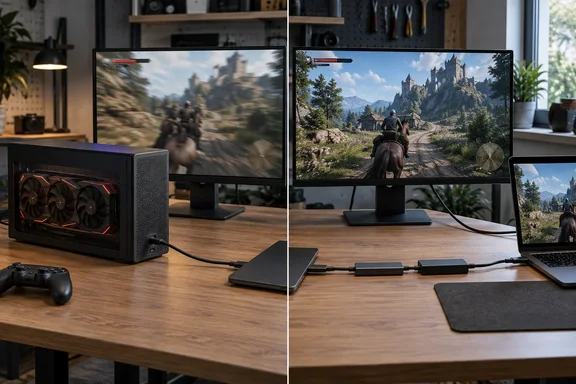
The test was run by MakeUseOf writer Dipan Saha. He moved a single AMD Radeon RX 9070 (non-XT) between a normal Thunderbolt 3 enclosure and a home-built USB4 setup. His conclusion was that the rough, adapter-heavy USB4 build beat the proper enclosure clearly enough that he switched to it, even though he likes the enclosure more.
The two setups
The builds are very different, and that matters when reading the results.
- Thunderbolt 3 enclosure: a fairly ordinary Thunderbolt 3 eGPU enclosure from Acasis that uses Intel's JHL7440 chipset, also known as Titan Ridge.
- DIY USB4 build: an Oculink-to-USB4 adapter built on a Minisforum DEG1. The DEG1's Oculink cable runs to an M.2-to-Oculink adapter, which plugs into a 40Gbps UGREEN M.2-to-USB-C adapter. Saha admits it's "a lot of hoops."
- Controller: The DIY build uses ASMedia's ASM2464PD chipset, which is much newer than the JHL7440.
- GPU: an RX 9070 (non-XT) taken from his AM4 desktop.
Summary: One side is a 2018-era Intel Thunderbolt 3 bridge in a finished enclosure. The other is a newer ASMedia USB4 bridge at the end of a chain of adapters.
What the tests showed
Saha ran the tests on Arch Linux with the Niri compositor and Dank Material Shell, using the latest stable Mesa drivers and the vulkan-radeon packages, with hardware acceleration enabled. He used two games: DOOM (2016) and The Blood of the Dawnwalker.
- DOOM (2016): about 130 FPS on Thunderbolt 3, and a locked 175 FPS on USB4.
- The Blood of the Dawnwalker: heavy stutter and frame rates in the mid-50s on Thunderbolt 3. On USB4 it was also mostly in the mid-50s, sometimes going above 60. Both runs used mostly low settings with FSR on Balanced at 3400×1440.
- Stability: On USB4 he saw no disconnects, and no bug where panning the camera made the frame rate collapse.
Saha describes the result as "playable versus a stuttery, unplayable mess."
Read those numbers carefully, though. The DOOM result is a clear gap of roughly 35%. The Dawnwalker numbers as published put both setups in the mid-50s, which doesn't support the article's statement that the change there was "much more dramatic." The real difference in that game seems to be smoothness and stability rather than average FPS. That's a fair thing to care about, but it's not what the headline suggests.
Summary: One clear win in average FPS, one win that is mostly about stutter and stability, and a better experience overall on the USB4 build.
Why both "40Gbps" setups aren't equal
Saha puts the gap down to how bandwidth is shared out. In his words, the JHL7440 provides a realistic 32Gbps for the GPU, with the other 8Gbps reserved for the enclosure's USB-A and upstream 40Gbps ports. He also says the USB4 dock gives its full 40Gbps to the GPU, which helps both stability and performance.
The vendor specifications support the general idea, but his exact numbers need some qualification:
- Intel's spec page lists the JHL7440 as a Titan Ridge part launched in Q1 2018 with PCI Express Gen 3 support. A Gen 3 x4 link tops out at about 32Gbps, which matches Saha's figure. Intel's page doesn't say how any particular enclosure divides its bandwidth, so the "8Gbps reserved for USB" detail is his explanation, not an Intel specification.
- ASMedia's product page says the ASM2464PD's USB connection runs at "USB4/Thunderbolt 20Gbps x2", with a PCIe Gen 4 x4 link on the device side. The PCIe side is not the bottleneck. That doesn't mean every host, cable and adapter chain will pass a full 40Gbps of usable GPU traffic, though. Link overhead is real, so "full 40Gbps to the GPU" should be read loosely.
The eGPU community had measured this before Saha's article. An eGPU.io forum thread tracking the ASM2464PD cites an RTX 4080 comparison in which enclosures using the chip showed clear gains over the 2018 Intel JHL7440 PCIe 3.0 bridge: peak host-to-device PCIe write was 20% higher on a 12th-gen-or-newer Thunderbolt 4 system and 36% higher on a USB4 system with a PCIe 4.0 GPU. The same thread defines PCIe 4.0 GPUs as AMD RX 5000 series or newer, Nvidia RTX 3000 series or newer, and Intel Arc. Saha's RX 9070 is well inside that group, so the direction of his result matches earlier community data, even if his exact FPS gap is specific to his system.
For context, Titan Ridge was an improvement in its own right. Dan Charlton's enclosure chipset tracker notes that most older Thunderbolt 3 enclosures used Alpine Ridge chips capped at 22Gb/s out of 40Gb/s, while JHL7440 designs are about 10% faster, with real-world speeds peaking around 2.6–2.8GB/s. The JHL7440 was the good Thunderbolt 3 option. It has just been overtaken.
Summary: A "40Gbps" label describes the cable link, not how much PCIe bandwidth your GPU actually gets. The bridge chip's PCIe generation and design decide that.
The trade-offs Saha found
The USB4 build is not strictly better:
- No charging: The USB4 dock has no USB-PD support or passthrough port, so the laptop needs a second cable for power. The ASM2464PD chip does support Power Delivery signalling, so this is a limitation of this particular build, not of the chip.
- Fewer features: The eGPU.io thread notes that a similarly priced EXP GDC TH3P4G3 with the JHL7440 has more features, including 85W PD, USB-C daisy-chaining and a USB-A port. Older Intel-based enclosures often trade speed for convenience.
- Host compatibility: The ASM2464PD doesn't work well with every PC. A commenter on Charlton's tracker reports that 11th Gen Intel CPUs, especially H-series chips like the one in the Surface Laptop Studio, either fail to work with it or drop to 4Gbps, leaving those owners with the JHL7440. This is community-reported, so treat it as a warning to check your hardware rather than a confirmed rule.
- Firmware: The eGPU.io thread reports that applying ASM2464PD firmware version 230525 restored full bandwidth with an AMD GPU. Charlton's list also says ASMedia's MP Tool can check the firmware version and operating mode. If your new USB4 enclosure seems slow, check the firmware first.
Summary: USB4 bridges can be faster, but you may give up charging and ports, and older Intel laptops may not work well with them.
Buying checklist for Windows users
Saha tested on Linux, but the bandwidth reasoning applies on Windows too, since it comes from the hardware. Before you buy:
- Check the bridge chip. Saha's main advice is that the chipset is the most important thing to check when buying an eGPU dock. Look for the controller model in the specs. JHL7440 means a PCIe 3.0 path; ASM2464PD means a USB4 bridge with PCIe 4.0 on the GPU side.
- Check your laptop's port. A USB-C port may not support PCIe tunnelling at all. Intel's comparison lists USB4's minimum PC speed as 20Gbps, while Thunderbolt 4 requires 40Gbps and 32Gbps of PCIe. A USB4 logo alone doesn't guarantee eGPU-grade bandwidth.
- Match the GPU to the connection. Saha says recent PCIe 5.0 cards can be temperamental over eGPU and suggests Thunderbolt 5 enclosures for RTX 50-series and Radeon RX 90-series cards. That's his opinion, not something he tested. He did find that an older RX 6600 ran with no problems in the Thunderbolt 3 enclosure and reached its 120W power cap.
- Plan for power and ports. If you want single-cable docking with charging, check that the finished enclosure has PD passthrough. Don't assume it from the chip.
- Update firmware before deciding a USB4 enclosure is slow.
If you're looking further ahead, Intel lists Thunderbolt 5 at up to 80Gbps bidirectional, with a minimum of 64Gbps PCIe for PCs, and supports it on Windows 11 version 23H2 and later. Those are spec limits, not promised frame rates.
Caveats
This is a useful real-world report, but it isn't a controlled test. It names neither the host computer nor its USB4 controller. It gives no run counts, frame-time data or 1% lows, and doesn't say whether the display was plugged into the eGPU or into the laptop's own screen, which matters a lot for eGPU performance. The DIY chain also adds several adapters that the Acasis enclosure doesn't have, so the bridge chip isn't the only difference between the two setups.
Even so, earlier eGPU.io measurements point the same way. With a modern PCIe 4.0 GPU, the ASM2464PD generally moves more data than Intel's older Titan Ridge. If you're comparing two enclosures that both say "40Gbps," check which controller each one uses.
References
- I tested the same GPU over USB4 and Thunderbolt 3, and the performance gap is way bigger than you'd expect MakeUseOf · 2026-09-28T12:31:13+00:00
- (2023 ASMedia ASM2464PD USB4v1 encoder – 64Gbps PCIe 4.0 x4 over 40Gbps USB4v1 cable) as used in ADT-Link UT3G/UT4G & AOOSTAR AG02. Will a USB4v1 M.2 NVMe SSD enclosure work with ADT-Link K43SG M.2 NVMe eGPU adapter? | Thunderbolt & USB4 Enclosures egpu.io
- ASM2464PD | USB4 Device Controller 40G|ASMedia Technology Inc. asmedia.com.tw