

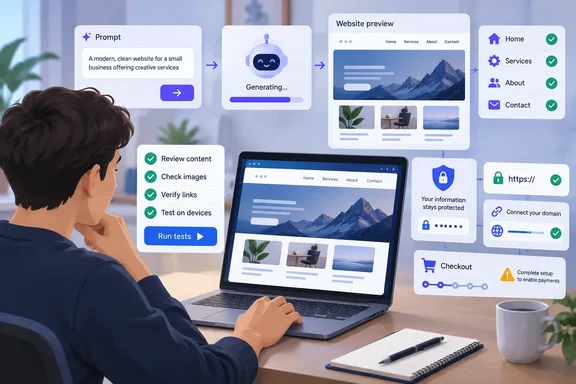
TechRadar Pro’s September 22 guide describes this workflow as a progression from a detailed prompt to a live preview, targeted revisions, optional content or commerce features, and deployment. Its practical advice is strongest where it separates generating a website from operating one. A convincing layout can arrive before the owner has decided how contact messages are delivered, who can access stored information, or what happens when checkout fails.
There is also a difference between using AI to accelerate development and allowing it to make every engineering decision unchecked. OWASP, the application-security organization, addresses that distinction directly in its Secure Coding with AI Cheat Sheet: generated code still needs human review, dependency checks, protected credentials, and meaningful tests. Those responsibilities grow when an AI tool can install software, execute commands, or deploy changes.
The route below keeps those boundaries visible. It starts with choosing an appropriate tool, follows the website through its first working version, and treats publication as a decision supported by observable results.
Choosing a vibe-coding tool means choosing who runs the website
Vibe coding describes a workflow in which you explain the desired software in natural language and an AI system generates or changes the underlying code. For a website, that can include its appearance, interactive behavior, and connections to services that store or process information. You review the result and use further instructions to move it closer to what you intended.
The interface can resemble a no-code website builder, especially when the tool includes a visual editor. The important operational difference is that some products generate an entire application, while others generate only its visible interface. “Build me a website” can therefore leave you with very different things: a hosted site, exportable components, or a project that still needs development and deployment work.
TechRadar divides the available tools into four broad categories. Treat them as starting points for evaluating responsibility, because individual products can combine several approaches.
| Tool category | What it generates or provides | Where it fits a first project |
|---|---|---|
| Full-stack application builders | The visitor-facing interface, server-side functionality, database connections, and potentially hosting. | A site that genuinely needs accounts, stored information, or application workflows. |
| Frontend or UI generators | Visual layouts and interface components, often with code export. | A landing page, design prototype, or interface for an existing project. |
| All-in-one platforms | AI generation alongside operational services such as hosting, domains, and email. | A beginner who wants fewer separate services to configure and maintain. |
| AI coding assistants | Code generation and editing inside a development environment. | Someone prepared to inspect a project, manage its dependencies, and control deployment. |
The frontend is the part visitors see and interact with. The backend handles server-side work, while a database stores information the application needs to retain. These distinctions become important as soon as a site moves beyond presenting pages: a form that saves an inquiry or an account that exposes private records requires more than a suitable arrangement of buttons.
For a straightforward first website, TechRadar recommends a full-stack builder or an all-in-one platform because the bundled services reduce launch work. That is a convenience argument, not a reason to add accounts or a database unnecessarily. If the project only needs a few public pages that rarely change, start with those requirements and resist generated features that expand the project without serving a visitor.
Hosting belongs in the tool decision
Before investing in a builder, determine what happens after the preview. Will the same platform host the finished site? Can it connect your domain? Does it provide certificate management? If you plan to move the code elsewhere, establish which parts of the project can move and which depend on services supplied by the original platform.
TechRadar describes exporting generated code to a web host, but that should not be read as a compatibility guarantee for every generated application. Its own distinction between interface generators and full-stack builders explains the limitation: exporting a layout is different from moving a working application that also depends on a backend and stored data. The practical conclusion is to establish the deployment path before building around those features.
The reporting does not provide a verified, current comparison of subscription prices, export entitlements, or custom-domain tiers across individual products. There is consequently no sound basis here for naming the cheapest builder or promising that a free plan includes publication. Evaluate the subscription against the services your project actually requires, rather than against the attractiveness of its initial preview.
An editor-based assistant makes a different bargain. You retain a conventional codebase and more direct control over changes, but you also take on the work of understanding that codebase. For a Windows developer already comfortable reviewing files and deployment configuration, that can be appropriate; for a beginner looking for a brochure site, it can introduce responsibilities that a hosted builder would otherwise absorb.
A useful website prompt defines behavior before visual style
The first prompt should read like a short project brief. State the website’s purpose, its intended audience, the pages it needs, and what visitors should be able to accomplish. Then describe the appearance: colors, typography, spacing, imagery, and any existing brand assets.
This is consistent with Microsoft for Developers’ October 2025 beginner tutorial, which describes effective vibe coding as “outcome-focused.” Its example prompt specifies a website for exploring podcast metrics, asks for particular capabilities, and names an intended publishing destination. The useful lesson is the specificity of the requested result, not a promise that every website can be finished in five minutes.
For a first attempt, the brief should also separate immediate requirements from future possibilities. A contact page is a requirement if visitors need a way to reach you. A customer account system is a separate project decision, even if the AI offers to generate one alongside the page.
Prepare the inputs before generating the site
Have the material you can safely provide ready before opening the builder. TechRadar specifically recommends supplying the site’s purpose, page list, design preferences, brand colors, and fonts, then adding your logo and other brand assets during refinement. Clear inputs give you something concrete against which to judge the generated output.
Use the following sequence to turn those materials into a brief:
- Describe the audience and the main task the website should help that audience complete.
- List the required pages and the order in which visitors should encounter them through navigation.
- State the content each page needs, including any material you will provide later.
- Identify functional requirements separately from appearance, such as a contact form, regularly published articles, or product listings.
- Describe the visual direction using specific preferences and existing assets.
- Identify features that are outside the first version, especially accounts, stored customer information, and payments.
That final boundary is an editorial recommendation derived from the different responsibilities those features introduce. It prevents a broad brief from silently turning a small website into an application you are not ready to operate. It also gives you a straightforward reason to reject unnecessary generated functionality.
For example, an initial brief for a small public-facing site could say:
“Create a website introducing my services to prospective customers. Include Home, Services, About, and Contact pages, with consistent navigation between them. Use the brand colors and logo I provide, and leave clearly marked placeholders for text I have not supplied. The first version should present information only; do not add customer accounts, checkout, or a database. Generate a preview for review before publication.”
This is an illustrative prompt, not a tested command for a particular platform. Its value is that each sentence establishes something the owner can inspect. The page list becomes a structure check, the supplied assets become a design check, and the excluded features become a scope check.
Keep credentials out of the brief
Do not include API keys, passwords, access tokens, or other credentials in the prompt. TechRadar explicitly warns against doing so, and OWASP extends the warning to the broader project context that an AI assistant may collect. Explaining that the site will eventually connect to a service does not require giving the model unrestricted access to that service.
For the same reason, use non-sensitive material while you establish the initial workflow. A builder can demonstrate a layout and navigation without real customer records. If you later add a data connection, treat configuring that connection as a separate task with its own permissions and credential storage.
This distinction is particularly important in an editor. OWASP notes that assistants can send open files, project structure, and terminal output to their model provider, rather than receiving only the words typed into chat. A clean prompt therefore does not, by itself, mean the surrounding context is free of secrets.
The first successful generation is one that you can evaluate against the brief. TechRadar reports that many tools can produce an initial preview quickly, but generation time is not a useful release criterion. The questions are whether the required pages exist, whether the intended structure is recognizable, and whether the tool stayed within the requested scope.
Review the generated website in the order visitors will use it
Begin with structure, not styling. TechRadar recommends checking the pages and navigation before adjusting appearance because restructuring later is more disruptive than changing colors or spacing. This also prevents a polished home page from distracting you from missing sections elsewhere.
Work through the site as a visitor trying to accomplish the task in your brief. If the purpose is to explain services and invite contact, follow that path from the home page to the service information and then to the contact destination. A page that exists but cannot be reached through the intended navigation has not satisfied the requirement.
A practical first review can follow this order:
- Confirm that every requested page exists and contains the expected type of material.
- Follow the navigation between those pages and identify missing or confusing destinations.
- Check that the main calls to action lead to the intended page or function.
- Ask for missing structure in a targeted follow-up prompt.
- Repeat the affected navigation path before moving on to visual refinement.
Success at this stage means the site’s organization matches the job you set it. It does not require perfect typography or finished imagery. If an important page is absent, request that page directly instead of trying to make an unrelated generated section serve the same purpose.
Small revisions are easier to judge than a complete redesign
Once the structure works, narrow the scope of each revision. TechRadar suggests targeted prompts for colors, spacing, fonts, image placement, and button styles, with a visual editor as an alternative where the platform provides one. For a small adjustment, selecting the element directly may be clearer than describing its location conversationally.
An illustrative follow-up might say: “On the Services page, reduce the space between the introductory paragraph and the service list. Keep the wording, navigation, and other pages unchanged.” The instruction gives the AI a specific target and tells the reviewer what should remain stable.
After each change, inspect the requested result and the parts that should have stayed the same. This advice has a security counterpart in OWASP’s guidance: coding agents can modify files beyond the apparent scope of a request. The hosted-builder version is to verify surrounding behavior; the developer version is to inspect every changed file.
Upload approved logos and brand imagery during this phase, as TechRadar recommends, instead of polishing a design around generic placeholders. Then review the page as a whole. Replacing a placeholder can change the visual balance, so the earlier layout should remain open to adjustment.
Testing at different window sizes is also useful before publication. The beginner workflow described by Vibecoding.app includes resizing the window, clicking buttons, and submitting forms during refinement. These are checks of the generated result, not merely requests that the AI make it “responsive.”
Debug the failure you observed
When something fails, describe the precise action and result. “The site is broken” provides less direction than identifying the affected page, the control you used, and the error that appeared. Vibecoding.app recommends returning the exact error message when the AI gets stuck on a bug.
Apply the earlier credential warning before copying that error into chat. OWASP identifies terminal output and error traces as part of the context an assistant may ingest, and it warns about sensitive information crossing that boundary. Share the useful failure information without blindly transferring surrounding credentials or private data.
After the AI proposes a correction, repeat the original action. If the contact button previously went to the wrong page, use that same button again; if a form failed, submit it again under the same relevant conditions. A confident explanation from the model is not the success condition—the previously failing behavior must work.
For a code-based workflow, review the changes made to tests as well as the application. OWASP warns that an agent may remove a failing test, weaken what it checks, or change it to accept incorrect behavior. A green test result is useful only when the test still represents the requirement you intended to enforce.
Add a CMS or checkout only when the website needs the extra machinery
A content-management system, or CMS, gives you an editing interface separate from the generated code. TechRadar recommends adding one for a blog, news section, or other material that changes frequently. For a small collection of pages that rarely changes, it explicitly recommends skipping this step.
The decision is about the publishing workflow. If you expect to publish repeatedly, editing articles through a dedicated interface can be more suitable than asking an AI to change the application each time. If the content is stable, adding a CMS creates another component to configure without necessarily solving a current problem.
The article describes two possible routes: use CMS functionality offered by the platform, or connect an external CMS through an application programming interface, usually shortened to API. An API is the connection through which one service exchanges information with another. The exact configuration depends on the builder and CMS, so there is no verified universal sequence of menu choices or credentials to enter.
Before treating the integration as complete, exercise the publishing workflow it is meant to provide. Create or change non-sensitive sample content through the editing interface and confirm that the website presents the intended result. The point of the CMS is to make those updates manageable without repeatedly rewriting the site.
If the connection requires a secret, apply the same protected-storage rules as any other integration. Do not paste it into a prompt or hard-code it into a generated project simply because the AI asks for it. The visual convenience of the editing interface does not change the sensitivity of its access credentials.
Commerce needs a complete transaction test
Ecommerce raises the consequences of incomplete implementation. TechRadar describes adding product listings, a shopping cart, checkout, and a payment processor through supported integrations. It also directs owners to test the full purchase flow, including failed payments and confirmation emails, before launch.
Treat those as connected requirements. A product page is the beginning of the purchase process; the visitor must also be able to select the intended item, proceed through checkout, receive the appropriate outcome, and understand whether the transaction succeeded. Testing only the first screen leaves the actual business function unexamined.
A supported pre-launch review should therefore cover the whole path:
- Check that the intended products appear with the correct information.
- Exercise the shopping cart and confirm it reflects the intended selection.
- Follow the payment provider’s supported testing process for a successful purchase.
- Exercise the supported failed-payment path and inspect what the customer sees.
- Confirm that the expected confirmation email is delivered for the successful flow.
- Repeat the relevant checks on the deployed site before opening it to customers.
The provider-specific testing process matters. The reporting does not establish universal test-card details, dashboard settings, or payment-mode switches, and inventing them would be unsafe. Choose an integration whose supported test workflow you can actually carry out before enabling real transactions.
Keep payment credentials out of the conversation and use the platform’s supported integration. If configuring that integration takes you beyond what you can confidently inspect, this is an appropriate point to obtain technical help. TechRadar specifically recommends having someone who can read the code review work involving customer information, logins, or payments.
There is also a legitimate scope decision here: launch the informational website first and postpone commerce. That is a practical inference from the separate testing obligations, not a limitation inherent to every AI builder. It lets you finish the public pages without making an unreviewed checkout system a condition of publishing anything at all.
OWASP’s AI-coding guidance makes security a release requirement
The strongest security advice for a first AI-generated website is to review what it actually does before allowing it to handle real information. TechRadar makes that recommendation, and OWASP’s guidance supplies the mechanisms behind it: exposed secrets, inappropriate access, questionable dependencies, misleading tests, and excessive agent permissions.
OWASP also discusses “Inappropriate Trust in AI Generated Code” in the additional-risk material accompanying its 2025 Top 10. That placement is important: it is an issue highlighted beyond the ten principal categories, not a claim that “vibe coding” itself occupies one of the ten slots. Its recommendation is direct—people remain responsible for the code they submit and should understand and review it.
The available guidance supports concrete precautions, but it does not supply a controlled, universal vulnerability rate for every AI website builder. There is no need to attach an unsupported percentage to the risk. A single exposed credential or incorrectly protected customer record is enough to justify review of those specific boundaries.
Check access, not just the presence of a login page
Authentication establishes who a user is; authorization determines what that user is allowed to do. A generated website may present a login interface while still requiring careful review of the underlying access restrictions. OWASP identifies authentication and authorization as security-critical areas whose tests should be written or independently verified by a human.
For a site with private functionality, identify the intended access categories before testing. Which material is public? What should an ordinary signed-in user see? Which actions are reserved for an administrator? Those requirements give a reviewer something definite to test instead of a general instruction to “make it secure.”
Use controlled accounts and non-sensitive sample information for those checks. Test the functions under the access conditions they are supposed to allow and reject. OWASP explicitly recommends negative and adversarial cases, including invalid inputs and expired tokens, rather than relying entirely on the paths the AI generated for itself.
The expected result includes refusal. If a function is private, an unauthorized attempt should not reveal the protected information or complete the restricted action. A technical reviewer should verify the enforcement in the code and relevant services, because visual navigation alone cannot demonstrate how the application handles access.
Keep that review within your own site or an environment you are authorized to test. For a beginner who cannot evaluate the underlying controls, the safe decision is to keep real customer information out until someone qualified has reviewed them. Generating another reassuring explanation from the same AI does not replace that work.
Protect secrets throughout the workflow
OWASP’s secret-handling guidance goes further than “do not paste passwords into chat.” AI coding assistants may collect a broader context that includes files, terminal output, and project structure. Consequently, the review must cover both what you deliberately submit and what the tool can read automatically.
OWASP recommends excluding sensitive material such as environment files, private keys, and credential files from AI context. The supported exclusion mechanism varies by tool, so use the mechanism documented for the assistant you actually run. Do not assume a filename convention alone creates a security boundary.
In particular, OWASP warns that .gitignore does not stop an AI assistant from reading a file. That file controls Git’s tracking behavior; it is not a general filesystem-access restriction. A credential omitted from a repository can still be exposed to an assistant that has permission to inspect the surrounding project.
Store secrets through an appropriate environment-variable mechanism, vault service, or encrypted secret store, rather than embedding them in prompts or application source. The important part is the access boundary: an agent that can read the storage location may still be able to obtain the secret. A storage choice and an agent-permission choice must therefore be considered together.
For a hosted builder, determine how its integration configuration handles credentials before supplying them. For an editor-based assistant, avoid opening private keys or credential files while context collection is active. OWASP also warns against pasting credentials into a terminal that the assistant can observe.
Review dependencies before allowing installation
Generated applications often use external software packages, called dependencies. OWASP warns that AI assistants can suggest nonexistent package names, names resembling legitimate packages, or versions with known vulnerabilities. A plausible-looking installation instruction is therefore a proposal to verify.
The recommended checks include confirming the package exists in its public registry and examining its maintainers, creation date, and usage history. A newly created or little-used package deserves scrutiny, although those signals are not a complete safety verdict. The purpose is to avoid treating the AI’s confidence as evidence of provenance.
For organizations, OWASP recommends an allowlist of approved packages. For an individual project, the equivalent decision is to pause when an unfamiliar dependency appears and establish why it is needed before installing it. This is especially relevant when a small website unexpectedly acquires a large collection of services and packages.
OWASP also recommends dependency auditing appropriate to the project’s language and package system. The check should cover the generated dependency list before changes are accepted, and updates should follow a normal dependency-management process. An AI suggestion is not a substitute for checking current security information.
If you use an all-in-one platform that hides these implementation details, this is a boundary to understand rather than an instruction to run unrelated developer commands. Establish which checks the platform provides and what a reviewer can inspect. The beginner’s hosted workflow and the developer’s exported-code workflow do not expose identical controls.
An AI agent needs fewer privileges than your everyday account
Some tools only suggest code. Others can run shell commands, install packages, edit files, use the network, and push changes. OWASP treats the latter as agentic coding and warns that unrestricted execution can give a compromised agent context the same reach as the developer’s workstation.
That risk concerns the environment used to build the site, not only the site eventually published. If an agent can read cloud credentials or modify deployment configuration, an apparently small design task can touch sensitive systems. The permissions granted to the tool determine how far an error or malicious instruction can reach.
OWASP recommends isolated environments such as development containers, restricted shells, virtual machines, or temporary cloud workspaces. It also recommends restricting commands and network access, protecting credential stores, and using short-lived credentials scoped to the task. Those are alternatives to choose and configure, not a universal setup procedure for every Windows PC.
Avoid auto-accept behavior on unfamiliar or untrusted projects. Require review before an agent makes consequential changes, and do not give a first website experiment production credentials or organization-wide secrets. In a workplace, the approved development environment and credential policy should determine those boundaries.
External content is another reason to constrain permissions. OWASP explains that repository documentation, issue descriptions, comments, fetched webpages, and error output can carry instructions that manipulate an agent—a problem called indirect prompt injection. Material the agent reads for context should not automatically gain authority to redirect the task.
After the agent processes external material, review its actions for unexpected changes. Restrict the context to what the task needs, and give particular scrutiny to newly created or modified instruction files. OWASP identifies persistent rules files as security-sensitive because they can steer later generations as well as the current one.
Review the files that can change the build itself
For a developer-controlled project, application pages are only part of the review. OWASP highlights package scripts, deployment files, and continuous integration and delivery configuration—commonly called CI/CD—as especially sensitive. Those files can execute commands during installation, testing, building, or deployment.
An apparently cosmetic task should not be accepted solely on the basis of an agent’s summary. Inspect all changed files, including dependency lockfiles, tests, and workflow configuration. OWASP specifically warns that reviewers can become anchored on the requested change and overlook modifications elsewhere.
The same scrutiny applies to test results. An agent can make a test suite pass by weakening its assertions or removing a failing case. Review test modifications and retain independently checked security tests for authentication, authorization, and input validation.
A useful release standard combines human review, security tooling, dependency checks, and observed behavior. Built-in scanning can contribute, as TechRadar recommends, but the scanner’s result should sit alongside the functional and access tests. A polished preview is not a security review.
Connecting the domain starts a second round of website testing
Publication connects the reviewed application to the address visitors will actually use. TechRadar describes two broad arrangements: an all-in-one platform may handle domain registration and certificates, or the owner may need to direct an existing domain to the hosting service through DNS settings.
DNS, the Domain Name System, supplies the records used to direct a domain to the relevant service. The required record types and values depend on the host and domain arrangement. There is no supported universal record to copy for every AI-generated website, and the builder’s preview address does not tell you what those values should be.
Before making changes, establish which service hosts the website and which service manages the domain. Then use the host’s domain-connection process for that specific project. This is one reason to choose the hosting path early: deployment should complete a known plan rather than introduce an unfamiliar infrastructure decision at the end.
Publish in a sequence you can verify
Once the site has passed the relevant review, proceed in an order that separates connection, transport security, and application behavior:
- Confirm that the version selected for publication is the version you reviewed.
- Connect the custom domain through the platform’s supported process, including its specified DNS changes where required.
- Confirm that HTTPS is active for the domain; TechRadar describes this as checking SSL before publication.
- Open the site at its intended public address and revisit every required page and navigation path.
- Repeat the applicable form, account, CMS, and purchase-flow checks in the deployed environment.
- Correct any production-only failure and rerun the affected checks before inviting visitors to use the function.
HTTPS protects the connection, while application review addresses what the site permits and exposes. They serve different purposes. A correctly configured certificate cannot decide whether an ordinary user should have access to an administrative function.
TechRadar explicitly recommends a final pass after the domain is live because elements can behave or render differently outside the preview. That makes the public address a separate test target. Do not assume that a successful form submission or purchase simulation in a preview automatically settles the deployed version.
For forms, success should mean the intended result actually occurs, not simply that a success message appears. For the purchase flow, retain the earlier checks of failure handling and confirmation email. For a CMS-backed site, confirm that the content published through the editing workflow appears as intended at the public address.
Stop at the boundary you cannot verify
If the domain connects but an important function fails, keep the launch decision focused on that function. A working home page does not make a broken contact or checkout path acceptable. Record the observed failure, have the relevant configuration or code reviewed, and repeat the same path after correction.
Rollback and recovery procedures depend on the platform and deployment method. The reporting does not establish a universal restore button, export process, or revision-history guarantee. Before allowing consequential changes, determine whether your chosen workflow provides a recoverable earlier version and how that recovery operates.
This is particularly important for an assistant authorized to deploy automatically. OWASP recommends approval gates around sensitive actions and limits on deployment credentials. Keeping publication as an explicit human decision gives you a point at which to verify the intended version and its review status.
After launch, generated dependencies and configuration remain part of the project. OWASP recommends updating dependencies through a normal management process and retaining security checks as changes are accepted. The practical consequence is that a website needs an owner after the generation session ends, even when its hosting is bundled.
What this means for your first AI-generated website
Choose the smallest version you can confidently review, then expand only when you can verify the additional responsibilities. An informational site is a suitable starting point when you do not yet have the expertise to assess accounts, stored customer information, or payment handling. If those features are essential from the beginning, include technical review in the project instead of treating it as an optional cleanup exercise.
The most important decisions are concrete:
- Choose a builder with a deployment path you understand, and establish which hosting, domain, integration, and export capabilities your intended plan actually includes.
- Write a brief that specifies pages, visitor tasks, design preferences, and excluded features, then use that brief as the checklist for the generated preview.
- Review navigation and behavior before polishing appearance, and verify each targeted change instead of accepting the AI’s description of what it fixed.
- Keep credentials out of prompts and accessible project context, and restrict any coding agent that can execute commands or use deployment permissions.
- Require human review and meaningful access tests before introducing real customer information, accounts, or payments.
- Repeat the relevant checks on the public domain, including HTTPS, forms, protected functions, failed-payment behavior, and confirmation messages.
Vibe coding can make the distance between an idea and an inspectable website much shorter. The dependable way to benefit is to keep the project’s requirements, permissions, and release decision explicit: generate a bounded first version, verify its behavior, and publish only what you can responsibly operate. The next feature should arrive with its own review and test plan, not merely another successful prompt.