

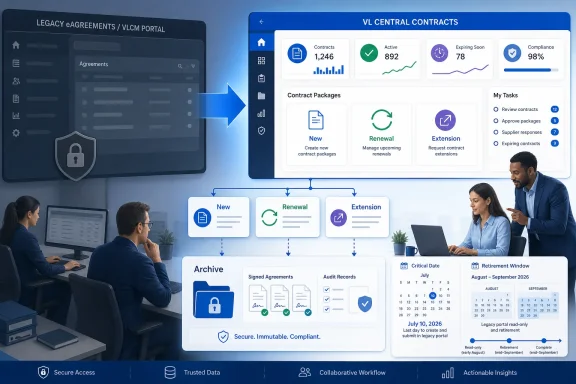
Microsoft made the remaining Non-EA programs available in VL Central Contracts on April 7, 2026. The practical consequence is straightforward: all Non-EA contracting happens in VL Central Contracts, which is now the only route — eAgreements retired on August 15, 2026 and can neither create nor serve records.
Do this today
- Create every new, renewal, and extension package in VL Central Contracts.
- Stop parallel edits and designate one system of record for every in-flight package.
- Inventory which legacy agreements, signature records, and package evidence were exported before the August 15 retirement, and escalate any gaps through Microsoft support and your licensing partner.
- Confirm that no active workflow, bookmark, or script still depends on eAgreements/VLCM.
Microsoft’s VL Central guidance says packages created during the parallel-production period were visible in both platforms, but partners were advised not to work on the same package in both tools. That warning should now be treated as an operational control. Assign one owner to each in-flight transaction, record where it is being handled, and do not attempt to maintain competing versions.
A safe immediate procedure for a Non-EA team is:
- Create all New, Renewal, and Extension packages in VL Central Contracts.
- Do not attempt to use eAgreements; it has been fully retired since August 15, 2026.
- Review all open work and identify which system contains the authoritative package.
- Stop parallel editing or duplicate package creation.
- Audit the legacy evidence licensing, finance, legal, audit, and customer-facing teams need, and verify it exists in internal archives.
- Track access, signature, or package problems through an internal escalation log.
- Close any remaining dependency on eAgreements in procedures and training material.
These are the actions that matter now. The legacy portal has already disappeared, so procedures that still reference it fail on contact.
Why July 24—not the retirement month—was the date that changed the workflow
Microsoft moved the read-only date from July 10 to July 24, 2026, extended full retirement from July 31 to August 15, 2026, and completed it: VL Central Contracts is now the only route for Non-EA contracting, with no fallback tool. The sequence still matters for planning — creation moved to VL Central first, and legacy retrieval closed weeks later — but an organization still waiting on either milestone is past both.
That distinction should drive the recovery plan. The dates that governed legacy retrieval have passed; what remains actionable is the state of your own package work and internal archives in VL Central Contracts.
The in-scope programs are:
- Open Value
- Open Value Subscription
- SPLA
- Campus/EES
- ISV Royalty
- Select
- Select Plus
Microsoft’s April announcement made those remaining programs available in VL Central Contracts. The affected organizations include distributors, SPLA resellers, ISV distributors, and LSP/SSP teams.
The read-only limitation was narrow but decisive. Between July 24 and the August 15 retirement, existing packages could still be searched, viewed, and downloaded in eAgreements, while new packages — including renewals and extensions — could not be created there. That window is now closed; all current Non-EA work runs through VL Central Contracts.
WindowsForum user discussions about Microsoft’s recent legacy removals repeatedly point to the same practical problem: teams often focus on the final disappearance of a product or service and overlook the earlier date on which it stops performing an essential task. The eAgreements transition is a direct example. July 24 changed what licensing teams could do; the August 15 retirement removed the remaining historical access.
Audit the archive built before read-only access ended
The read-only retrieval window closed with the August 15, 2026 retirement. What matters now is auditing whether the controlled archive of legacy evidence your organization expects to need actually exists. This is an operational recommendation, not a Microsoft-prescribed export or retention requirement.
The objective is not to capture every screen indiscriminately. Preserve the material that licensing, finance, legal, audit, records, or customer-success teams may later need to establish what was submitted, signed, amended, completed, or left unresolved.
A practical internal checklist can include:
- Download executed agreements, package documents, signature evidence, and amendments for active and recently completed customer relationships.
- Preserve relevant records for open renewals, extensions, drafts, or signature-stage packages that may be questioned after retirement.
- Create an internal index containing available package identifiers, customer names, program names, agreement numbers, package status, and relevant dates.
- Store documents in a restricted organizational repository rather than in an individual employee’s downloads folder or mailbox.
- Use consistent customer- and program-based naming so another employee can locate the evidence without relying on the original package creator.
- Record that the material came from eAgreements/VLCM and note the retrieval date.
- Have a second reviewer spot-check a sample for completeness, legibility, and correct customer association.
- Maintain an exception register for packages that cannot be found, downloaded, or matched to the correct customer.
- Identify the business owner responsible for deciding whether each exception needs escalation.
Prioritize records according to business risk. Active customer relationships, unresolved signatures, near-term renewals, amendments, and packages likely to be needed for reconciliation deserve attention before low-value historical material.
The archive should also preserve context. A document without a package identifier, customer association, status, or retrieval date may be difficult to use later. A lightweight index often adds more value than a large unstructured folder of downloaded files.
This recommendation reflects an issue WindowsForum users have encountered across Microsoft transitions: “still accessible” is easily mistaken for “permanently available.” Microsoft’s 2025 legacy cleanup, as discussed by WindowsForum readers, included both quiet removals and formally scheduled retirements. The useful lesson for licensing teams is not that every transition is identical; it is that local records and named ownership reduce dependence on a closing service.
Archive work must not create a second package workflow. Archiving what was already downloaded from the legacy portal is appropriate. Editing an old copy and treating it as a substitute for work in VL Central Contracts is not. Keep evidence archives separate from package processing.
Reconcile every in-flight package
The highest-risk work is often neither fully historical nor clearly new. Packages opened during a transition can be duplicated, abandoned, or handled differently by separate teams unless someone reconciles them.
WindowsForum recommends creating a short in-flight register containing:
- Customer name
- Licensing program
- Package identifier, where available
- Current package status
- Assigned owner
- System of record
- Next required action
- Signature status
- Business deadline
- Known access or validation issue
Use this register to make one explicit decision for each item: identify where the authoritative package resides and stop work on any duplicate. Do not assume that visibility in both platforms authorizes edits in both.
Parallel work can create more than clerical inconvenience. Separate versions may contain different customer information, dates, selections, or signature progress. The customer may receive competing instructions, while internal teams lose confidence about which package represents the intended transaction. Microsoft’s warning against working on the same package in both tools is therefore one of the most important controls in the transition.
A daily review may be appropriate during the first weeks after the July 24 change, particularly for organizations with high transaction volume or several regional teams. Smaller organizations can use a less frequent review, but every open package should still have one named owner and one recorded next step.
If a package appears stalled, investigate that package before creating another one. Confirm its identifier, state, customer association, documents, signature progress, and last successful action. A duplicate should not be the default response to uncertainty.
Assign responsibilities by function
Portal access alone does not prove that an organization is ready. A package can still stall because no one owns its creation, approval, signature follow-up, evidence retention, or escalation.
WindowsForum recommends a role-based division of work. These role assignments are an internal operating model, not a Microsoft-mandated staffing structure.
Package creators should begin all new Non-EA business in VL Central Contracts. They should remove or clearly mark obsolete bookmarks, job aids, templates, and training material that still tell employees to begin package creation in eAgreements.
Licensing operations leads and submitters should review every in-flight package, identify its system of record, and prevent parallel work. They should also confirm that staff understand the difference between retrieving an old record and attempting to process a new transaction.
Portal or licensing administrators should verify working access before a live customer deadline. A successful sign-in is not enough: the user should be able to reach the area needed for the assigned work and should know whom to contact internally if the expected capability is missing.
Do not assume that historical access, customer associations, or role assignments have transferred correctly merely because a user can enter VL Central. Verify access against actual responsibilities and test it before an urgent renewal or extension is due.
Customer-facing account teams should update customers when an active transaction will use a different contract or signature experience. This is especially important when a renewal was initially discussed using legacy terminology or when a customer has saved an old link.
Records, finance, and legal teams should decide which evidence warrants preservation and where it belongs. Package creators should not be the only custodians of executed or business-critical records.
Service-desk or operations coordinators can own the exception log, gather evidence, and track internal escalation deadlines. This avoids vague reports such as “VL Central is not working” and replaces them with a record of the affected user, customer, program, package, attempted action, and business impact.
This division makes failures easier to diagnose. If a transaction stops, the organization can distinguish among an access problem, missing customer information, signature delay, package-state issue, documentation gap, or internal ownership failure.
WindowsForum’s coverage of Microsoft’s broader 2025 tool changes reached a similar conclusion: replacing a legacy service is not finished when administrators recognize the new product name. Readiness depends on updated procedures, tested access, assigned ownership, and a known path for exceptions.
Use an internal escalation runbook
Because eAgreements can no longer create the affected package types, “start again in the old tool” is not a valid fallback. WindowsForum recommends maintaining an internal escalation runbook for access, package, and signature problems.
This runbook is an organizational contingency measure. It should not be presented as Microsoft’s required escalation sequence unless your organization has confirmed the applicable Microsoft documentation and support terms.
For a blocked package, collect:
- The affected user and organization
- The customer and licensing program
- The package identifier, if one exists
- The current package state
- The intended action
- The last successful action
- The date and time of the problem
- Relevant error text or screenshots
- The customer or renewal deadline
- Whether another version of the package exists
- The internal owner and next review time
For an access problem, record what the user can reach as well as what is missing. “User can sign in but cannot perform the assigned contract task” is more useful than “portal access failed.” Check internal account, role, and customer-association information before escalating externally.
For a signature delay, first verify the package’s actual state and preserve its evidence. Confirm whether the customer received the expected request and whether the package is waiting for customer action, internal action, or system resolution. Do not create a duplicate solely because the signature appears delayed.
The internal runbook should specify:
- Who performs the first review.
- Who verifies the user’s organizational access and assigned responsibilities.
- Who decides whether a duplicate or abandoned package exists.
- Who gathers evidence for an external support request.
- Who communicates with the customer.
- Who tracks the issue until closure.
- Who updates the in-flight and exception registers.
Microsoft has indicated that Change of Channel Partner functionality is upcoming. That does not establish a general workaround for blocked Non-EA package creation, access, or signatures. Treat channel-change requirements as their own scenario and do not build a contingency plan around functionality that is not yet part of the verified procedure.
A good escalation record protects the customer experience as well as internal operations. It gives account teams a factual status, prevents repeated troubleshooting, and reduces the chance that another employee will create conflicting work.
Update instructions, bookmarks, and training
Old documentation can keep a retired behavior alive long after the official process changes. Search internal knowledge bases, shared drives, onboarding material, browser favorites, email templates, and renewal checklists for instructions that direct employees to begin Non-EA packages in eAgreements.
Update those materials to state four facts clearly:
- New, Renewal, and Extension package creation belongs in VL Central Contracts.
- eAgreements/VLCM retired on August 15, 2026 and cannot create or serve records.
- Historical records exist only in the organization’s own exported archives.
- The same package must not be worked in both systems.
Avoid publishing click-by-click instructions unless they have been validated against the current portal. Interface labels and navigation can change, and an unverified path may send users to the wrong place. Internal job aids should focus first on the required outcome, responsibility, and control points.
Training should include a real-world test rather than only a presentation. Have the relevant employees demonstrate that they can access the destination environment, identify how their assigned package work begins, recognize where a package is waiting, and locate the internal escalation route. Do not use a live customer deadline as the first access test.
Customer communications may also need revision. Remove old eAgreements links from reusable messages and explain the current process without overloading customers with platform-migration detail. Customers mainly need to know what action is required, how to recognize the correct request, and whom to contact if it fails.
Life after the final retirement date
Microsoft retired eAgreements/VLCM on August 15, 2026 — an extension of the previously communicated July 31 date — and VL Central Latest News confirmed VL Central Contracts as the only route with no fallback tool. The monitoring task is therefore closed; what remains is a records audit.
Assign one person to own the records audit and distribute its findings to licensing operations, administrators, records teams, legal, finance, and customer-facing staff. The audit should trigger exception handling for anything that was not exported before retirement.
A useful post-retirement audit checklist is:
- Confirm priority records were downloaded before retirement.
- Recheck unresolved archive exceptions.
- Verify that all open packages have one owner and one system of record.
- Remove remaining internal instructions that suggest eAgreements can create packages.
- Confirm the escalation runbook has active owners.
- Notify affected teams that legacy retrieval has ended.
- Document completion and any accepted gaps.
WindowsForum readers tracking the unusually heavy 2026 Microsoft retirement calendar have emphasized the need to separate dates that sound similar but require different actions. End of support, removal of a feature, loss of transaction capability, and final service retirement are not interchangeable milestones.
That distinction also appeared in WindowsForum discussions of Microsoft 365 support on Windows 10 and the wider group of Microsoft product deadlines around October 14, 2025. Those cases involve different products and support rules, so they should not be used as evidence for VL Central policy. They do, however, reinforce a sound planning habit: identify exactly what changes on each date, assign the corresponding action, and do not let a later headline date obscure an earlier functional restriction.
For this transition, the action map is simple:
- April 7, 2026: the remaining Non-EA programs became available in VL Central Contracts.
- July 24, 2026: eAgreements/VLCM became read-only for creating New, Renewal, and Extension packages in scope (moved from July 10).
- August 15, 2026: full retirement of eAgreements/VLCM (extended from July 31).
- After retirement: conduct all package work in VL Central Contracts; historical evidence lives only in internal archives.
What completion looks like
A team has completed the operational transition when it can do more than sign in. It should be able to:
- Begin every affected New, Renewal, and Extension package in VL Central Contracts.
- Identify the owner and system of record for every in-flight package.
- Prevent parallel edits and duplicate packages.
- Confirm required historical evidence was exported from eAgreements before retirement, or escalate the gap through Microsoft support.
- Verify that employees can perform their assigned work.
- Escalate access, package, or signature problems with useful evidence.
- Tell customers what action they need to take.
- Confirm that no package workflow still depends on eAgreements.
- Close or accept archive exceptions now that legacy access has ended.
This is consistent with the strongest lesson in WindowsForum’s user reports on Microsoft’s legacy-tool overhaul: migration is an operational exercise, not a login exercise. Inventory, ownership, replacement procedures, evidence, and exception handling determine whether the transition is complete.
Frequently Asked Questions
Should we still use eAgreements for any new Non-EA deal?
No. Since July 24, 2026, eAgreements/VLCM cannot create New, Renewal, or Extension packages for the affected Non-EA programs. Create that work in VL Central Contracts.
Can we still retrieve old packages from eAgreements?
No. Microsoft retired eAgreements/VLCM on August 15, 2026, after extending the date from July 31. Records that were not downloaded before retirement are no longer retrievable through the portal; pursue missing evidence through Microsoft support, your licensing partner, and internal copies.
Which programs are affected?
Open Value, Open Value Subscription, SPLA, Campus/EES, ISV Royalty, Select, and Select Plus are in scope.
Which organizations need to act?
The transition applies to the relevant work performed by distributors, SPLA resellers, ISV distributors, and LSP/SSP organizations.
Can we continue editing a package in both platforms?
No. Microsoft advised partners not to work on the same package in both tools during the parallel period. Designate one authoritative package and stop parallel edits.
What can eAgreements still do?
Nothing. Since the August 15, 2026 retirement, all Non-EA contracting happens exclusively in VL Central Contracts.
Should we wait for Microsoft to publish the final retirement date?
The question is settled. Creation moved to VL Central Contracts in July 2026, and the legacy portal retired on August 15, 2026. Move all package work to VL Central Contracts and rely on internal archives for historical evidence.
Does signing in prove that a user is ready?
No. WindowsForum recommends verifying that each user can perform the work assigned to that role before a live renewal or customer deadline. Treat access and role checks as internal readiness controls.
What should we do if a package or signature is stuck?
Preserve the package identifier, customer and program details, current state, attempted actions, errors, and deadline. Check for duplicates before creating anything new, then follow your organization’s documented escalation runbook.
Is Change of Channel Partner functionality a fallback for package problems?
Do not assume so. Microsoft has indicated that Change of Channel Partner functionality is upcoming, but that does not establish it as a workaround for access, package, or signature failures.
Is the archive checklist a Microsoft requirement?
It is a WindowsForum operational recommendation. Each organization should determine what evidence it needs and how that material should be stored, reviewed, protected, and retained.
What are the four most important actions right now?
Create all affected packages in VL Central Contracts, stop parallel work, audit the legacy evidence exported before the August 15 retirement, and escalate any gaps through Microsoft support.