

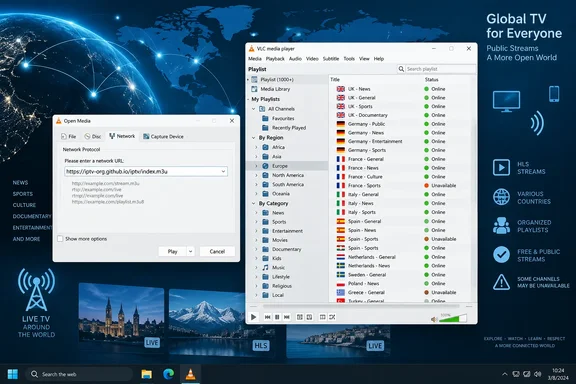
For Windows users, the payoff is simple: no browser tabs, no dedicated IPTV client, and no account are required to test an M3U playlist. But the full playlist is a discovery tool, not a dependable replacement for a paid live-TV service. IPTV-org does not operate the channels, does not host their video, and cannot promise that a link which worked yesterday will work from a particular network today.
VLC’s Network Stream dialog is doing the real work
VLC has supported network playback for years because it is built to receive media delivered over protocols such as HTTP, HLS, and RTSP as well as to play local files. On Windows, opening Media > Open Network Stream, pasting an M3U playlist address, and selecting Play hands VLC a text file containing channel names and individual stream locations.
Once VLC has parsed the file, its playlist pane becomes the channel directory. Users can show it through View > Playlist or the playlist toggle in the player interface, then search or browse the entries like a local media library. Individual streams can also be opened directly when a broadcaster publishes a specific HLS or DASH feed.
PCWorld’s instructions are accurate as far as they go: VLC can ingest the IPTV-org playlist and begin playing a selected feed. The important correction is that VLC is not supplying television service or bypassing a broadcaster’s access controls. It is acting as a client connecting the PC directly to each third-party server named in the playlist.
That architecture explains both why the trick is useful and why it can be temperamental. There is no central streaming platform between VLC and the broadcaster to normalize formats, maintain availability, or provide support when a feed fails.
IPTV-org is an index of links, not a free-TV provider
The IPTV-org repository describes itself as a collection of publicly available IPTV channels from around the world. Its maintainers publish several M3U files, including a broad all-channel playlist and smaller lists grouped by category, language, country, region, and source.
That distinction matters for readers assessing the “free and legal” framing. The project says it stores no video files and contains user-submitted links to streams it believes copyright holders intentionally made public. That is a statement about the repository’s role as an index. It is not a blanket license for every broadcast in the directory, and it does not establish that every listed stream is authorized for viewing from every country.
A channel’s availability can be restricted by geography, browser-style request requirements, temporary outages, or schedule. IPTV-org’s own API includes fields for stream labels such as Geo-blocked and Not 24/7, while its contribution documentation asks submitters to identify restricted or intermittently available streams. Readers should treat those labels as useful metadata rather than a guarantee that a channel will play from their connection.
The repository’s legal position also does not change a broadcaster’s terms, subscription rules, or territorial rights. The safe practical rule is uncomplicated: use feeds that broadcasters make freely available to viewers in your region, and do not treat an M3U directory as permission to defeat a geo-block or obtain a channel that normally requires authentication.
The full playlist is the least practical way to start
Loading every available channel is impressive, but it is often the wrong first step on a Windows PC. A very large playlist can take time to parse, makes navigation cumbersome, and leaves the user sorting through duplicates, unfamiliar callsigns, and feeds unavailable outside their broadcast territories.
IPTV-org’s smaller playlists are a better fit for normal use. A country playlist can surface local and national broadcasters that actually target a chosen market; language lists reduce noise for multilingual households; category lists are useful for news, music, children’s programming, or other broad genres. These files are still dynamic directories, but they reduce VLC’s initial workload and make the playlist pane usable.
There is another limitation behind the scenes. IPTV-org maintainers have explained in a project discussion that the service previously performed automated checks to prioritize working links in public playlists, but later lost the ability to automatically test stream status. Current playlist generation can still account for details such as quality and declared restrictions, yet it cannot certify that each destination will be live when a reader clicks it.
That is more consequential than the usual “some channels may not work” disclaimer. The catalogue may contain a correctly formatted link whose server is overloaded, expired, blocked by a content-delivery network, or incompatible with a bare VLC request. A successful playlist download only proves that the index is reachable; it says nothing definitive about the hundreds or thousands of separate stream servers it references.
Broken playback often comes down to headers and rights controls
When a channel plays in a web browser but fails in VLC, the failure is not always a dead stream. IPTV-org’s stream-testing guidance identifies a common cause: some broadcasters expect an HTTP User-Agent or Referer header, values browsers normally send automatically. The project documents VLC-specific playlist options that can supply those values for an individual stream.
That is a legitimate troubleshooting clue for an openly available broadcast, but it also marks the boundary between ordinary playback and attempts to work around a provider’s intended access path. A request header can identify the originating page or client type; it cannot make a subscription feed lawful to watch, and it will not solve DRM-protected services that VLC cannot simply decode from a raw playlist link.
For ordinary users, the efficient response to a failed channel is to try another feed, use the broadcaster’s official site or app, or move to a smaller playlist. Digging through developer tools to extract headers makes sense for someone validating a public stream or building a local media setup; it is excessive for casual channel surfing and may still fail after the broadcaster changes its delivery configuration.
VLC’s own Tools > Messages window can help distinguish a malformed URL, a network error, a codec problem, and a server refusal. That is especially helpful for IT pros or home-lab users who want to determine whether a problem lies with the endpoint, their DNS or firewall policy, or the player itself. It is also a reminder that this is an open Internet stream workflow, with all the variability that implies.
The security risk is the playlist source, not VLC’s menu option
Opening a network stream is a normal VLC function. The risk begins when users substitute a random “free premium IPTV” playlist from a search result, social-media post, or reseller site for a well-known public project. An M3U file is plain text, but it directs the player to remote servers; it can expose the client to unwanted tracking, deceptive channel names, unstable hosts, or content of uncertain provenance.
IT administrators should apply the same judgment they would to any unapproved Internet media source. A device on a managed network may contact a wide range of external hosts as a user moves through an all-channel playlist. That can complicate proxy logs, bandwidth management, content controls, and incident triage. It is unsuitable for most corporate endpoints unless there is an explicit business reason and appropriate network policy.
The practical precautions are modest:
- Use the official IPTV-org repository or a broadcaster’s own published stream page rather than copied playlist links from unknown sites.
- Prefer a narrowly scoped country, language, or category playlist instead of opening the full directory.
- Keep VLC updated, since network-facing media parsers are software that should receive normal security maintenance.
- Avoid entering credentials, payment details, or account tokens into third-party IPTV applications simply to make a “free” list work.
- Stop treating a feed as public if it requires workarounds intended to evade a territorial or subscriber restriction.
A useful VLC capability, with realistic expectations
PCWorld is right that VLC offers an easy route into publicly available live streams, and IPTV-org gives the player a much larger directory than most users would assemble alone. For Windows enthusiasts, it is a worthwhile way to find public broadcasters, international news, government channels, local stations, and niche programming that may otherwise be scattered across the web.
The stronger takeaway is less sensational: VLC can play an M3U playlist, while IPTV-org helps organize public stream URLs. Neither component guarantees channel availability, picture quality, legality in a particular territory, or long-term reliability. Start with a smaller, relevant playlist; verify the broadcaster behind any channel you plan to watch regularly; and keep official broadcaster apps or websites as the dependable option when a feed inevitably disappears.