

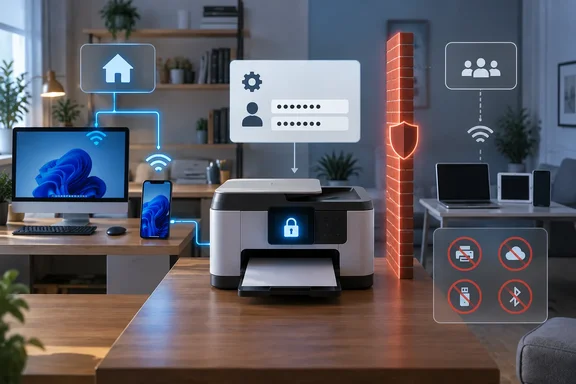
The headline claim that a printer can “see everything” needs qualification. Being reachable on the same network does not establish that a printer can read every device’s files or inspect all its traffic. The supported concern is narrower: a compromised printer may have opportunities to contact other devices, and unnecessary services or weak administrative credentials can increase its exposure.
Separate discovery, administration, and access
Three different functions are involved in network printing: finding the printer, sending it jobs, and changing its configuration. Treating them as separate decisions makes hardening less likely to break everyday use.
Microsoft documents UPnP and Web Services on Devices, or WSD, among the protocols Windows can use to discover network devices. Their presence is not, by itself, evidence of malicious activity. Discovery helps software locate devices that are not directly attached to the PC. Microsoft’s documentation also identifies DNS service discovery and Wi-Fi Direct as distinct discovery mechanisms. Microsoft Learn
Disabling a discovery service therefore changes how a device is found; it does not establish a firewall boundary around it. Conversely, preventing access to a printer’s management interface does not necessarily prevent an already-configured PC from printing. Which functions share services depends on the printer.
This is why How-To Geek’s recommendation to disable WSD and older printing protocols should be applied selectively. Turning off a protocol that your existing print connection uses can interrupt that connection. The sensible target is unused services, rather than every service with an unfamiliar name.
Isolation needs a printing plan
How-To Geek recommends a VLAN or guest network and suggests enabling “client isolation” for wireless devices. The intended benefit is to stop a compromised printer from freely reaching other household equipment.
Those options should not be treated as interchangeable guarantees. A separate network name alone does not demonstrate which connections are blocked. The useful question is whether the router’s configuration separates the printer from trusted devices—and whether it permits an intentional printing connection across that boundary.
There are two practical approaches:
- Full isolation suits a printer that does not need routine access from the main network, but network printing may become unavailable.
- Controlled access suits a household that needs regular printing, provided its router supports rules that permit the required connections without broadly reopening access between networks.
The second approach is a design goal, not a universal router procedure. Neither the printer nor router model is identified in the account, so an exact menu path or firewall rule cannot safely be supplied. A basic guest-network feature may not offer the controls needed.
How-To Geek reports that isolation disrupted AirPrint discovery and describes moving the printer back onto the main network when needed. That restores convenience by removing the separation during use. The same general trade-off deserves attention on Windows: discovery and connectivity must remain available through whichever printing method the PC uses.
Do not assume that adding a printer by IP address bypasses isolation. An address identifies the destination; it does not override a rule blocking access to it.
A measured hardening sequence
The reported changes are most useful when applied in an order that preserves administrative access and identifies which adjustment causes a problem.
- Change a default or weak administrator password. This protects configuration access. It does not replace network isolation, and isolation does not replace authentication; they address different opportunities for access.
- Record which functions you actually use. Include printing from Windows, phone printing, scanning to a PC or shared folder, and remote access where applicable. This establishes which services cannot simply be switched off without a replacement.
- Disable unnecessary management and legacy services where the printer exposes those controls. How-To Geek specifically recommends reviewing UPnP, WSD, raw printing, Telnet, FTP, and outside-the-home management. Treat that as a review list, not a model-independent instruction to disable everything.
- Apply network separation only after deciding how authorized devices will print. If the router offers only complete guest isolation, accept the resulting loss of direct access rather than assuming discovery settings will repair it.
- Verify the functions you intend to retain after each change. A printer disappearing from a discovery list demonstrates a discovery change—not proof that all access to it is blocked. Likewise, a successful print job does not establish that scanning still works.
Changing one setting at a time makes failures easier to associate with the relevant change. Avoid making a protocol shutdown and a network move simultaneously if you need to distinguish their effects.
The useful outcome is a printer with protected administration, fewer unnecessary services, and deliberately limited network access. A configuration that merely makes the printer disappear—or requires routinely undoing every restriction to print—has not yet resolved the security-and-usability trade-off.
References
- The network settings I changed after realizing my printer can see everything in my house How-To Geek · 2026-09-21T10:00:13+00:00
- Unable to install Secure Web Services on Devices (WSD) Printer - Windows Client | Microsoft Learn learn.microsoft.com