

What Microsoft actually announced
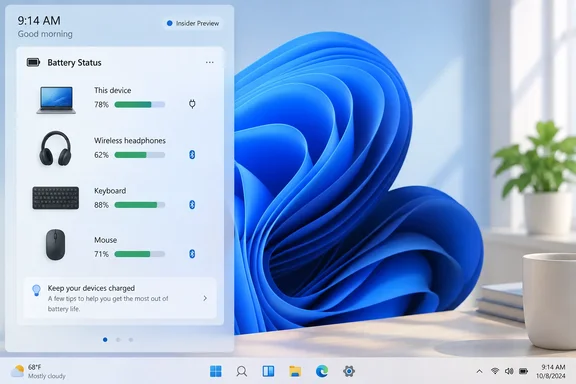
Microsoft describes the widget as part of its effort to make Widgets more useful day to day. It gives a unified view of battery levels for your PC and peripheral devices, so you don't have to hunt through several parts of the interface. To add it, go to Widgets board > Add widgets > Battery Status.
The announcement came in the October 7, 2026 Windows Insider post, right after Microsoft's Windows and Surface event. That post covered new Beta and Experimental builds, including Beta build 26220.9606 and Experimental build 26340.9616, plus 26H1 and Future Platforms variants.
Who can get it, and who can't
The widget is limited to the Experimental channel. Don't assume every build in that day's post has it.
- Coverage of the announcement describes the Battery Status widget as Experimental-channel only.
- Microsoft's release notes say Experimental updates are based on Windows 11, version 26H2, delivered through an enablement package (build 26340.9616).
- Neowin reports that build 26340.9616 is the one that adds the widget, alongside Task Manager process grouping, File Explorer font preview and installation support, and bug fixes.
- Microsoft's notes list the feature under changes "gradually being rolled out." That means even eligible Insiders may not see it immediately.
- Microsoft gave no date for a public release. If you're on regular stable Windows 11, there's nothing to install or enable yet.
How to try it (Experimental Insiders)
- Make sure you're on Experimental build 26340.9616 or a newer build from that track.
- Open the Widgets board.
- Select Add widgets.
- Choose Battery Status.
If the widget isn't in the list, Microsoft's announcement offers no troubleshooting steps or eligibility checklist. Staged rollouts are common for preview features, so a missing widget isn't necessarily a fault. I won't invent a fix that Microsoft hasn't documented.
What the widget looks like
Digital Trends reports that the widget shows your PC next to connected devices such as Surface Headphones, a Surface Keyboard and a Precision Mouse. It also says each device gets a battery percentage and a connection status. Microsoft's official text doesn't spell out those details. They come from the report and the preview image, so treat them as what the demo shows rather than a guarantee.
An earlier Windows Central report, from September 7, described what was found in preview-build assets before the widget worked. That report said the widget lists devices vertically, starting with the PC battery at the top. It added that the widget could show charging status and whether energy saver is on. Those details come from pre-release strings and images. The final Insider version may differ.
The big unanswered question: which devices?
Digital Trends is right to focus on compatibility, because Microsoft hasn't published any. The announcement doesn't say:
- Which brands or models are supported. Logitech, Sony and Razer accessories are not mentioned.
- Whether the widget relies on standard Bluetooth battery reporting, a vendor app, or something else.
- Which connection types are covered, such as Bluetooth, USB dongles or proprietary wireless.
- Whether disconnected devices stay listed.
- How often the readings refresh.
One outlet describes the widget as showing the PC's battery alongside "supported" connected peripherals. That wording suggests limits, but Microsoft hasn't defined them.
My own read, from general industry knowledge and not from Microsoft: Windows already displays battery data for many Bluetooth devices. Microsoft's own Windows documentation says the Bluetooth & devices settings page can show battery life and connection status for connected Bluetooth devices. That page is Settings > Bluetooth & devices > Devices. The new widget would sit on top of the same kind of data. That would explain why Microsoft's examples are Microsoft hardware. But no source confirms the widget uses that mechanism. Many gaming mice and headsets report battery through vendor software instead, and the widget may not see those.
The lock screen
The September Windows Central report said preview assets suggested the widget could also be placed on the lock screen. Microsoft's October 7 announcement mentions only the Widgets board. Lock screen support is still unconfirmed.
Why it matters
Widgets have had a mixed reputation since they debuted. A battery panel is the kind of system-level glance that suits a widget. It's also something Android and iOS have offered for years, as Windows Central pointed out.
If you juggle a laptop, a mouse, a keyboard and headphones, one list beats opening Settings or a vendor app for each device. The value depends entirely on how many of your devices show up. If only Surface accessories appear, it's a demo. If most Bluetooth devices appear, it could become a widget people actually keep.
Bottom line
- Confirmed: Microsoft is testing a Battery Status widget that combines PC and peripheral battery levels. It's added via Widgets board > Add widgets > Battery Status, in the Experimental Insider channel.
- Not confirmed: Support for third-party accessories, lock screen placement, a stable-release date, and technical details such as connection types and refresh behavior.
- Practical advice: Insiders can try it and report which devices appear. Everyone else should wait until Microsoft publishes compatibility details. Preview features can change, be cut, or never ship.
References
- Windows 11 is finally getting a useful battery widget for all your peripherals - Digital Trends Digital Trends · 2026-10-07T21:42:28+00:00
- Windows 11 Insider Experimental Preview Build 26340.9616 - Windows Insider Program learn.microsoft.com
- New Windows 11 Insider builds bring yet another Search redesign - Neowin neowin.net