

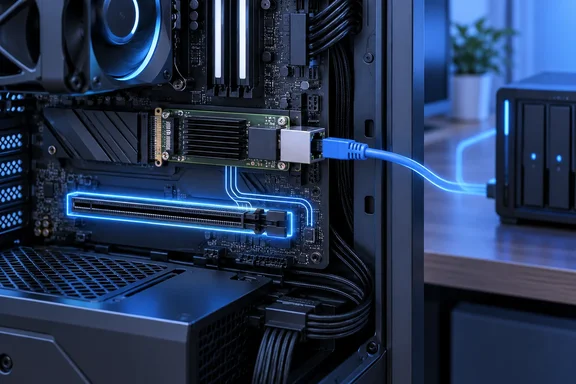
For home-lab builders, the useful outcome is additional flexibility inside the PC. The network upgrade and the slot relocation solve different problems: a direct Ethernet connection bypasses the router’s Gigabit ports, while the M.2 adapter changes where the network card connects to the motherboard.
Two connections, two different jobs
According to XDA, Makwana’s desktop used a Gigabyte X870 Eagle Wi-Fi7 motherboard with built-in 2.5GbE networking, but connected to an ASUS RT-AX88U router through its Gigabit LAN ports. The faster motherboard interface therefore could not provide a 2.5Gbps connection through that router.
Makwana added network adapters to the desktop and a mini-PC home server to establish a separate, direct connection between them. The existing router connection continued to serve the ordinary network; the additional connection provided a path for desktop-to-server traffic that avoided the router’s Gigabit ports.
The distinction is important when deciding whether to copy the idea:
- A faster network adapter cannot make a Gigabit router port operate at 2.5Gbps.
- A direct connection can bypass that limitation for traffic between the two connected computers.
- Moving the same adapter from PCIe to M.2 does not raise its Ethernet speed.
XDA reports that this approach cost less for Makwana than upgrading the wider network, but provides no itemized cost comparison or measured file-transfer results. It supports a targeted upgrade strategy, rather than a quantified performance or savings claim.
The account also does not provide the addressing and routing configuration for the direct link. Installing the hardware should therefore not be mistaken for a complete, reproducible two-computer networking procedure.
What the M.2 adapter actually changes
M.2 is a connector format, not a guarantee that an attached device must be an SSD. Where a socket exposes PCIe connectivity, a suitable adapter can make that connection available to a conventional PCIe expansion card.
Purpose-built Ethernet modules offer another route: an earlier July 25 XDA feature described using a spare M.2 slot for an M.2 2.5GbE card. The September build instead reused a conventional network card through an adapter, making the adapter’s compatibility and mounting requirements part of the decision.
The adapter does not manufacture extra PCIe lanes or increase the capabilities of the attached card. The connection remains constrained by what the card, adapter and motherboard support. Putting a device behind a wider or faster connection cannot make it use capabilities it does not have.
According to XDA, Makwana initially expected the adapter’s advertised bandwidth to improve performance. After examining the card specifications and motherboard manual, he found that the card’s connection remained the limiting factor. The spare M.2 socket also connected through the motherboard chipset, whereas his boot SSD occupied a CPU-connected socket.
Chipset attachment alone does not establish a performance bottleneck. In this account, the useful finding was that changing the connection location delivered no reported bandwidth gain. XDA is the only evidence here for the specific build’s behavior; no independent reproduction or benchmark measurements establish a broader performance result.
Check the slot arrangement before buying
Makwana reported that his motherboard had three M.2 sockets, with two unused, but also had a bandwidth-sharing rule affecting neighboring M.2 connections. That makes socket count an incomplete guide to expansion capacity.
For a prospective build, the useful checks are specific:
- Confirm that the intended M.2 socket provides PCIe connectivity and matches the adapter’s connector key and mounting requirements. An unused socket is not sufficient evidence of compatibility.
- Identify the socket’s electrical lane count and connection path. A physically large slot on an adapter does not promise the bandwidth of a full-width motherboard slot.
- Identify any lane-sharing rule involving that socket. Record which other connection changes when it is populated, especially if another SSD or expansion device is planned.
- Verify how the card will be secured, where its external ports will be accessible, and whether the adapter and card require additional power connections.
These checks determine whether the arrangement solves a real space problem. Freeing a motherboard connector does not necessarily free the same amount of room inside the case: the relocated card still needs a secure mounting position.
XDA lists USB controllers, SATA controllers, wireless adapters, sound cards and capture cards as other possible uses. Those are categories to investigate, not a universal compatibility list. The September account establishes a working network-card arrangement, not tested support for every expansion-card type.
Windows 11 detection was successful, but remains device-specific
According to XDA, Windows 11 detected Makwana’s network card automatically and installed a Realtek driver without a BIOS change or a conflict with the boot drive. That is a useful installation observation, but the report does not identify the exact adapter model, network-controller model or driver version needed to reproduce it.
Microsoft’s “Manage inbox network drivers” documentation provides narrower corroborating context: Windows images include drivers for many PCIe Ethernet devices, including listed Realtek driver packages. Starting with Windows 11, some network drivers are available as Features on Demand and can be removed when an installation image is customized.
Consequently, automatic detection on one Windows 11 machine is not a guarantee for another controller or a managed Windows image. Microsoft’s documentation also does not establish that Windows will install the latest vendor driver for this particular card.
For the build XDA describes, the concrete benefit was recovering a conventional PCIe slot, not extracting more speed from the network adapter. An M.2-to-PCIe adapter is worth considering when an unused, compatible M.2 connection can relieve expansion-slot pressure. If a conventional PCIe slot is already available and the card performs correctly there, this account supplies no performance reason to move it.
References
- I plugged a network card into my M.2 slot, and it's the most boring upgrade I love XDA · 2026-09-21T16:00:21+00:00
- Inbox network drivers | Microsoft Learn learn.microsoft.com