

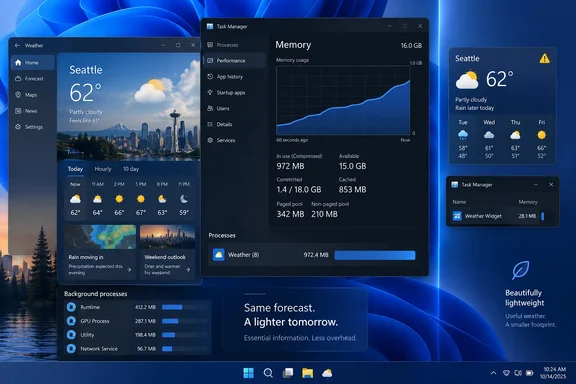
The custom widget is not a downloadable replacement readers can independently inspect or benchmark; How-To Geek published the workflow rather than the code. But its basic premise has moved beyond a single anecdote. Windows Latest first reported MSN Weather reaching about 1.2GB while idle, and TechRadar separately saw its own Windows 11 test system peak near 1GB, with memory later falling nearer 800MB. TechSpot also reported the high-memory behavior, tracing it to a group of Chromium-derived child processes.
The useful lesson is not that every Windows utility must be rewritten with an AI assistant. It is that a weather display has a sharply limited job, and the trade-offs behind Microsoft’s implementation are now visible enough for users to decide whether the supplied app is worth keeping open.
Why the Weather process group gets so large
Microsoft’s own WebView2 documentation explains the underlying architecture. A WebView2 application runs with browser, renderer, GPU, utility, and other supporting processes, much as Microsoft Edge does. That multi-process design is not inherently an error: isolating work across processes can improve resilience, security, and responsiveness when a renderer or service fails.
It does, however, impose a meaningful baseline cost when the application is fundamentally a web experience. Microsoft says WebView2 memory consumption depends on the complexity of the hosted content and how the application uses the control; it does not say that WebView2 alone makes an app consume a gigabyte. That qualification matters. The reported numbers point to MSN Weather’s page design, embedded content, and process model together—not proof that every WebView2 application is careless.
Still, a weather utility faces a harder test than a rich desktop application. Microsoft Support describes MSN Weather as a service with 10-day and hourly forecasts, device and browser synchronization, saved locations, and optional current-location detection. The app also presents far more than a temperature, including radar, air quality, wind, precipitation, moon data, editorial material, and advertising inventory reported by Windows Latest and other outlets.
Those functions may suit someone researching a trip or following a storm system. They are poorly matched to the use case described by How-To Geek: a persistent corner display that answers “what is happening outside?” and draws attention when a warning is active. The difference in resource use follows from that difference in scope.
A Task Manager total should not be treated as a precise invoice for RAM uniquely owned by one weather window. Modern Windows process accounting includes separate helper processes, and some memory can be shared or reclaimed differently than a simple number suggests. Yet that does not erase the practical issue. On an 8GB or 16GB PC, hundreds of megabytes reserved by an always-open forecast app can affect how much memory remains before Windows starts compressing memory or paging active workloads to storage.
For users running local models, virtual machines, browser-heavy research sessions, Adobe applications, or games alongside desktop utilities, that headroom is tangible. A small weather display should not become the process group a user has to close before loading a larger workload.
The DIY design succeeds by deciding what to omit
WeatherWidget’s reported 70MB-to-80MB footprint has not been independently verified, but its architecture is sensible: one location entered by the user, a current-conditions panel, a small forecast, and an alert state. How-To Geek says it deliberately left out account sign-in, automatic location tracking, a news feed, radar, pollen information, prompts, and advertising.
The technical advantage is less about using an AI coding tool than about limiting the program’s responsibilities. A widget that renders a handful of text fields and an icon can be built with a conventional Windows UI stack and a lightweight HTTP client. It does not need a large browser surface, a content feed, or a set of components designed for ad delivery and engagement measurement.
The source split is also appropriate, with an important boundary. Open-Meteo offers forecast data through a JSON API without an API key for non-commercial use, while the National Weather Service’s API exposes official U.S. weather alerts. Open-Meteo consolidates forecast-model output from multiple meteorological services; it is not the same thing as an NWS warning system. Treating those two feeds as separate services is the right design choice because their update intervals and their stakes are different.
How-To Geek says it configured forecasts to refresh as infrequently as every 30 minutes while allowing NWS alert checks every two minutes. That is conservative by the NWS API’s published guidance, which recommends no more than one alert request every 30 seconds. It also avoids the common mistake of treating every piece of weather data as though it needs constant refreshing.
A two-minute polling interval is reasonable for a personal desktop indicator, but it does not make the computer widget an emergency-warning device. The NWS explicitly says that timely internet delivery is not guaranteed and directs people to official dissemination channels for critical alerts. Wireless Emergency Alerts, NOAA Weather Radio, local emergency notifications, and weather.gov remain the channels to rely on when life and property may be at risk.
“No tracking” needs a narrower definition
The personal-widget approach offers a real privacy improvement over a service that can sync preferences through a Microsoft account or use device location. If the user manually enters a location and the app stores nothing beyond local settings, it can avoid an account relationship and avoid continuous operating-system location access.
But “no telemetry” should not be confused with “no data leaves the PC.” A weather request still sends an IP address and location information—usually latitude and longitude, a ZIP code, or a place name—to the forecast provider. An NWS alert lookup must likewise identify an area. The privacy gain is control and minimization, not invisibility.
That distinction should shape how hobbyists build these tools. Store the selected location locally. Use coordinates only when a request needs them. Do not send a device identifier or a contact list. Avoid adding analytics merely because a template or AI-generated starter project includes it. And if the application is ever shared beyond personal use, document what it sends, how long it stores settings, and which data providers receive requests.
There is a second operational issue for anyone copying this model. NWS asks API clients to identify themselves with a useful User-Agent string, including a way to contact the operator. A local one-person widget may never draw attention, but proper identification and back-off handling are basic API hygiene. The application should tolerate rate limiting, cache the last successful alert response, and show that the data is stale rather than silently presenting old conditions as current.
AI can accelerate the build, but it cannot validate it
How-To Geek credits Claude with translating a detailed description into the finished widget. The author specified a small window, independent refresh intervals, a visual warning mode, optional taskbar behavior, and a minimalist display before asking for implementation. That is a far better use of generative coding tools than asking for “a weather app” and accepting whatever framework, dependencies, and data collection the model chooses.
For Windows users considering the same route, the post’s most valuable advice is to define behavior before code. Specify which location source is allowed, which APIs are used, how failures appear, how long data may be cached, where settings reside, and whether the window should start automatically. Each omission should be deliberate.
AI-generated code needs a review that vibe coding often skips. Check that API endpoints are HTTPS; do not hard-code secrets; validate returned JSON before displaying it; set timeouts; preserve the last known good data when a service is unavailable; and test the app after sleep, network changes, and system restart. If an alert changes the widget’s color, make the text and alert type prominent too—color alone is not an adequate notification mechanism.
Most importantly, inspect the generated project for its dependency footprint. A utility meant to save memory loses the argument if it imports Electron, embeds a browser runtime, phones home to an analytics package, or spins up multiple background services. The fastest way to reproduce MSN Weather’s problem is to recreate its architecture under a different name.
Microsoft has a straightforward comparison point
Microsoft is not obligated to make MSN Weather a bare temperature label. Plenty of people want radar, extended outlooks, saved destinations, and richer visual presentation. The company’s own support material makes clear that MSN Weather is meant to be a broader service, not merely a desktop widget.
But Windows 11 currently leaves users with a poor separation between that feature-rich service and the narrow utility use case. The reports from Windows Latest, TechRadar, Tom’s Hardware, and TechSpot establish that the 1GB range is reproducible on at least some systems, even if the precise total varies by device, session, and content. Microsoft has documented ways WebView2 developers can share environments and reduce unnecessary inter-process communication, but it has not publicly explained whether MSN Weather will be optimized or offered in a lighter mode.
Until that changes, the practical answer is simple: keep MSN Weather for the occasions when its full feature set is useful, but do not assume it is a trivial background app. For an always-visible forecast and alert indicator, a narrowly scoped local widget—whether personally coded, AI-assisted, or built from a transparent lightweight project—can reserve far more of the PC for work that actually needs the memory.
References
- Windows 11's Weather app eats 1GB of RAM—this is how I built my own that doesn't How-To Geek · 2026-09-17T11:00:14+00:00