

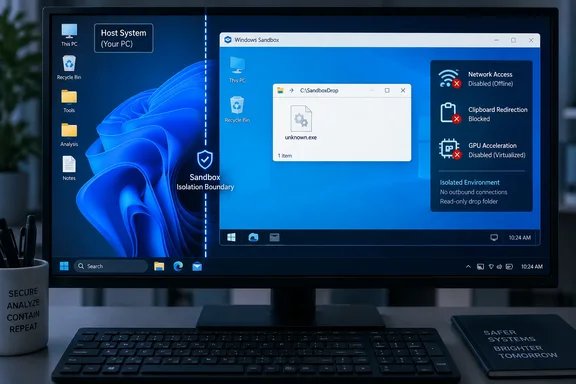
There is no newly disclosed Windows Sandbox vulnerability here, and no evidence that Microsoft silently changed the defaults in September 2026. Networking and clipboard redirection have been documented defaults for years. The practical finding is still worth acting on because Windows Sandbox is often launched precisely when a file is not trusted — while Microsoft’s default session is optimized to be convenient for general software testing, browsing, and short-lived app installs.
For a suspicious executable that does not need the internet, disable the network. If you do not need to paste commands, URLs, files, or credentials into it, disable clipboard redirection too. Those two choices remove capabilities that the program otherwise receives before it has done anything to earn them.
The default Sandbox session is connected by design
Microsoft documents that a standard Windows Sandbox session starts with networking enabled through the Hyper-V default switch. The sandbox receives a virtual network adapter, meaning code run inside the session can contact internet services and potentially resources reachable from the host’s network.
Microsoft explicitly warns that enabled networking can expose untrusted applications to the internal network. That deserves a more precise reading than the usual “Sandbox means safe” shorthand. A networked sandbox remains separated from the host by virtualization and a distinct kernel, but the application inside it can still make outbound requests, retrieve additional payloads, phone home, scan reachable services, or attempt to use credentials and services available through the network path.
Disabling networking does not turn malicious code into harmless code, and it does not prove a sandbox escape is impossible. It does a narrower, valuable job: it prevents the process in that particular Sandbox session from using its normal network connection. For static inspection, a first-run check of a downloaded executable, or opening an attachment that should not need connectivity, that is the correct default posture.
It also prevents a common testing mistake. An installer that appears innocuous offline but immediately fails because it cannot fetch a second-stage component has told the tester something meaningful. That behavior does not prove malice — plenty of legitimate installers are web stubs — but it distinguishes a self-contained installer from one whose real activity begins only after it reaches the network.
Clipboard sharing is a host bridge, not a harmless convenience
Clipboard redirection is also enabled by default. Microsoft describes it plainly: users can copy and paste text and files back and forth between the host and Windows Sandbox. That is useful when moving a test file or command into a clean environment. It is also a bidirectional sharing channel that is unnecessary in many untrusted-file scenarios.
The immediate risk is often human rather than a dramatic clipboard exploit. An administrator may copy a password, API token, internal hostname, PowerShell command, or customer data on the host, then paste something into Sandbox without considering that clipboard contents can travel in both directions. A program inside the sandbox may also be able to observe or replace data that the user subsequently pastes elsewhere, depending on how the session is used.
For that reason, the cleanest workflow is to avoid the clipboard entirely for suspicious files. Put the file in a deliberately limited staging folder, map that folder into the Sandbox as read-only, and disable clipboard sharing. The result is less convenient than Ctrl+C and Ctrl+V, but it gives the test process no access to the host clipboard and no write path back through the folder share.
MakeUseOf’s central recommendation — disable networking and clipboard sharing when they are not required — is sound. Its framing understates a third default that belongs in the same security review: virtualized GPU is enabled on most non-Arm64 systems, and Microsoft says that enabling it can increase Sandbox’s attack surface. Microsoft’s own unknown-download example disables vGPU alongside networking.
Microsoft’s own unknown-download sample is stricter than the shortcut
Microsoft provides an official .wsb configuration example for testing an unknown download. It does not use a default Sandbox with an unrestricted internet connection. The sample disables <Networking> and <VGpu>, maps a host folder into the sandbox, and sets that mapping to read-only.
The read-only detail matters. A mapped folder is still a host resource exposed to the Sandbox. Read-only mapping stops software inside the session from writing back through that share, but it does not stop the program from reading every file placed in the mapped directory. Mapping a full Downloads folder may be acceptable in a throwaway home setup, but it is unnecessarily broad on a work machine where Downloads can contain documents, installers, exported data, or email attachments unrelated to the current test.
A dedicated staging folder is safer. Copy only the file you intend to examine into a folder such as C:\SandboxDrop, verify that it contains nothing else sensitive, and map that directory read-only. Do not map Desktop, Documents, Downloads wholesale, a project checkout, or a network-synced folder simply to avoid one extra file copy.
A compact configuration for an offline first run can look like this:
<Configuration>
  <VGpu>Disable</VGpu>
  <Networking>Disable</Networking>
  <ClipboardRedirection>Disable</ClipboardRedirection>
  <MappedFolders>
    <MappedFolder>
      <HostFolder>C:\SandboxDrop</HostFolder>
      <SandboxFolder>C:\SandboxDrop</SandboxFolder>
      <ReadOnly>true</ReadOnly>
    </MappedFolder>
  </MappedFolders>
  <LogonCommand>
    <Command>explorer.exe C:\SandboxDrop</Command>
  </LogonCommand>
</Configuration>
Save it with a .wsb extension, such as OfflineInspection.wsb, and open that file rather than starting Windows Sandbox directly. Microsoft’s documentation confirms that a .wsb file launches Sandbox with the specified configuration.
The configuration deliberately does not make the staging folder writable. If the test program needs to create output, let it write to the sandbox’s own temporary filesystem. When the session closes, Sandbox discards that environment and its local changes. If an analyst needs to preserve a report, exported sample, or screenshot, they should deliberately transfer only that item after reviewing it — rather than leaving a broad host folder mounted throughout execution.
Protected Client is worth evaluating, but it changes usability
Microsoft also documents a setting called Protected Client. When enabled, it runs the Sandbox session inside an AppContainer Isolation environment and adds isolation for credentials, devices, files, networks, processes, and windows. The vendor warns that this option can restrict copying and pasting files into and out of the session.
That makes Protected Client relevant for a hardened profile, especially on machines used to inspect unsolicited attachments. It is not a replacement for disabling networking. An isolated process with access to the network can still communicate over the network; the stronger choice for an offline binary test is to use both an appropriate Sandbox isolation mode and an explicitly disconnected configuration.
There is a usability cost. Browser testing, phishing-page investigation, web-based installer validation, package-manager testing, and reproduction of a network-dependent bug all require some degree of connectivity. In those cases, turning off networking defeats the purpose of the test. The answer is not to reflexively re-enable every integration feature; it is to decide which features the test requires before launching the session.
A sensible split is straightforward:
- Run unknown executables in an offline Sandbox with clipboard redirection and vGPU disabled, using a minimal read-only staging folder.
- Use a connected Sandbox for software that genuinely must reach the web, but recognize that it can contact services visible from that machine’s network.
- Avoid host-folder mappings unless a file must be transferred, and keep every mapped folder read-only unless writing back is an explicit, reviewed requirement.
- Use a separate VM, dedicated network segment, or a detonation environment when the task requires interacting with a genuinely suspicious website or malware sample over the network.
The limit of Sandbox’s “disposable” promise
Windows Sandbox’s disposable nature is useful, but it can encourage the wrong mental model. Closing a session deletes the Sandbox’s local files, installed applications, and configuration changes. It cannot undo an outbound request, an uploaded document, a network scan, a downloaded payload sent to an external service, or activity directed at an accessible internal system while networking was enabled.
That is why the configuration matters more than watching a suspicious program from behind the apparent safety of a sandbox window. The default Windows Sandbox profile is reasonable for broad-purpose testing, and Microsoft has never presented network access or clipboard sharing as hidden features. But Microsoft’s own guidance for an unknown download is more restrictive than that default.
For Windows power users and administrators, the practical move is to keep two .wsb files: one offline inspection profile with no network or clipboard bridge, and one connected profile for web-dependent testing. Launching the right profile before the file runs is the point at which Sandbox becomes a deliberate control rather than a convenient assumption.