

Noctua's September 2026 target for the WireView Pro II Noctua Edition has almost run out
The teaser is the latest step in a reveal that started at Computex 2026. Wccftech, which reported the new Noctua post, says the company announced that the Noctua Edition will launch in Q3 2026, but we are almost entering the fourth quarter with no official release date confirmed. Coverage from Computex gave a more specific month. TechPowerUp reported that the edition will be a bit more expensive compared to the original WireView Pro II and should come in September. Techolam's show coverage also said availability is expected in September, though exact pricing has not yet been confirmed.
The product first appeared before Computex. VideoCardz reports it was shown by Roman Hartung, better known as Der8auer, during a Gamers Nexus Computex segment. At that point the launch is planned in roughly three months, according to the Computex discussion, which also points to September.
So a September target is well documented, but as of September 25 there was still no retail listing or firm date. Wccftech's author guesses that it's possible that we might see the official launch within the next five days. That is his own guess; neither company has announced a date. The practical reading is that the device may arrive very soon or slip into Q4, and nobody has confirmed which.
How WireView Pro II per-pin monitoring on 12V-2×6 works
The Noctua branding is on top of a real diagnostic tool. Thermal Grizzly's product page says that on the WireView Pro II, current is not only measured as a total value, but also per each individual pin and wire of the 12V-2x6 connector. This enables immediate identification of potential contact issues between the cable and graphics card.
Per-pin measurement is the important part. The 16-pin 12V-2×6 connector, and the older 12VHPWR it replaced, carry very high power through a handful of small contacts. If one pin seats badly or wears, the current can pile up on the remaining wires. The total wattage can look normal while one wire runs dangerously hot. A monitor that only reports total power misses that; one that measures every pin can catch it. OC3D describes the purpose the same way: per-pin data can be used to enable useful safety features that can prevent damage to GPUs and PSUs by avoiding "melted connector" incidents.
Thermal Grizzly's documentation for the standard Pro II lists a fuller feature set:
- It continuously measures current, voltage, temperature and power, and you can configure the monitoring values and warning thresholds.
- It gives a visual warning on its 320×170-pixel TFT-IPS display and can sound an alarm when a threshold is exceeded.
- An optional automatic system shutdown can be triggered through the included splitter cable.
- It has two external 10k NTC temperature sensors, a USB-C port for user-installed firmware updates and an internal USB cable.
- It logs per-pin current, total power and PCB temperature near the connector, storing one record every 60 seconds.
The device warns you and can shut the system down. It does not stop a connector from failing on its own. Thermal Grizzly's own wording is that it is allowing early detection of load distribution problems and helping to prevent possible damage, and "helping" is the right level of claim. It also adds a physical link to the power path. One TechPowerUp commenter noted that the thing weights something and acts like a lever plugged in the connector. It also adds more contacts in the way. That comment is a reader's opinion, not a measured result, but anyone putting an extra module on a heavy cable should keep it in mind.
What the NF-A4x10 redesign changes: a bigger fan, a bigger case, same electronics
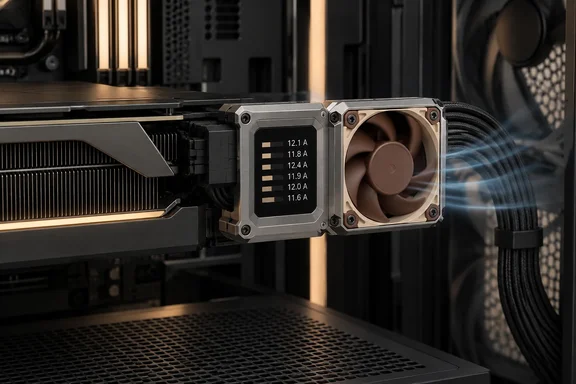
Every outlet agrees that the electronics stay the same and the cooling changes. VideoCardz says the new model is based on the existing WireView Pro II, so the electrical monitoring features remain the same. This includes per-pin sensing. TechPowerUp adds that it will use a different CNC-machined aluminium case with a Noctua-optimized fan grill that should improve airflow-to-noise performance, as well as use Noctua's frameless NF-A4x10 PWM fan with semi-passive cooling mode.
The fan is the main hardware change. The regular WireView Pro II uses a 30 mm fan, while the Noctua version moves to a 40 mm fan. Thermal Grizzly said it had to modify the PCB and make the housing around 7 mm larger to fit the fan. OC3D also says the edition has a unique PCB, enlarged design, and a new heatsink/thermal pad that cools the device. Wccftech confirms that the edition still retains the display for monitoring, and hosts similar connectivity to the standard edition, including a USB Type-C port for firmware updates.
"Semi-passive" means the fan stays off at low load and spins up only when the device gets hot enough. The goal is to keep the fan off as often as possible. According to Der8auer, as reported by VideoCardz, the larger fan should allow the device to run passively at much higher loads. He said that around 600W, the Noctua Edition may still run without spinning the fan in systems with some airflow.
That 600 W figure is the most concrete performance claim available. It comes from Thermal Grizzly's side, from one Gamers Nexus segment, and it is conditional on "systems with some airflow". OC3D's version of it comes from the same video, so it doesn't count as independent confirmation. Noise figures aren't final either: Noctua also helped optimize the fan grill, although Thermal Grizzly does not yet have final acoustic numbers. OC3D's logic is sound as an expectation: if the Noctua Edition needs its fan less often, it's likely the fan doesn't need to run fast when it does. It remains a prediction until someone measures the retail unit.
€199 versus €119: what the WireView Pro II Noctua Edition premium buys
The reported price gap is large. VideoCardz says pricing is expected to be €199, compared with €119 for the regular WireView Pro II in Europe. OC3D reported the same figures, and Wccftech repeats the €199 expectation. All of this goes back to the Computex briefing. None of the manufacturers has published final pricing, and TechPowerUp only said the edition would be "a bit more expensive." Treat €199 as the expected EU price, not a confirmed one. Thermal Grizzly's US store currently lists the standard WireView Pro II at $146.13, and no US price for the Noctua Edition has been reported.
At those numbers, you pay about €80 extra for exactly the same monitoring. What you get is a larger CNC-milled aluminium housing, a Noctua fan and grille, and a device that should run silently more often. Monitoring accuracy, the warning features and firmware support are unchanged. OC3D's summary: for that, users will get a larger, more premium design.
The same Computex announcement included a cheaper option. TechPowerUp reported that Thermal Grizzly also announced the new, more compact version called the WireView II. Techolam says that model has no display, calling it an attractive alternative for those who prioritize functionality over form. The details reported so far don't establish whether the WireView II keeps the Pro II's per-pin sensing and alarms. Check that before you treat it as a replacement.
Why fitment on your GPU and case decides whether you can buy the WireView Pro II Noctua Edition
Having a 12V-2×6 connector doesn't guarantee the device fits your build. Thermal Grizzly tells buyers of the standard Pro II to check compatibility first. Its product page says that before purchasing a WireView Pro II, it should be verified whether the graphics card in use is compatible. To do so, the following steps can be carried out: Check the compatibility list in the download section of the product page.
For the standard model, Thermal Grizzly's check has three parts:
- Look your graphics card up on the WireView Pro II compatibility list. The list assumes the card is mounted horizontally with the power cable routed toward the bottom of the case.
- Compare the published technical drawing against your graphics card, your case's side-panel clearance and, if relevant, your CPU cooler. Large tower coolers can get in the way.
- Pick the "Normal (N)" or "Reverse (R)" variant based on which way the connector faces on your card and which way the power cable needs to run. You can rotate the display 180° in the settings, but you can't reverse the connector.
The Noctua Edition makes this check more important. Its housing is reportedly about 7 mm larger, so a card that barely fits the standard model may not fit this one. Thermal Grizzly hasn't published a separate compatibility list for the Noctua Edition in anything reviewed here. Don't assume it fits a Noctua-branded card such as the ASUS RTX 5080 Noctua Edition just because both products carry the Noctua name. Some owners are already running into limits. Under TechPowerUp's Computex story, one reader wrote "I'd buy one if they had one for the Founder's Edition." That is one person's experience, but it matches Thermal Grizzly's own advice to check each card individually.
What this means for you
Decide based on the problem you're trying to solve. If you want per-pin monitoring on a high-power 12V-2×6 card right now, the standard WireView Pro II already does that job and costs less. The Noctua Edition makes sense if fan noise from the monitor bothers you and you have room for a larger housing. If you're undecided, you lose little by waiting for final pricing, a compatibility list and independent noise tests.
- The WireView Pro II Noctua Edition has the same per-pin current, voltage, power and temperature monitoring as the standard Pro II. Only the cooling and housing change.
- The main hardware change is a 40 mm Noctua NF-A4x10 fan instead of a 30 mm fan, which required a modified PCB and a housing about 7 mm larger.
- The expected EU price of €199, against €119 for the standard model, comes from Computex briefings and is not yet final.
- The claim that it can stay passive at around 600 W in systems with some airflow comes from Der8auer. No independent tests or final noise figures exist yet.
- Check the Normal or Reverse orientation, case clearance and CPU cooler clearance before buying, and wait for a Noctua Edition compatibility list rather than relying on the standard model's.
- Neither version replaces a properly seated cable. The monitor warns you and can trigger a shutdown, but it can't fix a bad connection.
Noctua's new teaser suggests launch is close, but until Thermal Grizzly and Noctua announce a date, price and compatibility list, the September target is just a target. The useful part of the product is Thermal Grizzly's per-pin monitoring, which already ships in the cheaper standard model. The Noctua Edition's quieter cooling is optional, so most buyers can wait for independent noise measurements and a confirmed fit for their card before deciding whether it's worth the reported €80 premium.
Update: WireView Pro II Noctua Edition goes on sale with noise figures and GPU-connector warranty (September 28, 2026)
The WireView Pro II Noctua Edition is now available, according to Tom’s Hardware, ending the earlier uncertainty over whether its September target would slip. The outlet reports a suggested retail price of $189.90, although Thermal Grizzly’s official store was listing it at $222.18 at publication.
The launch also brings the first specific cooling figures. In a worst-case test setup with case fans disabled and ambient temperatures above 40°C, Thermal Grizzly says the monitor can remain fanless with a GPU drawing up to 300 W. When active cooling is required, the Noctua fan reportedly stays below 2,000 RPM, versus 5,000 RPM for the standard unit, with quoted noise falling from 39.4 dB(A) to 21.5 dB(A) measured at 10 cm.
Both Normal and Reversed connector orientations are being sold. The edition also includes an extended two-year warranty covering the GPU connector, adding a practical distinction beyond its quieter, larger cooling design.
References
- Noctua Teases WireView Pro II “Noctua” Edition For Modern Graphics Cards With 12V-2×6 Connectors Wccftech · 2026-09-25T14:49:18+00:00
- Thermal Grizzly Shows New WireView Pro II Noctua Edition and New WireView II at Computex 2026 | TechPowerUp techpowerup.com
- Thermal Grizzly prepares WireView Pro II Noctua Edition for 12V-2×6 GPUs - VideoCardz.com videocardz.com