

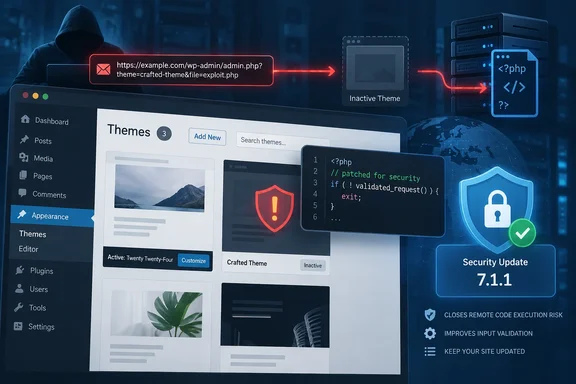
WordPress’s release announcement confirms that specially crafted URLs could automatically install and preview an inactive theme from WordPress.org. Security researcher Paulos Yibelo and pwn.ai disclosed the attack chain, while WordPress security firm Patchstack published an analysis of its mechanics and prerequisites. The finding exposes a consequential boundary in theme management: a theme can remain inactive on the public website while its PHP runs during a preview.
Click2Shell turns WordPress theme preview into an installation request
The vulnerable workflow begins in WordPress’s theme installer. An administrator can follow a link containing a theme’s slug—its machine-readable catalog name—to open the corresponding theme preview. Normally, opening that preview does not install the theme.
Click2Shell exploits a disagreement between two parts of that workflow. The WordPress.org Themes API processes the URL value as a theme name, stripping extra characters to find a legitimate catalog entry. JavaScript in the administration page then reuses the original value inside a jQuery selector, an expression used to locate elements on the page. Before the fix, that second use did not adequately escape the value.
Specially chosen punctuation therefore had two meanings. To the catalog API, it was material to discard while identifying a real theme. To the browser’s selector engine, it was structural syntax that could redirect which element WordPress selected. The administration page’s own JavaScript could consequently trigger the theme’s genuine Install control rather than simply open its preview.
This explains why the attacker does not need to steal an installation nonce, the security token used by the installation action. According to pwn.ai’s technical disclosure, the trusted administration page already has that token, and the victim’s account supplies the permission to install themes. The attack makes WordPress use those existing credentials and controls on the attacker’s behalf.
The authentication boundary is essential. The attacker needs no WordPress account, but the victim must have the necessary administrative permissions. Patchstack’s analysis says an ordinary visitor, Author, or Editor cannot trigger this chain because those accounts lack the required theme-installation capability. It identifies targeted phishing against a logged-in administrator as one delivery route; a separate cross-site scripting vulnerability could also make the administrator’s browser send the request.
Calling the chain “pre-authentication” describes the attacker’s position. It does not mean the site can be compromised merely by an unauthenticated request arriving at the server, with no administrator involved.
An inactive WordPress theme can still supply the PHP execution path
The Core vulnerability’s immediate result is narrower than arbitrary code upload: it forces installation of an attacker-selected package from the official WordPress.org theme catalog. It does not, by itself, accept an arbitrary theme archive hosted on the attacker’s server. The distinction determines how the attack reaches remote code execution.
In pwn.ai’s demonstration, the selected package was Mobile Repair Zone 2.5.4. After forcing its installation, the chain invoked a WordPress Customizer preview. The Customizer loaded the inactive theme’s PHP, allowing its functions and request handlers to become available even though another theme remained the website’s active theme. Patchstack’s analysis describes the same second-stage behavior.
The relevant handler accepted a plugin download location without checking an action nonce or the user’s installation capability. It could download the supplied plugin archive, unpack it, and load its PHP. That separate weakness turned the forced installation into execution of attacker-selected code on the server.
The chain therefore crosses three distinct boundaries:
- The crafted theme-preview link causes WordPress to install a legitimate catalog package without an explicit installation decision.
- The Customizer preview loads that package’s PHP before permanent activation.
- A vulnerable handler in the theme accepts and executes an attacker-selected plugin package.
This is why checking only the website’s active theme is insufficient to assess the demonstrated exposure. Mobile Repair Zone did not need to be the administrator’s chosen design—or even installed beforehand—because the Core flaw supplied the installation step. Conversely, the presence of any inactive theme is not proof of compromise: the demonstrated code-execution outcome depended on a particular vulnerable handler.
The public website can also continue to look normal. Pwn.ai reports that the original theme remains active throughout its demonstration. An unchanged homepage therefore does not establish that no unexpected theme or plugin code was loaded.
The potential consequences extend beyond appearance. BleepingComputer reports that successful PHP execution could allow file modification or deletion, access to user data, and access to wp-config.php, which contains database credentials and authentication secrets. Those are possible consequences of successful exploitation, not evidence that a particular website has suffered them. Pwn.ai describes execution under the WordPress server account; that should not be inflated into an automatic claim of unrestricted operating-system administrator access.
WordPress 7.1.1 fixes the selector boundary, not merely one vulnerable theme
WordPress 7.1.1 addresses the Core entry point in wp-admin/js/theme.js. The patch escapes the URL-derived slug with $.escapeSelector() before placing it in the selector and restricts matching to actual theme-card elements. Characters that previously altered the selector’s structure are treated as literal data instead. Pwn.ai’s disclosure and Patchstack’s analysis both describe these changes.
For developers, the mechanism supplies a practical lesson about input handling. A value cleaned for a catalog lookup is not automatically safe to embed in a browser-side selector. The relevant boundary was the second interpretation of the original input, and the fix addresses that use directly.
For administrators, it means avoiding Mobile Repair Zone alone is not a substitute for updating Core. The forced-installation flaw can select other catalog themes; Mobile Repair Zone 2.5.4 was the component used to demonstrate the complete chain. Fixing the shared entry point removes the demonstrated way to impose that installation through a crafted preview link.
The strongest established version boundary is the fixed release, WordPress 7.1.1. Pwn.ai reports reproduction on WordPress 7.1.0 and says the Core issue is expected to affect earlier releases. That expectation should not be presented as an individually tested inventory of every historical WordPress version.
WordPress’s September 17 announcement says security fixes are being backported, where necessary, to eligible branches through 4.7, but also says those backports are shipping as they become ready. It explicitly identifies only the most recent WordPress version as actively supported. Administrators maintaining an older branch therefore need confirmation that their particular security update includes this fix; the announcement of backport work is not confirmation that every older installation is protected.
The release contains 11 security fixes, and WordPress recommends immediate updating. The Click2Shell disclosure did not include a CVE identifier, but administrators already have an actionable patch boundary and a documented behavior to track. There is no operational reason to wait for an identifier before deploying the fix.
WordPress administrators should patch Core and verify the installation boundary
Deploy WordPress 7.1.1, or confirm a specifically documented security backport if an older branch must remain in service. WordPress’s published update procedure is to open the WordPress Dashboard, select Updates, and choose Update Now. Sites supporting automatic background updates can receive the release automatically; verify the installed version rather than assuming that eligibility means deployment has completed.
Patchstack identifies DISALLOW_FILE_MODS as a mitigation for sites that cannot update immediately. With that setting enabled, the demonstrated route cannot force installation of new themes or plugins. This blocks the installation prerequisite; it does not repair the vulnerable selector, and Patchstack still recommends updating WordPress.
Keep the setting’s scope in view. It restricts file-modification operations needed for installation, so it belongs within the site’s deployment policy rather than being treated as a consequence-free switch. The evidence establishes its value against this installation route, not a blanket guarantee against every vulnerability in already installed themes or plugins.
For teams prioritizing several sites, the concrete takeaways are:
- Verify that each production site has received WordPress 7.1.1 or a confirmed backport containing the Click2Shell fix.
- Treat administrator interaction as an attack prerequisite, not as a reason to postpone the update; a crafted link can borrow an already authenticated session.
- Do not assess exposure solely from the active theme, because the demonstrated chain installs and previews a different, inactive theme.
- Treat
DISALLOW_FILE_MODSas a constrained mitigation for forced installation, not as an equivalent replacement for the Core patch. - If an administrator visited a suspicious theme-preview link, include unexpected theme and plugin installations in the site’s security review; an unchanged public design does not rule out the demonstrated sequence.
Click2Shell makes a routine-looking theme preview relevant to server security because the preview workflow can reach executable PHP before activation. WordPress 7.1.1 closes the Core flaw that starts that sequence. The immediate decision is to deploy and verify the fix, while keeping any investigation of suspected earlier activity separate from the act of updating: a repaired entry point does not, by itself, establish that the site was never altered.