

The Xbox Elite Series 2 is a 2019 design Microsoft still sells for Windows PCs
The hardware is old. Microsoft announced the Series 2 in June 2019 as compatible with Xbox One consoles, Windows PCs, and other platforms that support the Xbox controller family. Sales started on November 4, 2019, in 24 markets including the United States, at a launch MSRP of $179.99. In 2026 that makes it a seven-year-old controller competing with far newer designs.
Microsoft has kept it in the catalogue. The current Xbox accessories page invites buyers to play like a pro with the XBOX Elite Wireless Controller Series 2, and Xbox Design Lab still offers custom Elite builds. Owners can also configure one of four component packs to restyle a controller they already have. The Microsoft Store listing for the cheaper Core model advertises limitless customization with the XBOX Accessories app on XBOX Series X|S, XBOX One, and Windows PC.
The fair reading of the MakeUseOf headline is a complaint about marketing emphasis: the product has been left to sell itself. That is an opinion about promotion, and nothing in the public record lets anyone measure it either way. The product itself is supported, available and aimed at Windows users.
Why the Elite Series 2 wins on PC: battery, the Xbox Accessories app and Xbox Wireless
The reviewer's case for the Series 2 on Windows comes down to getting rid of the small annoyances. They had tried DualShock, standard Xbox, GameSir and 8BitDo pads and kept hitting unreliable Bluetooth connections or extra drivers to install. The Series 2 won them over by working in most PC games on Windows 10 and 11 without any extra software, while offering deep customization for anyone who wants it.
Battery life is the first pillar. The Series 2 was the first Elite with a built-in rechargeable battery, rated by Microsoft at up to 40 hours per charge. The reviewer's unit reaches roughly 35–36 hours in their own use and has held that figure after a year. That is one person's result, not a lab test, but it sits close to Microsoft's rating. Microsoft also said at launch that the battery was designed to operate at its full capacity for years of use. The trade-off is that the battery can't be swapped out, unlike the standard Xbox Wireless Controller's.
The second pillar is first-party software. Through the Xbox Accessories app, available on Windows and Xbox consoles, the controller stores three custom profiles, and a dedicated Profile button switches between them and a default profile. LEDs on the controller show which profile is active. At launch Microsoft said the app could remap buttons, triggers, bumpers and paddles, and could even map voice commands such as "record that" or "take a screenshot" to a button. The reviewer says they also use the app to calibrate sticks, change the front LED colour and update firmware, and that turning down some settings stretches battery life further. Those extra functions are their description of the current app.
The third pillar is connectivity. The controller connects over Xbox Wireless, Bluetooth or USB-C. The reviewer runs it through an Xbox Wireless adapter on their PC and makes three claims about that setup: the adapter connects up to six Xbox controllers, it avoids crowding a room already full of Bluetooth devices, and it lets them check battery status and update firmware wirelessly. The reviewer says the adapter often sells for about $10 on Amazon. Treat that as a street-price anecdote, not a Microsoft price.
Full Elite Series 2 or Elite Series 2 Core: the box contents decide the value
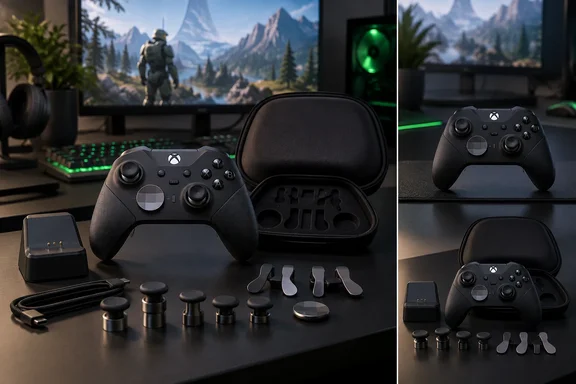
Microsoft sells the controller in two configurations, and comparing prices without checking the contents is the easiest way to overpay or end up short. The full Series 2 is the package the MakeUseOf reviewer describes. Microsoft's launch specification lists:
- a carrying case and a charging dock that works inside or outside the case
- six thumbsticks: two standard, two classic, one tall and one wide dome
- four paddles: two medium and two mini
- two D-pads, one standard and one faceted
- a thumbstick-adjustment tool and a braided USB-C cable
The Core has the same controller in a much smaller box. Microsoft's Core listing says it comes with the adjustment tool and a USB-C cable, and it keeps the headline features: adjustable-tension thumbsticks, shorter hair-trigger locks, a wrap-around rubberized grip, 40 hours of battery life, three profiles and button mapping in the Xbox Accessories app. Kotaku puts it more plainly: the Core ships with the controller, a USB-C cable, a standard D-pad, two thumbsticks, and an adjustment tool, and the carrying case, charging dock, and full set of swappable components are sold separately.
This matters for the reviewer's argument. The case, dock, magnetic stick swaps and back paddles they value most are all in the full kit. A Core owner who wants them has to buy a component pack, which can wipe out much of the price gap.
Pricing is also a moving target. The full model launched at $179.99, but Microsoft now lists it at $199.99. Kotaku reported in March 2026 that the MSRP for the premium controller is now $200, which matches the reviewer's $200 figure. The Core lists at $149.99, and Microsoft's own store recently showed it at $128.99. Retailers have gone lower: Kotaku reported in February 2026 that an Amazon deal on the white Core brought it down to $100, from $150. For a buyer, the Core often costs far less than the full kit, and discounts come around often enough that paying full list price rarely makes sense.
DualSense Edge on Windows: why the MakeUseOf reviewer turned away from it
Most of the MakeUseOf piece compares the Series 2 with Sony's DualSense Edge, which the reviewer bought at launch in 2023 because they wanted back paddles for multiplayer games. Their verdict is that the Edge is a good controller let down by its choices. In their experience it has worse battery life than the standard DualSense, weighs more and costs a lot more, yet uses stick modules they consider prone to drift.
The Edge's selling point is its replaceable stick modules. Sony's documentation describes swapping a failed stick for a separately sold module as an intended repair. The reviewer's right stick began drifting within a year, and when they went to buy a replacement they could not find a module at Amazon or at their local PlayStation retailer. They ended up paying about $50 to import one from Japan, close to the cost of a new controller. That is one buyer's experience of stock in one market, not evidence of a worldwide shortage. It does show that a modular repair design is only as good as the supply of parts. The reviewer also says replacing sticks manually voids the warranty, but they cite no warranty terms, so treat that as unverified.
On Windows setup, the gap is smaller than the MakeUseOf piece suggests. Sony supports the Edge on Windows PCs over USB or Bluetooth and offers a PlayStation Accessories app for Windows that creates profiles and updates firmware. Both companies now provide first-party configuration software for PC. The Xbox advantage the reviewer describes is really Xbox Wireless and the fact that games treat an Xbox pad as the default on Windows, not a monopoly on PC software.
The reviewer also admits the Series 2 has no advantage on stick durability. It still uses the same potentiometer-based sticks as standard Xbox Series controllers, so drift remains a risk. Their workaround is to replace the sticks with TMR or Hall-effect modules, which they say needs only a prying tool and a screwdriver. That is an enthusiast modification, not a Microsoft-supported repair, and nothing in Microsoft's material says it is safe for your warranty.
Their split verdict is sensible. For a player who games only on a PS5, they still consider the DualSense Edge the best controller available, provided you accept the roughly $200 price. For a PC player, the battery life, the four paddles and the Xbox Wireless route tip them toward Microsoft.
Buying an Elite Series 2 for PC in 2026
The main decision is which package to buy and whether you can accept a seven-year-old design with conventional sticks. If you want paddles, swappable sticks, a case and a dock, the full Series 2 is the product the reviewer is praising. If you mainly want adjustable stick tension, trigger stops and profiles on a tighter budget, the Core delivers those features for less. If stick drift is your biggest worry, neither Microsoft's pad nor Sony's Edge solves it out of the box.
- The full Elite Series 2 now lists at $199.99, up from its 2019 launch price of $179.99. The Core lists at $149.99 and has regularly sold for $100–$130.
- The Core does not include the carrying case, charging dock, back paddles or full set of swappable parts. Budget for a component pack if you want them.
- Microsoft rates battery life at up to 40 hours. The MakeUseOf reviewer measured about 35–36 hours per charge, unchanged after a year, and the battery cannot be replaced by the user.
- Profiles, remapping and paddle assignments are handled in the Xbox Accessories app on Windows 10 or 11. The controller also works in most PC games without the app installed.
- Pair over Xbox Wireless, Bluetooth or USB-C. The reviewer prefers an Xbox Wireless adapter to avoid Bluetooth congestion and to get wireless battery readouts and firmware updates.
- The Series 2 uses potentiometer sticks that can drift. Swapping in Hall-effect or TMR sticks is a do-it-yourself job that Microsoft does not support.
The MakeUseOf headline gets the facts backwards but the judgment mostly right. Microsoft has not forgotten the Elite Series 2. It still sells both versions and still promotes them for Windows, and repeated 2026 discounts on the Core have made it one of the cheaper routes to a premium pad. What the reviewer does show is that a 2019 design still covers most of what a PC player wants from a controller. Its one weakness, conventional sticks, is the same one Sony's newer Edge failed to fix in their hands. Until Microsoft announces a successor, the Elite Series 2 is its premium controller, and the practical choice for PC players is between the full kit and the Core.
References
- Microsoft made the best controller of the generation and completely forgot about it - MakeUseOf MakeUseOf · 2026-09-23T23:00:14+00:00
- Buy XBOX Elite Wireless Controller Series 2 – Core (White) for XBOX Series X|S & Windows PC - See Price & Availability | Microsoft Store microsoft.com
- Meet the Xbox Elite Wireless Controller Series 2, Over 30 New Ways to Play like a Pro - XBOX Wire news.xbox.com