
The important nuance is that this is not an ordinary Chrome-for-Windows issue, even though Chromium’s codebase and security advisories often span multiple platforms. CVE-2026-13037 specifically concerns WebView on Android—the Chromium-powered component that lets Android applications render web content inside their own interfaces. For Windows users, the story matters less as a local patching event and more as a reminder that the Chromium ecosystem’s attack surface extends well beyond desktop browsers, into mobile apps, embedded sign-in pages, in-app help centers, payment flows, and hybrid business software.
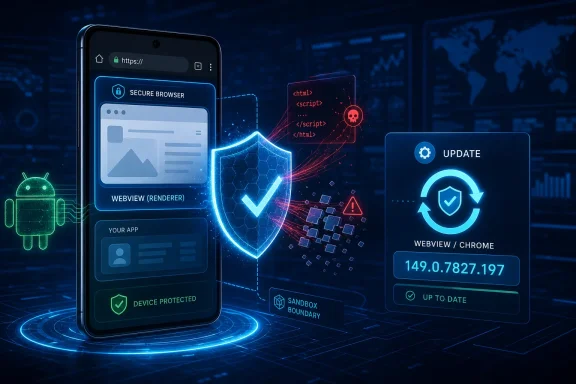 Overview: What CVE-2026-13037 Means
The official description states that a use after free in WebView in Google Chrome on Android before 149.0.7827.197 could allow a local attacker to execute arbitrary code inside a sandbox via a crafted HTML page. Chromium rates the bug High severity, and the National Vulnerability Database identifies the weakness as CWE-416, Use After Free.
A use-after-free occurs when software continues to access a memory object after that object has been released. In a memory-safe programming environment, that reference would become invalid in a controlled way. In native code, however, stale memory references can sometimes be manipulated to produce crashes, information disclosure, or code execution.
That does not mean every use-after-free is equally exploitable. Many are difficult to control reliably, especially across diverse Android hardware and operating-system versions. Yet browser and WebView memory-safety defects deserve special attention because they process attacker-controlled web content at huge scale. HTML, JavaScript, image resources, fonts, media, and network responses create a large and complex parser surface.
The CVE’s stated impact is carefully bounded: code execution occurs inside a sandbox. That distinction matters. A successful exploit in the WebView renderer or a related sandboxed process is serious, but it is not synonymous with unrestricted control of Android itself. Browser sandboxing, Android application permissions, process isolation, and other defenses can constrain what code running in that context can reach.
Still, sandboxed code execution can be a valuable first step in a broader exploit chain. It may enable data theft from the rendered session, abuse of the app’s web context, fraud against an in-app workflow, or pairing with a separate sandbox escape or Android privilege-escalation vulnerability. Security teams should treat the “inside a sandbox” language as an impact boundary—not as a reason to defer the update.
The affected version threshold
The vulnerable range is explicit:
- Affected: Chrome on Android / Android WebView versions before
149.0.7827.197 - Fixed version:
149.0.7827.197 - Severity: Chromium High
- Weakness type: CWE-416 Use After Free
- Trigger: A crafted HTML page
- Stated attack condition: A local attacker
- Stated impact: Arbitrary code execution within a sandbox
Google’s release notice says that Chrome 149 (149.0.7827.197) for Android was released on June 23 and would reach Google Play over the following days. The same notice says Android releases carry the security fixes from corresponding desktop releases unless otherwise noted. Google’s Chrome for Android update post is therefore the practical patch reference for this CVE, while the NVD entry remains the clearest public vulnerability record.
Why Android WebView Changes the Risk Calculation
Android WebView is not simply “a browser tab with fewer buttons.” It is an embedded web runtime that applications can use to display web pages directly inside their own user interfaces. Chromium lists Android WebView as one of Chromium’s supported platforms, reflecting the shared engineering foundation between Chrome and the component embedded by Android applications. Chromium’s Android WebView documentation confirms that relationship.
This architectural role is what gives a WebView flaw a different operational character from a browser-only bug. A user might encounter a vulnerable WebView while opening:
- An in-app support article or knowledge base
- A single sign-on or OAuth authentication page
- A payment or checkout view
- An embedded marketing campaign
- A news or content feed
- A mobile device management portal
- A document-viewing or collaboration feature
- A hybrid application built around web technologies
- A deep link that opens web content inside the app rather than in the default browser
In each example, the web page is rendered within the context of an installed app. The page may be supplied by the organization that built the app, by a third-party service, or by content routed through redirects and advertising networks. The more broadly an application permits navigation to arbitrary destinations, the more important its WebView configuration becomes.
The local-attacker wording deserves careful reading
CVE-2026-13037’s CVSS 3.1 vector, contributed through CISA’s ADP process, is AV:L/AC:L/PR:N/UI:R/S:U/C:H/I:H/A:H, which results in a 7.8 High score. The key elements are local attack vector, low complexity, no privileges required, and required user interaction. NVD’s CVE record presents both the vector and the associated severity score.
“Local” should not be casually translated as “safe unless someone physically holds the phone.” In CVSS terminology, local access means the attack is not described as a straightforward network-delivered exploitation path. The supplied vulnerability description also says that a crafted HTML page is involved and that user interaction is required.
That combination supports a practical interpretation: the attacker needs a way to get malicious web content rendered under the relevant conditions, and the victim must participate in some action that causes the content to load or execute. The public record does not provide enough detail to responsibly assert a specific delivery mechanism, exploit chain, or affected WebView code path.
Accordingly, organizations should avoid both extremes:
- Do not call this a confirmed one-click remote Android takeover.
- Do not dismiss it because the CVSS vector is local.
The appropriate response is to patch the vulnerable rendering component promptly, reduce the exposure of in-app web content, and audit applications that load untrusted URLs in WebView.
The Significance of Code Execution “Inside a Sandbox”
Chromium’s modern security model is layered. Sandboxing tries to restrict what compromised renderer processes can do, while site isolation and process separation can limit access across web boundaries. Chromium describes Site Isolation as a feature that uses the Chrome sandbox to make it harder for untrusted sites to access information from other sites. Chromium’s Site Isolation overview explains both the security goal and the platform-specific tradeoffs.
For CVE-2026-13037, this design matters because the stated impact remains within the sandbox. A successful attack may gain code execution in a constrained Chromium/WebView process rather than immediately attaining the privileges of the hosting Android app or the operating system.
That containment is a meaningful strength of the platform. It raises the difficulty of turning a renderer flaw into total compromise and can reduce the consequences of memory corruption. It also helps explain why a browser vulnerability can be severe without being rated critical.
Sandboxing is a mitigation, not immunity
A sandbox is most effective when it is one layer among many:
- The vulnerable WebView build is patched.
- The hosting app limits which origins it trusts.
- JavaScript access is constrained where possible.
- Local file and content access are disabled unless truly required.
- Sensitive data is not unnecessarily exposed to embedded pages.
- Android and Google Play system updates are applied.
- Device management tools verify component versions across the fleet.
The practical limitation is that an application embedding WebView may have more context, data, and privileged bridges than a standalone browser tab. For example, hybrid apps sometimes expose JavaScript interfaces, authentication state, app-specific URLs, or file-selection capabilities to web content. Those design choices can create consequences that are broader than the base browser sandbox model alone.
Google’s Android security guidance cautions that enabling JavaScript together with risky file-access settings can open the door to file-based cross-site scripting and access to files available to the application. It also notes that broad file URL settings have been deprecated in favor of safer alternatives such as WebViewAssetLoader. Android Developers’ WebView unsafe file inclusion guidance provides the relevant configuration risks and mitigation direction.
This does not establish that CVE-2026-13037 depends on any unsafe developer setting. It does not. Instead, it illustrates why a WebView vulnerability may have different real-world consequences depending on the app that hosts it.
What Is Known—and What Is Not Publicly Detailed
The public CVE record offers a concise but useful set of facts. It identifies the component, weakness category, affected release boundary, attacker condition, trigger class, impact level, and Chromium severity. The NVD listing also records that no NVD-authored CVSS assessment has yet been provided, while CISA’s ADP supplied the CVSS 3.1 7.8 score.
Several details remain unavailable in the public issue metadata:
- The exact vulnerable source-code subsystem
- The memory object lifetime error that causes the use-after-free
- The full proof-of-concept structure
- Whether exploitation is stable across Android device classes
- Whether a public exploit exists
- Whether Google has observed exploitation in the wild
- Whether particular device manufacturers or Android versions have distinctive exposure
The absence of a public exploit is not evidence that exploitation is impossible. Chromium security bugs frequently have restricted technical detail while users update and downstream projects incorporate fixes. Publishing deep exploitation mechanics too early would make it easier for attackers to target users who have not yet received the patched WebView build.
The current SSVC data in the CVE record lists exploitation: none, automatable: no, and technical impact: total. NVD’s record attributes those decisions to CISA’s coordinator role. This is useful prioritization context, but it should not be misread as a permanent guarantee. Exploitability can change when researchers analyze patches, attackers combine flaws, or a proof of concept becomes available.
Why the CVSS figure should be read in context
A 7.8 High CVSS score will rightly draw attention, but the vector matters more than the headline number. The rating reflects:
- Low attack complexity
- No privileges required
- User interaction required
- High potential impact to confidentiality, integrity, and availability
- Local attack vector
- Unchanged scope
The “high” impact values are aligned with arbitrary code execution in the compromised sandbox context. The required user interaction and local vector, meanwhile, distinguish it from a fully remote, no-click browser compromise.
For defenders, this is a patch-now issue rather than a panic-now issue. The update is already available, the fixed build is known, and the public advisory offers a clear remediation target.
Immediate Actions for Android Users
The most effective response is straightforward: update Google Chrome and Android System WebView through Google Play, then ensure the installed provider is at or newer than the fixed release. Google’s Chrome support documentation says Chrome can update automatically through Play Store settings and provides manual steps for locating and applying updates. Google Chrome Help’s Android update instructions detail that process.
A practical update checklist
- Open the Google Play Store on the Android device.
- Tap the account or profile icon.
- Open Manage apps & device.
- Install available updates for Google Chrome.
- Search for Android System WebView and install an update if the component is present and enabled.
- Restart the device if an enterprise policy or device vendor recommends it.
- Check the installed version in the app’s Play Store listing or Android’s application settings.
- Apply pending Android operating-system and Google Play system updates as part of the same maintenance cycle.
Not every Android device exposes Android System WebView in exactly the same way. Depending on Android version, device vendor implementation, and configured WebView provider, Chrome itself may serve that role or the WebView app may appear disabled. Chromium documentation notes that WebView shares substantial code with Chrome and is updated independently from the core Android release process on supported configurations. Chromium’s WebView platform guidance explains the component’s update model and its shared Chromium lineage.
The operational takeaway is simple: update both Chrome and Android System WebView when they are separately available, and do not assume that updating one automatically proves the other is patched on every device configuration.
What not to do
Users should not attempt to mitigate a memory-safety bug by clearing browsing data, disabling JavaScript globally, or uninstalling updates to “stabilize” the phone. Those actions do not remove the vulnerable native-code path and may cause compatibility or security regressions.
Similarly, do not sideload random APK files marketed as “patched WebView” builds. The trusted route is the device vendor’s supported update mechanism and Google Play where applicable. Corporate devices should follow the organization’s approved mobility-management workflow.
Guidance for Enterprise Android Administrators
For enterprise mobility teams, CVE-2026-13037 is a reminder that browser patch compliance must include WebView provider compliance. A device can be compliant in one inventory report and still have an outdated embedded rendering component if reporting does not distinguish Chrome, Android System WebView, Android version, and managed app inventory.
Prioritize version visibility
A useful compliance policy should identify devices that meet any of these conditions:
- Chrome for Android below
149.0.7827.197 - Android System WebView below
149.0.7827.197, where it is the active provider - Devices unable to obtain current Chrome/WebView updates because of unsupported Android versions
- Devices outside managed Google Play distribution
- Dedicated-purpose or kiosk devices with restrictive update policies
- Bring-your-own-device deployments that use corporate apps with embedded WebViews
- Mobile application fleets that invoke WebView for authentication or sensitive workflows
Google’s Android Chrome release post explicitly identifies 149.0.7827.197 as the June 23 Android release. Google’s stable Chrome for Android announcement is the appropriate version baseline for compliance checks.
Treat update lag as an exposure window
Google stated that the release would become available on Google Play over the following days. That normal staged-distribution model is sensible for reliability, but it creates an unavoidable window in which some devices may not yet have the fixed build. Google’s release announcement describes that rollout timing.
For managed fleets, administrators can narrow the gap through:
- Enforced auto-update policies
- Managed Google Play approval and update controls
- Compliance rules tied to installed component versions
- Conditional access restrictions for devices below the fixed build
- Targeted notifications to users with stale update status
- Additional monitoring of apps that render external content in WebView
A measured policy is preferable to indiscriminately blocking all Android access. The CVE’s public data does not establish active exploitation, and the vulnerability requires conditions beyond simply owning an Android device. But sensitive environments—financial services, healthcare, government, privileged administration, and executive travel—may reasonably prioritize the update more aggressively.
Guidance for Android App Developers
Patching the WebView provider is the primary fix for CVE-2026-13037. App developers cannot reliably code around a native use-after-free in a vulnerable rendering engine. However, they can reduce the damage potential of WebView incidents generally and make their applications less attractive targets.
Restrict WebView to content that is genuinely trusted
A WebView should not be treated as a general-purpose browser for arbitrary URLs unless the product explicitly needs that capability. Developers should define trusted origins, validate redirects, and use external browser handoff for destinations that do not need privileged in-app integration.
This is especially important for deep links, password-reset links, payment redirects, customer-support articles, ad content, and document previews. Seemingly harmless navigation features often become the pathways through which hostile HTML reaches an embedded renderer.
Keep dangerous settings disabled by default
Android’s security documentation recommends disabling JavaScript when it is not necessary and turning off file and content access that the application does not need. It specifically calls out setAllowFileAccess, setAllowFileAccessFromFileURLs, and setAllowUniversalAccessFromFileURLs as insecure patterns when broadly enabled. Android Developers’ unsafe file inclusion guidance provides detailed rationale and safer alternatives.
A hardened baseline commonly includes:
javaScriptEnabled = falseunless requiredallowFileAccess = falseallowContentAccess = falsewhere feasible- No universal access from
file://URLs - Strict URL allowlists
- No JavaScript bridge exposed to untrusted origins
- Strong redirect validation
- No loading of cleartext HTTP content
- Minimal persistence of cookies and sensitive session data
- Safe Browsing enabled
Android’s guidance also recommends enabling WebView Safe Browsing through manifest configuration so URLs passed into WebView can be checked against malicious or phishing domains. Android Developers’ cross-app scripting guidance documents that capability as part of a broader WebView hardening model.
Do not confuse app hardening with patch substitution
No configuration change replaces the updated Chromium/WebView binary. URL allowlists, reduced JavaScript exposure, and safer file handling all lower the chance that an attacker can reach sensitive functionality or compound a renderer compromise. They do not correct the underlying memory-lifetime flaw described by CVE-2026-13037.
The strongest posture is therefore layered:
- Update the WebView provider.
- Keep Android patched.
- Reduce untrusted web content in sensitive app flows.
- Minimize WebView privileges and bridges.
- Monitor for unexpected navigation or renderer crashes.
Why This Matters Beyond Android
Windows enthusiasts may reasonably ask why an Android WebView CVE warrants attention in a Windows-focused security conversation. The answer lies in the shared Chromium ecosystem and the increasingly cross-platform nature of personal and enterprise computing.
Many Windows users rely on Android phones as authentication devices, corporate access endpoints, payment devices, messaging clients, and companions to Windows PCs. A compromise of a mobile app’s embedded web session can have consequences that spill into desktop workflows through token theft, account recovery abuse, shared cloud sessions, or enterprise single sign-on.
At the same time, the issue illustrates an important lesson for anyone following browser security: the browser engine is often embedded where users do not recognize it as a browser. A user may be cautious about links opened in Chrome yet assume an in-app login window or support panel is inherently safer. In practice, embedded web content deserves the same patch discipline and skepticism as a conventional browser tab.
Chromium’s own documentation emphasizes that WebView is a distinct platform with architecture and compatibility considerations separate from ordinary browser usage. Chromium’s WebView-friendly shipping guidance notes that native apps can rely on WebView differently from the web platform and may not follow beta or update practices as closely as browser users.
That makes WebView patch management both a security issue and a software-maintenance issue. Organizations need asset visibility. Developers need conservative defaults. Users need automatic updates enabled. And platform providers need to keep the component deliverable through reliable channels.
Conclusion
CVE-2026-13037 is a high-severity use-after-free vulnerability in Android WebView with a direct, available remediation: update to Chrome/WebView version 149.0.7827.197 or later. The flaw can enable code execution within Chromium’s sandbox through crafted HTML under the conditions stated in the public advisory, making it a meaningful risk for devices that render web content inside Android applications. The NVD entry and Google’s Android Chrome release notice provide the authoritative public version boundary.
The key strength in the security model is that the documented execution occurs inside a sandbox, which can limit the immediate blast radius. The key risk is that WebView lives within applications users trust and may be paired with app-specific data, authentication state, local resources, and JavaScript interfaces. That combination makes prompt patching essential rather than optional.
For users, the response is to update Chrome and Android System WebView through Google Play. For organizations, it is to verify the active WebView provider across the mobile fleet. For developers, it is to patch first and then reduce unnecessary WebView privileges, untrusted navigation, file access, and JavaScript exposure. That layered approach offers the most durable protection against CVE-2026-13037 and the next Chromium WebView vulnerability that follows it.
