
The advisory is significant because the affected component sits in the file-system path used for cloud-file placeholders, synchronization roots, and on-demand content. Microsoft’s Cloud Files platform underpins the Windows integration used by OneDrive Files On-Demand and by third-party sync clients that register a cloud sync root. A flaw in this layer is therefore relevant well beyond the OneDrive executable itself: the vulnerable code is Windows’ kernel-side file-system plumbing.
Microsoft classifies the issue as an elevation-of-privilege vulnerability. That means CVE-2026-62713 is not, on the evidence presently available, an internet-facing initial-access bug. An attacker would first need a foothold on a vulnerable machine — through malware, a malicious local application, a compromised low-privilege account, or another vulnerability — and could then use the Cloud Files driver flaw to obtain greater rights.
That still places it firmly in the patch queue. Local privilege escalation is how limited endpoint access becomes a machine-level compromise.
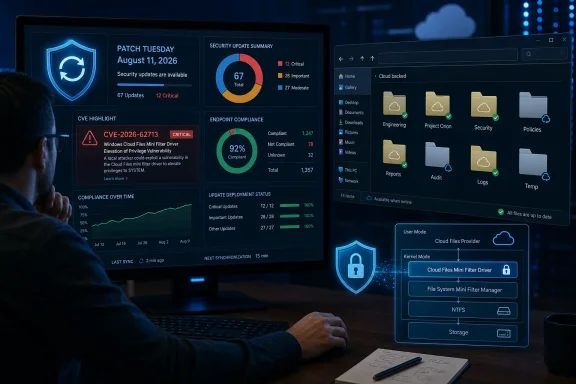 The Cloud Files Driver Is Part of the Operating System, Not a OneDrive Add-On
The “Cloud Files Mini Filter Driver” name refers to the Windows file-system minifilter that supports Cloud Files API operations. Microsoft’s developer documentation describes the Cloud Files API as the boundary between user-mode sync providers and the file system, handling placeholder files and directories. A placeholder can appear in File Explorer as an ordinary file while its content remains remote until an application needs it.
That design requires Windows to broker operations that are inherently sensitive: creating or converting placeholders, hydrating remote content locally, assigning pin state, handling reparse-style metadata, and coordinating access between File Explorer, applications, and a sync provider. The driver is consequently exposed to file and metadata activity initiated by ordinary user processes.
This is the practical point administrators should take from the component name: CVE-2026-62713 is a Windows servicing issue, not a directive to update or remove OneDrive. Updating a sync client alone does not remediate a flaw in the Windows filter driver. The operating-system security update is the fix path Microsoft has published.
The vulnerability also should not be read as proof that a cloud provider has been breached or that synced data is automatically exposed. Microsoft has disclosed an elevation-of-privilege condition in Windows’ local Cloud Files handling. The advisory does not establish data theft, remote code execution, account compromise, or a defect in OneDrive’s cloud service.
“Confirmed” Does Not Mean Exploited
The advisory includes Microsoft’s explanation of the CVSS report confidence metric, which distinguishes a vendor-confirmed defect from preliminary or speculative research. That is worth separating from the questions security teams actually need answered during Patch Tuesday: Is there public exploit code? Is it being exploited? Is there a published workaround? And which builds are affected?
At publication, Microsoft has confirmed the vulnerability exists and issued a security update. No independent reporting located at the time of publication identifies active exploitation of CVE-2026-62713, a public proof of concept, an attacker group, or a victim campaign specifically tied to this CVE. Those omissions matter. A confirmed local privilege-escalation flaw warrants prompt patching; it does not automatically warrant treating every Windows endpoint as the subject of an active zero-day incident.
Microsoft’s disclosure is also thin on mechanism. It does not publicly describe whether the underlying defect is an improper access check, a race condition, unsafe handling of Cloud Files metadata, an object-lifetime issue, or another class of kernel flaw. That restraint is normal on release day, but it limits the value of configuration-based mitigations. Administrators should not guess at registry edits, driver changes, or file-permission workarounds and call the system protected.
There is a particular reason to avoid improvised mitigation here. Disabling the Cloud Files Filter Driver, commonly seen as CldFlt in Windows service and driver configuration, can break Files On-Demand behavior and prevent normal access to cloud placeholders. In an enterprise using OneDrive Known Folder Move, SharePoint libraries, or another provider built on the Cloud Files API, that can translate into failed file opens, unexpected redownloads, and support incidents. Microsoft has not published disabling CldFlt as a mitigation for CVE-2026-62713.
Patch by Windows Build, Then Verify the Driver’s Presence
The most useful response is to treat this as an operating-system patch deployment and validate the result rather than relying on the presence of a cloud-sync application. Microsoft’s August release arrived on Tuesday, August 11, 2026, and the Security Update Guide is the primary record for mapping a CVE to products, KB articles, and build numbers.
For managed environments, the deployment sequence should be familiar:
- Install the August 11 cumulative security update offered for each supported Windows client and server release in the organization.
- Confirm successful installation through Windows Update for Business, WSUS, Microsoft Configuration Manager, Intune reporting, endpoint-management tooling, or the installed-update inventory used internally.
- Reboot systems where the cumulative update requires it, since a kernel driver security fix cannot be considered deployed merely because the package downloaded.
- Test a representative set of endpoints that use Files On-Demand or other Cloud Files providers, especially devices with large SharePoint or OneDrive sync roots and endpoints using third-party sync integrations.
- Do not use the presence of OneDrive.exe, a recent OneDrive version, or a healthy sync status as evidence that the Windows vulnerability has been remediated.
The last point is easy to miss in a busy patch cycle. A device can have a fully current OneDrive client while still running a Windows build that has not received the August cumulative update. Conversely, a device without an actively signed-in OneDrive account may still have the relevant Windows component installed and should not be excluded from normal security-update reporting without confirming Microsoft’s affected-product list.
Organizations should also avoid treating every old Windows system as covered simply because it receives some updates. Product support status, edition, servicing channel, and Extended Security Update eligibility determine whether a particular device receives the relevant cumulative update. If an unsupported Windows release appears in inventory, the right conclusion is not that it is safe because the Cloud Files feature is unused; it is that the endpoint is already outside the ordinary security-servicing path.
Why Local Privilege Escalation Still Belongs in Incident Triage
A Cloud Files driver elevation-of-privilege bug becomes most valuable after an attacker has landed as a restricted user. That makes it a likely second-stage vulnerability if exploitation details emerge: an initial payload runs with limited rights, then invokes a local escalation to weaken controls, tamper with security tooling, access protected data, or establish more durable control of the system.
Endpoint teams should therefore correlate patch status with signs of pre-existing compromise rather than hunt indiscriminately for a nonexistent signature. Devices with suspicious low-privilege process execution, unexpected use of cloud-sync folders for payload staging, security-agent tampering, abnormal creation of local administrator accounts, or unexplained privileged process launches deserve priority. None of those events proves exploitation of CVE-2026-62713, but unpatched systems exhibiting them are where a local escalation flaw changes an investigation most sharply.
The Cloud Files connection also makes user-profile locations operationally relevant. Attackers often need writable space to stage files, and cloud-synced folders are user-writable by design. That does not make OneDrive or another provider the attack vector here; it means security teams should remember that a file-system privilege escalation can be exercised through ordinary local activity rather than an obvious administrative interface.
Microsoft’s August 11 advisory establishes the problem and the remediation path, but it does not presently supply public exploit details or a safe workaround. The concrete action is to deploy the August Windows cumulative updates, confirm the resulting OS builds across managed endpoints, and leave the Cloud Files driver enabled unless Microsoft issues different guidance.
