

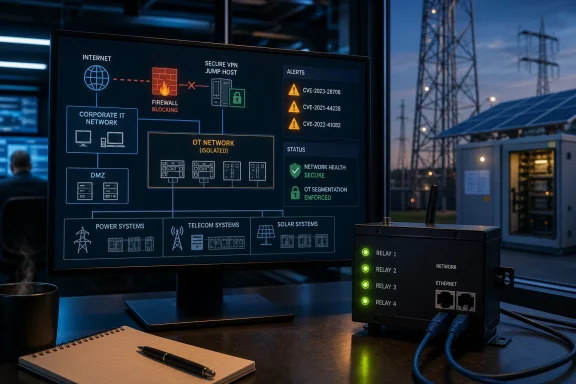
The September 3 CISA advisory, ICSA-26-246-08, identifies CVE-2026-77847, CVE-2026-82712, and CVE-2026-82684. It classifies the underlying weaknesses as hard-coded credentials, cross-site request forgery, and missing authorization, and gives the affected set a CVSS v3 score of 8.8. CISA says it has received no reports of public exploitation specifically targeting these vulnerabilities.
This is a device family whose management features can directly affect attached equipment. Tycon markets the TPDIN-Monitor-WEB3 for remote monitoring of voltage, current, and temperature, alongside four onboard relays used to control connected loads and power-cycle equipment. That makes a security failure in the web interface materially different from an ordinary dashboard compromise: a successful intrusion can affect uptime at a remote solar, telecom, lighting, or other power installation.
The exposed function is remote power control
Tycon’s own product documentation says the WEB3 can be accessed through a browser or SNMP, can control relays manually, and can trigger relay actions based on sensor data, schedules, watchdogs, or solar-controller information. Its support documentation also describes relay cycling and toggling through HTTP requests. In practical terms, a person who obtains—or bypasses—the necessary level of access may be able to interrupt power to equipment downstream of a relay.
The vendor’s documented HTTP controls make the CISA advisory’s mention of factory resets and credential wiping especially important. A reset is not merely an inconvenience on a remote unit: it can remove the information an operations team needs to regain management access, force a site visit, or leave connected equipment in an unexpected state while configuration is restored.
CISA does not publicly map each stated outcome to one of the three CVEs. Administrators should therefore avoid assuming that hard-coded credentials alone explain the risk, or that changing a password alone resolves it. The advisory describes a combined exposure across authentication, authorization, and request validation.
The immediate consequence is straightforward: treat WEB3 management interfaces as operational technology, not as ordinary convenience devices on a flat LAN. They should not be directly reachable from the internet, from general office networks, or from guest and contractor segments.
Tycon’s public documentation shows why version checks are necessary
Tycon’s public support material contains an important version detail that merits attention. A WEB3 knowledge-base entry describes firmware 2.2.5 as prompting for a username and password on initial access, but it also states that clicking sign-in with blank fields allows access when credentials have not yet been configured. CISA’s affected range extends through firmware 2.2.9, so any team that treats the existence of a password prompt as proof of a secure deployment is relying on the wrong test.
The public support entry does not establish that the blank-credential behavior is identical to CVE-2026-77847 or either of the other two CVEs. It does establish something more operationally useful: WEB3 installations need to be checked for their actual configured credentials and their real network reachability, rather than presumed secure because a login dialog appears.
Tycon’s firmware portal continues to list a WEB3 firmware download category, but its public page does not clearly identify a release that remediates the three CISA-listed CVEs. The CISA advisory likewise names affected versions through 2.2.9 but does not name a fixed version. That omission matters. Do not upgrade blindly to an unlabeled image and then mark the incident closed; obtain written confirmation from Tycon that a specific firmware build addresses all three identifiers before treating firmware installation as remediation.
For organizations with asset inventories that track hardware models but not embedded firmware, this advisory is a reminder that the latter is the decisive field. “TPDIN monitor” is insufficiently precise. Inventory records should distinguish TPDIN-Monitor-WEB3 units from older WEB and WEB2 models, record the installed firmware version, identify the unit’s management IP and reachable interfaces, and document what each relay controls.
Containment should happen before a firmware answer arrives
CISA’s generic advice—minimize exposure, isolate control systems, and use appropriately secured remote access—fits this case, but the WEB3’s documented services make the first containment steps more concrete. Tycon’s support site states that TPDIN products communicate on ports 80 or 8000, with the port configurable in the interface. That means an edge rule limited to the defaults may miss systems that were moved to a nonstandard port.
Administrators should begin with a configuration review rather than an indiscriminate port scan of production networks. Identify routes, port forwards, cloud-managed router rules, cellular-router settings, VPN split-tunnel rules, and remote-support appliances that can reach WEB3 addresses. Examine firewall logs for inbound sessions to any configured management port, and search asset-management records for the model name as well as common deployment descriptions such as remote power monitor, solar monitor, relay controller, and Tycon PowerSens.
A sensible containment checklist is short:
- Remove direct inbound internet access to every TPDIN-Monitor-WEB3, including NAT and port-forward rules on cellular and branch routers.
- Restrict web and SNMP management to an OT administration subnet or a tightly controlled jump host, using explicit allow rules rather than broad internal access.
- Disable or restrict remote access routes that are no longer operationally required, especially paths used only for occasional troubleshooting.
- Review all accounts and change credentials after isolating the device, particularly where a unit may have been commissioned with blank, default, shared, or undocumented credentials.
- Export or otherwise preserve known-good configuration details before performing resets, firmware changes, or other actions that could make a remote device unreachable.
- Review relay dependencies before testing controls or restarting the monitor, because relay cycling can reboot attached PoE switches and every device powered through them.
A VPN remains useful for remote management, but it is not a substitute for network segmentation or device-level controls. CISA explicitly notes that VPN security depends on the connected endpoints and their patch state. In this case, a VPN that provides a large user population with unrestricted access to WEB3 interfaces simply moves the attack boundary inward.
CSRF turns ordinary browsing into an operational risk
Cross-site request forgery deserves special attention because it can turn an authenticated administrator’s browser session into the attack path. If an operator is logged into a WEB3 interface and visits a malicious page or follows a crafted link, a CSRF weakness may allow that page to send actions to the device using the operator’s active session. CISA lists factory reset and credential wiping among potential outcomes of successful exploitation.
The practical defense is partly architectural and partly procedural. WEB3 management pages should not be browsed from the same general-purpose Windows workstation used for email, web research, and document downloads. Use a dedicated administrative workstation or jump host, access the device only from its management segment, and close the administrative session when the work is complete. Browser isolation will not fix the flaw, but it narrows the opportunity for an authenticated session to be abused.
Teams should also stop exposing these interfaces through browser-accessible convenience paths. A public hostname, remote-access portal, or inbound rule that reaches a controller’s management page combines internet scanning risk with the possibility of session-based attacks. Put remote support behind a controlled access gateway and require an operator to deliberately enter the OT management environment.
What Windows and enterprise IT teams should do now
This advisory belongs on the same work queue as a firewall, switch, UPS, or out-of-band-management exposure, even though the affected product is a specialized controller. Windows administrators often own the Active Directory accounts, browser endpoints, VPN policies, endpoint protection, remote-management tooling, and network documentation that determine whether an attacker can reach such devices in the first place.
Start by asking operations teams where remote power recovery is used. WEB3 devices may be deployed precisely because a distant site lacks local staff: utility-adjacent equipment, solar installations, telecom shelters, wireless backhaul, remote cameras, and distributed network closets are all plausible homes for relay-controlled power. Those are also the locations where a factory reset or credential loss can become expensive fastest.
CISA’s advisory is clear about the affected ceiling—TPDIN-Monitor-WEB3 firmware 2.2.9 and earlier—but leaves the repair destination unanswered. Until Tycon publishes and confirms a remediating firmware version, network isolation and access reduction are the available compensating controls. An organization that cannot isolate a WEB3 should document that exception, identify the equipment its relays control, and monitor the device’s management path as a high-priority exposure rather than assuming the absence of reported exploitation means the risk can wait.