

Dave W. Plummer released RetroPad in early June 2026 as a tiny x86 assembly re-creation of Windows XP-era Notepad, claiming feature parity in roughly 2.7KB and publishing both source code and an executable on GitHub under Apache 2.0. The stunt is funny because it is small, but it lands because Windows itself no longer feels small. RetroPad is not a replacement strategy for Microsoft’s modern Notepad; it is a provocation in executable form. It asks a question Windows users have been asking for years: when did “basic” stop meaning fast, local, predictable, and boring?
RetroPad arrives as the kind of hacker artifact that the Windows world used to produce for sport: a useful little program, written close to the metal, built as much to prove a point as to solve a problem. Plummer, best known to Windows veterans for his work on Task Manager, ZIP folders, and other familiar corners of the operating system, framed RetroPad as a “full-feature-parity” version of the Notepad that shipped with Windows XP. The reported size has moved slightly as he added polish, from 2,686 bytes to around 2,749 bytes and then to about 2,794 bytes after adding the old Notepad keyboard shortcuts.
That byte-count drift is part of the charm. In most modern software conversations, a hundred bytes is beneath notice, swallowed by telemetry libraries, UI frameworks, package metadata, signing overhead, localization scaffolding, and a long tail of dependencies. In RetroPad, a few dozen bytes are newsworthy because the whole project treats size as a design constraint rather than an afterthought.
The achievement is not that Plummer has produced the world’s best text editor. He has not, and that is not the point. The achievement is that the skeletal function of Notepad — open text, edit text, save text, search, replace, wrap, respond to familiar shortcuts — can still be expressed in less space than a modern webpage spends on a cookie banner.
That makes RetroPad more than nostalgia. It is a compression test for the assumptions behind modern Windows application design.
That mattered. Notepad was the diagnostic stethoscope of Windows. You opened logs with it, pasted registry keys into it, stripped formatting from text with it, wrote batch files in it, and used it as the safe place where rich text could not follow you. It was not an app so much as a system reflex.
Windows XP’s Notepad was small because its ambitions were small. It delegated most of its visible behavior to familiar Win32 controls and system dialogs. It used the operating system’s own furniture rather than arriving with a private design language, a packaged app identity, and a modern shell around a tiny editing surface.
That simplicity came with trade-offs. The old Notepad was not great with large files, not friendly to cross-platform text, and not designed for the Unicode-heavy, cloud-synced, multi-document habits of 2026. But those limitations were legible. You could understand the tool’s boundaries because the tool was honest about what it was.
RetroPad revives that bargain. It does not say the XP model was enough for every user. It says there was value in the fact that everyone knew exactly where the model began and ended.
The problem is not any one of those features. The problem is what happens when a utility becomes a product surface.
Modern Notepad is now part of the Microsoft Store app model on Windows 11, with a more complex packaging and update story than the classic executable ever had. Depending on the system, what looks like notepad.exe may function more like a launcher or bridge into the app package rather than the whole editor itself. That architecture gives Microsoft flexibility, but it also breaks the old mental model: a tiny local executable that simply exists in the Windows directory and does one thing.
The Copilot-era additions sharpen the tension. Once an app as basic as Notepad becomes a canvas for AI writing features, it stops being merely a text buffer and becomes part of Microsoft’s broader services strategy. For some users, that is convenient. For others, especially administrators and security-minded users, it is one more example of Windows staples being pulled into an expanding cloud-and-account orbit.
This is where RetroPad’s absurd smallness becomes an argument. It reminds us that Notepad’s original job did not require a product roadmap. It required restraint.
A hand-tuned x86 assembly program also achieves its size by making different bets. It is less portable, harder for most developers to maintain, less approachable to contributors, and more tightly coupled to platform behavior. The reason modern software is written in higher-level languages and frameworks is not simply developer laziness. It is because organizations need teams to ship, audit, extend, test, and secure code over years.
But the byte count still matters because it exposes scale. If a Notepad-like editor can be reduced to a few thousand bytes when built against classic Win32 assumptions, then the megabytes surrounding modern Notepad are not the text editor. They are the cost of the world around the text editor.
Some of that cost is justified. Some of it is institutional sediment. RetroPad cannot tell us which is which, but it gives users a ruler.
That matters because the critique is not anti-Microsoft by default. It is a critique from inside the Windows tradition: the tradition of native tools, fast startup, predictable controls, and a certain engineering pride in not wasting resources. Plummer’s public projects often carry that old-school sensibility, where the point is not merely that something works, but that it works with an economy visible to other programmers.
RetroPad also arrives at a moment when Microsoft itself has been trying to talk about “getting back to basics” in Windows. The company has acknowledged, directly and indirectly, that the everyday experience of File Explorer, the taskbar, Settings, updates, and built-in apps matters as much as the next grand platform thesis. Users may disagree about whether Microsoft has delivered on that promise, but the appetite is clearly there.
That is why this tiny editor resonates. It compresses a large grievance into a file small enough to email as an afterthought.
Notepad is a useful case study precisely because it is low stakes. If users are annoyed that Notepad has become heavier, updated through a different channel, or decorated with features they may never use, they are not really saying Notepad is the biggest problem in Windows. They are saying even the smallest things no longer feel immune from strategic layering.
The old Windows contract was blunt: the OS included a set of tools, and those tools were part of the local machine. The newer contract is more fluid. Apps update independently, features arrive continuously, cloud services surface in unexpected places, and Microsoft can change the personality of a built-in tool without waiting for a new Windows release.
That model has benefits. It lets Microsoft fix Notepad outside the old service-pack cadence. It lets the company modernize ancient corners of the OS without freezing them for a decade. But it also means users have less confidence that a simple tool will remain simple.
RetroPad’s appeal is not just that it is small. It is that it looks finished.
But the security story is not one-sided. Modern Windows app packaging, code signing, update mechanisms, memory protections, and platform policies exist for reasons. A tiny executable downloaded from GitHub may be transparent to programmers, but it is still a binary from the internet. Administrators who would never allow random utilities on managed endpoints should not make an exception just because the file is comically small.
There is also a support boundary. Microsoft’s Notepad is patched, distributed, and integrated as part of Windows. RetroPad is a hobbyist project, however accomplished its author may be. It is not the editor an enterprise should suddenly standardize on because it makes a good screenshot.
The more serious lesson is architectural. If Microsoft wants users to trust modernized inbox apps, it needs to make their boundaries clearer: what runs locally, what touches the network, what is optional, what can be removed, what policies govern AI features, and what compatibility story applies when the app model changes. Small tools earn trust by being inspectable. Large tools must earn it by being explainable.
The reason RetroPad is impressive is that it uses assembly for the kind of target where assembly still makes sense: a constrained demonstration built on stable operating-system APIs. It is a performance and size exercise with a deliberately narrow scope. That is very different from arguing that mainstream Windows applications should be rebuilt this way.
Modern Notepad has to serve a larger audience than XP Notepad did. Windows users now expect touch support, accessibility consistency, high-DPI behavior, better text encoding, dark mode, multilingual correctness, and recovery from mistakes. Those expectations are not fake bloat. They are part of what happens when a utility becomes infrastructure for a billion users.
Still, constraints improve design. The discipline of RetroPad is not that every instruction is hand-placed; it is that every feature must justify itself against a visible budget. Modern software teams rarely operate with that kind of budget, even conceptually. The result is not always laziness, but it often looks the same to the user waiting for a basic app to open.
Notepad was one of the last places in Windows that felt ideology-free. It did not ask what you were writing, suggest what you meant, or turn a blank document into a services opportunity. It was a rectangle of text and a menu bar. In an operating system increasingly shaped by recommendations, accounts, sync, ads, widgets, and Copilot surfaces, that neutrality had become part of its value.
Microsoft sees AI as a platform shift, and Windows is one of its most important distribution channels. From that standpoint, putting writing tools into Notepad is logical. Notepad is where people write. Why not make the writing smarter?
The answer is that some tools are trusted because they do less. The existence of RetroPad dramatizes that point better than a settings toggle ever could. A 2.7KB Notepad clone cannot plausibly be a funnel, an assistant, a subscription wedge, or a data surface. Its poverty is its proof of innocence.
Microsoft often talks about Windows as a forward-looking platform, and rightly so. The company has to support modern hardware, security models, app frameworks, and developer expectations. But Windows’ durability comes from the fact that old software keeps running and old programming models remain useful.
RetroPad is a love letter to that durability. It is also a reminder that the classic desktop stack is not merely legacy baggage. For certain classes of tools, Win32 remains direct, fast, and sufficient.
This does not mean Microsoft should freeze Windows in amber. It does mean the company should be careful about treating every built-in utility as a candidate for full productization. Sometimes the correct modernization path is not a new framework. Sometimes it is a better version of the same small thing.
One Notepad personality could be the modern app: tabs, autosave, spell check, improved encoding, theme integration, and optional AI features governed by clear policy and settings. Another could be a classic mode: no cloud, no sessions, no Copilot, minimal UI, fast launch, local-only behavior, and a stable executable identity for scripts and administrators.
Windows already carries enormous compatibility complexity. Preserving a truly classic Notepad path would be comparatively modest, and it would send a useful signal. It would tell power users and IT departments that Microsoft understands the difference between modernization and escalation.
The company has done versions of this before, sometimes intentionally and sometimes through compatibility residue. The challenge is not technical imagination. It is product discipline. Microsoft must decide whether every surface in Windows needs to express the company’s current strategic priorities, or whether some surfaces should express continuity instead.
That is uncomfortable because it reframes the conversation. Microsoft can explain why modern Notepad is larger. It can point to features, accessibility, packaging, security, and user demand. Many of those explanations will be reasonable. But RetroPad makes users ask which parts of that weight they actually wanted.
This is the recurring problem with platform companies. They are very good at adding value in the aggregate and very bad at preserving the emotional simplicity of individual tools. Each feature can be defended. The totality becomes harder to love.
Windows users do not reject progress. They reject the sense that progress is never allowed to stop at “better.” It must become connected, intelligent, monetizable, extensible, measurable, and strategically aligned. RetroPad, by contrast, is strategically useless. That is why it feels refreshing.
But nostalgia often attaches itself to real losses. Users miss XP-era Notepad not because it was the perfect editor, but because it represented a relationship with the operating system that felt more direct. Click icon, get window. Type text, save file. No account, no assistant, no session restoration surprise, no ambiguity about whether the app is a local binary or a packaged experience wearing an old name.
The best version of Windows in 2026 would not be a museum. It would be a modern system that knows when to leave a tool alone. It would add features where they solve real problems and preserve minimal paths where minimalism is the feature.
That is the lesson Microsoft should take from Plummer’s tiny project. RetroPad is not saying the past was better. It is saying the past had constraints modern Windows could afford to remember.
RetroPad will probably remain a delightful curiosity, a programmer’s flex, and a conversation piece for people who still know why a 2.7KB executable feels outrageous in the best possible way. But the reaction to it says something durable about Windows: users still want tools that feel like tools, not campaigns. If Microsoft can bring that sensibility back to the places where Windows is supposed to disappear into the background, the next generation of built-in apps might not need a tiny assembly clone to remind everyone what restraint looks like.
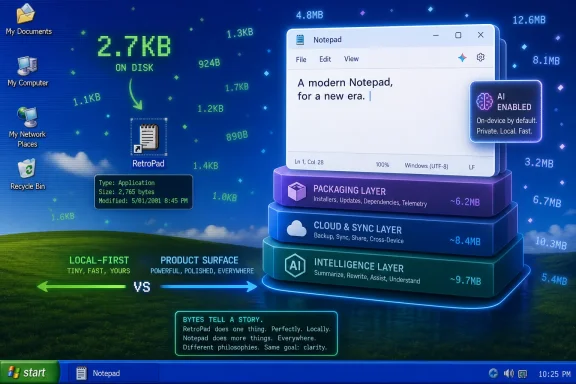 A 2.7KB Notepad Clone Is a Joke With Teeth
RetroPad arrives as the kind of hacker artifact that the Windows world used to produce for sport: a useful little program, written close to the metal, built as much to prove a point as to solve a problem. Plummer, best known to Windows veterans for his work on Task Manager, ZIP folders, and other familiar corners of the operating system, framed RetroPad as a “full-feature-parity” version of the Notepad that shipped with Windows XP. The reported size has moved slightly as he added polish, from 2,686 bytes to around 2,749 bytes and then to about 2,794 bytes after adding the old Notepad keyboard shortcuts.That byte-count drift is part of the charm. In most modern software conversations, a hundred bytes is beneath notice, swallowed by telemetry libraries, UI frameworks, package metadata, signing overhead, localization scaffolding, and a long tail of dependencies. In RetroPad, a few dozen bytes are newsworthy because the whole project treats size as a design constraint rather than an afterthought.
The achievement is not that Plummer has produced the world’s best text editor. He has not, and that is not the point. The achievement is that the skeletal function of Notepad — open text, edit text, save text, search, replace, wrap, respond to familiar shortcuts — can still be expressed in less space than a modern webpage spends on a cookie banner.
That makes RetroPad more than nostalgia. It is a compression test for the assumptions behind modern Windows application design.
XP Notepad Was Not Perfect, But It Knew Its Job
The old Notepad occupies a strange place in Windows history. Nobody romanticizes it because it was powerful. Developers complained for years about line-ending behavior, lack of tabs, weak encoding handling, and the absence of niceties available in almost every programmer’s editor. Users loved it anyway because it was instant, dumb in the best sense, and always there.That mattered. Notepad was the diagnostic stethoscope of Windows. You opened logs with it, pasted registry keys into it, stripped formatting from text with it, wrote batch files in it, and used it as the safe place where rich text could not follow you. It was not an app so much as a system reflex.
Windows XP’s Notepad was small because its ambitions were small. It delegated most of its visible behavior to familiar Win32 controls and system dialogs. It used the operating system’s own furniture rather than arriving with a private design language, a packaged app identity, and a modern shell around a tiny editing surface.
That simplicity came with trade-offs. The old Notepad was not great with large files, not friendly to cross-platform text, and not designed for the Unicode-heavy, cloud-synced, multi-document habits of 2026. But those limitations were legible. You could understand the tool’s boundaries because the tool was honest about what it was.
RetroPad revives that bargain. It does not say the XP model was enough for every user. It says there was value in the fact that everyone knew exactly where the model began and ended.
Modern Notepad Became a Product, Not a Utility
Microsoft has spent the last several years turning Notepad from a static accessory into an actively developed Windows app. Some of those changes are genuinely useful. Tabs reduce window clutter. Autosave protects accidental notes. Better encoding behavior and Unix line-ending support fixed long-standing irritations. Spell check helps ordinary users. Dark mode finally lets Notepad stop looking like a flashlight at 2 a.m.The problem is not any one of those features. The problem is what happens when a utility becomes a product surface.
Modern Notepad is now part of the Microsoft Store app model on Windows 11, with a more complex packaging and update story than the classic executable ever had. Depending on the system, what looks like notepad.exe may function more like a launcher or bridge into the app package rather than the whole editor itself. That architecture gives Microsoft flexibility, but it also breaks the old mental model: a tiny local executable that simply exists in the Windows directory and does one thing.
The Copilot-era additions sharpen the tension. Once an app as basic as Notepad becomes a canvas for AI writing features, it stops being merely a text buffer and becomes part of Microsoft’s broader services strategy. For some users, that is convenient. For others, especially administrators and security-minded users, it is one more example of Windows staples being pulled into an expanding cloud-and-account orbit.
This is where RetroPad’s absurd smallness becomes an argument. It reminds us that Notepad’s original job did not require a product roadmap. It required restraint.
The Byte Count Is Not the Whole Story
It would be too easy to say that 2.7KB is good and 5MB is bad. Software size alone is a crude measurement, and experts know better than to pretend otherwise. A modern app can be larger because it supports accessibility, localization, high-DPI rendering, safer libraries, input methods, modern text encoding, sandboxing, signing, crash reporting, and security mitigations that were either immature or absent in the XP era.A hand-tuned x86 assembly program also achieves its size by making different bets. It is less portable, harder for most developers to maintain, less approachable to contributors, and more tightly coupled to platform behavior. The reason modern software is written in higher-level languages and frameworks is not simply developer laziness. It is because organizations need teams to ship, audit, extend, test, and secure code over years.
But the byte count still matters because it exposes scale. If a Notepad-like editor can be reduced to a few thousand bytes when built against classic Win32 assumptions, then the megabytes surrounding modern Notepad are not the text editor. They are the cost of the world around the text editor.
Some of that cost is justified. Some of it is institutional sediment. RetroPad cannot tell us which is which, but it gives users a ruler.
Dave Plummer Is the Right Messenger for This Particular Complaint
RetroPad would have been interesting from any skilled assembly programmer, but Plummer’s name gives it cultural force. He is not an outside critic sneering at Windows from a Unix terminal. He is one of the engineers associated with Windows utilities that users still cite as examples of practical, efficient software.That matters because the critique is not anti-Microsoft by default. It is a critique from inside the Windows tradition: the tradition of native tools, fast startup, predictable controls, and a certain engineering pride in not wasting resources. Plummer’s public projects often carry that old-school sensibility, where the point is not merely that something works, but that it works with an economy visible to other programmers.
RetroPad also arrives at a moment when Microsoft itself has been trying to talk about “getting back to basics” in Windows. The company has acknowledged, directly and indirectly, that the everyday experience of File Explorer, the taskbar, Settings, updates, and built-in apps matters as much as the next grand platform thesis. Users may disagree about whether Microsoft has delivered on that promise, but the appetite is clearly there.
That is why this tiny editor resonates. It compresses a large grievance into a file small enough to email as an afterthought.
Windows Bloat Is Really a Trust Problem
“Bloat” is one of the least precise words in tech criticism, but users keep using it because it describes a real feeling. It is the feeling that software is doing things you did not ask for, consuming resources you did not mean to spend, and changing behaviors you had already built workflows around. In Windows, that feeling is amplified because the operating system sits underneath everything else.Notepad is a useful case study precisely because it is low stakes. If users are annoyed that Notepad has become heavier, updated through a different channel, or decorated with features they may never use, they are not really saying Notepad is the biggest problem in Windows. They are saying even the smallest things no longer feel immune from strategic layering.
The old Windows contract was blunt: the OS included a set of tools, and those tools were part of the local machine. The newer contract is more fluid. Apps update independently, features arrive continuously, cloud services surface in unexpected places, and Microsoft can change the personality of a built-in tool without waiting for a new Windows release.
That model has benefits. It lets Microsoft fix Notepad outside the old service-pack cadence. It lets the company modernize ancient corners of the OS without freezing them for a decade. But it also means users have less confidence that a simple tool will remain simple.
RetroPad’s appeal is not just that it is small. It is that it looks finished.
The Security Argument Cuts Both Ways
For IT pros, tiny software has an obvious appeal: less code often means less attack surface. A minimalist local editor with no network features, no plugin system, and no account integration is easier to reason about than a larger app bound to modern packaging and optional cloud functionality. In a world where even text editors can become part of supply-chain and living-off-the-land discussions, simplicity has operational value.But the security story is not one-sided. Modern Windows app packaging, code signing, update mechanisms, memory protections, and platform policies exist for reasons. A tiny executable downloaded from GitHub may be transparent to programmers, but it is still a binary from the internet. Administrators who would never allow random utilities on managed endpoints should not make an exception just because the file is comically small.
There is also a support boundary. Microsoft’s Notepad is patched, distributed, and integrated as part of Windows. RetroPad is a hobbyist project, however accomplished its author may be. It is not the editor an enterprise should suddenly standardize on because it makes a good screenshot.
The more serious lesson is architectural. If Microsoft wants users to trust modernized inbox apps, it needs to make their boundaries clearer: what runs locally, what touches the network, what is optional, what can be removed, what policies govern AI features, and what compatibility story applies when the app model changes. Small tools earn trust by being inspectable. Large tools must earn it by being explainable.
Assembly Is a Scalpel, Not a Time Machine
RetroPad will inevitably trigger some predictable commentary about how programmers used to be better, how assembly language kept everyone honest, and how modern developers waste RAM because they have forgotten discipline. There is a grain of truth there, but only a grain. Assembly is not a moral virtue. It is a tool that trades portability and maintainability for control.The reason RetroPad is impressive is that it uses assembly for the kind of target where assembly still makes sense: a constrained demonstration built on stable operating-system APIs. It is a performance and size exercise with a deliberately narrow scope. That is very different from arguing that mainstream Windows applications should be rebuilt this way.
Modern Notepad has to serve a larger audience than XP Notepad did. Windows users now expect touch support, accessibility consistency, high-DPI behavior, better text encoding, dark mode, multilingual correctness, and recovery from mistakes. Those expectations are not fake bloat. They are part of what happens when a utility becomes infrastructure for a billion users.
Still, constraints improve design. The discipline of RetroPad is not that every instruction is hand-placed; it is that every feature must justify itself against a visible budget. Modern software teams rarely operate with that kind of budget, even conceptually. The result is not always laziness, but it often looks the same to the user waiting for a basic app to open.
Notepad’s AI Moment Makes the Contrast Sharper
The most contentious modern Notepad additions are not tabs or dark mode. They are the features that make Notepad feel less like a neutral scratchpad and more like an entry point into Microsoft’s AI platform. Writing assistance in a text editor is not inherently outrageous; many users will find it useful. The issue is symbolic placement.Notepad was one of the last places in Windows that felt ideology-free. It did not ask what you were writing, suggest what you meant, or turn a blank document into a services opportunity. It was a rectangle of text and a menu bar. In an operating system increasingly shaped by recommendations, accounts, sync, ads, widgets, and Copilot surfaces, that neutrality had become part of its value.
Microsoft sees AI as a platform shift, and Windows is one of its most important distribution channels. From that standpoint, putting writing tools into Notepad is logical. Notepad is where people write. Why not make the writing smarter?
The answer is that some tools are trusted because they do less. The existence of RetroPad dramatizes that point better than a settings toggle ever could. A 2.7KB Notepad clone cannot plausibly be a funnel, an assistant, a subscription wedge, or a data surface. Its poverty is its proof of innocence.
The Old Win32 Contract Still Has Power
One of the reasons RetroPad works at all is that Windows remains astonishingly compatible with its past. The Win32 API, for all its age and oddities, still lets a programmer create a window, attach controls, handle messages, and build a recognizable desktop app without hauling in a modern framework. That continuity is one of Windows’ greatest technical assets.Microsoft often talks about Windows as a forward-looking platform, and rightly so. The company has to support modern hardware, security models, app frameworks, and developer expectations. But Windows’ durability comes from the fact that old software keeps running and old programming models remain useful.
RetroPad is a love letter to that durability. It is also a reminder that the classic desktop stack is not merely legacy baggage. For certain classes of tools, Win32 remains direct, fast, and sufficient.
This does not mean Microsoft should freeze Windows in amber. It does mean the company should be careful about treating every built-in utility as a candidate for full productization. Sometimes the correct modernization path is not a new framework. Sometimes it is a better version of the same small thing.
The Best Modern Notepad Would Have Two Personalities
There is a practical compromise hiding inside this argument. Microsoft does not need to choose between XP Notepad forever and an AI-assisted, tabbed, packaged editor. It could acknowledge that users want different things from the same name.One Notepad personality could be the modern app: tabs, autosave, spell check, improved encoding, theme integration, and optional AI features governed by clear policy and settings. Another could be a classic mode: no cloud, no sessions, no Copilot, minimal UI, fast launch, local-only behavior, and a stable executable identity for scripts and administrators.
Windows already carries enormous compatibility complexity. Preserving a truly classic Notepad path would be comparatively modest, and it would send a useful signal. It would tell power users and IT departments that Microsoft understands the difference between modernization and escalation.
The company has done versions of this before, sometimes intentionally and sometimes through compatibility residue. The challenge is not technical imagination. It is product discipline. Microsoft must decide whether every surface in Windows needs to express the company’s current strategic priorities, or whether some surfaces should express continuity instead.
Tiny Tools Make Big Companies Uncomfortable
RetroPad is not a commercial threat. It will not meaningfully reduce Notepad usage, undermine Copilot, or change Microsoft’s app strategy. Its power is rhetorical. It makes a giant company’s design choices look heavy by placing them next to something featherweight.That is uncomfortable because it reframes the conversation. Microsoft can explain why modern Notepad is larger. It can point to features, accessibility, packaging, security, and user demand. Many of those explanations will be reasonable. But RetroPad makes users ask which parts of that weight they actually wanted.
This is the recurring problem with platform companies. They are very good at adding value in the aggregate and very bad at preserving the emotional simplicity of individual tools. Each feature can be defended. The totality becomes harder to love.
Windows users do not reject progress. They reject the sense that progress is never allowed to stop at “better.” It must become connected, intelligent, monetizable, extensible, measurable, and strategically aligned. RetroPad, by contrast, is strategically useless. That is why it feels refreshing.
The 2.7KB Editor Leaves Microsoft With an Awkward Mirror
RetroPad should not be overread as a blueprint, but it should not be dismissed as a toy either. Its value is that it makes several usually abstract points concrete, measurable, and easy to understand.- RetroPad demonstrates that the core behavior of classic Notepad can still be implemented in only a few kilobytes when the scope is narrow and the developer leans on native Windows APIs.
- Modern Notepad’s larger footprint reflects not just text-editing functionality, but packaging, UI framework choices, update architecture, and Microsoft’s broader product ambitions.
- The old Notepad experience remains attractive because it was fast, local, predictable, and visibly limited in ways users could understand.
- IT administrators should treat RetroPad as an interesting artifact rather than a managed endpoint standard, because tiny third-party binaries still create support and trust questions.
- Microsoft’s best response is not to mock minimalism or abandon modern features, but to preserve a clear local-first path for users who want a utility rather than a platform surface.
Nostalgia Is Not the Same as Regression
There is a lazy version of this debate in which every complaint about modern Windows becomes nostalgia for XP, and every defense of modern Windows becomes an excuse for bloat. Both miss the point. XP was not a golden age of security, usability, or international text handling. Modern Windows is objectively better in many ways that matter.But nostalgia often attaches itself to real losses. Users miss XP-era Notepad not because it was the perfect editor, but because it represented a relationship with the operating system that felt more direct. Click icon, get window. Type text, save file. No account, no assistant, no session restoration surprise, no ambiguity about whether the app is a local binary or a packaged experience wearing an old name.
The best version of Windows in 2026 would not be a museum. It would be a modern system that knows when to leave a tool alone. It would add features where they solve real problems and preserve minimal paths where minimalism is the feature.
That is the lesson Microsoft should take from Plummer’s tiny project. RetroPad is not saying the past was better. It is saying the past had constraints modern Windows could afford to remember.
RetroPad will probably remain a delightful curiosity, a programmer’s flex, and a conversation piece for people who still know why a 2.7KB executable feels outrageous in the best possible way. But the reaction to it says something durable about Windows: users still want tools that feel like tools, not campaigns. If Microsoft can bring that sensibility back to the places where Windows is supposed to disappear into the background, the next generation of built-in apps might not need a tiny assembly clone to remind everyone what restraint looks like.
References
- Primary source: Tom's Hardware
Published: 2026-06-07T12:22:06.921144
Loading…
www.tomshardware.com - Official source: github.com
Loading…
github.com - Related coverage: github-star.com
Loading…
github-star.com - Related coverage: arstechnica.com
Loading…
arstechnica.com - Related coverage: forums.malwarebytes.com
Loading…
forums.malwarebytes.com - Related coverage: detection.fyi
Loading…
detection.fyi
- Related coverage: deprogrammaticaipsum.com
Loading…
deprogrammaticaipsum.com