

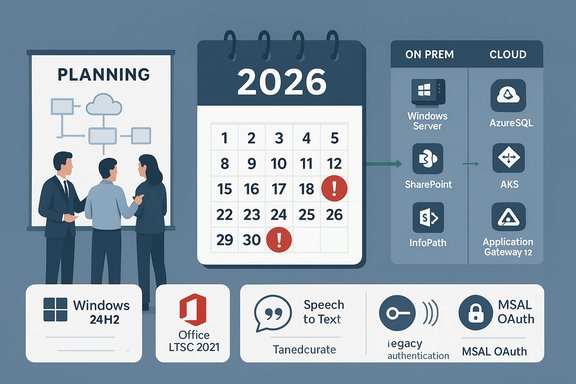
2026 opens with an uncommonly heavy calendar of Microsoft end‑of‑support and service retirements that will force IT teams to choose between urgent migrations, paid extensions, or running vulnerable legacy systems. Major desktop releases, several server and database platforms, multiple on‑prem collaboration products, and a raft of Azure services are scheduled for removal or forcible retirement across the year — and the deadlines are real, public, and sooner than many organizations expect.
Microsoft’s product lifecycle is a predictable drumbeat by design: mainstream support, extended support, and for a shrinking set of legacy products, paid Extended Security Updates (ESUs). But the practical impact of multiple, overlapping end‑of‑support dates in a single calendar year amplifies complexity for administrators. The Modern Lifecycle policy, subscription editions, and cloud incentives steer customers to cloud services and rolling releases — yet many enterprises still run a mix of on‑premises servers, LTSC (Long‑Term Servicing Channel) desktop images, and older automation built on deprecated authentication or forms technologies.
2026’s retirements represent both a consolidation (encouraging moves to Windows 11 25H2, Microsoft 365, Azure SQL and AKS on newer Windows Server SKUs) and a security hardening moment (blocking legacy auth protocols, removing unsupported runtime libraries). The consequences are operational, financial, and often legal for regulated environments.
Consequences:
Action: Inventory Azure resources, schedule migration scripts for Application Gateway v1 → v2, update Speech SDK usages to supported API versions, and rebuild AKS Windows node pools on supported Windows Server images (WS2022/WS2025) with suitable container base images.
Action: Identify any automation, desktop apps, or third‑party tools relying on legacy tokens, and either rework them to use modern auth (MSAL) or plan alternate approaches.
Administrators can turn this wave into an advantage by using the deadlines as a forcing function to modernize — but only if planning starts immediately. The single best risk‑reduction move is inventory and triage: knowing precisely what depends on what, and scheduling the highest risk and highest exposure items first.
Start by mapping the deadlines to ownership, budget the necessary migration effort, and treat the next 12 months as a migration sprint. Organizations that do will emerge with fewer legacy headaches, tighter security posture, and infrastructure aligned to the current Microsoft lifecycle — and those that delay will find choices narrowing and costs rising as the calendar moves inexorably toward the cutoffs.
Source: theregister.com 2026 brings a bumper crop of Microsoft tech funerals
 Background
Microsoft’s product lifecycle is a predictable drumbeat by design: mainstream support, extended support, and for a shrinking set of legacy products, paid Extended Security Updates (ESUs). But the practical impact of multiple, overlapping end‑of‑support dates in a single calendar year amplifies complexity for administrators. The Modern Lifecycle policy, subscription editions, and cloud incentives steer customers to cloud services and rolling releases — yet many enterprises still run a mix of on‑premises servers, LTSC (Long‑Term Servicing Channel) desktop images, and older automation built on deprecated authentication or forms technologies.2026’s retirements represent both a consolidation (encouraging moves to Windows 11 25H2, Microsoft 365, Azure SQL and AKS on newer Windows Server SKUs) and a security hardening moment (blocking legacy auth protocols, removing unsupported runtime libraries). The consequences are operational, financial, and often legal for regulated environments.
The short summary: what’s leaving and when
The following list presents the most consequential retirements administrators should treat as high priority for 2026 planning. Dates below are the deadlines that require action planning today.- October 13, 2026 — End of servicing for Office LTSC 2021 (Office 2021 family: Access, Excel, Outlook, Publisher, Project, Visio, Word) and Windows 11 Home and Pro, version 24H2.
- July 14, 2026 — End of support for SharePoint Server 2016 and SharePoint Server 2019, and related retirements (Project Server 2016/2019 lifecycles and InfoPath 2013 client/forms service removal from SharePoint Online).
- July 14, 2026 — SQL Server 2016 reaches end of extended support; Extended Security Updates (ESUs) are the short‑term stopgap for customers who cannot migrate immediately.
- October 13, 2026 — The final year of Extended Security Updates for Windows Server 2012/2012 R2 concludes.
- January 31, 2026 (blocked by default, temporary toggle until April 30, permanent May 1, 2026) — Legacy client authentication and IDCRL retirement in SharePoint Online and OneDrive for Business.
- March 2026 — Multiple AKS/AKS hybrid retirements for older Windows Server images (Windows Server 2019 support on AKS is being retired in March 2026).
- March 31, 2026 — Speech‑to‑Text API v3.0 (Azure Cognitive Speech) is scheduled for retirement; upgrades to newer Speech APIs are required.
- April 28, 2026 — Azure Application Gateway v1 SKU will be forcibly stopped if not migrated to v2.
Why 2026 feels different: overlapping lifecycles and cascading dependencies
Microsoft’s lifecycles are staggered by product launch dates, but a cluster of major releases (2016–2019 family servers, 2021 LTSC Office, 24H2/25H2 Windows cadence) have converged on 2026 as a turning point. That convergence creates three practical problems:- Cascading dependencies. Workloads that span SharePoint, SQL Server, and Windows Server will face multiple EOL events closely spaced. Upgrading one component (for example, moving SharePoint on‑prem to Subscription Edition) may require parallel upgrades to the underlying Windows Server and SQL Server versions.
- Migration queueing. Cloud migration projects are not instantaneous; migration windows, testing, and application refactoring all take months. Simultaneous retirements compress the calendar and create resource contention.
- Security and compliance erosion. After end of support there are no security updates. Organizations with regulatory obligations will face escalating compliance risk if they remain on unsupported versions.
Deep dive: the major retirements — what they mean in practice
Windows 11 24H2 (Home & Pro) — end of servicing, October 13, 2026
Windows feature updates on the Home and Pro channels follow a shorter servicing window than Enterprise/Education. Devices running Windows 11, version 24H2 (Home/Pro) will stop receiving cumulative quality and security updates after October 13, 2026. In practice this means:- Unmanaged Home/Pro devices will either need to be upgraded to Windows 11 25H2 or migrated to supported configurations before the date.
- Devices incapable of meeting 25H2 requirements—hardware or firmware constraints—will require replacement or segregation from critical networks.
- Enterprise fleets should evaluate staging paths: 24H2 → 25H2 enablement package (where supported) keeps disruption minimal for many devices.
Office LTSC 2021 and Microsoft Publisher — October 13, 2026
The fixed‑term nature of LTSC releases means Office LTSC 2021 suites (including Publisher 2021) cease servicing on October 13, 2026. For organizations using Publisher for ad hoc printables or certificates, the lack of a cloud‑native direct replacement is notable: Publisher is a niche product with few like‑for‑like replacements inside Microsoft 365.- Customers must decide between migrating to Microsoft 365 Apps or moving to the newer Office perpetual SKU where available (Office 2024/Office LTSC successor options).
- Publisher users with light use may be able to shift to template‑based solutions (Word templates, third‑party design tools), but internal processes dependent on Publisher automation or templates will need conversion.
SQL Server 2016 — July 14, 2026 (end of extended support), ESU available
SQL Server 2016 reaches its end of extended support in mid‑July 2026; organizations have the option of paid Extended Security Updates for a limited period. Key implications:- Databases and apps built against SQL Server 2016 should be scheduled for upgrade testing to SQL Server 2019 / 2022 / 2025 or migration to Azure SQL Managed Instance or Azure SQL where appropriate.
- Cloud providers and managed services may begin restricting the creation of new SQL Server 2016 instances well before the EOL date; vendors have announced automated remediations for remaining instances post‑deadline.
SharePoint Server 2016/2019 and InfoPath 2013 — July 14, 2026
On‑premises SharePoint Server 2016 and 2019 both reach end of support on July 14, 2026. At the same time Microsoft is retiring InfoPath Forms Services from SharePoint Online and InfoPath Client 2013 ends extended support.Consequences:
- On‑prem environments running custom InfoPath forms, SharePoint Designer workflows, or legacy add‑ins will face either migration to SharePoint Server Subscription Edition or replatforming to SharePoint Online (Power Apps, Power Automate, Forms).
- There is no Microsoft migration tool that automates all InfoPath scenarios; many require manual redesign.
- Organizations still using classic SharePoint customizations (Farm solutions, ACS authentication patterns) must budget for redevelopment.
Azure retirements: Application Gateway v1, Speech‑to‑Text v3.0, AKS Windows Server images
Azure platform changes include both service version retirements and enforced stops:- Application Gateway v1 SKU: Will be forcibly stopped on April 28, 2026 if not migrated to v2. Any remaining v1 deployments will be stopped and then subject to deletion.
- Speech‑to‑Text REST API v3.0: Scheduled retirement by March 31, 2026; migration to v3.1 or newer is required for batch transcription and custom speech scenarios.
- AKS (Azure Kubernetes Service): Windows Server 2019 images for AKS and AKS hybrid are being retired in March 2026; existing node pools using WS2019 will be unsupported and blocked from Kubernetes version upgrades.
Action: Inventory Azure resources, schedule migration scripts for Application Gateway v1 → v2, update Speech SDK usages to supported API versions, and rebuild AKS Windows node pools on supported Windows Server images (WS2022/WS2025) with suitable container base images.
Identity & Authentication: IDCRL and legacy auth block in SharePoint/OneDrive
Microsoft is enforcing modern authentication by blocking the Identity Client Runtime Library (IDCRL) and other legacy client authentication protocols for SharePoint Online and OneDrive:- From January 31, 2026, legacy client authentication will be blocked by default.
- Organizations may temporarily re‑enable legacy auth via PowerShell until April 30, 2026.
- From May 1, 2026, legacy authentication will be permanently blocked.
Action: Identify any automation, desktop apps, or third‑party tools relying on legacy tokens, and either rework them to use modern auth (MSAL) or plan alternate approaches.
Notable strengths in Microsoft’s approach — and where administrators can breathe a little
- Advance notice and documentation. Microsoft has publicly published timelines and technical migration guidance for many retirements, giving enterprises time to plan.
- Migration pathways exist. For many products there are recommended cloud alternatives (Azure SQL, SharePoint Online, AKS with WS2022) and tooling (Azure Migrate, Microsoft 365 Assessment scanner). Vendors and partners provide migration scripts and playbooks.
- Security-first intent. Blocking legacy authentication and retiring old protocols reduces the attack surface and aligns with modern security controls.
The risks administrators must not understate
- Operational disruption. Forced stops (Application Gateway v1) or blocked upgrades (AKS with WS2019 node pools) can break CI/CD pipelines, scaling operations, or traffic paths if not scheduled and tested.
- Hidden dependencies. Legacy automation, bespoke scripts, or 3rd‑party connectors often use deprecated authentication or APIs. These hidden links are the most common cause of post‑retirement outages.
- Cost shock. ESUs, accelerated cloud migrations, and hardware refreshes all have price tags. Organizations that “kick the can” to avoid early investment often face higher costs later.
- Long migration tails. Some systems (InfoPath forms, SharePoint add‑ins) require manual reengineering; timelines can stretch beyond the ESU window, leaving organizations exposed.
- Vendor lock‑in pressure. Moves to Azure‑native services (Azure SQL, AKS, App Gateway v2) reduce immediate operational burden but can deepen cloud provider dependence — a strategic decision that must be weighed against multi‑cloud or on‑prem needs.
A practical playbook: prioritize, inventory, migrate
The following checklist and phased roadmap translate deadlines into immediate actions.Phase 0 — Governance: assemble the migration task force (weeks 0–2)
- Appoint a cross‑functional migration owner (infrastructure, apps, security, procurement).
- Set up a consolidated retirement calendar with hard deadlines and owners.
- Budget a migration contingency (ESU, cloud migration, app refactor).
Phase 1 — Inventory & risk triage (weeks 0–6)
- Use automated discovery tools to capture:
- OS and build levels for endpoints and servers.
- SQL Server instances and compatibility levels.
- SharePoint farm customizations, InfoPath/SharePoint Designer artifacts.
- Azure resources: Application Gateway SKUs, AKS node images, Speech API usage.
- Authentication methods being used by apps and scripts (legacy vs modern).
- Rank workloads by risk:
- Tier 1: internet‑facing, regulated data, production databases.
- Tier 2: internal apps with business continuity impact.
- Tier 3: low‑impact or test/dev systems.
Phase 2 — Quick wins and blocking fixes (weeks 6–16)
- Patch and upgrade systems with vendor‑provided, low‑risk paths (e.g., Office/Windows cumulative updates).
- For Azure, run migration scripts for Application Gateway v1 → v2 and test in staging.
- Replace Speech‑to‑Text v3.0 API calls with v3.1 or newer SDKs.
- Block legacy authentication in test tenants and identify failing apps.
Phase 3 — Mid‑term migrations (months 3–9)
- Rebuild AKS Windows node pools on supported Windows Server images (WS2022 or later) and revalidate container images.
- Upgrade SQL Server instances after compatibility testing, or migrate to Azure SQL Managed Instance.
- Migrate on‑prem SharePoint to Subscription Edition or move workloads to SharePoint Online; replace InfoPath forms with Power Apps/Power Automate where feasible.
Phase 4 — Long tail and compliance close‑out (months 9–18)
- Decommission legacy platforms once cutover is verified.
- Validate compliance posture (patch status, supported versions) and update documentation.
- Reassess architecture for future lifecycle resilience (subscription editions, containers on supported OS images).
Prioritization guide — what to do first
- Immediate priority: any internet‑facing SharePoint, OneDrive integrations or automation that use legacy auth; public APIs relying on Speech‑to‑Text v3.0; Application Gateway v1 frontends.
- Short term (next 3–6 months): Mission‑critical SQL Server 2016 databases without a tested upgrade path; AKS clusters with WS2019 node pools; Windows 11 fleets on 24H2 that cannot delay upgrade.
- Medium term (6–12 months): InfoPath and SharePoint Designer migrations; full Move to Microsoft 365 or Subscription Edition planning.
- Financial planning: evaluate ESU cost vs migration cost and include both in procurement cycles.
Tools and resources that speed the work
- Inventory scanners: Microsoft 365 Assessment tools (InfoPath discovery), SCCM/Endpoint Manager, Azure Resource Graph.
- Migration helpers: Azure Migrate, Azure Database Migration Service, AKS migration scripts and tooling for node pool recreation.
- Authentication modernization: Microsoft Authentication Library (MSAL) migrations, sample code for switching from SharePointOnlineCredentials to OAuth flows.
- Testing: Canary deployments, staging AKS clusters, and blue/green cutover patterns for Application Gateway migration.
Cost considerations: ESU vs. migrate
Extended Security Updates are an available stopgap but are intentionally priced to encourage migration. Consider these financial dynamics:- ESUs buy time for high‑risk systems where immediate migration is impossible, but they are not a long‑term alternative.
- Cloud migration incentives and cost calculators can offset lift‑and‑shift expenses in the medium term — but total cost of ownership should include refactor, data egress, and ongoing cloud ops.
- Budget for staff time: migration projects rarely succeed without dedicated engineering and QA cycles.
Final analysis: strengths, gaps, and practical counsel
Microsoft’s 2026 retirement roster is sharp but not surprising; the company has been steering customers toward modern cloud services and updated security practices for years. The key strengths of the current approach are transparency of timelines and the availability of documented migration pathways. Where organizations will get hurt is in under‑estimating the hidden dependencies: legacy auth flows, InfoPath forms plugged into critical business processes, and bespoke SharePoint add‑ins.Administrators can turn this wave into an advantage by using the deadlines as a forcing function to modernize — but only if planning starts immediately. The single best risk‑reduction move is inventory and triage: knowing precisely what depends on what, and scheduling the highest risk and highest exposure items first.
- If budgets are tight: prioritize security‑critical systems and internet‑facing endpoints. Buy ESU only where migration timelines cannot be met.
- If modernization is the strategic goal: bundle migrations where dependencies align (e.g., upgrade Windows Server and SQL Server together while migrating SharePoint).
- If avoiding vendor lock‑in is a concern: evaluate multi‑cloud or hybrid patterns, but weigh them against operational complexity and staff skill sets.
Conclusion — a hard calendar, a manageable road
2026 will be remembered as a banner year for Microsoft retirements. The deadlines are real, and the technical consequences are immediate for many customers. The remedy is straightforward in concept and complex in execution: inventory comprehensively, triage ruthlessly, and execute migrations with adequate testing and rollback plans. The alternative — running systems past end of support — is an operational and compliance risk that grows every day after the cutoff.Start by mapping the deadlines to ownership, budget the necessary migration effort, and treat the next 12 months as a migration sprint. Organizations that do will emerge with fewer legacy headaches, tighter security posture, and infrastructure aligned to the current Microsoft lifecycle — and those that delay will find choices narrowing and costs rising as the calendar moves inexorably toward the cutoffs.
Source: theregister.com 2026 brings a bumper crop of Microsoft tech funerals
