

Microsoft’s Work IQ is a Microsoft 365 intelligence layer, detailed by Microsoft Digital in June 2026, that lets Copilot and agents reason across emails, files, chats, meetings, calendars, SharePoint content, and connected business systems while preserving tenant permissions and compliance controls. It is not another app for workers to learn, which is precisely why it matters. Microsoft is trying to make enterprise AI less like a chatbot bolted onto Office and more like an ambient operating system for work. The bet is that agents will only become useful when they understand not just documents, but the messy human context around them.
For years, the enterprise software industry has treated knowledge as something to be stored, indexed, searched, and occasionally governed. Work IQ suggests Microsoft has moved to a different assumption: the knowledge estate is no longer a library, but fuel for semi-autonomous systems. In that world, the winning platform is not merely the one with the best model, but the one that can explain what a vague request means inside a specific company at a specific moment.
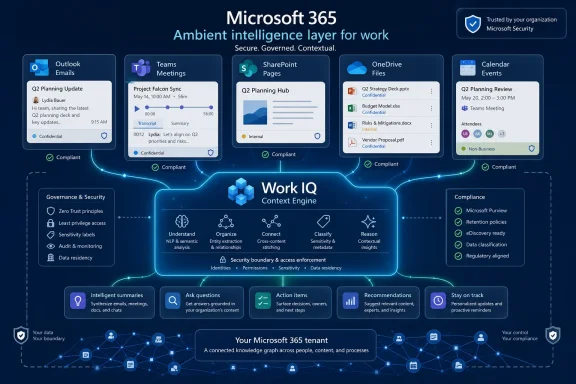
That is the real thrust of Microsoft’s Work IQ pitch. The company is not presenting it as a user-facing product with a shiny icon in the Microsoft 365 launcher. It describes Work IQ as a shared intelligence layer that continuously interprets work signals across a tenant, giving Copilot and agents a richer sense of people, projects, meetings, files, relationships, and organizational patterns.
This is classic Microsoft platform strategy. Windows abstracted hardware. Microsoft Graph abstracted access to workplace data. Work IQ tries to abstract work context itself. If Microsoft succeeds, developers and agent builders will not wire up separate connectors for mail, calendars, Teams, SharePoint, and files every time they build something useful. They will ask the intelligence layer for meaning.
The idea sounds obvious only because generative AI has conditioned everyone to expect computers to “understand” things. In practice, enterprise systems rarely understand anything. They hold messages, files, permissions, meeting recordings, and metadata in separate containers, and then ask humans to remember how those containers relate. Work IQ is Microsoft’s attempt to make those relationships machine-readable without forcing every organization to rebuild its information architecture from scratch.
That difference is crucial. A traditional search result can find the meeting transcript where a product decision was mentioned. A context layer can infer that the transcript, a SharePoint roadmap, a recent Outlook thread, and a Teams channel conversation all belong to the same workstream. The first is retrieval. The second is the start of organizational reasoning.
Microsoft describes Work IQ as built on three layers: data, memory, and inference. The data layer spans files, emails, meetings, chats, and business systems. The memory layer builds persistent understanding of how people and teams work. The inference layer combines models, tools, and skills to reason and act. That structure matters because it reveals the ambition: Microsoft wants Copilot and agents to become less transactional and more continuous.
The most controversial piece is memory. Users have long complained that assistants forget who they are, what they are doing, and what they already explained last week. Microsoft’s internal testing reportedly found the same thing. Work IQ is meant to help Copilot tailor responses over time, so a communications employee receives different framing than an engineer, and a project owner gets answers grounded in recent collaboration rather than generic corporate prose.
That is also where the stakes rise. Persistent context is what makes AI feel useful, but it is also what makes AI feel invasive. An assistant that remembers your role and priorities can save hours. An assistant that seems to know too much about meetings, relationships, and unfinished work can trigger the uneasy feeling that the machine has become an observer, not a tool. Microsoft’s answer is that Work IQ inherits the tenant’s existing security and compliance model. Whether that answer is sufficient depends on how well that tenant was governed before AI arrived.
Work IQ changes the framing. Copilot in Outlook can use conversation history, calendar patterns, meeting context, recipients, urgency signals, and recent collaboration to decide which messages deserve attention. That is not just summarization. It is workplace triage.
The difference is subtle but important. A model can summarize any long email thread if given the text. A context-aware assistant can summarize the thread while identifying decisions, owners, and next steps in relation to the user’s actual work. It can understand that a message from a particular stakeholder matters because it connects to a meeting yesterday, a file edited this morning, and a deadline buried in a project channel.
This is where Microsoft’s advantage is obvious. Gmail, Slack, Notion, Salesforce, ServiceNow, and countless vertical tools all hold fragments of work. Microsoft 365 holds an unusually large share of the daily exhaust: the calendar, the meeting, the file, the chat, the email, and the intranet page. Work IQ is an attempt to turn that exhaust into an intelligence moat.
Still, IT pros should resist the marketing gloss. The inbox does not become magically clean because Copilot has context. Ranking work is a judgment call, and judgment calls can be wrong. A useful assistant must be transparent enough for users to challenge it, and predictable enough that employees do not start delegating priority decisions to a black box. Microsoft’s examples make Outlook feel more assistant-like, but the enterprise risk is that “more relevant” can quietly become “more authoritative.”
That is powerful. Microsoft’s internal example involving a legal team and a SIPOC process diagram shows how a free-form meeting discussion can later become structured documentation. A Copilot Researcher agent reportedly used the transcript, knowledge of the participants, SharePoint context, and similar work elsewhere in the organization to generate a usable process-mapping artifact. Work that once required hours of manual synthesis became a prompt-driven transformation.
This is the dream version of enterprise AI: meetings become less wasteful because their contents can be reused, connected, and acted upon. Decisions do not vanish into someone’s private notes. People who missed the meeting can catch up without spelunking through chats and attachments. Agents can extract action items, connect them to owners, and fold them into future work.
But this also changes the social contract of meetings. Many organizations still treat transcription as optional, awkward, or legally sensitive. Work IQ makes transcription strategically valuable. Microsoft’s own lesson is that broad meeting transcription is not just a technical setting; it is a cultural shift. Without transcripts, the intelligence layer loses a major source of organizational context.
The tension is obvious. The same transcript that helps a project team remember a decision can also preserve ambiguity that participants expected to evaporate. Casual remarks, early-stage thinking, disagreement, and political nuance become searchable and potentially inferable. Sensitivity labels and meeting classifications help, but they do not resolve the human reality that more memory changes behavior. The agentic workplace may be more productive, but it may also become more recorded, more formal, and less forgiving.
Microsoft’s examples are pragmatic. Copilot in SharePoint can draft project overviews, status updates, and page sections using documents, emails, Teams conversations, metadata, and related organizational work. It can suggest layout changes, visuals, tone adjustments, and content improvements. A domain-specific agent such as Knowledge Agent can drill into sites and libraries to help employees structure and publish content faster.
The bigger shift is that SharePoint content creation becomes conversational. Instead of clicking through templates, hunting for canonical documents, and manually reconciling what the team last agreed, a user can ask an agent to assemble a page grounded in current work. For organizations with sprawling intranets, this is not a small quality-of-life improvement. It is a direct attack on the content rot that undermines knowledge management.
The danger is that bad SharePoint hygiene becomes more consequential. If outdated pages, duplicate libraries, abandoned drafts, and overshared documents already exist, Work IQ may surface those patterns more effectively than any human ever did. Microsoft emphasizes that governance problems exposed through Copilot are not caused by Work IQ; the AI is honoring what the tenant already allows. That is technically fair. It is also cold comfort to admins who discover that their “existing access model” was mostly a pile of inherited exceptions and forgotten sharing links.
Work IQ therefore makes SharePoint strategy matter again. Metadata, labels, authoritative sites, ownership, lifecycle policies, and information architecture are no longer chores for compliance teams. They directly influence the quality of AI output. In the agent era, your intranet is not just read by employees. It is interpreted by machines.
The reason is simple: AI changes the blast radius of bad governance. A user who technically has access to too many files may never find them through manual browsing. A context-aware assistant can connect, summarize, and surface those files in seconds. The permission did not change. The practical discoverability did.
Microsoft’s useful distinction is between discoverable and extractable information. Work IQ may understand that a protected document influenced a decision, but Copilot should not reveal the document’s contents to someone lacking access. Sensitivity labels can also propagate to derived outputs such as summaries and AI-generated responses, helping maintain classification as information moves from source material into synthesized content.
That model is sound in principle. It is also dependent on the organization doing the hard work of labeling and permission management. Microsoft’s internal example of a sensitive document surfacing because of a missing sensitivity label is the kind of incident many customers should expect. The failure was not the AI’s defiance of policy. It was the AI’s ruthless exposure of policy gaps.
This is why Work IQ should make security teams both optimistic and nervous. Optimistic because the product is designed to sit within Microsoft’s existing trust boundaries rather than spray raw data into a separate AI service. Nervous because “existing controls” are only as good as the humans, scripts, migrations, and departmental habits that created them. Work IQ does not replace governance. It turns governance into a prerequisite for safe productivity.
Outside native Microsoft 365 experiences, the story changes. Microsoft positions Work IQ as something developers can explicitly access through APIs and Model Context Protocol servers. That matters because the future of enterprise agents will not live entirely inside Word, Outlook, Teams, and SharePoint. Companies want agents in line-of-business applications, Azure-hosted workflows, custom portals, and operational systems.
MCP has become the fashionable connective tissue for agents, and Microsoft is leaning into it. In the Work IQ context, MCP servers act as governed tool interfaces that expose scoped slices of Microsoft 365 signals, such as mail, calendar, files, people, chat, sites, and meeting activity. Instead of building separate integrations for each workload, developers can give agents a structured way to request context while still honoring permissions and tenant controls.
That is valuable because it reduces plumbing. It is risky because it makes context portable. Microsoft’s line is that Work IQ ports intelligence, not raw access. Even so, administrators should treat Work IQ MCP servers as infrastructure, not developer toys. Enabling a server means deciding which builders can use it, which scenarios justify it, and how permission reviews and labeling discipline will keep pace.
The key shift is accountability. A Copilot feature inside Outlook is Microsoft’s product experience. A custom agent using Work IQ through MCP is an enterprise architecture decision. If that agent drafts a customer update, summarizes sensitive deal context, or acts on behalf of a worker, the organization owns the workflow design. Work IQ may provide the intelligence, but it does not absolve the business of deciding where that intelligence belongs.
The internal lessons are useful. Microsoft says Work IQ was not rolled out as a conventional product launch. It emerged as ambient infrastructure through improvements to Copilot relevance and context. Adoption depended less on a single deployment milestone and more on meeting transcription, Copilot training, champions programs, scenario-based learning, internal communications, and feedback loops.
That tracks with what IT pros already know: collaboration tools are rarely transformed by flipping a switch. They change when users see practical value in daily work. A better inbox summary, a more useful meeting recap, a faster SharePoint page, or a researcher agent that turns a transcript into a process document can do more for adoption than another executive memo about AI transformation.
Still, Microsoft is both the vendor and the showcase customer. Its employees are unusually close to the product teams, unusually motivated to use Microsoft tools, and unusually likely to accept Microsoft’s internal AI strategy as part of the job. Most enterprises have messier application estates, more third-party data gravity, more political friction, and less tolerance for being unpaid beta testers.
That does not invalidate Microsoft’s evidence. It does mean customers should translate it carefully. The lesson is not “Work IQ works because Microsoft says it works.” The lesson is that context-aware AI requires organizational readiness. If your meetings are not transcribed, your labels are inconsistent, your SharePoint sites are stale, and your users do not trust Copilot, Work IQ will amplify those realities.
Work IQ handles the human side of work: emails, documents, chats, meetings, calendars, relationships, and workflows. Fabric IQ is aimed at structured data, analytics, metrics, events, transactions, semantic models, and business planning. Foundry IQ provides grounding for developers building agents, tying entities, relationships, ontologies, and domain knowledge into agentic systems. Microsoft has also discussed web grounding in the broader Microsoft IQ framing, reflecting the need to combine internal truth with external information.
This is Microsoft’s answer to the limits of classic retrieval-augmented generation. RAG can fetch relevant chunks of text and hand them to a model. That is useful, but it does not automatically create a durable understanding of how a business works. Agents need to know that a product name in a roadmap, a cost center in a finance system, a policy in HR, and a manager in Teams all refer to connected parts of the same enterprise reality.
That is why ontology keeps appearing in Microsoft’s language. Ontology is a dry term for a high-stakes idea: agents need shared meaning. If “customer,” “account,” “region,” “manager,” “project,” and “policy exception” mean different things in different systems, AI will improvise. Improvisation is charming in demos and dangerous in operations.
The IQ stack is therefore Microsoft’s attempt to make enterprise AI less improvisational. Work IQ extracts meaning from unstructured collaboration. Fabric IQ brings analytic consistency to structured data. Foundry IQ gives builders a way to ground agents in enterprise truth. If those layers actually converge, the agent stops being a chatbot with file access and starts becoming a workflow participant.
The most concerning argument against Work IQ is that modern work is already over-instrumented. Employees live in systems that log edits, reactions, meetings, attendance, messages, transcripts, sharing behavior, and response patterns. Work IQ gives that data a higher-level interpretive function. The machine is not merely storing what happened; it is learning how work happens.
Microsoft’s governance story focuses on data protection, permission boundaries, labels, and compliance. Those are necessary controls, but they are not the full ethics of ambient workplace intelligence. Employees may reasonably ask whether context-aware agents will be used to help them, evaluate them, nudge them, or manage them. Microsoft’s article emphasizes productivity and trusted access, not workforce analytics. But any technology that understands work patterns will invite management interest.
Administrators cannot solve that with sensitivity labels alone. They need policy clarity. Which signals can agents use? Which outputs are logged? Who can inspect agent interactions? Can managers ask Copilot to infer employee responsiveness or collaboration patterns? What happens when an AI-generated summary mischaracterizes a meeting? The technical trust boundary is only one part of the organizational trust boundary.
This is where Microsoft customers should be explicit before the rollout becomes ambient. Work IQ’s invisibility is good user experience, but invisible infrastructure still needs visible governance. Employees should understand what is being used, why it improves their work, and where the organization draws lines. Trust is not inherited from Microsoft 365 licensing. It is earned locally.
This also makes the Microsoft 365 administrator’s job more strategic. In the old model, bad information governance was embarrassing but survivable. In the Work IQ model, it becomes operational debt that agents can compound. Overshared files, unlabeled confidential content, stale SharePoint pages, and inconsistent meeting practices will not stay hidden in the background. They will shape what AI believes the organization knows.
Microsoft’s own framing is unusually candid on this point. Work IQ does not make governance optional. It makes governance visible. That is why the most mature customers will not ask whether they should “turn on AI” in the abstract. They will ask whether their tenant is ready to be reasoned over.
If Microsoft is right, the next phase of enterprise productivity will not be defined by who has the flashiest chatbot. It will be defined by who has the cleanest, most trusted, most machine-readable understanding of their own work. Work IQ is Microsoft’s bid to own that layer, and for Windows and Microsoft 365 shops, the future now looks less like installing another app and more like preparing the entire workplace to become intelligible to agents.
 Microsoft Is Selling Context as the New Platform
For years, the enterprise software industry has treated knowledge as something to be stored, indexed, searched, and occasionally governed. Work IQ suggests Microsoft has moved to a different assumption: the knowledge estate is no longer a library, but fuel for semi-autonomous systems. In that world, the winning platform is not merely the one with the best model, but the one that can explain what a vague request means inside a specific company at a specific moment.That is the real thrust of Microsoft’s Work IQ pitch. The company is not presenting it as a user-facing product with a shiny icon in the Microsoft 365 launcher. It describes Work IQ as a shared intelligence layer that continuously interprets work signals across a tenant, giving Copilot and agents a richer sense of people, projects, meetings, files, relationships, and organizational patterns.
This is classic Microsoft platform strategy. Windows abstracted hardware. Microsoft Graph abstracted access to workplace data. Work IQ tries to abstract work context itself. If Microsoft succeeds, developers and agent builders will not wire up separate connectors for mail, calendars, Teams, SharePoint, and files every time they build something useful. They will ask the intelligence layer for meaning.
The idea sounds obvious only because generative AI has conditioned everyone to expect computers to “understand” things. In practice, enterprise systems rarely understand anything. They hold messages, files, permissions, meeting recordings, and metadata in separate containers, and then ask humans to remember how those containers relate. Work IQ is Microsoft’s attempt to make those relationships machine-readable without forcing every organization to rebuild its information architecture from scratch.
The Graph Told Copilot What Exists; Work IQ Tells It Why It Matters
Microsoft is careful to distinguish Work IQ from Microsoft Graph, and that distinction is more than branding. Graph is the permission-aware access layer for Microsoft 365 data and services. It can tell a system what files, messages, people, sites, and events exist and whether a user can access them. Work IQ, as Microsoft frames it, interprets those signals into context an AI system can reason over.That difference is crucial. A traditional search result can find the meeting transcript where a product decision was mentioned. A context layer can infer that the transcript, a SharePoint roadmap, a recent Outlook thread, and a Teams channel conversation all belong to the same workstream. The first is retrieval. The second is the start of organizational reasoning.
Microsoft describes Work IQ as built on three layers: data, memory, and inference. The data layer spans files, emails, meetings, chats, and business systems. The memory layer builds persistent understanding of how people and teams work. The inference layer combines models, tools, and skills to reason and act. That structure matters because it reveals the ambition: Microsoft wants Copilot and agents to become less transactional and more continuous.
The most controversial piece is memory. Users have long complained that assistants forget who they are, what they are doing, and what they already explained last week. Microsoft’s internal testing reportedly found the same thing. Work IQ is meant to help Copilot tailor responses over time, so a communications employee receives different framing than an engineer, and a project owner gets answers grounded in recent collaboration rather than generic corporate prose.
That is also where the stakes rise. Persistent context is what makes AI feel useful, but it is also what makes AI feel invasive. An assistant that remembers your role and priorities can save hours. An assistant that seems to know too much about meetings, relationships, and unfinished work can trigger the uneasy feeling that the machine has become an observer, not a tool. Microsoft’s answer is that Work IQ inherits the tenant’s existing security and compliance model. Whether that answer is sufficient depends on how well that tenant was governed before AI arrived.
The Inbox Becomes a Ranking Problem, Not a Filing Problem
Microsoft’s Outlook examples are some of the clearest illustrations of Work IQ’s practical value. Email has always been a terrible proxy for priority. Unread counts, flags, and sender names tell you something, but they cannot reliably distinguish between a noisy thread and the message that will derail your afternoon if ignored.Work IQ changes the framing. Copilot in Outlook can use conversation history, calendar patterns, meeting context, recipients, urgency signals, and recent collaboration to decide which messages deserve attention. That is not just summarization. It is workplace triage.
The difference is subtle but important. A model can summarize any long email thread if given the text. A context-aware assistant can summarize the thread while identifying decisions, owners, and next steps in relation to the user’s actual work. It can understand that a message from a particular stakeholder matters because it connects to a meeting yesterday, a file edited this morning, and a deadline buried in a project channel.
This is where Microsoft’s advantage is obvious. Gmail, Slack, Notion, Salesforce, ServiceNow, and countless vertical tools all hold fragments of work. Microsoft 365 holds an unusually large share of the daily exhaust: the calendar, the meeting, the file, the chat, the email, and the intranet page. Work IQ is an attempt to turn that exhaust into an intelligence moat.
Still, IT pros should resist the marketing gloss. The inbox does not become magically clean because Copilot has context. Ranking work is a judgment call, and judgment calls can be wrong. A useful assistant must be transparent enough for users to challenge it, and predictable enough that employees do not start delegating priority decisions to a black box. Microsoft’s examples make Outlook feel more assistant-like, but the enterprise risk is that “more relevant” can quietly become “more authoritative.”
Teams Meetings Are No Longer Ephemeral, and That Changes the Politics of Work
The Teams scenario is more revealing than the Outlook one because it turns meetings into durable organizational memory. Microsoft describes Work IQ using transcripts, speaker contributions, shared files, AI-generated summaries, and related artifacts as inputs for future reasoning. Once a meeting is recorded and transcribed, it stops being a one-hour event and becomes part of the company’s knowledge substrate.That is powerful. Microsoft’s internal example involving a legal team and a SIPOC process diagram shows how a free-form meeting discussion can later become structured documentation. A Copilot Researcher agent reportedly used the transcript, knowledge of the participants, SharePoint context, and similar work elsewhere in the organization to generate a usable process-mapping artifact. Work that once required hours of manual synthesis became a prompt-driven transformation.
This is the dream version of enterprise AI: meetings become less wasteful because their contents can be reused, connected, and acted upon. Decisions do not vanish into someone’s private notes. People who missed the meeting can catch up without spelunking through chats and attachments. Agents can extract action items, connect them to owners, and fold them into future work.
But this also changes the social contract of meetings. Many organizations still treat transcription as optional, awkward, or legally sensitive. Work IQ makes transcription strategically valuable. Microsoft’s own lesson is that broad meeting transcription is not just a technical setting; it is a cultural shift. Without transcripts, the intelligence layer loses a major source of organizational context.
The tension is obvious. The same transcript that helps a project team remember a decision can also preserve ambiguity that participants expected to evaporate. Casual remarks, early-stage thinking, disagreement, and political nuance become searchable and potentially inferable. Sensitivity labels and meeting classifications help, but they do not resolve the human reality that more memory changes behavior. The agentic workplace may be more productive, but it may also become more recorded, more formal, and less forgiving.
SharePoint Gets a Second Life as Agent Substrate
SharePoint has survived many eras of Microsoft strategy because it solves an unglamorous problem: organizations need somewhere to put shared information. It has also been the place where information goes to become stale, duplicated, misclassified, or forgotten. Work IQ gives SharePoint a new role. Instead of being merely a repository, it becomes part of the reasoning fabric.Microsoft’s examples are pragmatic. Copilot in SharePoint can draft project overviews, status updates, and page sections using documents, emails, Teams conversations, metadata, and related organizational work. It can suggest layout changes, visuals, tone adjustments, and content improvements. A domain-specific agent such as Knowledge Agent can drill into sites and libraries to help employees structure and publish content faster.
The bigger shift is that SharePoint content creation becomes conversational. Instead of clicking through templates, hunting for canonical documents, and manually reconciling what the team last agreed, a user can ask an agent to assemble a page grounded in current work. For organizations with sprawling intranets, this is not a small quality-of-life improvement. It is a direct attack on the content rot that undermines knowledge management.
The danger is that bad SharePoint hygiene becomes more consequential. If outdated pages, duplicate libraries, abandoned drafts, and overshared documents already exist, Work IQ may surface those patterns more effectively than any human ever did. Microsoft emphasizes that governance problems exposed through Copilot are not caused by Work IQ; the AI is honoring what the tenant already allows. That is technically fair. It is also cold comfort to admins who discover that their “existing access model” was mostly a pile of inherited exceptions and forgotten sharing links.
Work IQ therefore makes SharePoint strategy matter again. Metadata, labels, authoritative sites, ownership, lifecycle policies, and information architecture are no longer chores for compliance teams. They directly influence the quality of AI output. In the agent era, your intranet is not just read by employees. It is interpreted by machines.
Governance Is the Product Whether Microsoft Says So or Not
Microsoft repeatedly stresses that Work IQ does not introduce new data access. It inherits existing Microsoft 365 permissions, sensitivity labels, data-loss prevention rules, compliance controls, and tenant policies. That is the right architecture, and it is also the sentence every administrator should read twice.The reason is simple: AI changes the blast radius of bad governance. A user who technically has access to too many files may never find them through manual browsing. A context-aware assistant can connect, summarize, and surface those files in seconds. The permission did not change. The practical discoverability did.
Microsoft’s useful distinction is between discoverable and extractable information. Work IQ may understand that a protected document influenced a decision, but Copilot should not reveal the document’s contents to someone lacking access. Sensitivity labels can also propagate to derived outputs such as summaries and AI-generated responses, helping maintain classification as information moves from source material into synthesized content.
That model is sound in principle. It is also dependent on the organization doing the hard work of labeling and permission management. Microsoft’s internal example of a sensitive document surfacing because of a missing sensitivity label is the kind of incident many customers should expect. The failure was not the AI’s defiance of policy. It was the AI’s ruthless exposure of policy gaps.
This is why Work IQ should make security teams both optimistic and nervous. Optimistic because the product is designed to sit within Microsoft’s existing trust boundaries rather than spray raw data into a separate AI service. Nervous because “existing controls” are only as good as the humans, scripts, migrations, and departmental habits that created them. Work IQ does not replace governance. It turns governance into a prerequisite for safe productivity.
MCP Turns Ambient Intelligence Into an Architectural Choice
Inside Microsoft 365, Work IQ is ambient. Users do not enable it, configure it, or think about it. If they are using Copilot in supported Microsoft 365 experiences, the intelligence layer is part of the product behavior.Outside native Microsoft 365 experiences, the story changes. Microsoft positions Work IQ as something developers can explicitly access through APIs and Model Context Protocol servers. That matters because the future of enterprise agents will not live entirely inside Word, Outlook, Teams, and SharePoint. Companies want agents in line-of-business applications, Azure-hosted workflows, custom portals, and operational systems.
MCP has become the fashionable connective tissue for agents, and Microsoft is leaning into it. In the Work IQ context, MCP servers act as governed tool interfaces that expose scoped slices of Microsoft 365 signals, such as mail, calendar, files, people, chat, sites, and meeting activity. Instead of building separate integrations for each workload, developers can give agents a structured way to request context while still honoring permissions and tenant controls.
That is valuable because it reduces plumbing. It is risky because it makes context portable. Microsoft’s line is that Work IQ ports intelligence, not raw access. Even so, administrators should treat Work IQ MCP servers as infrastructure, not developer toys. Enabling a server means deciding which builders can use it, which scenarios justify it, and how permission reviews and labeling discipline will keep pace.
The key shift is accountability. A Copilot feature inside Outlook is Microsoft’s product experience. A custom agent using Work IQ through MCP is an enterprise architecture decision. If that agent drafts a customer update, summarizes sensitive deal context, or acts on behalf of a worker, the organization owns the workflow design. Work IQ may provide the intelligence, but it does not absolve the business of deciding where that intelligence belongs.
Customer Zero Is a Strong Story, but It Is Still Microsoft Grading Microsoft
Microsoft Digital’s “Customer Zero” narrative gives the Work IQ story credibility. Microsoft is a large, complex, highly regulated, globally distributed enterprise with a vast Microsoft 365 footprint. If Work IQ cannot survive inside Microsoft, it is unlikely to survive inside a multinational bank, manufacturer, government contractor, or healthcare provider.The internal lessons are useful. Microsoft says Work IQ was not rolled out as a conventional product launch. It emerged as ambient infrastructure through improvements to Copilot relevance and context. Adoption depended less on a single deployment milestone and more on meeting transcription, Copilot training, champions programs, scenario-based learning, internal communications, and feedback loops.
That tracks with what IT pros already know: collaboration tools are rarely transformed by flipping a switch. They change when users see practical value in daily work. A better inbox summary, a more useful meeting recap, a faster SharePoint page, or a researcher agent that turns a transcript into a process document can do more for adoption than another executive memo about AI transformation.
Still, Microsoft is both the vendor and the showcase customer. Its employees are unusually close to the product teams, unusually motivated to use Microsoft tools, and unusually likely to accept Microsoft’s internal AI strategy as part of the job. Most enterprises have messier application estates, more third-party data gravity, more political friction, and less tolerance for being unpaid beta testers.
That does not invalidate Microsoft’s evidence. It does mean customers should translate it carefully. The lesson is not “Work IQ works because Microsoft says it works.” The lesson is that context-aware AI requires organizational readiness. If your meetings are not transcribed, your labels are inconsistent, your SharePoint sites are stale, and your users do not trust Copilot, Work IQ will amplify those realities.
The IQ Stack Is Microsoft’s Answer to the Limits of RAG
Work IQ is only one part of Microsoft’s broader IQ strategy. Microsoft now talks about Work IQ, Fabric IQ, Foundry IQ, and related intelligence layers as a unified context system for agents. The naming is inelegant, but the architectural direction is coherent: different kinds of enterprise knowledge need different kinds of grounding.Work IQ handles the human side of work: emails, documents, chats, meetings, calendars, relationships, and workflows. Fabric IQ is aimed at structured data, analytics, metrics, events, transactions, semantic models, and business planning. Foundry IQ provides grounding for developers building agents, tying entities, relationships, ontologies, and domain knowledge into agentic systems. Microsoft has also discussed web grounding in the broader Microsoft IQ framing, reflecting the need to combine internal truth with external information.
This is Microsoft’s answer to the limits of classic retrieval-augmented generation. RAG can fetch relevant chunks of text and hand them to a model. That is useful, but it does not automatically create a durable understanding of how a business works. Agents need to know that a product name in a roadmap, a cost center in a finance system, a policy in HR, and a manager in Teams all refer to connected parts of the same enterprise reality.
That is why ontology keeps appearing in Microsoft’s language. Ontology is a dry term for a high-stakes idea: agents need shared meaning. If “customer,” “account,” “region,” “manager,” “project,” and “policy exception” mean different things in different systems, AI will improvise. Improvisation is charming in demos and dangerous in operations.
The IQ stack is therefore Microsoft’s attempt to make enterprise AI less improvisational. Work IQ extracts meaning from unstructured collaboration. Fabric IQ brings analytic consistency to structured data. Foundry IQ gives builders a way to ground agents in enterprise truth. If those layers actually converge, the agent stops being a chatbot with file access and starts becoming a workflow participant.
The Productivity Pitch Is Real, but So Is the Surveillance Shadow
The most compelling argument for Work IQ is that modern work is drowning in context switching. Employees spend enormous time reconstructing what happened, who said what, which document is current, what decision was made, and what action follows. AI that can stitch together that context has obvious value.The most concerning argument against Work IQ is that modern work is already over-instrumented. Employees live in systems that log edits, reactions, meetings, attendance, messages, transcripts, sharing behavior, and response patterns. Work IQ gives that data a higher-level interpretive function. The machine is not merely storing what happened; it is learning how work happens.
Microsoft’s governance story focuses on data protection, permission boundaries, labels, and compliance. Those are necessary controls, but they are not the full ethics of ambient workplace intelligence. Employees may reasonably ask whether context-aware agents will be used to help them, evaluate them, nudge them, or manage them. Microsoft’s article emphasizes productivity and trusted access, not workforce analytics. But any technology that understands work patterns will invite management interest.
Administrators cannot solve that with sensitivity labels alone. They need policy clarity. Which signals can agents use? Which outputs are logged? Who can inspect agent interactions? Can managers ask Copilot to infer employee responsiveness or collaboration patterns? What happens when an AI-generated summary mischaracterizes a meeting? The technical trust boundary is only one part of the organizational trust boundary.
This is where Microsoft customers should be explicit before the rollout becomes ambient. Work IQ’s invisibility is good user experience, but invisible infrastructure still needs visible governance. Employees should understand what is being used, why it improves their work, and where the organization draws lines. Trust is not inherited from Microsoft 365 licensing. It is earned locally.
The WindowsForum Reader’s Work IQ Checklist Is Mostly About Dirt Under the Floorboards
The practical lesson for Windows shops and Microsoft 365 administrators is that Work IQ is less a product to deploy than a mirror held up to the tenant. The better your information estate, the better your agents. The worse your hygiene, the faster AI will reveal it.- Work IQ is not a separate app; it is a Microsoft 365 intelligence layer that makes Copilot and agents more context-aware across everyday work signals.
- The feature’s safety depends heavily on existing permissions, sensitivity labels, data-loss prevention policies, meeting labels, and tenant governance.
- Meeting transcription becomes a strategic input because transcripts turn ephemeral collaboration into reusable organizational knowledge.
- Custom agents that use Work IQ through APIs or MCP servers should be treated as governed infrastructure with selective enablement and approved builders.
- SharePoint, OneDrive, Outlook, Teams, and calendar hygiene now directly influence AI output quality, not just search results.
- The broader Microsoft IQ stack signals that Microsoft wants enterprise agents grounded in shared business meaning, not merely connected to document retrieval.
Microsoft’s Real Play Is to Make the Tenant the Agent Runtime
The most important thing about Work IQ is not that Copilot can write a better summary. It is that Microsoft is turning the Microsoft 365 tenant into an agent runtime, where identity, permissions, collaboration history, meetings, files, workflows, and business semantics become the operating environment for AI. That gives Microsoft a formidable advantage over standalone AI tools, because the hard part of enterprise AI is not generating fluent text. The hard part is knowing which text, which person, which file, which policy, which meeting, and which action matters now.This also makes the Microsoft 365 administrator’s job more strategic. In the old model, bad information governance was embarrassing but survivable. In the Work IQ model, it becomes operational debt that agents can compound. Overshared files, unlabeled confidential content, stale SharePoint pages, and inconsistent meeting practices will not stay hidden in the background. They will shape what AI believes the organization knows.
Microsoft’s own framing is unusually candid on this point. Work IQ does not make governance optional. It makes governance visible. That is why the most mature customers will not ask whether they should “turn on AI” in the abstract. They will ask whether their tenant is ready to be reasoned over.
If Microsoft is right, the next phase of enterprise productivity will not be defined by who has the flashiest chatbot. It will be defined by who has the cleanest, most trusted, most machine-readable understanding of their own work. Work IQ is Microsoft’s bid to own that layer, and for Windows and Microsoft 365 shops, the future now looks less like installing another app and more like preparing the entire workplace to become intelligible to agents.
References
- Primary source: Microsoft
Published: Thu, 11 Jun 2026 16:00:00 GMT
Loading…
www.microsoft.com - Official source: learn.microsoft.com

Microsoft IQ documentation
Microsoft IQ is the enterprise intelligence layer of the Microsoft stack. It gives AI agents and Microsoft 365 Copilot a shared, continuously updated understanding of your organization by connecting how people work, how the business operates, and how agents unlock knowledge.learn.microsoft.com - Official source: blogs.microsoft.com

Microsoft Build 2026: Be yourself at work - The Official Microsoft Blog
Platforms shift when developers build. We explore, choose tools, dream, create. This platform shift comes with more information than ever, ready at your fingertips. This shift, it’s about building fast AND THEN: it’s about building, operating, optimizing and observing. Securing your...blogs.microsoft.com - Official source: devblogs.microsoft.com

Work IQ: Production‑ready intelligence for every agent - Microsoft 365 Developer Blog
Work IQ provides a workplace intelligence layer that enables agents to access and reason over organizational data, context, and tools, continuously building a semantic understanding across Microsoft 365 and external systems with built-in, permission-aware governance. devblogs.microsoft.com
- Related coverage: windowscentral.com
"Agents are only as good as the context we give them": Microsoft IQ connects AI agents to your workspace data and the web | Windows Central
The newly unveiled Microsoft IQ data stack and Scout assistant turn generic AI into a personalized workplace tool.www.windowscentral.com - Related coverage: tomsguide.com

Biggest Microsoft Build 2026 announcements — agentic AI, RTX Spark Dev Box, GitHub Copilot app, new MAI models, and more | Tom's Guide
All the big news from Microsoft's AI-focused eventwww.tomsguide.com
- Related coverage: itpro.com

Microsoft unveils Foundry overhaul for managing, optimizing AI agents
The hyperscaler is aiming to simplify AI agent oversight, as organizations grapple with the increasingly complicated business of processing and paying for outputs www.itpro.com
- Official source: cdn-dynmedia-1.microsoft.com
- Related coverage: arturmarkus.com
Microsoft 365 Copilot Rolls Out 27 New Features in January 2026, Adds GPT-5.2 Model Selector with 3 Reasoning Modes
PDF documentwww.arturmarkus.com
- Official source: news.microsoft.com
- Official source: techcommunity.microsoft.com