

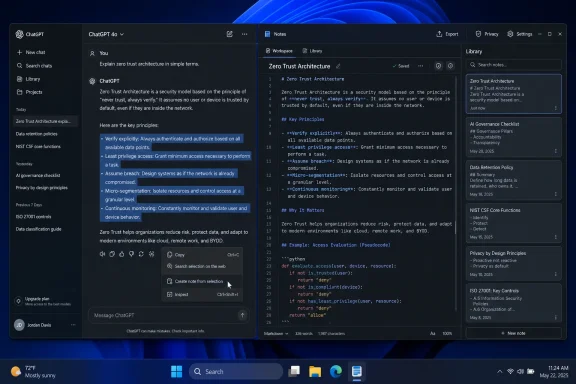
OpenAI began surfacing a Notes feature inside ChatGPT for some users in June 2026, with early reports showing both a “create a note” action from selected chat text and a more complete Markdown note editor available through the ChatGPT Library. The feature has not yet arrived as a clean, universally announced product with a tidy marketing page and a finished workflow. That is precisely why it matters. Notes looks less like another small interface flourish and more like the next step in OpenAI’s long campaign to turn ChatGPT from a place where conversations happen into the place where work lives.
The original ChatGPT metaphor was almost brutally simple: type into a box, get an answer, continue the thread. That simplicity made the product explode, but it also created a long-term problem for anyone who tried to use it for serious work. Chats are excellent for thinking aloud; they are terrible as filing cabinets.
A Notes feature attacks that weakness directly. If a user can capture a useful answer, convert a research fragment into a reusable document, edit it in Markdown, and store it in the Library, ChatGPT starts to behave less like a bot and more like a workspace. The center of gravity shifts from “ask and answer” to “collect, refine, and return.”
That is a subtle but important change. Productivity software does not win merely by generating text; it wins by reducing the number of places where the user has to keep context. OpenAI’s apparent bet is that the same system producing the draft should also store the draft, remember the surrounding project, and help revise it later.
This is why Notes is more interesting than its quiet rollout suggests. A note-taking pane is not hard to imagine. A note-taking pane attached to ChatGPT’s memory, files, projects, writing blocks, research tools, and model context is something different.
That inconsistency is easy to dismiss as rollout messiness, and it probably is. But it also tells us what OpenAI is trying to reconcile. ChatGPT already has multiple overlapping surfaces for durable work: chats, projects, uploaded files, generated documents, writing blocks, and Library assets. Notes has to fit into that architecture without becoming just another place where user content disappears.
The selected-text workflow is the obvious killer feature. In real use, people do not wake up and decide to “make a note” in the abstract. They see a useful paragraph in a model answer, a strong argument in a draft, a set of instructions in a troubleshooting session, or a citation trail in a research workflow. The natural action is to highlight the good bit and preserve it.
If OpenAI gets that right, Notes becomes a bridge between conversation and documentation. If it gets it wrong, Notes becomes a nicer scratchpad bolted onto a still-chaotic archive of chats. The difference is not cosmetic; it determines whether ChatGPT becomes a knowledge tool or merely a better text editor with a chatbot attached.
That matters to WindowsForum’s audience in particular. Sysadmins, developers, power users, and technical writers already live in Markdown-adjacent environments: GitHub READMEs, documentation repositories, static-site generators, Obsidian vaults, VS Code workspaces, and internal runbooks. A note system that understands headings, lists, code blocks, tables, and lightweight formatting is immediately more credible than a rich-text toy.
Markdown also makes AI collaboration cleaner. Models can generate it reliably, users can inspect it directly, and downstream tools can ingest it without much ceremony. A ChatGPT note can become a meeting summary, then a project brief, then a troubleshooting checklist, then a draft article, with fewer format conversions along the way.
The larger implication is that OpenAI is not just trying to store snippets. It is creating a format layer for human-AI coauthoring. That sounds grandiose for a Notes feature, but productivity platforms are often won through the dullest substrate: the file format, the editor surface, the save location, the sync model.
Notes extend that logic. A file upload is often something the user brings into ChatGPT. A generated document is often something ChatGPT produces for the user. A note sits between the two: a living object that may begin as a user idea, a model answer, or a hybrid of both.
That middle category is where modern AI productivity is heading. Users do not just want answers; they want evolving materials. They want a résumé tailored across multiple job searches, a project plan that changes as constraints change, a research memo that accumulates findings, a troubleshooting log that remembers what has already been tried.
For enterprise and education users, this also raises the stakes. Once notes live inside ChatGPT, the platform is no longer just processing prompts; it is hosting work product. That means retention, export, permissions, compliance, and data governance become central questions rather than administrative afterthoughts.
OpenAI’s challenge is that the Library cannot remain a junk drawer. If it accumulates notes, files, drafts, charts, generated documents, and research artifacts without robust organization, it will reproduce the same mess that haunts email inboxes and shared drives. Search will help, but structure still matters.
The same applies to Notion, OneNote, Google Docs, and the expanding universe of Markdown editors. ChatGPT does not have to replace them outright. It can siphon off first drafts, research fragments, meeting summaries, study guides, outline building, and project scratchpads. Those are the moments when users are deciding where knowledge begins.
The strongest incumbent note apps are organized around user-controlled repositories. Obsidian’s appeal is local Markdown and graph-based knowledge management. OneNote’s appeal is flexible notebooks and deep Microsoft ecosystem integration. Notion’s appeal is structured collaboration and databases. ChatGPT’s appeal is that the editor can talk back, rewrite, summarize, critique, and connect ideas.
That is not a small distinction. In a conventional notes app, intelligence is a feature added to a document system. In ChatGPT, the document system is being added to an intelligence layer. Those two approaches may converge, but they begin from different assumptions about what the user is trying to do.
The risk for OpenAI is trust. People are willing to ask a chatbot a disposable question. They are more cautious about making it the home for their research archive, work notes, personal reflections, or long-running project knowledge. A Notes feature must therefore prove not only that it is useful, but that it is durable.
Notes could clarify the product if implemented well. Conversations are where thinking happens. Notes are where the durable result goes. Library is where those results live. Projects are where related materials and instructions are grouped. That architecture would make sense to normal users and power users alike.
But if the boundaries blur too much, the product may feel like a pile of half-overlapping metaphors. Is a writing block a note? Is a generated document a Library file? Is a project instruction different from a note? Does memory remember what notes contain, and if so, under what controls? These are not pedantic UX questions; they define how much confidence users can have in the system.
The best productivity tools make the user feel oriented. The worst make the user feel as though content might be saved somewhere, referenced somehow, by a model that may or may not understand which version matters. ChatGPT is already powerful enough. Its next challenge is legibility.
A student writing study notes may not care where the Markdown lives as long as it is searchable and available on a phone. A developer drafting architecture notes might care a great deal. A sysadmin documenting an outage, a consultant handling client material, or an employee summarizing internal meetings will need to know what is stored, how it is secured, whether it can be exported, and who can access it.
This is where OpenAI’s consumer velocity collides with enterprise expectations. Features can appear quietly for some users, change behavior during rollout, and mature over time in public. That is normal for consumer software. It is less comfortable when the feature is a container for business knowledge.
The Microsoft angle is also hard to ignore. Microsoft has its own note-taking and knowledge products, from OneNote to Loop to SharePoint-backed Microsoft 365 experiences, and it has embedded Copilot across that ecosystem. OpenAI adding first-class notes to ChatGPT does not necessarily put it in direct conflict with Microsoft, but it does create overlap in the same user behavior Microsoft has spent years trying to own: keeping work inside the productivity suite.
For individual users, the practical advice is simple: experiment, but do not confuse convenience with an archive strategy. Until export, retention, sharing, and organization are clear, ChatGPT Notes should be treated as an emerging workspace rather than the sole home for critical records.
Notes would make that stack feel more complete. The missing layer in many AI workflows has been a lightweight place to put the intermediate output: not polished enough for a final document, not disposable enough to leave buried in a chat. Notes are exactly that layer.
This also explains why the feature could become habit-forming. A user might ask ChatGPT to explain a technical topic, save the clearest explanation as a note, add their own examples, ask the model to turn it into a study guide, then later pull it into a project or draft. That loop keeps the user inside ChatGPT across the entire arc of learning and production.
The strategic prize is not note-taking revenue. It is retention of context. The more user work lives inside ChatGPT, the more useful ChatGPT becomes, and the harder it is for rival assistants to offer equivalent continuity. Productivity platforms become powerful when leaving them means leaving behind structure.
That does not mean users should panic. It does mean OpenAI must be explicit. A real note system needs clear controls for deletion, export, model training settings, workspace ownership, sharing, administrative access, and retention. Users should not have to infer the lifecycle of a note from the behavior of a chat transcript.
There is also a memory-adjacent ambiguity. If ChatGPT can reference Library content or notes in future chats, that may be extremely useful. It may also surprise users who thought a note was simply stored, not actively available as context. The distinction between storage and personalization needs to be visible in the product, not buried in settings language.
For enterprise administrators, the question will be whether Notes can be governed like other business data. Can organizations restrict note creation, control sharing, enforce retention, audit access, or export content for compliance? A consumer rollout can defer those questions; a workplace platform cannot.
A blank note is deliberate. It is the user saying, “I want to write something.” A note from selected text is opportunistic. It is the user saying, “This is worth keeping.” The second behavior is where AI assistants have a natural advantage because valuable material often emerges unexpectedly during a conversation.
That is the old failure mode of ChatGPT: good work gets trapped in the transcript. Users copy it into Google Docs, paste it into Obsidian, drop it into OneNote, or lose it forever after the thread title becomes one more vague item in the sidebar. Notes can turn the transcript into a source rather than a graveyard.
The product challenge is to preserve provenance. A note clipped from a chat should ideally remember where it came from, what prompt produced it, and what files or assumptions informed it. Without that trail, notes risk becoming polished fragments detached from their evidentiary context. For research and technical work, that can be dangerous.
OpenAI does not need to overcomplicate the first release. But if Notes is to become a serious knowledge layer, traceability will matter. Users need to know not only what a note says, but why they trusted it when they saved it.
For a visual tweak, that is fine. For a feature that stores user-created knowledge, it is more delicate. Users need to know whether Notes is experimental, whether content will persist, whether the feature is tied to a plan or region, and whether the behavior they see today will remain tomorrow.
The current ambiguity may simply reflect an early rollout. The more polished Library-based editor suggests a coherent destination, while the rougher selected-text path suggests wiring still in progress. That is normal software development, but users should be careful not to treat every surfaced menu item as a finalized contract.
There is a broader industry pattern here. AI companies are moving faster than traditional productivity vendors, but productivity software demands confidence. People can tolerate a flaky answer better than a flaky archive. If OpenAI wants ChatGPT to be where work lives, it must make the boring parts boringly reliable.
If Notes matures, ChatGPT becomes stickier in the places where knowledge work actually happens: collecting, trimming, organizing, revising, and resurfacing information. That could make it more valuable for students building study systems, professionals managing recurring projects, writers gathering research, and IT pros maintaining working documentation.
The near-term picture is still uneven, but the direction is clear.
 OpenAI Is Building a Desk, Not Just a Chat Window
The original ChatGPT metaphor was almost brutally simple: type into a box, get an answer, continue the thread. That simplicity made the product explode, but it also created a long-term problem for anyone who tried to use it for serious work. Chats are excellent for thinking aloud; they are terrible as filing cabinets.A Notes feature attacks that weakness directly. If a user can capture a useful answer, convert a research fragment into a reusable document, edit it in Markdown, and store it in the Library, ChatGPT starts to behave less like a bot and more like a workspace. The center of gravity shifts from “ask and answer” to “collect, refine, and return.”
That is a subtle but important change. Productivity software does not win merely by generating text; it wins by reducing the number of places where the user has to keep context. OpenAI’s apparent bet is that the same system producing the draft should also store the draft, remember the surrounding project, and help revise it later.
This is why Notes is more interesting than its quiet rollout suggests. A note-taking pane is not hard to imagine. A note-taking pane attached to ChatGPT’s memory, files, projects, writing blocks, research tools, and model context is something different.
The Rough Edges Are the Product Roadmap Showing Through
The early implementation reportedly exposes two paths into Notes, and the split is revealing. Selecting text inside a conversation can surface an option to create a note, but some users are seeing that content appear in a writing block inside the same chat rather than as a separate Library item. Creating a note from the Library, by contrast, appears to open a dedicated Markdown editor with a more complete note-taking experience.That inconsistency is easy to dismiss as rollout messiness, and it probably is. But it also tells us what OpenAI is trying to reconcile. ChatGPT already has multiple overlapping surfaces for durable work: chats, projects, uploaded files, generated documents, writing blocks, and Library assets. Notes has to fit into that architecture without becoming just another place where user content disappears.
The selected-text workflow is the obvious killer feature. In real use, people do not wake up and decide to “make a note” in the abstract. They see a useful paragraph in a model answer, a strong argument in a draft, a set of instructions in a troubleshooting session, or a citation trail in a research workflow. The natural action is to highlight the good bit and preserve it.
If OpenAI gets that right, Notes becomes a bridge between conversation and documentation. If it gets it wrong, Notes becomes a nicer scratchpad bolted onto a still-chaotic archive of chats. The difference is not cosmetic; it determines whether ChatGPT becomes a knowledge tool or merely a better text editor with a chatbot attached.
Markdown Is the Boring Choice That Makes the Feature Serious
The reported Markdown editor is the right decision for a feature like this. Markdown is not glamorous, but it is the lingua franca of modern technical writing, project notes, developer documentation, personal knowledge bases, and AI prompt workflows. It is readable as plain text, expressive enough for structure, and portable enough to avoid the feeling that every note is trapped in a proprietary blob.That matters to WindowsForum’s audience in particular. Sysadmins, developers, power users, and technical writers already live in Markdown-adjacent environments: GitHub READMEs, documentation repositories, static-site generators, Obsidian vaults, VS Code workspaces, and internal runbooks. A note system that understands headings, lists, code blocks, tables, and lightweight formatting is immediately more credible than a rich-text toy.
Markdown also makes AI collaboration cleaner. Models can generate it reliably, users can inspect it directly, and downstream tools can ingest it without much ceremony. A ChatGPT note can become a meeting summary, then a project brief, then a troubleshooting checklist, then a draft article, with fewer format conversions along the way.
The larger implication is that OpenAI is not just trying to store snippets. It is creating a format layer for human-AI coauthoring. That sounds grandiose for a Notes feature, but productivity platforms are often won through the dullest substrate: the file format, the editor surface, the save location, the sync model.
The Library Is Becoming ChatGPT’s Filing System
The Library has been one of ChatGPT’s more consequential under-the-radar additions because it gives the product a place for persistent artifacts outside the linear sprawl of chat history. A traditional chat transcript is chronological; a library is intentional. It says, “This object matters enough to exist outside the conversation that produced it.”Notes extend that logic. A file upload is often something the user brings into ChatGPT. A generated document is often something ChatGPT produces for the user. A note sits between the two: a living object that may begin as a user idea, a model answer, or a hybrid of both.
That middle category is where modern AI productivity is heading. Users do not just want answers; they want evolving materials. They want a résumé tailored across multiple job searches, a project plan that changes as constraints change, a research memo that accumulates findings, a troubleshooting log that remembers what has already been tried.
For enterprise and education users, this also raises the stakes. Once notes live inside ChatGPT, the platform is no longer just processing prompts; it is hosting work product. That means retention, export, permissions, compliance, and data governance become central questions rather than administrative afterthoughts.
OpenAI’s challenge is that the Library cannot remain a junk drawer. If it accumulates notes, files, drafts, charts, generated documents, and research artifacts without robust organization, it will reproduce the same mess that haunts email inboxes and shared drives. Search will help, but structure still matters.
ChatGPT Is Creeping Toward the Territory of Notion, Obsidian, and OneNote
It is tempting to frame Notes as a direct shot at note-taking apps. That is partly true, but it undersells the strategy. OpenAI does not need to build a better Obsidian to hurt Obsidian-like workflows; it only needs to make fewer users leave ChatGPT during the messy middle of thinking.The same applies to Notion, OneNote, Google Docs, and the expanding universe of Markdown editors. ChatGPT does not have to replace them outright. It can siphon off first drafts, research fragments, meeting summaries, study guides, outline building, and project scratchpads. Those are the moments when users are deciding where knowledge begins.
The strongest incumbent note apps are organized around user-controlled repositories. Obsidian’s appeal is local Markdown and graph-based knowledge management. OneNote’s appeal is flexible notebooks and deep Microsoft ecosystem integration. Notion’s appeal is structured collaboration and databases. ChatGPT’s appeal is that the editor can talk back, rewrite, summarize, critique, and connect ideas.
That is not a small distinction. In a conventional notes app, intelligence is a feature added to a document system. In ChatGPT, the document system is being added to an intelligence layer. Those two approaches may converge, but they begin from different assumptions about what the user is trying to do.
The risk for OpenAI is trust. People are willing to ask a chatbot a disposable question. They are more cautious about making it the home for their research archive, work notes, personal reflections, or long-running project knowledge. A Notes feature must therefore prove not only that it is useful, but that it is durable.
The Feature Also Exposes ChatGPT’s Growing Identity Problem
Every new ChatGPT surface solves one problem while creating another: what exactly is ChatGPT now? It is a chatbot, a search assistant, a writing environment, a data analysis tool, a coding companion, a file library, a memory system, a research agent, and increasingly a productivity suite. That breadth is powerful, but it can make the product feel conceptually crowded.Notes could clarify the product if implemented well. Conversations are where thinking happens. Notes are where the durable result goes. Library is where those results live. Projects are where related materials and instructions are grouped. That architecture would make sense to normal users and power users alike.
But if the boundaries blur too much, the product may feel like a pile of half-overlapping metaphors. Is a writing block a note? Is a generated document a Library file? Is a project instruction different from a note? Does memory remember what notes contain, and if so, under what controls? These are not pedantic UX questions; they define how much confidence users can have in the system.
The best productivity tools make the user feel oriented. The worst make the user feel as though content might be saved somewhere, referenced somehow, by a model that may or may not understand which version matters. ChatGPT is already powerful enough. Its next challenge is legibility.
For Windows Users, the Local-versus-Cloud Tension Gets Sharper
Windows users have lived through decades of shifting file metaphors: local folders, network shares, SharePoint libraries, OneDrive sync, browser apps, and now AI workspaces. ChatGPT Notes fits into that history as another move away from the local desktop and toward cloud-hosted work surfaces. That may be convenient, but it is not neutral.A student writing study notes may not care where the Markdown lives as long as it is searchable and available on a phone. A developer drafting architecture notes might care a great deal. A sysadmin documenting an outage, a consultant handling client material, or an employee summarizing internal meetings will need to know what is stored, how it is secured, whether it can be exported, and who can access it.
This is where OpenAI’s consumer velocity collides with enterprise expectations. Features can appear quietly for some users, change behavior during rollout, and mature over time in public. That is normal for consumer software. It is less comfortable when the feature is a container for business knowledge.
The Microsoft angle is also hard to ignore. Microsoft has its own note-taking and knowledge products, from OneNote to Loop to SharePoint-backed Microsoft 365 experiences, and it has embedded Copilot across that ecosystem. OpenAI adding first-class notes to ChatGPT does not necessarily put it in direct conflict with Microsoft, but it does create overlap in the same user behavior Microsoft has spent years trying to own: keeping work inside the productivity suite.
For individual users, the practical advice is simple: experiment, but do not confuse convenience with an archive strategy. Until export, retention, sharing, and organization are clear, ChatGPT Notes should be treated as an emerging workspace rather than the sole home for critical records.
The Productivity Hub Thesis Is No Longer Theoretical
OpenAI’s recent ChatGPT changes point in a consistent direction. Full-screen writing blocks make longer-form work less awkward. Library support makes generated and uploaded materials easier to reuse. Memory improvements aim to keep context fresh across sessions. Research workflows and file handling make the system more useful for tasks that span more than a single prompt.Notes would make that stack feel more complete. The missing layer in many AI workflows has been a lightweight place to put the intermediate output: not polished enough for a final document, not disposable enough to leave buried in a chat. Notes are exactly that layer.
This also explains why the feature could become habit-forming. A user might ask ChatGPT to explain a technical topic, save the clearest explanation as a note, add their own examples, ask the model to turn it into a study guide, then later pull it into a project or draft. That loop keeps the user inside ChatGPT across the entire arc of learning and production.
The strategic prize is not note-taking revenue. It is retention of context. The more user work lives inside ChatGPT, the more useful ChatGPT becomes, and the harder it is for rival assistants to offer equivalent continuity. Productivity platforms become powerful when leaving them means leaving behind structure.
The Privacy Story Has to Catch Up With the Workflow
The more ChatGPT resembles a workspace, the less acceptable it is for users to think vaguely about data. Notes invite a different class of content than ordinary prompts. People may store personal reflections, health research, meeting notes, legal outlines, credentials-adjacent operational details, draft business plans, or proprietary technical documentation.That does not mean users should panic. It does mean OpenAI must be explicit. A real note system needs clear controls for deletion, export, model training settings, workspace ownership, sharing, administrative access, and retention. Users should not have to infer the lifecycle of a note from the behavior of a chat transcript.
There is also a memory-adjacent ambiguity. If ChatGPT can reference Library content or notes in future chats, that may be extremely useful. It may also surprise users who thought a note was simply stored, not actively available as context. The distinction between storage and personalization needs to be visible in the product, not buried in settings language.
For enterprise administrators, the question will be whether Notes can be governed like other business data. Can organizations restrict note creation, control sharing, enforce retention, audit access, or export content for compliance? A consumer rollout can defer those questions; a workplace platform cannot.
The Unfinished Note Button Says More Than the Finished Editor
The most telling part of the early reports is not that the Library editor works better than the selected-text workflow. It is that both workflows appear to exist at all. OpenAI seems to understand that notes must be born both deliberately and opportunistically.A blank note is deliberate. It is the user saying, “I want to write something.” A note from selected text is opportunistic. It is the user saying, “This is worth keeping.” The second behavior is where AI assistants have a natural advantage because valuable material often emerges unexpectedly during a conversation.
That is the old failure mode of ChatGPT: good work gets trapped in the transcript. Users copy it into Google Docs, paste it into Obsidian, drop it into OneNote, or lose it forever after the thread title becomes one more vague item in the sidebar. Notes can turn the transcript into a source rather than a graveyard.
The product challenge is to preserve provenance. A note clipped from a chat should ideally remember where it came from, what prompt produced it, and what files or assumptions informed it. Without that trail, notes risk becoming polished fragments detached from their evidentiary context. For research and technical work, that can be dangerous.
OpenAI does not need to overcomplicate the first release. But if Notes is to become a serious knowledge layer, traceability will matter. Users need to know not only what a note says, but why they trusted it when they saved it.
The Quiet Rollout Is Classic OpenAI, and That Cuts Both Ways
OpenAI often ships interface changes in stages, with features appearing for some users before the company provides a full public explanation. That approach lets the company test behavior at scale and refine the product based on real use. It also produces confusion, speculation, and uneven expectations.For a visual tweak, that is fine. For a feature that stores user-created knowledge, it is more delicate. Users need to know whether Notes is experimental, whether content will persist, whether the feature is tied to a plan or region, and whether the behavior they see today will remain tomorrow.
The current ambiguity may simply reflect an early rollout. The more polished Library-based editor suggests a coherent destination, while the rougher selected-text path suggests wiring still in progress. That is normal software development, but users should be careful not to treat every surfaced menu item as a finalized contract.
There is a broader industry pattern here. AI companies are moving faster than traditional productivity vendors, but productivity software demands confidence. People can tolerate a flaky answer better than a flaky archive. If OpenAI wants ChatGPT to be where work lives, it must make the boring parts boringly reliable.
The Small Note Icon Points to a Bigger Land Grab
The concrete implications are easy to miss because the feature sounds so modest. A note editor is not a new model, a new benchmark, or a dramatic agent demo. But platform shifts often arrive as mundane affordances that change user habits over time.If Notes matures, ChatGPT becomes stickier in the places where knowledge work actually happens: collecting, trimming, organizing, revising, and resurfacing information. That could make it more valuable for students building study systems, professionals managing recurring projects, writers gathering research, and IT pros maintaining working documentation.
The near-term picture is still uneven, but the direction is clear.
- ChatGPT Notes appears to be in an early rollout, with some users seeing note creation options before the workflow is fully unified.
- The Library-based implementation looks like the more complete version, offering a dedicated Markdown editor for standalone notes.
- Markdown support makes the feature more useful for technical users because notes can remain structured, readable, and portable.
- The feature strengthens ChatGPT’s shift from conversational assistant to persistent productivity workspace.
- OpenAI still needs to clarify storage, export, privacy, governance, and the relationship between notes, memory, projects, and Library content.
- Users should experiment with Notes, but they should avoid making it the only repository for important material until the feature’s durability and controls are clearer.
References
- Primary source: thewincentral.com
Published: 2026-06-12T07:20:11.974480
Loading…
thewincentral.com - Official source: help.openai.com
Loading…
help.openai.com - Official source: openai.com

Dreaming: Better memory for a more helpful ChatGPT
ChatGPT introduces a new memory system to better remember preferences, keeping context fresh and relevant across conversations.openai.com
- Related coverage: techradar.com
Loading…
www.techradar.com - Related coverage: releasefeed.net
Loading…
releasefeed.net - Related coverage: windowsreport.com
Loading…
windowsreport.com